


FinanceX is a free fintech HTML template built with Tailwind CSS and Vite. It suits card platforms, payment apps, neobanks and finance startups that want a bold product site without WordPress. It is a single scrolling page with 9 sections, from a payment card hero and services to live stats, testimonials and a sign-up call to action.
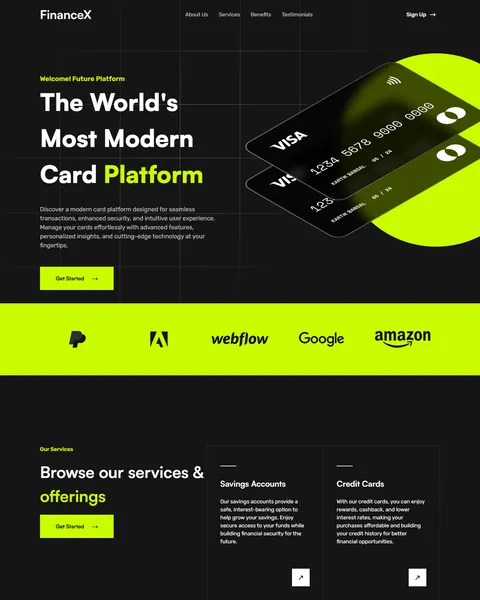
The live demo opens with “The World’s Most Modern Card Platform” in large white type on near-black, with “Card Platform” in electric lime. Two tilted black cards sit on a lime circle beside it. Near-black and lime give your product a sharp, modern and confident tech look.
FinanceX is plain HTML with Tailwind CSS, so there is no theme or plugin to install. Edit index.html, run the Vite build and upload the files.

Quick Template Details
- Template Name: FinanceX
- Template Type: Single landing page
- Built With: HTML, Tailwind CSS 3 and Vite 4
- Extra Libraries: Swiper and Lenis from npm, plus jQuery, Owl Carousel and AOS from public CDNs
- Landing Page Sections: 9
- WordPress Required: No
- Price: Free
- Responsive: Desktop, Tablet, Mobile
Who Is This Fintech HTML Template For?
- Card and payment platforms. A card hero and a transaction report block show your product at a glance.
- Neobanks and digital banks. Service cards cover savings, credit cards, investments, overdraft protection and checking accounts.
- Business payment tools. Feature cards for local business finance and global payments suit B2B products.
- Finance startups. Stats for users, countries and transaction volume help you show traction.
- Developers building fintech sites. A compact Tailwind and Vite project is easy to rebrand for a client.
Prefer to run your fintech site on WordPress? The same FinanceX design is sold as a fintech Elementor landing page.
See Every Section of the FinanceX Fintech HTML Template
Click any section below to open it in the live demo.
A Card Hero, Partner Logos and Five Services
People judge a finance product by how modern and safe it looks. FinanceX opens with a short welcome tag, a bold headline, a line about security and insights, and a lime Get Started button. The menu links to about, services, benefits and testimonials, with a Sign Up link on the right.
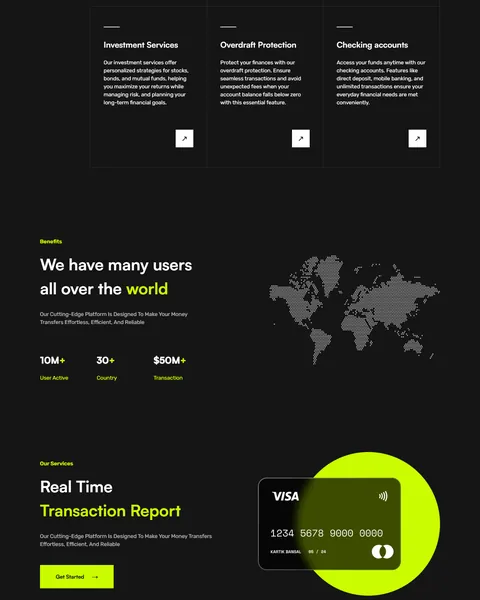
A full-width lime band of partner logos follows. “Browse our services & offerings” then lays out five outlined cards in a grid: savings accounts, credit cards, investment services, overdraft protection and checking accounts. Each card has a short description and a small arrow button.
Stats and a Real Time Transaction Report
“We have many users all over the world” sits beside a dotted world map. Three counters show active users, countries and transaction volume. Big numbers like these build trust quickly with first-time visitors.
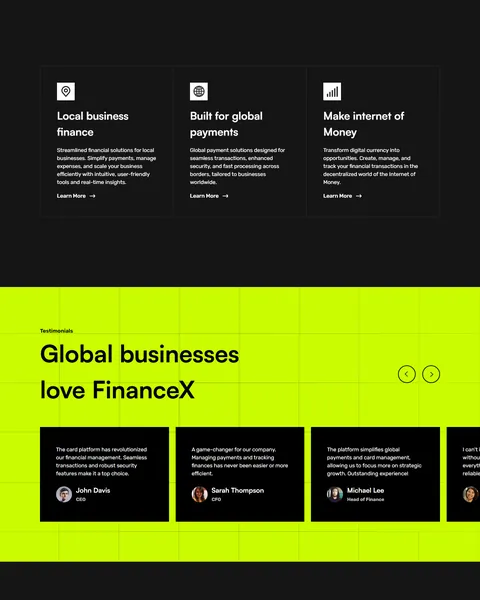
“Real Time Transaction Report” shows a single black card on a lime circle with a Get Started button. Three feature cards follow, local business finance, global payments and internet of money, each with an icon and a Learn More link.
Testimonials, Sign Up and Footer
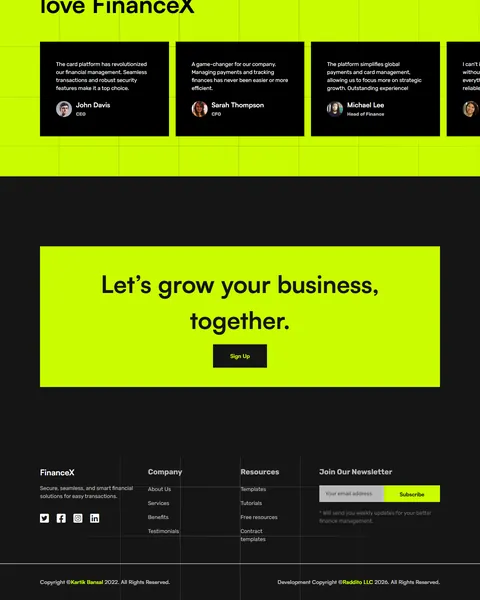
“Global businesses love FinanceX” places review cards with photos, names and job titles on a lime band, with arrows to slide between them. A bordered lime box then says “Let’s grow your business, together.” above a dark Sign Up button.
The dark footer closes the page with a short tagline, company and resource links, social icons and an email field for a newsletter.
Research-Driven Design for Fintech Brands
We looked at how people choose a new card, payment app or digital bank. They want to know what the product does, whether it is safe, who else uses it and how quickly they can sign up. Money is personal, so trust has to come before features. This fintech HTML template is designed to explain the product in seconds, show proof of scale and keep the sign-up button within easy reach.
Near-black and electric lime. The Tailwind config sets lime, #CBFC01, as the primary color and near-black, #151515, as the secondary color. The pairing feels fast and tech-forward, and lime makes every button easy to spot.
Rubik throughout. Rubik has slightly rounded corners that look friendly while staying clean and readable in headlines, numbers and small labels.
Show the product. Payment card mockups in the hero and the report section help visitors picture the real thing. Swap them for your own card design or app screens.
Numbers build trust. The stats block uses users, countries and volume because scale is one of the first things people check in a finance brand. Only show figures you can stand behind.
Social proof from businesses. Testimonials with names and job titles show that real teams rely on the platform. Short quotes are easy to scan, and the slider keeps the band compact even when you add more reviews.
Mobile friendly. The hero, service grid and testimonial cards stack on phones, where many people first discover finance apps and compare them before signing up.
What’s Included With the FinanceX HTML Template
- index.html. The full landing page, written with Tailwind utility classes.
- Tailwind and Vite config. tailwind.config.js with the FinanceX colors and Rubik font, plus package.json with the build scripts.
- main.js and style.css. The Owl Carousel testimonial slider, scroll animations, smooth scrolling and custom styles.
- Assets folder. Card images, the world map, icons, partner logos and social icons used in the demo.
- README. Setup, development and build steps.
Need help with the files? Our product support team can help. If you would rather have the site built for you with your own product and copy, see our done-for-you website service.
How to Set Up the FinanceX Fintech HTML Template
Install Node.js first. Then:
- Unzip FinanceX and open its folder in a terminal.
- Run npm install to download Tailwind CSS, Vite, Swiper and Lenis.
- Run npm run dev to preview the page locally while you edit.
- Change the headline, services, stats, testimonials, logos and links in index.html and the assets folder.
- Run npm run build, then upload the dist folder to your host.
FinanceX vs Other Tailwind Options for Fintech Websites
Comparing ways to build a fintech page with Tailwind CSS? Here is how FinanceX compares with other popular options online.
| FinanceX | Other popular Tailwind CSS libraries online* | |
|---|---|---|
| Complete fintech landing page | Yes, ready to use | No, none of the three offers one |
| Financial services grid with stats and card visuals | Yes | Not as a ready section on any of them |
| Plain HTML project with a Vite build setup | Yes | No, they offer copy-paste blocks or React templates |
| Same design also sold for Elementor and Bricks | Yes | No, not on any of them |
Why fintech teams choose FinanceX:
- Made for finance products. Hero, services, stats, features and testimonials are ready.
- No WordPress needed. A fast static site with nothing to update.
- Free download. No license fee and no yearly plan.
*We compared FinanceX with two paid Tailwind CSS libraries, Tailwind Plus and Flowbite Pro, and the free HyperUI collection, using each product’s own website. Details were checked on November 1, 2026. Prices and features may change.
More Finance and Tech Templates by Raddito
Prefer WordPress? FinanceX is also available as a fintech Bricks Builder landing page with the same look. For related businesses, compare these HTML templates.
Finaura – digital banking HTML template
Best for online banks and banking apps.
Single landing page · Free · Tailwind CSS · Live Preview
SaaSify – SaaS HTML template
Best for software products and web apps.
Single landing page · Free · Tailwind CSS · Live Preview
LegalMark – notary HTML template
Best for notaries and document services.
Single landing page · Free · Tailwind CSS · Live Preview
Want more choices? Browse our finance and law website templates or every HTML website template we offer.
Frequently Asked Questions
Do I need WordPress for FinanceX?
No. FinanceX is a static fintech HTML template, so it runs on any web host without WordPress, plugins or a database.
Is FinanceX free?
Yes. It is a free download that you can use for your own product or a client project.
Does the Sign Up button create accounts?
No. Point the Sign Up and Get Started buttons to your app’s sign-up page or an onboarding form.
Is the newsletter field in the footer connected?
No. Connect it to your email marketing tool, such as Mailchimp or Brevo, using its form code.
Can I change the lime color?
Yes. Change the primary color in tailwind.config.js and rebuild, and every button and highlight updates.
Can I add more testimonials?
Yes. Copy a review card inside the carousel in index.html and change the quote, name, title and photo. The arrows move through every card.
Should I replace the sample logos, names and numbers?
Yes, please. The partner logos are real third-party brands, and the stats, reviews, card names and copyright line are samples, so use your own brand, figures and customer quotes.