


SaaSify is a free SaaS HTML template built with Tailwind CSS and Vite. It is made for analytics tools, B2B software startups, dashboard products and indie makers who need a sharp product page without WordPress. It is a single scrolling page with 10 sections, from a dashboard hero and logo strip to a three-step setup, pricing plans, reviews and a closing call to action.
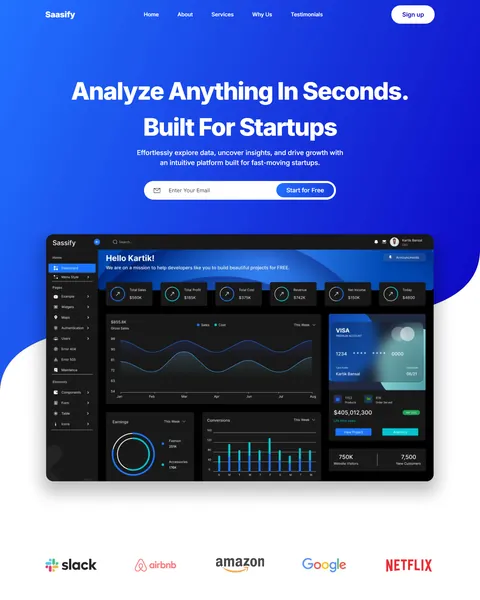
The live demo opens with “Analyze Anything In Seconds. Built For Startups” in bold white type on an electric blue background. An email field with a Start for Free button sits under the headline, and a large dark dashboard screenshot rises below it. Royal blue, deep navy and crisp white give your product a fast, confident and modern look.
SaaSify is plain HTML with Tailwind CSS, so there is no theme, plugin or database. You edit index.html, run the Vite build and deploy the static files.

Quick Template Details
- Template Name: SaaSify
- Template Type: Single landing page
- Built With: HTML, Tailwind CSS 3 and Vite 5
- Extra Libraries: Lenis, AOS and the YouTube player API, all loaded from public CDNs
- Landing Page Sections: 10
- WordPress Required: No
- Price: Free
- Responsive: Desktop, Tablet, Mobile
Who Is This SaaS HTML Template For?
- Analytics and data tools. A dashboard mockup and an “analyze results” step suit reporting and insights products.
- B2B software startups. A logo strip, three plans and testimonials cover what business buyers look for.
- Indie makers. An email capture in the hero lets you collect sign-ups before launch.
- Agencies building product sites. Clean Tailwind sections are easy to rebrand for a client’s app.
- Developers who prefer static sites. A Vite build deploys to Netlify, Vercel or any CDN in minutes.
Want to manage your product page inside WordPress? The same design is sold as a SaaS Elementor landing page.
See Every Section of the SaaSify SaaS HTML Template
Click any section below to open it in the live demo.
A Dashboard Hero and a Logo Strip
Software buyers want to see the product immediately. SaaSify places a full analytics dashboard right under the headline, with charts, totals and a card widget, so visitors understand the product before they scroll. The curved blue background and white menu bar keep the top clean.
A row of client logos follows on white. Replace them with your own customers or partners to add quick social proof under the hero.
Services, Features and a Three-Step Setup
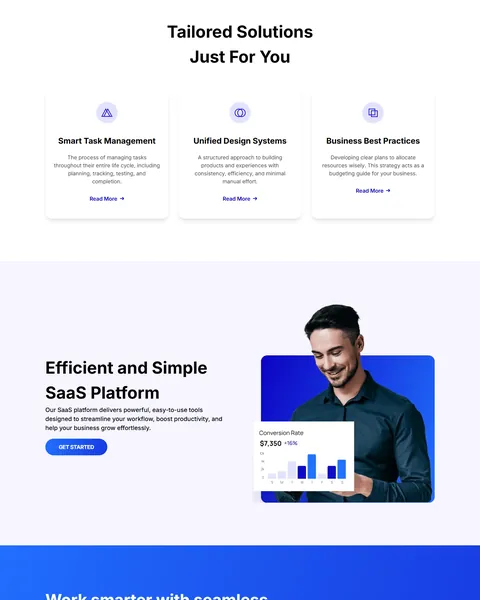
“Tailored Solutions Just For You” shows three cards, smart task management, unified design systems and business best practices, each with an icon and a Read More link. “Efficient and Simple SaaS Platform” pairs a short benefit paragraph with a photo and a floating conversion-rate chart.
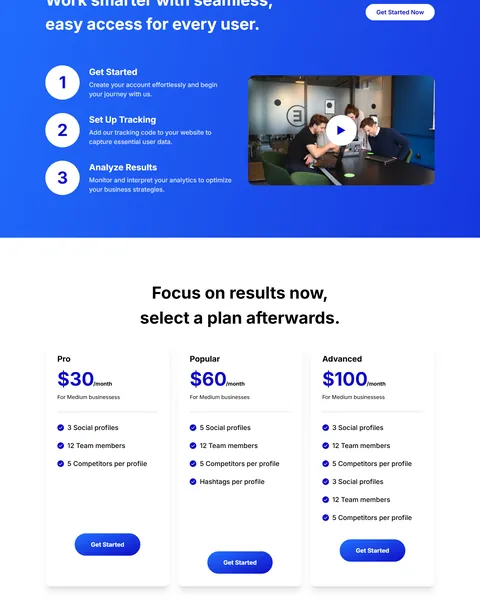
A blue “Work smarter” band then explains onboarding in three numbered steps, get started, set up tracking and analyze results, beside a video thumbnail with a play button. A Get Started Now button sits at the top right.
Pricing, Reviews and a Closing Call to Action
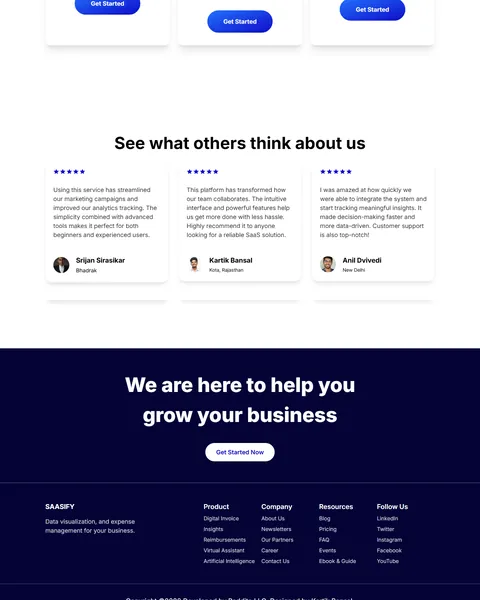
“Focus on results now, select a plan afterwards” lays out three monthly plans, Pro, Popular and Advanced, with prices, feature checklists and Get Started buttons. “See what others think about us” shows three star-rated reviews with names and locations.
A dark navy band with “We are here to help you grow your business” and a Get Started Now button closes the page above a footer with product, company, resources and social link columns.
Research-Driven Design for SaaS Products
We looked at how people evaluate new software online. They want to see the product, understand the main benefit in one line, check who else uses it, compare plans and start a free trial with as little effort as possible. Trust signals and clear pricing are often the deciding factors. This SaaS HTML template is designed to show the product early, answer pricing questions plainly and offer a sign-up at the top, middle and end of the page.
Royal blue and navy. The Tailwind config sets a royal blue, #0F0BC7, as the primary color, a brighter blue, #2272FF, for highlights and a deep navy, #040335, for the closing band. Blue is a familiar, trusted choice for software and data tools.
Inter throughout. Inter is a clean, neutral sans serif designed for screens, which keeps headlines, plan details and reviews easy to read at any size.
Product first. A real-looking dashboard beats an abstract illustration, because buyers can picture themselves using it. Swap in screenshots of your own app.
Three calls to action. Sign-up appears in the hero, the setup band and the closing section, so visitors can start whenever they are convinced.
Plain pricing. Three plans with monthly prices and checklists help buyers self-select without a sales call. A “Popular” middle plan nudges most visitors toward a sensible choice.
Mobile friendly. The dashboard, cards and plans stack on phones, and buttons stay large enough to tap. Founders often share launch links on social media, where most clicks come from phones.
What’s Included With the SaaSify HTML Template
- index.html. The full landing page, written with Tailwind utility classes.
- Tailwind and Vite config. tailwind.config.js with the SaaSify colors, plus package.json with the build scripts.
- main.js and style.css. Smooth scrolling, the video player and a few custom styles.
- Assets folder. The dashboard, logo, photo and icon images used in the demo.
- README. Setup, development and build steps.
Need help with the files? Our product support team can help. If you would rather have the page built for you with your own screenshots and plans, see our done-for-you website service.
How to Set Up the SaaSify SaaS HTML Template
Make sure Node.js is installed, then:
- Unzip SaaSify and open the project folder in your terminal.
- Run npm install to install Tailwind CSS and Vite.
- Run npm run dev and open the local link to preview your changes live.
- Replace the dashboard image, logos, plans and text in index.html and the assets folder.
- Run npm run build and deploy the dist folder to Netlify, Vercel or your own server.
SaaSify vs Other Tailwind Options for SaaS Websites
Comparing ways to build a software product page with Tailwind CSS? Here is how SaaSify compares with other popular options online.
| SaaSify | Other popular Tailwind CSS libraries online* | |
|---|---|---|
| Complete SaaS landing page, ready to use | Yes | Tailwind Plus sells React SaaS templates; the other two offer sections only |
| Plain HTML project with a Vite build setup | Yes | No, they offer copy-paste blocks or React templates |
| Three-step onboarding section with video | Yes | Not as a ready section on any of them |
| Same design also sold for Elementor and Bricks | Yes | No, not on any of them |
Why startups choose SaaSify:
- Made for software. Dashboard hero, logos, steps, plans and reviews are ready.
- No framework required. Plain HTML and Tailwind, easy for any front-end developer.
- Free download. No license fee and no yearly plan.
*We compared SaaSify with two paid Tailwind CSS libraries, Tailwind Plus and Flowbite Pro, and the free HyperUI collection, using each product’s own website. Details were checked on November 1, 2026. Prices and features may change.
More Tech and App Templates by Raddito
Prefer WordPress? SaaSify is also available as a SaaS Bricks Builder landing page with the same look. For other tech projects, compare these HTML templates.
FinanceX – fintech HTML template
Best for card platforms and payment apps.
Single landing page · Free · Tailwind CSS · Live Preview
NFT – NFT marketplace HTML template
Best for digital artists and NFT drops.
Single landing page · Free · Tailwind CSS · Live Preview
Studio – web design agency HTML template
Best for web design and development studios.
Single landing page · Free · Tailwind CSS · Live Preview
Want more choices? Browse our technology and app website templates or every HTML website template we offer.
Frequently Asked Questions
Does SaaSify need WordPress?
No. SaaSify is a static SaaS HTML template. It runs on any static host, including Netlify, Vercel and GitHub Pages.
Is SaaSify free?
Yes. It is a free download, and you can use it for your own product or for a client project.
Is the hero email field connected to anything?
No. Point the form to your email tool or your app’s sign-up page, or replace it with a Start Free Trial link.
Can I use it with React or Next.js?
The template is plain HTML, but the Tailwind classes copy easily into JSX if you later move to a framework.
How do I change the pricing plans?
Edit the three plan cards in index.html, including the names, prices, features and button links.
Can I add more sections?
Yes. Copy an existing section, change its content and keep the same Tailwind classes for a consistent look.
Should I replace the sample logos and reviews?
Yes, please. The logo strip shows real brands, and the reviews, prices and dashboard data are samples, so use only your own customers and real figures.