

Studio is a free web design agency HTML template built with Tailwind CSS and Vite. It suits web design studios, digital agencies, freelance developers and branding teams that want a bold portfolio site without WordPress. It is a single scrolling page with 8 sections, from a video hero and live stats to services, selected projects, articles and a project call to action.
The live demo opens with “Design-Driven Development Of Your Web Product” in wide white type on deep midnight navy, with “Web Product” in bright violet. Fine wave lines drift behind it, and a large team photo with a play button sits below. Midnight navy, violet and white give your agency a modern, confident and creative look.
Studio is plain HTML with Tailwind CSS, so there is no theme or plugin to install. Edit index.html, run the Vite build and upload the files.

Quick Template Details
- Template Name: Studio
- Template Type: Single landing page
- Built With: HTML, Tailwind CSS 3 and Vite 5
- Extra Libraries: Lenis and AOS from public CDNs
- Landing Page Sections: 8
- WordPress Required: No
- Price: Free
- Responsive: Desktop, Tablet, Mobile
Who Is This Web Design Agency HTML Template For?
- Web design studios. Large project cards show off your best client sites.
- Digital agencies. Service cards for web development, UI/UX, branding and content cover a full-service offer.
- Freelance developers. Counters for projects, clients and years help a solo business look established.
- Branding teams. A dark, type-led design makes a strong first impression on creative clients.
- Developers building agency sites. A light Tailwind project with only two extra scripts is quick to customize.
Prefer to run your agency site on WordPress? The same Studio design is sold as a web design agency Elementor landing page.
See Every Section of the Studio Web Design Agency HTML Template
Click any section below to open it in the live demo.

A Video Hero and Live Stats
Clients hire agencies they feel they can work with. Studio opens with a short line about design, development and maintenance. Below it, a wide photo of a team celebrating has a violet play button that opens a video in a popup. A round scroll badge and a violet Start a Project button keep the next step clear.
“Some Statistics” follows with three counters, for completed projects, happy clients and years of experience. The numbers count up when visitors scroll to them.
Services and Selected Projects
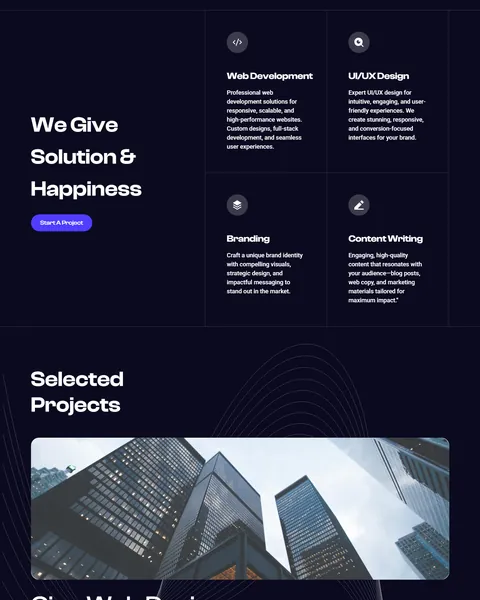
“We Give Solution & Happiness” sits beside a grid of four service cards: web development, UI/UX design, branding and content writing. Each card has an icon and a short description, with a Start A Project button on the left.
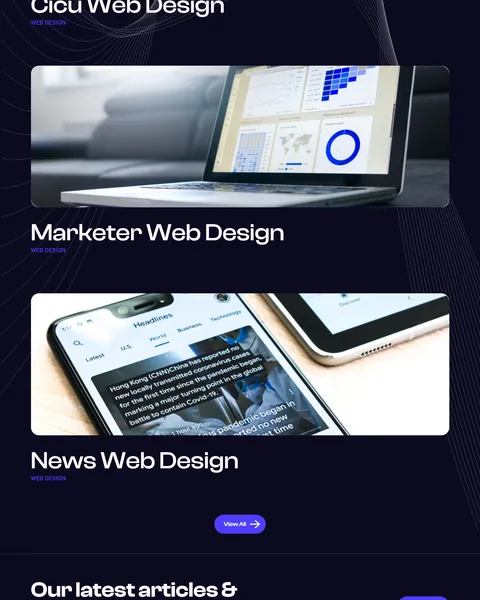
“Selected Projects” then shows three full-width project images with large titles and a small category label. A View All button leads to your full portfolio.
Articles and a Project Call to Action
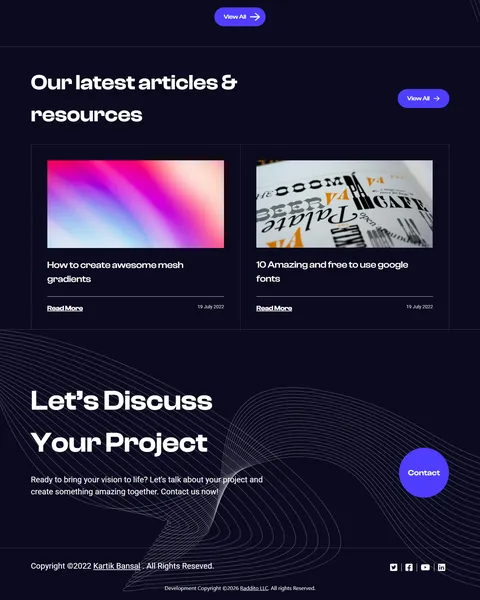
“Our latest articles & resources” shows two article cards with images, titles and dates. Each has a Read More link, and a View All button sits above them. Sharing useful articles shows clients you know your craft.
“Let’s Discuss Your Project” closes the page with a short invitation and a round violet Contact button. A slim footer adds the copyright line and social icons, keeping the end of the page clean.
Research-Driven Design for Web Design Agencies
We looked at how businesses choose a web design agency. They study the portfolio first, then check which services are offered, how experienced the team is and whether the agency seems easy to work with. Many compare three or four agencies before reaching out, so the site itself is the first proof of skill. This web design agency HTML template is designed to look sharp, put your work front and center and make starting a project simple.
Midnight navy and violet. The Tailwind config sets a deep navy, #0B0A1F, as the background color and a bright violet, #4F3DFE, as the primary color. The dark base makes project images glow, and violet marks every button and highlight.
Clash Display and Roboto. Clash Display gives headlines a wide, modern shape that feels designed, and Roboto keeps service text and dates clean and readable.
Work over words. Big project images take up most of the page, because clients want to see results before reading about process. Add a short case study link to each project if you can.
Proof in numbers. Animated counters for projects, clients and years add quick credibility, especially for smaller studios that are still building a client list.
Several ways to start. Start a Project buttons in the menu and services, plus the closing Contact button, make it easy to reach out from anywhere.
Mobile friendly. The hero, service grid and project images stack on phones, where many clients first look at an agency link shared by a colleague.
What’s Included With the Studio HTML Template
- index.html. The full landing page, written with Tailwind utility classes and a small inline script.
- Tailwind and Vite config. tailwind.config.js with the Studio colors and fonts, plus package.json with the build scripts.
- style.css. Custom styles for the wave lines and other details.
- Assets folder. Hero, project and article images, icons and the logo.
- README. Setup, development and build steps.
Need help with the files? Our product support team can help. If you would rather have the site built for you with your own projects and copy, see our done-for-you website service.
How to Set Up the Studio Web Design Agency HTML Template
With Node.js installed on your computer:
- Unzip Studio and open its folder in a terminal.
- Run npm install to download Tailwind CSS, Vite and the other packages.
- Run npm run dev to preview the site locally while you edit.
- Replace the headline, stats, services, projects, articles and video link in index.html and the assets folder.
- Run npm run build, then upload the dist folder to your host.
Studio vs Other Tailwind Options for Agency Websites
Comparing ways to build a web design agency page with Tailwind CSS? Here is how Studio compares with other popular options online.
| Studio | Other popular Tailwind CSS libraries online* | |
|---|---|---|
| Complete agency landing page | Yes, ready to use | No, none of the three offers one |
| Full-width project showcase with animated stats | Yes | Not as a ready section on any of them |
| Plain HTML project with a Vite build setup | Yes | No, they offer copy-paste blocks or React templates |
| Same design also sold for Elementor and Bricks | Yes | No, not on any of them |
Why agencies choose Studio:
- Made for creative studios. Hero, stats, services, projects and articles are ready.
- No WordPress needed. A fast static site with nothing to update.
- Free download. No license fee and no yearly plan.
*We compared Studio with two paid Tailwind CSS libraries, Tailwind Plus and Flowbite Pro, and the free HyperUI collection, using each product’s own website. Details were checked on November 1, 2026. Prices and features may change.
More Business and Creative Templates by Raddito
Prefer WordPress? Studio is also available as a web design agency Bricks Builder landing page with the same look. For related businesses, compare these HTML templates.
SaaSify – SaaS HTML template
Best for software products and web apps.
Single landing page · Free · Tailwind CSS · Live Preview
NFT – NFT marketplace HTML template
Best for digital art and NFT collections.
Single landing page · Free · Tailwind CSS · Live Preview
Artisian – home decor HTML template
Best for interior studios and home decor shops.
Single landing page · Free · Tailwind CSS · Live Preview
Want more choices? Browse our business and service website templates or every HTML website template we offer.
Frequently Asked Questions
Do I need WordPress for Studio?
No. Studio is a static web design agency HTML template, so it runs on any web host without WordPress, plugins or a database.
Is Studio free?
Yes. It is a free download that you can use for your own agency or a client project.
Is there a contact form?
No. The Contact and Start a Project buttons are links. Point them to your contact page, a form service or a booking tool such as Calendly.
How do I change the hero video?
Replace the YouTube embed link in the iframe in index.html with your own showreel or welcome video.
Can I change the stat numbers?
Yes. Edit the target numbers in the small script at the end of index.html, and the counters will count up to your figures.
Can I add more projects?
Yes. Copy a project block in index.html and change the image, title and category label.
Should I replace the sample content?
Yes, please. The projects, articles, dates and copyright lines are samples, and one project image shows a real news site, so use your own work and details.