


SaaSify is a SaaS Bricks Builder landing page for WordPress, made for software startups, analytics tools, B2B apps and product teams launching a new subscription service. It is a single scrolling page with an email signup hero, a product dashboard, service cards, a three-step onboarding guide, pricing plans and customer reviews.
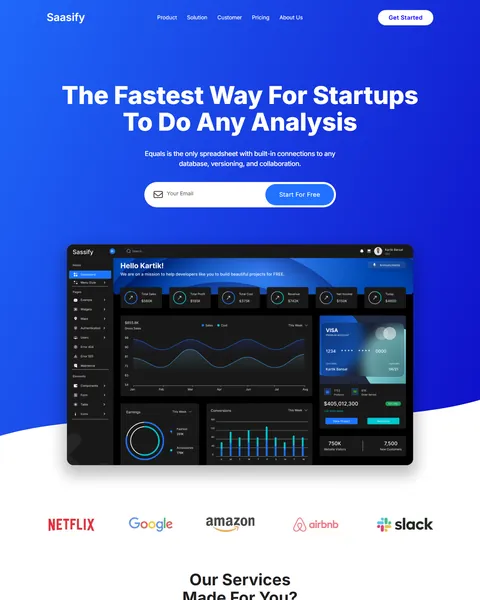
The demo opens with “The Fastest Way For Startups To Do Any Analysis” on a bright blue hero, with an email field and a Start For Free button. A large dark dashboard mockup sits below. Electric blue, deep navy and crisp white give your product a fast, modern and confident look.
SaaSify is built only with native Bricks elements, so no extra plugins are required. Bricks itself is a premium theme and is not included.

Quick Template Details
- Template Name: SaaSify
- Template Type: Single landing page
- Required Theme: Bricks (Premium, not included)
- Required Plugins: None
- Landing Page Sections: 8
- Responsive: Desktop, Tablet, Mobile
- Coding Required: No
Who Is This SaaS Bricks Builder Landing Page For?
- SaaS startups. A free-trial email signup in the hero turns visitors into leads from the first screen.
- Analytics and dashboard tools. The hero shows a full product dashboard, ideal for data and reporting apps.
- B2B software teams. Three plans for small, medium and enterprise businesses suit tiered pricing.
- Marketing and automation platforms. The feature section already talks about lead scoring and follow-ups.
- Product launches. One focused page works well for ads, Product Hunt launches and waitlists.
Selling IT services rather than your own software? Our Solute IT solutions Bricks Builder landing page is a better fit.
See Every Section of the SaaSify SaaS Bricks Builder Landing Page
Click any section below to open it in the live demo.
A Signup Hero With a Product Dashboard
Visitors decide in seconds whether a software product is worth a look. SaaSify opens with a bold two-line headline, a short value statement and an email field joined to a Start For Free button. Nobody has to hunt for the signup.
Below the form, a large dark dashboard mockup with charts, cards and a sidebar shows what the product looks like inside. A row of customer logos follows, where you can show the companies that use your software.
Services, Features and a Three-Step Start
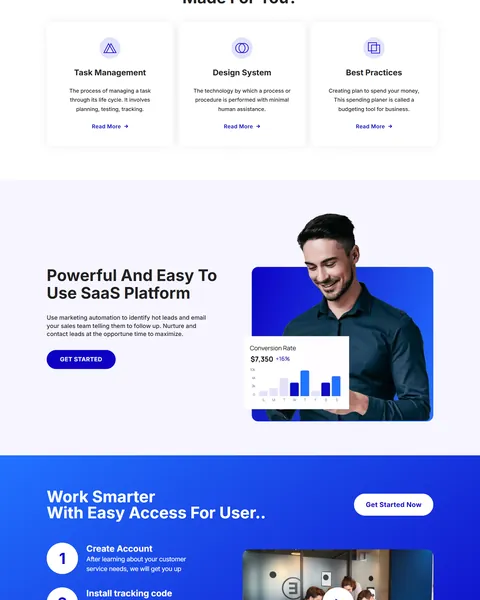
“Our Services Made For You?” presents three feature cards with line icons: task management, design system and best practices. Each card has a short description and a Read More link to a feature page or doc.
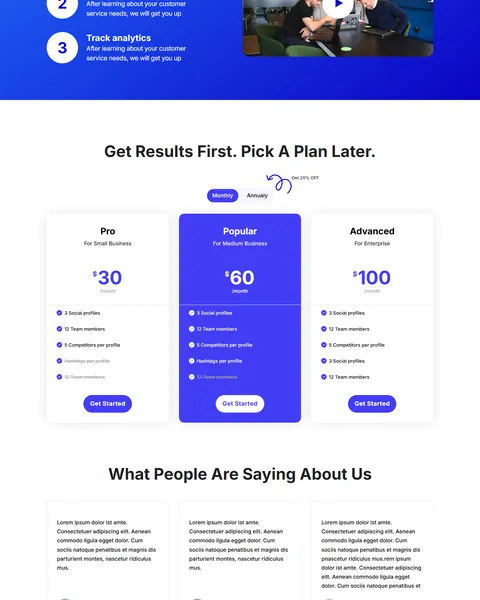
A “Powerful And Easy To Use SaaS Platform” block pairs a feature summary with a photo and a live-style conversion chart. “Work Smarter With Easy Access” then explains onboarding in three numbered steps: create an account, install a tracking code and track analytics, next to a video thumbnail.
Pricing With a Monthly and Annual Toggle
“Get Results First. Pick A Plan Later.” introduces three plans: Pro for small business, Popular for medium business and Advanced for enterprise. A Monthly and Annually switch changes the prices, and a hand-drawn “Get 20% Off” note points to the yearly option.
The middle plan is filled in bright blue, so it stands out as the recommended choice. Each card lists its limits, such as team members and social profiles, with a Get Started button. Link each button straight to checkout or a trial signup with the plan already selected.
Customer Reviews, a Final Call and the Footer
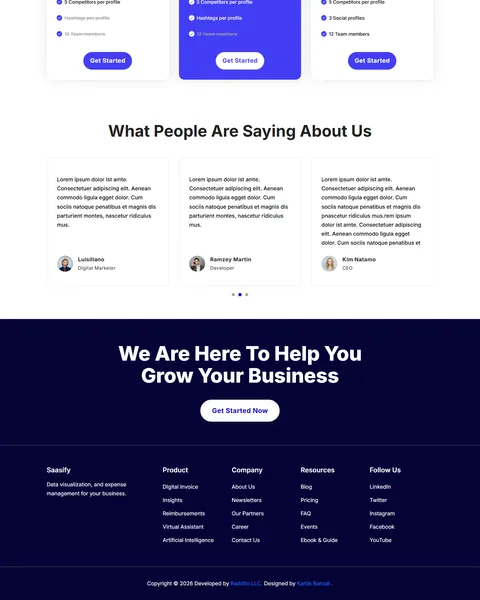
“What People Are Saying About Us” shows customer quotes in a slider with photos, names and job titles. Add quotes from real users, ideally with company names, to build trust with buyers. Short quotes about saved time or better results work best.
A deep navy “We Are Here To Help You Grow Your Business” banner gives one last Get Started Now button. The footer adds product, company, resources and social link columns, ready for your docs, blog, careers and changelog.
Research-Driven Design for SaaS Products
We looked at how people evaluate software online. They want to see the product, understand the main benefit in one sentence and check pricing before they talk to anyone. Many sign up for a trial within the first visit if the path is short. This SaaS Bricks Builder landing page is designed to show the product early, explain value quickly and make the free start the easiest action on the page.
Electric blue and deep navy. A vivid blue gradient fills the hero, the feature band and the featured plan. Blue is the most common color in software because it feels reliable and modern. Deep navy grounds the final banner and footer.
Inter throughout. Inter is a clean sans serif built for screens, used by many software products. Heavy weights make headlines punchy, while lighter weights keep feature text easy to scan.
Product first. A dashboard mockup appears before any long text, because buyers want to see the interface. Replace it with a real screenshot of your app for the strongest effect.
Low-friction signup. An email-only form and “Start For Free” wording lower the barrier. Asking for one field instead of five brings in more trial users.
Pricing that nudges. A highlighted middle plan and a yearly discount note guide visitors toward your preferred option without hiding the others. Clear limits on each card also cut down on sales questions.
Mobile friendly. On phones, the menu folds into a toggle, the dashboard scales down and plan cards stack. Many founders and buyers first see a product link on their phone.
What’s Included With the SaaSify Bricks Builder Landing Page
- SaaSify Bricks template. The full landing page as a JSON file, in both the latest and the original version.
- Theme Style file. Global colors, typography and buttons in one JSON file.
- Icons folder. The SVG icons the page references.
- READ_ME guide and changelog. Setup steps and the version history, with the latest update on July 29, 2025.
Need help with the template file? Our product support team can help. If you would rather have the whole page built with your own product, plans and branding, see our done-for-you website service.
How to Import the SaaSify SaaS Bricks Builder Landing Page
SaaSify needs nothing besides Bricks. Follow these steps:
- In Bricks > Settings > General, enable custom breakpoints, SVG uploads and smooth scroll (CSS), then save.
- In the builder’s breakpoint settings, set Tablet Portrait to 1025px and Mobile Landscape to 768px.
- Go to Bricks > Templates and import the SaaSify template file.
- Import the Theme Style and set its condition to the entire website or individual pages.
- Insert the template into a page, then save and refresh.
The video below walks through a full Bricks import. It also shows WooCommerce steps, which you can skip because SaaSify does not use WooCommerce.
SaaSify vs Other Bricks Options for SaaS Websites
Comparing ways to build a SaaS landing page in Bricks? Here is how SaaSify compares with other popular options online.
| SaaSify | Other popular Bricks template libraries online* | |
|---|---|---|
| Complete SaaS landing page | Yes, ready to import | No, all three are libraries of sections |
| Pricing with monthly and annual toggle | Yes | Not as a ready page on any of them |
| Three-step onboarding section | Yes | Not mentioned on any of them |
| Same design also sold for Elementor | Yes | No, not on any of them |
Why SaaS teams choose SaaSify:
- Built for signups. Email capture, pricing and onboarding are ready.
- Pure Bricks. No add-ons, so your page stays fast.
- One payment. $8.97 once, with no yearly plan.
*We compared SaaSify with two paid Bricks layout libraries and a free community Bricks template library, each listed on its own website. Details come from each product page on October 26, 2026. Prices and features may change.
More Tech and Agency Templates by Raddito
Prefer Elementor? SaaSify is also available as a SaaS Elementor landing page with the same look. If you sell services rather than software, compare these Bricks options.
Solute – IT solutions Bricks Builder landing page
Best for IT service companies and managed service providers.
Single landing page · No extra plugins · Live Preview
Studio – digital agency Bricks Builder landing page
Best for web design and digital marketing agencies.
Single landing page · No extra plugins · Live Preview
Upgrade – finance app Bricks Builder landing page
Best for fintech apps and money management tools.
Single landing page · No extra plugins · Live Preview
Want more choices? Browse our technology and app website templates or every WordPress Bricks Builder template we sell.
Frequently Asked Questions
Is SaaSify a WordPress theme?
No. SaaSify is a SaaS Bricks Builder landing page, a ready one-page design you import into Bricks. Bricks is the theme, and you need your own Bricks license.
Do I need any plugins besides Bricks?
No. Every section, including the pricing toggle and review slider, uses built-in Bricks elements, so there is nothing else to install.
Does the email signup connect to my app?
Not by default. Point the Start For Free button to your app’s signup page, or connect the form to your email marketing tool.
Can I change the plan prices and features?
Yes. Edit each plan card and both the monthly and annual prices in Bricks to match your own pricing and limits.
Can I add more pages later?
Yes. Reuse the header, footer and section styles to build feature, docs or about pages in Bricks with the same design.
Can I use it for a mobile app launch?
Yes. Swap the dashboard for phone screenshots and link the main buttons to the App Store and Google Play.
Should I replace the demo logos and reviews?
Yes, please. The brand logos, product claims, reviews and plan details are placeholders, so use only your own real customers and data.