


Studio is a web design agency Bricks Builder landing page for WordPress, made for web design studios, development agencies, UI/UX teams and freelance web designers. It is a single scrolling page with a video hero, agency statistics, four services, selected projects, latest articles and a project call to action.
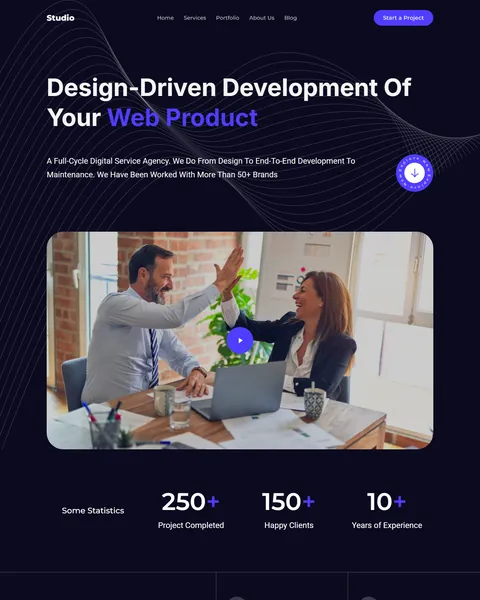
The demo opens with “Design-Driven Development Of Your Web Product” on a deep midnight background with flowing line art. Below it, a large rounded video frame shows two colleagues celebrating with a high five. A Start a Project button glows in electric violet in the header, giving your agency a bold, modern and tech-savvy look.
Studio is built only with native Bricks elements, so no extra plugins are required. Bricks itself is a premium theme and is not included.

Quick Template Details
- Template Name: Studio
- Template Type: Single landing page
- Required Theme: Bricks (Premium, not included)
- Required Plugins: None
- Landing Page Sections: 7
- Responsive: Desktop, Tablet, Mobile
- Coding Required: No
Who Is This Web Design Agency Bricks Builder Landing Page For?
- Web design studios. A design-led headline and selected projects show your craft from the first screen.
- Development agencies. Web development leads the services, with a full-cycle promise from design to maintenance.
- UI/UX teams. A dedicated UI/UX card and a dark, product-style look suit interface designers.
- Branding and content studios. Branding and content writing cards cover agencies that offer more than code.
- Freelance web designers. One focused page with projects and a clear call to action is enough to win new clients.
Need a full portfolio site with services, pricing and case study pages? Our Arik portfolio Bricks Builder template kit is a better fit.
See Every Section of the Studio Web Design Agency Bricks Builder Landing Page
Click any section below to open it in the live demo.
A Video Hero and Agency Statistics
Clients hiring a web agency want energy and confidence. Studio sets a large headline with a violet highlight over flowing line art, plus a short line about full-cycle design, development and maintenance. A rotating circle badge and a wide, rounded video frame with a play button bring the hero to life.
“Some Statistics” follows with three large counters for projects completed, happy clients and years of experience, set in a clean row with plus signs in violet.
Four Services and Selected Projects
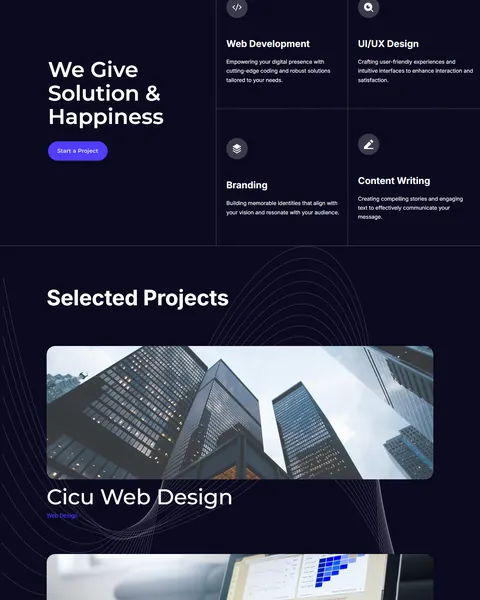
“We Give Solution & Happiness” sits beside a grid of four services: web development, UI/UX design, branding and content writing. Each has a small icon and a short line, separated by thin lines for a neat, technical feel.
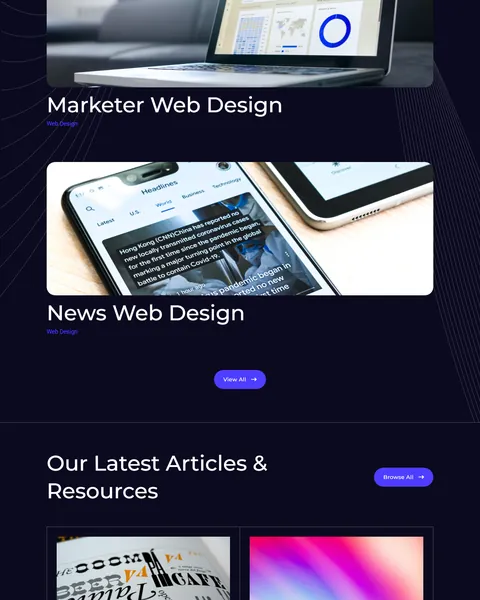
“Selected Projects” shows large project images with titles and category labels, such as a news site and a marketing site, with a View All button. Big, clean screenshots let your work speak for itself.
Articles, Call to Action and Footer
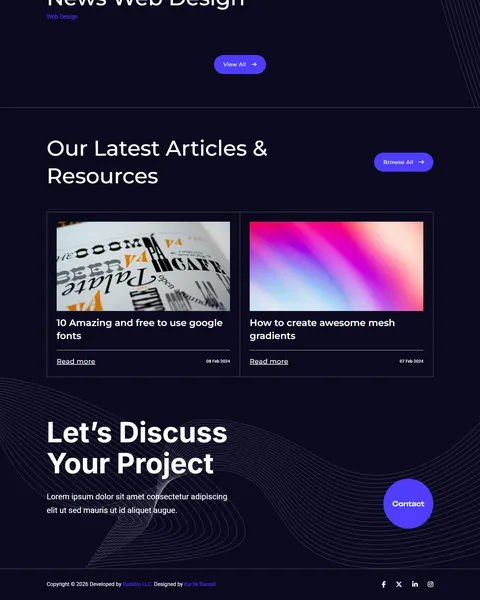
“Our Latest Articles & Resources” shows article cards with images, dates and Read More links, plus a Browse All button. Helpful posts on fonts, gradients or web tips show expertise and bring in search traffic.
A bold “Let’s Discuss Your Project” block with a round violet Contact button closes the page. A slim footer shows credits and social icons, keeping the end of the page clean.
Research-Driven Design for Web Agencies
We looked at how businesses choose a web design or development agency. They judge the agency’s own site first, then look at past work, services and how easy it is to start a conversation. A sleek, modern design proves you can deliver one. This web design agency Bricks Builder landing page is designed to feel premium and product-focused while guiding visitors toward a project inquiry.
Deep midnight and electric violet. Deep midnight, #0B0A1F, covers the whole page for a focused, cinematic mood. Electric violet, #4F3DFE, lights up buttons, highlights and counters. Flowing line art in the background adds depth and motion without clutter or distraction.
Inter, Montserrat and Roboto. Bold Inter and Montserrat headlines feel modern and techy. Roboto keeps service text, project labels and article titles clear at any size.
Your work, large. Full-width project images make your portfolio the star. Use real screenshots and mockups from client projects, ideally showing both desktop and mobile views.
Numbers early. Counters right after the hero give quick proof of experience before visitors scroll to the details. Keep them honest and update them each year.
One clear goal. Start a Project and Contact buttons keep the path to an inquiry obvious from top to bottom. There are no distracting side links or pop-ups to pull visitors away.
Mobile friendly. On phones, the video frame, service grid and project images stack neatly and buttons stay easy to tap. Many clients first see an agency on their phone through social media, Dribbble or referrals.
What’s Included With the Studio Bricks Builder Landing Page
- Studio Bricks template. The full landing page as one JSON file.
- Theme Style file. Global colors, typography and buttons in one JSON file.
- Assets folder. The images and line art the page references.
- READ_ME guide and changelog. Setup steps and the version history, with the latest update on July 29, 2025.
Need help with the template file? Our product support team can help. If you would rather have the whole page built with your own projects and branding, see our done-for-you website service.
How to Import the Studio Web Design Agency Bricks Builder Landing Page
Studio only needs Bricks. Follow these steps:
- In Bricks > Settings > General, enable custom breakpoints, SVG uploads and smooth scroll (CSS), then save.
- In the builder’s breakpoint settings, set Tablet Portrait to 1025px and Mobile Landscape to 768px.
- Go to Bricks > Templates and import the Studio template file.
- Import the Theme Style and set its condition to the entire website or individual pages.
- Insert the template into a page, link the Contact button to your inquiry page, then save and refresh.
The video below walks through a full Bricks import. It also shows WooCommerce steps, which you can skip because Studio does not use WooCommerce.
Studio vs Other Bricks Options for Agency Websites
Comparing ways to build a web design agency page in Bricks? Here is how Studio compares with other popular options online.
| Studio | Other popular Bricks template libraries online* | |
|---|---|---|
| Complete web design agency landing page | Yes, ready to import | No, all three are libraries of sections |
| Video hero and agency statistics | Yes | Not mentioned on any of them |
| Selected projects and articles sections | Yes | Not as a ready section on any of them |
| Same design also sold for Elementor | Yes | No, not on any of them |
Why agencies choose Studio:
- Made for web agencies. Services, projects, articles and a project inquiry are ready.
- Pure Bricks. No add-ons, so your page stays fast.
- One payment. $8.97 once, with no yearly plan.
*We compared Studio with two paid Bricks layout libraries and a free community Bricks template library, each listed on its own website. Details come from each product page on October 26, 2026. Prices and features may change.
More Agency and Tech Templates by Raddito
Prefer Elementor? Studio is also available as a web design agency Elementor landing page with the same look. For related businesses, compare these Bricks options.
Arik – portfolio Bricks Builder template kit
Best for freelance designers and developers.
10 pages · No extra plugins · Live Preview
Solute – IT solutions Bricks Builder landing page
Best for IT service and software companies.
Single landing page · No extra plugins · Live Preview
Fortify – business consulting Bricks Builder landing page
Best for consultants and growth strategy firms.
Single landing page · No extra plugins · Live Preview
Want more choices? Browse our business services website templates or every WordPress Bricks Builder template we sell.
Frequently Asked Questions
Is Studio a WordPress theme?
No. Studio is a web design agency Bricks Builder landing page, a ready one-page design you import into Bricks. Bricks is the theme, and you need your own Bricks license.
Does it include a contact form?
Not by default. Add a Bricks form to the call to action section, or link the Contact button to your inquiry page.
How do I add my showreel video?
Replace the hero image and link the play button to your YouTube or Vimeo showreel, or use a Bricks video element.
Can I show more projects?
Yes. Duplicate a project block in Bricks and change the image, title and category, or link View All to a portfolio page.
Does it include a mobile menu popup?
The zip has no separate menu popup, so set up the header’s mobile menu with the Bricks nav menu element.
Is it suitable for a digital marketing agency?
Yes. Rename the services to SEO, ads and social media, and show campaign results in the projects section.
Should I replace the sample projects and text?
Yes, please. The projects, counters, articles and call to action text are placeholders, so use only your own real work.