


Fortify is a business consulting Bricks Builder landing page for WordPress, made for business consultants, growth strategy firms, small consulting agencies and freelance advisors. It is a single scrolling page with a rated hero, three consulting services and a financial advisory band. A project portfolio, client reviews and a meeting request form follow.
The demo opens with “Achieve Your Business Goals Faster Than Ever” beside a confident consultant holding a notebook, framed by bold orange and violet paint strokes. Get Started and Watch Video buttons sit below, with a 4.9 star rating card. Deep indigo, electric violet and warm coral give your firm a bold, modern and energetic look.
Fortify is built only with native Bricks elements, including its contact form, so no extra plugins are required. Bricks itself is a premium theme and is not included.

Quick Template Details
- Template Name: Fortify
- Template Type: Single landing page
- Required Theme: Bricks (Premium, not included)
- Required Plugins: None
- Landing Page Sections: 9, plus a mobile menu popup
- Responsive: Desktop, Tablet, Mobile
- Coding Required: No
Who Is This Business Consulting Bricks Builder Landing Page For?
- Business consultants. Strategic insights lead the services, with a Get Started button in the hero.
- Growth and digital strategy firms. A digital growth service covers SEO and paid ads.
- Financial advisory teams. Corporate advisory, financial models and deal structuring are listed in the Why Choose Us band.
- Product and innovation consultants. A product solutions service speaks to teams going from idea to launch.
- Freelance advisors. One focused page with a portfolio and a booking form is often all a solo consultant needs.
Advising mainly on money, tax or investments? Our Relvise financial consulting Bricks Builder landing page may suit you better.
See Every Section of the Fortify Business Consulting Bricks Builder Landing Page
Click any section below to open it in the live demo.
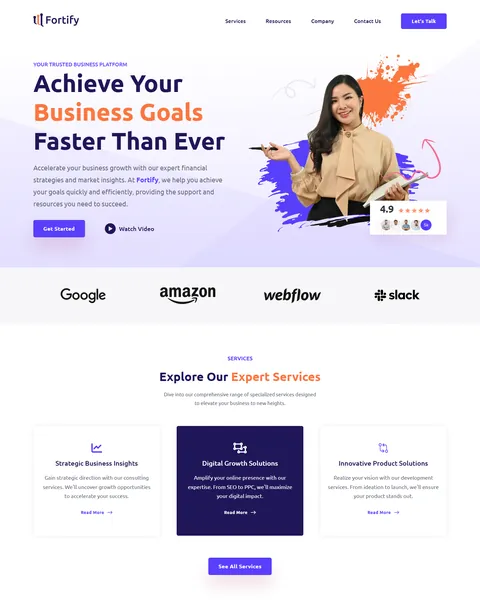
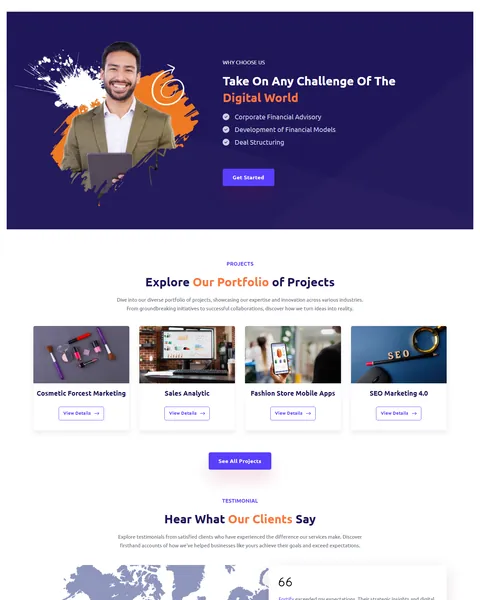
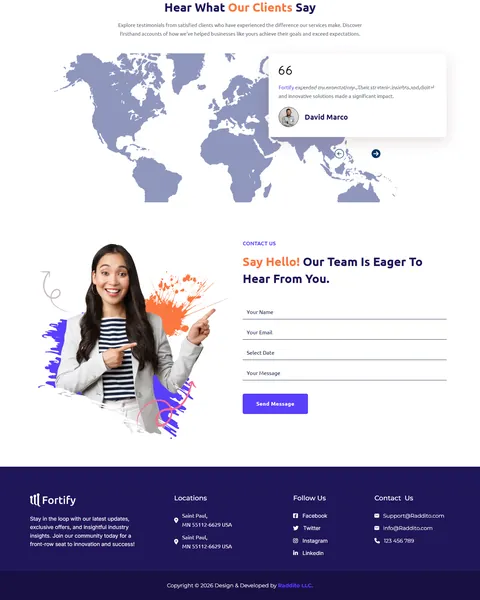
A Bold Hero, Client Logos and Three Services
Business owners judge a consultant on confidence and results. Fortify leads with a strong promise, an approachable consultant photo and a floating 4.9 rating card with client avatars. Watch Video gives visitors a quick way to meet you.
A strip of client logos sits under the hero. Three service cards follow for strategic insights, digital growth and product solutions. The middle card is set in deep indigo, with a See All Services button below.
Financial Advisory and a Project Portfolio
A deep indigo band pairs a smiling consultant with three checked points: corporate financial advisory, financial models and deal structuring. A Get Started button sits beside them.
“Explore Our Portfolio of Projects” shows four case study cards, such as a sales analytics project and a fashion store app, each with a View Details link. Real case studies are the strongest proof a consultant can show.
Client Reviews and a Meeting Request Form
“Hear What Our Clients Say” places review cards over a soft world map, hinting at clients in many countries. Short quotes about strategy and digital results build trust quickly.
“Say Hello! Our Team Is Eager To Hear From You” pairs a cheerful photo with a form for name, email, a preferred date and a message. The indigo footer adds a newsletter note, locations, social links and contact details.
Research-Driven Design for Consulting Firms
We looked at how business owners choose a consultant online. They want to understand what you do in one glance, see proof from past clients and feel you are easy to talk to. A clear next step, like booking a call, matters more than a long sales pitch. This business consulting Bricks Builder landing page is designed to feel bold and confident while keeping the path to a first meeting short.
Deep indigo and electric violet. Deep indigo, #201658, fills the advisory band and footer and feels serious and premium. Electric violet, #593FFB, marks buttons and the featured service card. Warm coral, #FF9670, highlights key words and paint-stroke accents for energy.
Montserrat and Inter. Montserrat headlines are bold and businesslike. Inter keeps service details, reviews and form labels sharp and easy to read on any screen.
Paint-stroke portraits. Consultant photos are cut out and framed with bright brush strokes, which feels creative and human instead of corporate stock. Swap in your own team photos and keep the strokes.
Proof in the first scroll. A rating card and client logos appear before the services, so visitors trust you before they read further.
A date field in the form. Letting prospects pick a preferred date turns the contact form into a simple meeting request and saves an extra email.
Mobile friendly. On phones, the menu opens as a popup, service and project cards stack and the form stays easy to fill in. Busy owners often check out a consultant between meetings on their phone.
What’s Included With the Fortify Bricks Builder Landing Page
- Fortify Bricks templates. The full landing page and a mobile menu popup as JSON files.
- Theme Style file. Global colors, typography and buttons in one JSON file.
- Assets folder. The images and icons the page references.
- READ_ME guide and changelog. Setup steps and the version history, with the latest update on July 29, 2025.
Need help with the template files? Our product support team can help. If you would rather have the whole page built with your own services and branding, see our done-for-you website service.
How to Import the Fortify Business Consulting Bricks Builder Landing Page
Fortify only needs Bricks. Follow these steps:
- In Bricks > Settings > General, enable custom breakpoints, SVG uploads and smooth scroll (CSS), then save.
- In the builder’s breakpoint settings, set Tablet Portrait to 1025px and Mobile Landscape to 768px.
- Go to Bricks > Templates and import the Fortify and mobile menu templates.
- Import the Theme Style and set its condition to the entire website or individual pages.
- Link the mobile menu popup to the bar icon and its close icon, then save and refresh.
The video below walks through a full Bricks import. It also shows WooCommerce steps, which you can skip because Fortify does not use WooCommerce.
Fortify vs Other Bricks Options for Consulting Websites
Comparing ways to build a consulting firm page in Bricks? Here is how Fortify compares with other popular options online.
| Fortify | Other popular Bricks template libraries online* | |
|---|---|---|
| Complete business consulting landing page | Yes, ready to import | No, all three are libraries of sections |
| Case study portfolio cards | Yes | Not mentioned on any of them |
| Meeting request form with a date field | Yes | Not as a ready section on any of them |
| Same design also sold for Elementor | Yes | No, not on any of them |
Why consultants choose Fortify:
- Made for consulting. Services, advisory, portfolio and booking are ready.
- Pure Bricks. No add-ons, so your page stays fast.
- One payment. $8.97 once, with no yearly plan.
*We compared Fortify with two paid Bricks layout libraries and a free community Bricks template library, each listed on its own website. Details come from each product page on October 26, 2026. Prices and features may change.
More Business Templates by Raddito
Prefer Elementor? Fortify is also available as a business consulting Elementor landing page with the same look. For related businesses, compare these Bricks options.
Relvise – financial consulting Bricks Builder landing page
Best for financial advisors and business consultants.
Single landing page · No extra plugins · Live Preview
Studio – digital marketing agency Bricks Builder landing page
Best for marketing, design and web agencies.
Single landing page · No extra plugins · Live Preview
Co-work – coworking space Bricks Builder landing page
Best for coworking spaces and shared offices.
Single landing page · No extra plugins · Live Preview
Want more choices? Browse our business services website templates or every WordPress Bricks Builder template we sell.
Frequently Asked Questions
Is Fortify a WordPress theme?
No. Fortify is a business consulting Bricks Builder landing page, a ready one-page design you import into Bricks. Bricks is the theme, and you need your own Bricks license.
Do I need any plugins besides Bricks?
No. The slider, cards and form all use built-in Bricks elements, so there is nothing else to install.
Can clients book a call?
Use the form’s date field for meeting requests, or link the Get Started buttons to your calendar booking page.
Can I add more case studies?
Yes. Duplicate a portfolio card in Bricks and link its View Details button to a full case study.
How do I add my intro video?
Link the Watch Video button to your YouTube or Vimeo video, or open it in a Bricks popup.
Is it suitable for a marketing agency?
Yes. Rename the services to SEO, ads and content, and fill the portfolio with your campaigns.
Should I replace the sample logos and reviews?
Yes, please. The client logos, rating, projects and reviews are placeholders, so use only your own real clients and results.