


Arik is a portfolio Bricks Builder template for WordPress, made for freelance web designers, developers and small studios that sell design, build and SEO work. The kit holds 10 pages, including Services, Pricing, Work, a case study page, Blog, Contact and a 404 page, along with a header, footer and two popups.
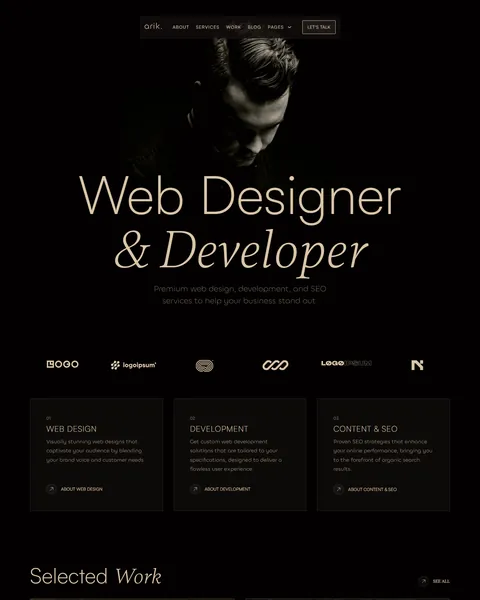
The demo opens on a near-black screen with a moody portrait of the designer. A huge “Web Designer & Developer” headline sits on top, with “& Developer” set in an elegant italic serif. Three numbered service cards and a selected work grid follow. Sand-colored type on deep black gives your studio a quiet, premium and confident feel.
Arik is built only with native Bricks elements, so no extra plugins are required. Bricks itself is a premium theme and is not included.

Quick Template Details
- Template Name: Arik
- Template Type: Full website template kit
- Required Theme: Bricks (Premium, not included)
- Required Plugins: None
- Page Templates: 10, plus header, footer and 2 popups
- Contact Form: Built-in Bricks form
- Fonts: Satoshi, Chillax and Gambetta, font files included
- Responsive: Desktop, Tablet, Mobile
- Coding Required: No
Who Is This Portfolio Bricks Builder Template For?
- Freelance web designers. The copy is written in the first person, so a solo designer can sell projects under their own name.
- Web developers who build with Bricks. You can show clients your own site in the same builder you will use for their project.
- SEO and content consultants. A dedicated SEO service group and a top pricing tier with SEO support are already in place.
- UX and UI designers. Wireframes, interactive prototypes and screen design appear as named steps in the project process.
- Two- or three-person studios. Case studies, awards and fixed packages work just as well for a small team as for one person.
Running a marketing or web agency with a team rather than a personal brand? Our Studio digital agency Bricks Builder landing page is a better fit.
See Every Page in the Arik Portfolio Bricks Builder Template
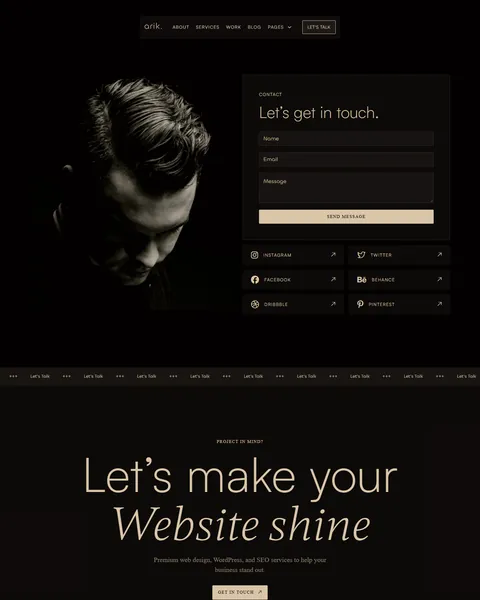
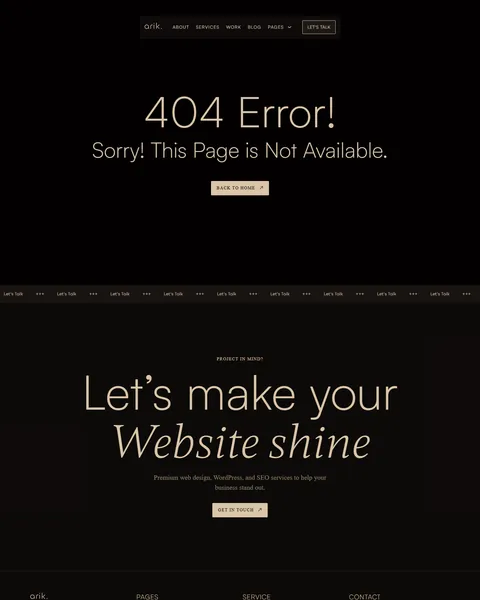
Every page template is shown below, along with the 404 page. Click any page to open it in the live demo.
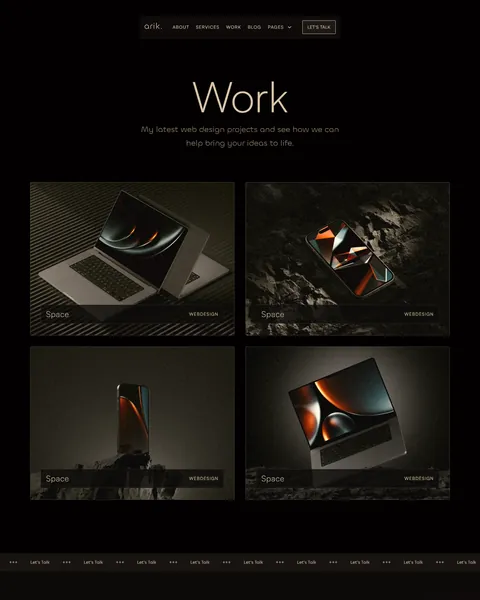
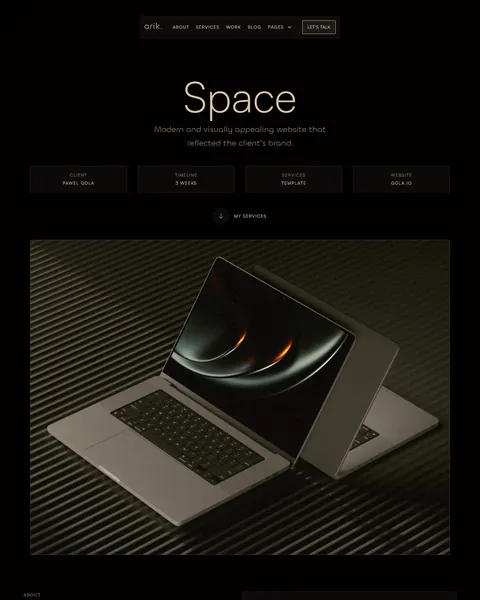
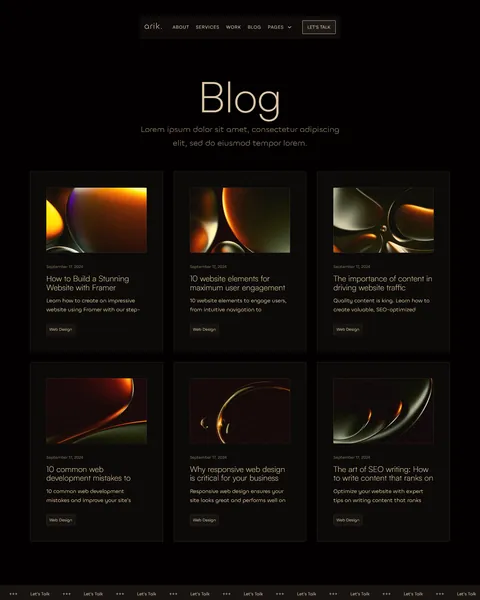
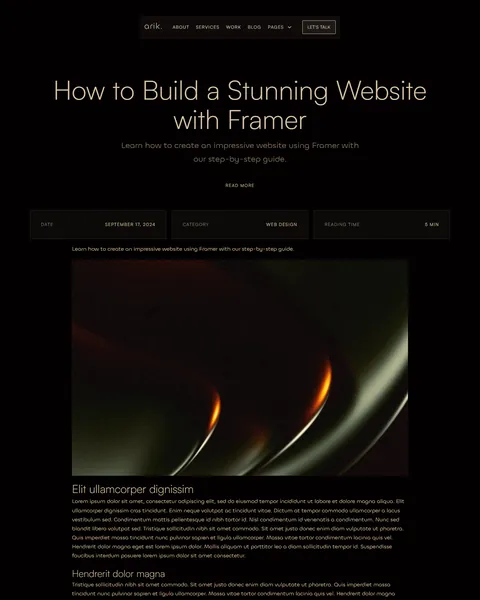
Built Natively in Bricks, With Nothing Extra to Install
Many Bricks users choose the builder because it keeps a site lean. Arik follows the same idea. Every layout uses core Bricks elements, and the contact form is the Bricks form element, so you do not need a form plugin or an add-on pack.
The mobile menu and the contact form are separate popup templates, so you can edit them once and reuse them across the site. Entrance animations use Bricks interactions, and global colors and type live in one Theme Style. Change the sand accent there and every page follows.
A Homepage That Moves Clients From Your Work to a Conversation
The homepage follows the order in which most clients size up a designer. A portrait hero and a client logo strip come first. Three numbered cards then cover web design, development, and content and SEO, each with its own link.
A “Selected Work” grid shows four large project images. Next, “Your Website in 5 steps” sets out discovery call, concept and strategy, web design, development and onboarding, with a duration and a short checklist for each step. Six client reviews and a personal banner with your name and a short bio close the page.
Services, Pricing and a Full Case Study Layout
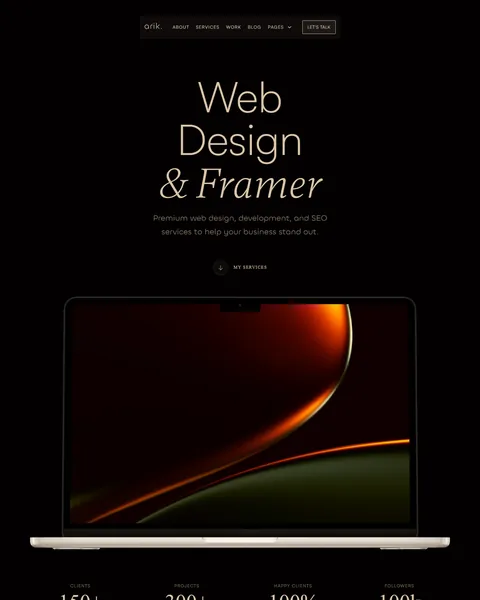
The Services page groups nine offers under three headings. They run from concept, UX and UI design and prototypes to CMS integration, design systems, keyword research, rankings and ongoing SEO support. Four counters sit above them for clients, projects, satisfaction and followers.
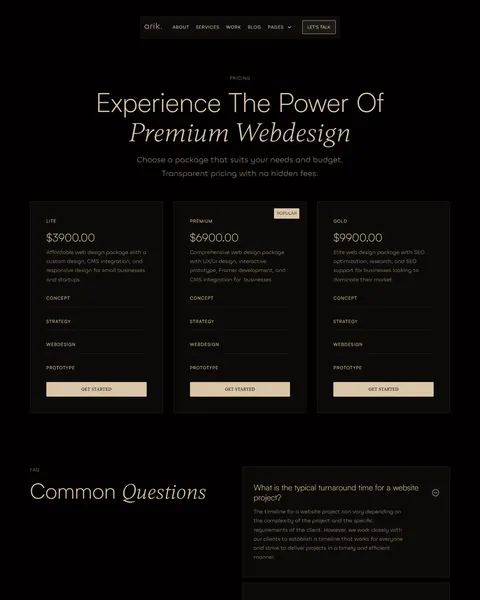
The Pricing page lists three fixed packages: Lite at $3,900, Premium at $6,900 and Gold at $9,900, with Premium marked Popular. A four-question FAQ answers turnaround, maintenance, search visibility and process questions. The Work Single page tells one project story with client, timeline, services and website link, followed by Challenge, Goal and Result blocks.
About, Journal and Contact Templates
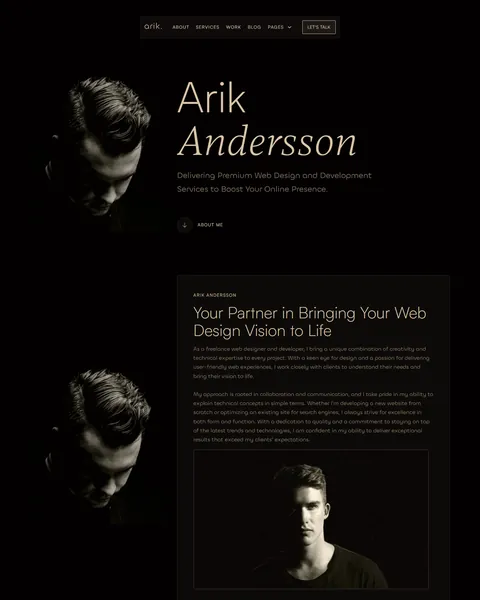
The About page pairs a large portrait with a personal story, links to six social profiles and an awards list with the year of each honor. The Blog page shows six article cards with date, category and excerpt. The Blog Single template adds a bar with date, category and reading time above a large cover image.
The Contact page places a name, email and message form beside the portrait, with Instagram, Twitter, Facebook, Behance, Dribbble and Pinterest tiles below. A scrolling “Let’s Talk” ticker and a “Let’s make your Website shine” banner appear above the footer on every page. Even the 404 page keeps visitors moving with a Back to Home button.
Research-Driven Design for Web Designers and Developers
We studied how clients pick a web designer. The site itself is the first sample of your work, so it has to show taste within seconds. After that, buyers look for three things: the type of projects you take on, proof that past clients were happy, and a rough idea of budget and timeline. Arik answers each of these in that order, without clutter.
Near-black and warm sand. A deep #030001 background works like a gallery wall and makes project images glow. Headings, links and buttons use a soft sand tone, #DAC5A7, which adds warmth without breaking the dark mood. Contrast stays high enough to read prices and steps with ease.
Satoshi, Chillax and Gambetta. Headlines use light Satoshi with Gambetta italic accents, like “Selected Work” and “Website shine“. The serif italics feel editorial and handmade, while rounded Chillax keeps intros and body text friendly. All three font families ship inside the kit, so the site looks the same as the demo after import.
Work before words. Project images run large with small labels, and inner pages open with a big centered title and lots of empty space. Visitors judge your craft before they read any copy.
Proof at every step. Client logos, counters, an awards list and named reviews show that other people already trust you. Replace them with your own real clients and results.
Clear routes to hire you. A Let’s Talk button stays in the header, and every package has a Get Started button. A Get in Touch button sits in the closing banner of each page.
Mobile friendly. On phones the menu turns into a popup, the giant headlines scale down and every grid stacks into a single column.
What’s Included With the Arik Bricks Builder Template
- 14 Bricks templates. Home, About, Services, Pricing, Work, Work Single, Blog, Blog Single and Contact, plus header, footer, 404, a mobile menu popup and a contact form popup.
- Theme Style file. Global colors, typography and spacing in one JSON file.
- Assets folder. The logo, icon and image files the templates reference.
- Font files. Satoshi, Chillax and Gambetta web fonts with their license files.
- READ_ME guide and changelog. Step-by-step setup notes and the version history.
Need help with the template files? Our product support team can help. If you would rather have the whole portfolio built with your own projects and branding, see our done-for-you website service.
How to Import the Arik Portfolio Bricks Builder Template
Setup takes a few minutes in the Bricks dashboard:
- In Bricks > Settings > General, turn on custom breakpoints, SVG uploads and smooth scroll (CSS), then save.
- In the builder’s breakpoint settings, set Tablet Portrait to 1025px and Mobile Landscape to 768px.
- Go to Bricks > Templates and import the template zip file.
- Import the Theme Style and set its condition to the entire website.
- Link the mobile menu popup to the menu icon in the header, and set up the contact form popup the same way.
The video below walks through a full Bricks site import. It also shows WooCommerce steps, which you can skip because Arik does not use WooCommerce.
Arik vs Other Portfolio Bricks Builder Templates
Comparing Bricks portfolio options? Here is how Arik compares with other popular choices online.
| Arik | Other popular Bricks portfolio options online* | |
|---|---|---|
| Complete portfolio website, ready to import | Yes, all pages plus header, footer and popups | Not all, two are libraries of sections |
| Services and Pricing page templates | Yes, both included | No, not as ready pages on any of them |
| Blog and blog post templates | Yes | Not listed as full pages on any of them |
| Contact form popup | Yes | Not mentioned on any of them |
| Same design also sold for Elementor | Yes | No, not on any of them |
Why designers choose Arik:
- A whole site, not parts. Services, pricing, case studies and blog are ready to use.
- Pure Bricks. No add-ons, so your site stays light.
- One payment. $19.90 once, with no yearly plan.
*We compared Arik with a popular portfolio Bricks Builder template sold on Gumroad and two paid Bricks layout libraries sold on their own websites. Details come from each product page on October 26, 2026. Prices and features may change.
More Creative and Agency Bricks Templates by Raddito
Prefer Elementor? Arik is also available as a web designer portfolio Elementor template kit with the same look. If you run an agency, a consultancy or a digital art project, compare these Bricks options.
Studio – digital agency Bricks Builder landing page
Best for digital marketing, web design and development agencies.
Single landing page · No extra plugins · Live Preview
Fortify – business consulting Bricks Builder landing page
Best for consultants and digital strategy advisors.
Single landing page · No extra plugins · Live Preview
NFT – digital art Bricks Builder landing page
Best for digital artists and NFT collections.
Single landing page · No extra plugins · Live Preview
Want more choices? Browse our creative and design website templates or every WordPress Bricks Builder template we sell.
Frequently Asked Questions
Is Arik a WordPress theme?
No. Arik is a portfolio Bricks Builder template, a set of layouts you import into Bricks. Bricks is the theme, and you need your own Bricks license.
Do I need any plugins besides Bricks?
No. Every page, the contact form and both popups use built-in Bricks elements, so there is nothing else to install or pay for.
Does the contact form send emails?
Yes. It is a standard Bricks form, so you set the email action and recipient address in the form settings after import.
The demo text mentions Framer. Do I need it?
No. Framer only appears as a sample tool in the service and process text. Swap it for Bricks, WordPress or the tools you really use.
Can I change the colors and fonts in one place?
Yes. Edit the imported Theme Style and the change applies across all pages, including the header, footer and popups.
Can I add more case studies?
Yes. Duplicate the Work Single template, add your images, client, challenge and result, then add a matching card to the Work page.
Should I replace the sample awards, reviews and prices?
Yes, please. The awards, client reviews, counters and package prices are placeholders, so use only your own real details.