


NFT is an NFT marketplace Bricks Builder landing page for WordPress, made for digital artists, NFT collections and drops, small NFT marketplaces and crypto art galleries. It is a single scrolling page with a dark gradient hero, a featured auction with a countdown, a trending artworks grid, popular artists and a community banner.
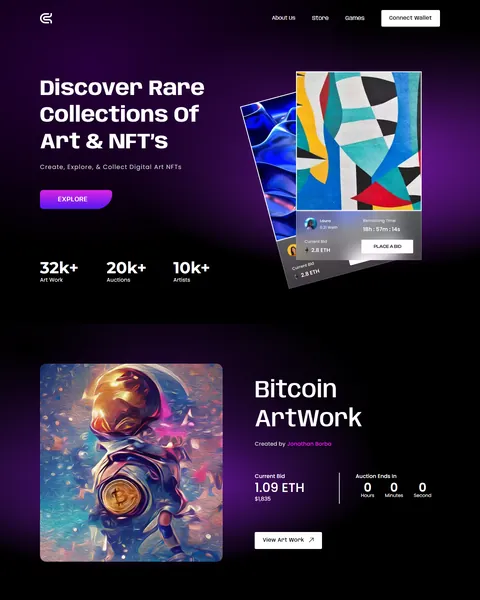
The demo opens with “Discover Rare Collections Of Art & NFT’s” beside a fanned stack of colorful artwork cards showing bids and time left. An Explore button sits below, with counters for artworks, auctions and artists. Deep black, rich purple and vivid magenta give your project a bold, futuristic and premium look.
NFT is built only with native Bricks elements, including its countdown and counters, so no extra plugins are required. Bricks itself is a premium theme and is not included.

Quick Template Details
- Template Name: NFT
- Template Type: Single landing page
- Required Theme: Bricks (Premium, not included)
- Required Plugins: None
- Landing Page Sections: 7
- Responsive: Desktop, Tablet, Mobile
- Coding Required: No
Who Is This NFT Marketplace Bricks Builder Landing Page For?
- Digital artists. A featured artwork with a creator credit and a trending grid show off your pieces.
- NFT collections and drops. A countdown to the end of an auction builds urgency before a launch.
- Small NFT marketplaces. Counters for artworks, auctions and artists suggest an active platform.
- Crypto art galleries. A dark, gallery-like layout lets bright digital art stand out.
- Web3 communities. A Join Community banner points visitors to Discord, Telegram or a mailing list.
Are you a designer or developer who wants a full portfolio site instead? Our Arik portfolio Bricks Builder template kit is a better fit.
See Every Section of the NFT Marketplace Bricks Builder Landing Page
Click any section below to open it in the live demo.
A Gradient Hero With Live-Looking Stats
Collectors judge an NFT project in seconds. This template’s hero glows with purple light behind a bold headline and a fanned stack of artwork cards. Each card shows a creator, a current bid and a Place A Bid button. A gradient Explore button and three counters complete the first screen.
The header holds About Us, Store and Games links plus a white Connect Wallet button. Web3 visitors find the action they expect right away.
A Featured Auction With a Countdown
A large square artwork spotlights one piece, with its title, creator, current bid in ETH and a US dollar value. An “Auction Ends In” timer counts down hours, minutes and seconds, and a View Art Work button leads to the full listing.
Time pressure works for auctions and drops. Set the countdown to your real end time, or use it for a mint date to build excitement before launch.
Trending Artworks, Artists and Community
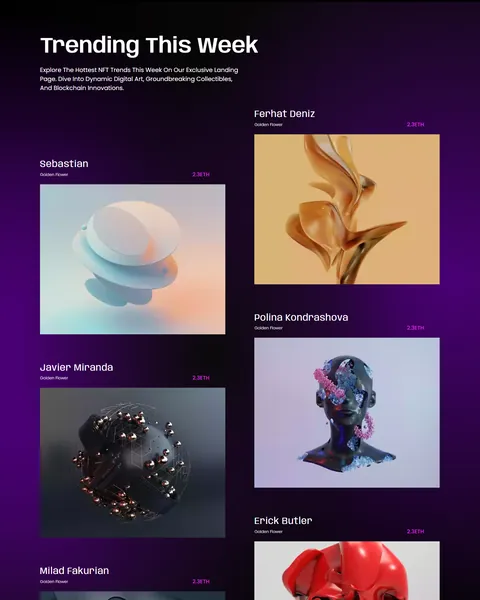
“Trending This Week” shows six artworks in a staggered two-column layout, each with the artist name, title and price in ETH. The offset grid feels like a curated gallery rather than a plain store.
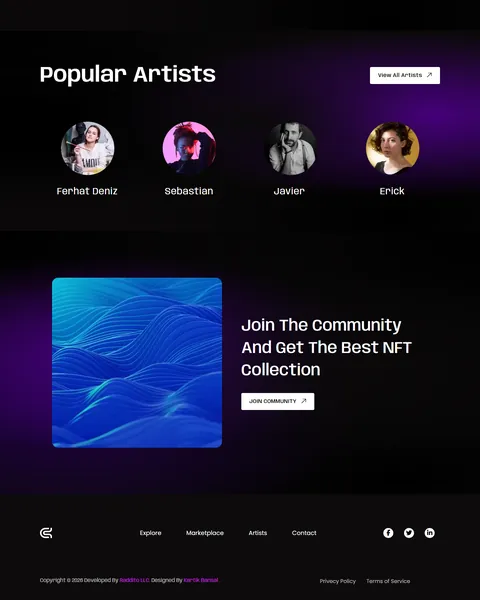
“Popular Artists” shows round portraits with names and a View All Artists button. A “Join The Community And Get The Best NFT Collection” banner with a wave artwork follows, and a simple footer adds menu and legal links.
Research-Driven Design for NFT Projects
We looked at how collectors discover and judge NFT projects online. They look for striking art, signs of an active market, credible artists and a clear next step, such as connecting a wallet or joining the community. Trust is fragile in this space, so a polished, professional design matters. This NFT marketplace Bricks Builder landing page is designed to let the art lead while showing activity and urgency.
Deep black with purple and magenta glow. Deep black, #0B090A, makes every artwork pop. Vivid magenta, #DD24E1, and electric violet, #5117F4, glow behind sections and mark key buttons and prices, giving the page a futuristic, night-time feel.
Anybody and Poppins. Anybody headlines are wide and bold, with a techy, display feel that suits web3. Poppins keeps descriptions, prices and links clean and easy to read.
Art first. Large artwork images fill most of the page, because collectors buy what they see. Use your best pieces at high resolution, with crisp edges and rich color.
Signals of activity. Counters, bids in ETH and a live countdown show that the platform is busy, which encourages first-time buyers. Keep these numbers honest, as collectors check them.
Simple, focused layout. Seven sections keep the page quick to scan, ideal for a single drop or a featured collection. Fewer distractions mean more attention on the art and the call to action.
Mobile friendly. On phones, the card stack, artworks and artist portraits stack neatly. Many collectors browse drops on their phone after tapping a link on X, Discord or Telegram.
What’s Included With the NFT Bricks Builder Landing Page
- NFT Bricks template. The full landing page as one JSON file.
- Theme Style file. Global colors, typography and buttons in one JSON file.
- Assets folder. The artwork images and icons the page references.
- READ_ME guide and changelog. Setup steps and the version history, with the latest update on July 29, 2025.
Need help with the template file? Our product support team can help. If you would rather have the whole page built with your own art and branding, see our done-for-you website service.
How to Import the NFT Marketplace Bricks Builder Landing Page
NFT only needs Bricks. Follow these steps:
- In Bricks > Settings > General, enable custom breakpoints, SVG uploads and smooth scroll (CSS), then save.
- In the builder’s breakpoint settings, set Tablet Portrait to 1025px and Mobile Landscape to 768px.
- Go to Bricks > Templates and import the NFT template file.
- Import the Theme Style and set its condition to the entire website or individual pages.
- Insert the template into a page, set the countdown date, then save and refresh.
The video below walks through a full Bricks import. It also shows WooCommerce steps, which you can skip because NFT does not use WooCommerce.
NFT vs Other Bricks Options for NFT Websites
Comparing ways to build an NFT page in Bricks? Here is how this template compares with other popular options online.
| NFT | Other popular Bricks template libraries online* | |
|---|---|---|
| Complete NFT marketplace landing page | Yes, ready to import | No, all three are libraries of sections |
| Featured auction with countdown | Yes | Not mentioned on any of them |
| Trending artworks and popular artists | Yes | Not as a ready section on any of them |
| Same design also sold for Elementor | Yes | No, not on any of them |
Why NFT projects choose this template:
- Made for digital art. Auction, trending art, artists and community are ready.
- Pure Bricks. No add-ons, so your page stays fast.
- One payment. $8.97 once, with no yearly plan.
*We compared NFT with two paid Bricks layout libraries and a free community Bricks template library, each listed on its own website. Details come from each product page on October 26, 2026. Prices and features may change.
More Tech and Creative Templates by Raddito
Prefer Elementor? This design is also available as an NFT marketplace Elementor landing page with the same look. For related projects, compare these Bricks options.
SaaSify – SaaS Bricks Builder landing page
Best for SaaS products and software startups.
Single landing page · No extra plugins · Live Preview
Upgrade – finance app Bricks Builder landing page
Best for money management and budgeting apps.
Single landing page · No extra plugins · Live Preview
Arik – portfolio Bricks Builder template kit
Best for freelance designers and developers.
10 pages · No extra plugins · Live Preview
Want more choices? Browse our technology and app website templates or every WordPress Bricks Builder template we sell.
Frequently Asked Questions
Is NFT a WordPress theme?
No. NFT is an NFT marketplace Bricks Builder landing page, a ready one-page design you import into Bricks. Bricks is the theme, and you need your own Bricks license.
Does Connect Wallet work out of the box?
No. It is a design button, so link it to your marketplace or add a web3 wallet plugin or script of your choice.
Can I sell NFTs directly from this page?
Link each View Art Work button to the item on your marketplace, such as your own platform or a public one.
How do I change the auction countdown?
Select the countdown element in Bricks and set the end date and time for your auction or mint.
Can I add more artworks?
Yes. Duplicate an artwork card in the trending grid and change the image, artist, title and price.
Does it include a mobile menu popup?
The zip has no separate menu popup, so set up the header’s mobile menu with the Bricks nav menu element.
Should I replace the sample artworks and artists?
Yes, please. The artworks, artist names, prices and counters are placeholders, so use only art and creators you have rights to show.