


Upgrade is a finance app Bricks Builder landing page for WordPress, made for fintech startups, digital banking apps, budgeting and money management tools, and card programs. It is a single scrolling page with an app hero, feature tabs and a security section. A bento grid of services, customer reviews and a download banner follow.
The demo opens with “Finance With Security And Flexibility” in bold uppercase on a deep green gradient. A phone mockup and two green payment cards float beside the headline, with an Open Account button below. Deep forest green, bright emerald and clean white give your app a fresh, secure and modern look.
Upgrade is built only with native Bricks elements, so no extra plugins are required. Bricks itself is a premium theme and is not included.

Quick Template Details
- Template Name: Upgrade
- Template Type: Single landing page
- Required Theme: Bricks (Premium, not included)
- Required Plugins: None
- Landing Page Sections: 10, plus a mobile menu popup
- Responsive: Desktop, Tablet, Mobile
- Coding Required: No
Who Is This Finance App Bricks Builder Landing Page For?
- Fintech startups. An app hero, feature tabs and an Open Account button suit a product launch.
- Digital banking apps. Checking, savings and card sections fit neobank and online account offers.
- Budgeting and expense apps. An expense tracker and personal insights are ready as features.
- Multi-currency and transfer services. Free global transfers and holding money in many currencies appear in the services grid.
- Card programs. A custom card tile and card mockups suit debit or credit card launches.
Launching a credit card or neobank card with plans and benefits? Our Finaura digital banking Bricks Builder landing page may suit you better.
See Every Section of the Upgrade Finance App Bricks Builder Landing Page
Click any section below to open it in the live demo.
An App Hero and a Partner Logo Strip
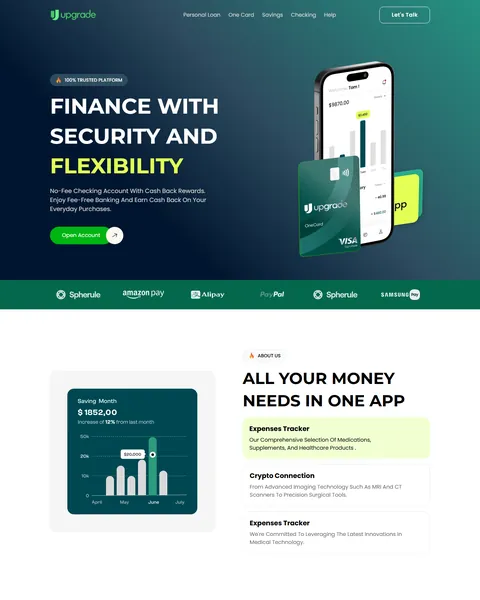
People trust a finance app when it looks polished and safe. Upgrade opens with a “100% Trusted Platform” badge, a short line about fee-free banking and cash back, and a large phone and card mockup. A Let’s Talk button sits in the header.
A green strip below the hero shows six payment partner logos. Replace them with the banks, card networks or wallets you actually work with, since real partners build instant credibility.
Feature Tabs, App Features and Security
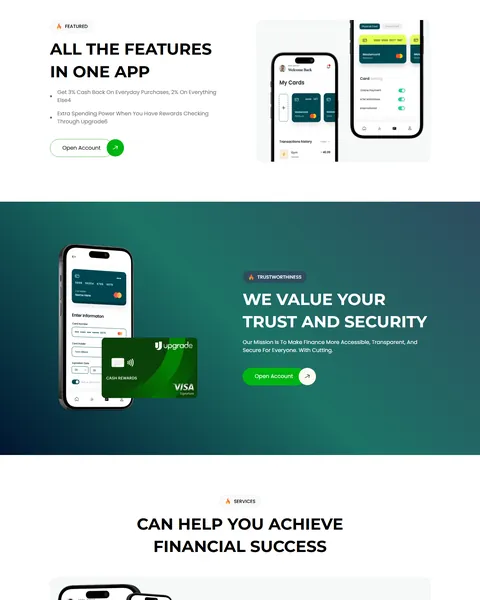
A savings chart card sits beside three feature tabs, such as an expense tracker and crypto connection. “All The Features In One App” then lists two key perks beside a pair of phone screens.
A deep green “We Value Your Trust And Security” band shows a phone and card mockup with your mission and an Open Account button. Security is the first worry for anyone moving money to a new app.
A Bento Grid of Services
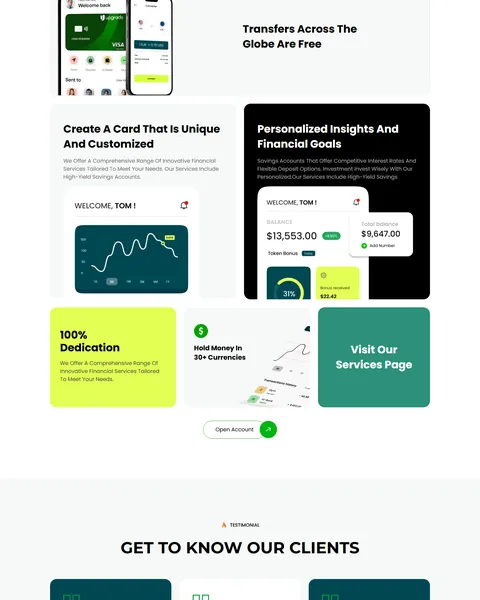
“Can Help You Achieve Financial Success” shows your services in a bento grid of cards in white, black, lime and green. Tiles cover free global transfers, a custom card, personal insights and goals, a dedication badge and holding money in many currencies.
App screens with balances and charts fill several tiles, so visitors see the product while they read. A “Visit Our Services Page” tile links to more detail.
Customer Reviews and a Download Banner
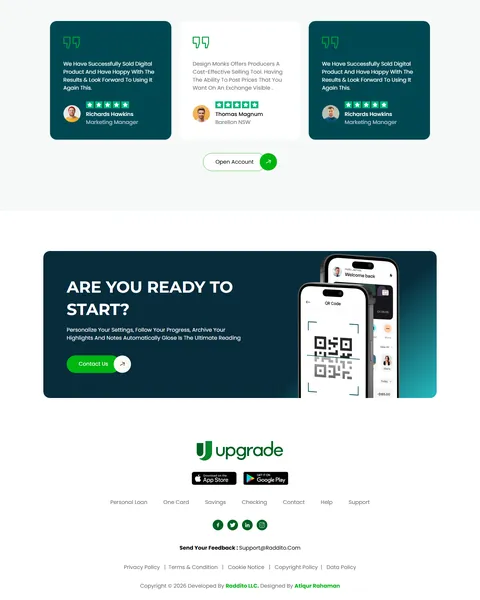
“Get To Know Our Clients” shows reviews on green and white cards with star ratings in a slider. A dark green “Are You Ready To Start?” banner follows with a phone mockup, a QR code and a Contact Us button.
The footer centers your logo with App Store and Google Play badges, menu links, social icons, a feedback email and legal links.
Research-Driven Design for Finance Apps
We looked at how people choose a new banking or money app. They want to see the app itself, understand the key benefits in seconds and feel sure their money and data are safe. Clear fees, real partners and reviews help them take the leap. This finance app Bricks Builder landing page is designed to show the product on every screen and keep the Open Account button within reach.
Deep forest green and emerald. Deep forest green, #04684C, fills the hero, the security band and the reviews and suggests money and stability. Bright emerald, #00B67A, marks buttons and highlights. A lime tile and black cards add contrast to the services grid.
Montserrat and Poppins. Bold uppercase Montserrat headlines feel confident and modern, like a fintech brand. Poppins keeps feature text, reviews and buttons friendly and easy to read.
Phone mockups everywhere. App screens appear in almost every section, so visitors understand what they will get before they sign up. Use real screenshots of your own app.
A bento services grid. Tiles of different sizes and colors make a long list of services feel light and easy to scan. It is a layout people already know from modern app stores and product pages.
Open Account, again and again. The same green button repeats after each section, so a ready visitor never has to scroll back to sign up.
Mobile friendly. On phones, the menu opens as a popup, tiles stack and mockups resize cleanly. Most people will sign up for a finance app on the same phone they will use it on.
What’s Included With the Upgrade Bricks Builder Landing Page
- Upgrade Bricks templates. The full landing page and a mobile menu popup as JSON files.
- Theme Style file. Global colors, typography and buttons in one JSON file.
- Assets folder. The images, mockups and icons the page references.
- READ_ME guide and changelog. Setup steps and the version history.
Need help with the template files? Our product support team can help. If you would rather have the whole page built with your own app and branding, see our done-for-you website service.
How to Import the Upgrade Finance App Bricks Builder Landing Page
Upgrade only needs Bricks. Follow these steps:
- In Bricks > Settings > General, enable custom breakpoints, SVG uploads and smooth scroll (CSS), then save.
- In the builder’s breakpoint settings, set Tablet Portrait to 1025px and Mobile Landscape to 768px.
- Go to Bricks > Templates and import the Upgrade and mobile menu templates.
- Import the Theme Style and set its condition to the entire website or individual pages.
- Link the mobile menu popup to the bar icon and its close icon, then save and refresh.
The video below walks through a full Bricks import. It also shows WooCommerce steps, which you can skip because Upgrade does not use WooCommerce.
Upgrade vs Other Bricks Options for Fintech Websites
Comparing ways to build a finance app page in Bricks? Here is how Upgrade compares with other popular options online.
| Upgrade | Other popular Bricks template libraries online* | |
|---|---|---|
| Complete finance app landing page | Yes, ready to import | No, all three are libraries of sections |
| Bento grid of financial services | Yes | Not mentioned on any of them |
| Phone and card mockups in place | Yes | Not as a ready section on any of them |
| App store download banner | Yes, with QR code | Not mentioned on any of them |
Why fintech teams choose Upgrade:
- Made for finance apps. Features, security, services and reviews are ready.
- Pure Bricks. No add-ons, so your page stays fast.
- One payment. $8.97 once, with no yearly plan.
*We compared Upgrade with two paid Bricks layout libraries and a free community Bricks template library, each listed on its own website. Details come from each product page on October 26, 2026. Prices and features may change.
More Finance Templates by Raddito
Building for banking, payments or financial advice? Compare these Bricks Builder landing pages.
FinanceX – fintech Bricks Builder landing page
Best for payment platforms and finance management agencies.
Single landing page · No extra plugins · Live Preview
Finaura – digital banking Bricks Builder landing page
Best for credit card brands and neobanks.
Single landing page · No extra plugins · Live Preview
Relvise – financial consulting Bricks Builder landing page
Best for financial advisors and business consultants.
Single landing page · No extra plugins · Live Preview
Want more choices? Browse our finance and law website templates or every WordPress Bricks Builder template we sell.
Frequently Asked Questions
Is Upgrade a WordPress theme?
No. Upgrade is a finance app Bricks Builder landing page, a ready one-page design you import into Bricks. Bricks is the theme, and you need your own Bricks license.
Do I need any plugins besides Bricks?
No. The tabs, slider and mockups all use built-in Bricks elements, so there is nothing else to install.
Does it include a sign-up form?
No. Link the Open Account buttons to your app store pages or your own secure sign-up flow.
Can I use my own app screenshots?
Yes. Replace the mockup images in Bricks with screenshots of your app on matching phone frames.
Can I change the green color scheme?
Yes. Update the colors in the Theme Style and section backgrounds to match your brand.
Is it suitable for a crypto or investing app?
Yes. Rename the features and service tiles to wallets, trading or portfolios, and keep the layout.
Should I replace the sample brand names and logos?
Yes, please. The partner logos, card designs, reviews and offer text are placeholders, so use only your own brand, real partners and approved financial wording.