


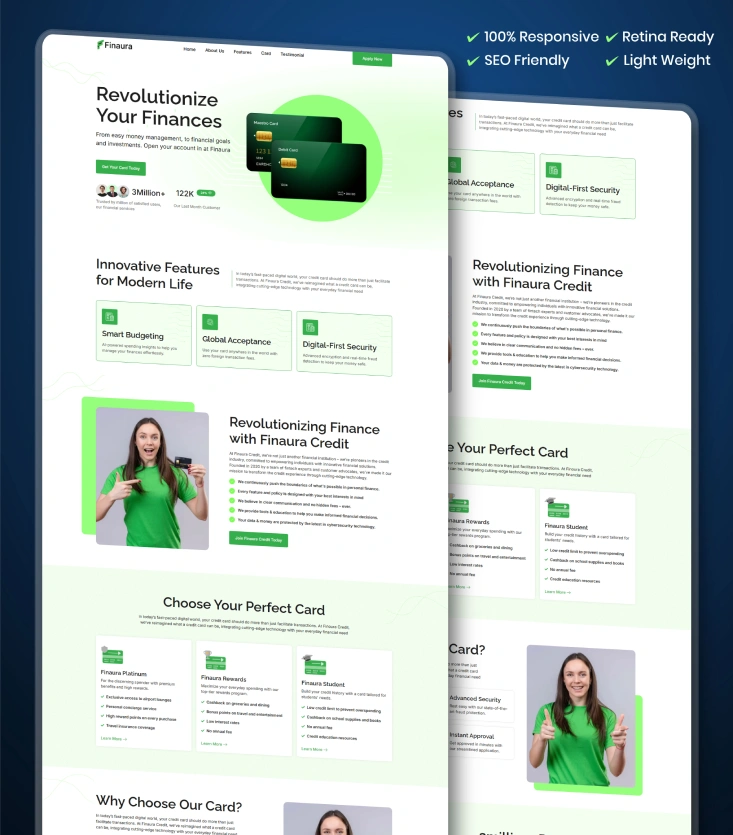
Finaura is a digital banking Bricks Builder landing page for WordPress, made for credit card brands, neobanks, fintech startups and card programs launching a new product. It is a single scrolling page with a card hero, feature highlights, an about section, three card plans, card benefits, customer reviews and a sign-up banner.
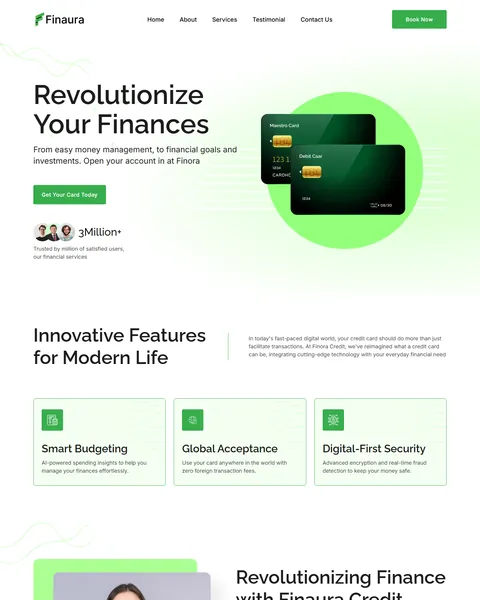
The demo opens with “Revolutionize Your Finances” beside two dark credit cards on a bright green circle. A Get Your Card Today button and a “3 Million+” trust badge sit below. Fresh green, deep charcoal and soft mint give your brand a modern, positive and trustworthy look.
Finaura is built only with native Bricks elements, so no extra plugins are required. Bricks itself is a premium theme and is not included.
Quick Template Details
- Template Name: Finaura
- Template Type: Single landing page
- Required Theme: Bricks (Premium, not included)
- Required Plugins: None
- Landing Page Sections: 8, plus a mobile menu popup
- Responsive: Desktop, Tablet, Mobile
- Coding Required: No
Who Is This Digital Banking Bricks Builder Landing Page For?
- Credit card brands. Platinum, rewards and student cards are ready as three plan cards.
- Neobanks and digital banks. Smart budgeting, global acceptance and digital security suit app-first banks.
- Fintech startups. A founding story and a list of values help a new brand earn trust quickly.
- Card programs at credit unions. No annual fee, rewards and instant approval benefits fit member card offers.
- Teams launching a new card. One focused page works well for paid ads and partner campaigns.
Offering financial advice rather than a card or account? Our Relvise financial consulting Bricks Builder landing page is a better fit.
See Every Section of the Finaura Digital Banking Bricks Builder Landing Page
Click any section below to open it in the live demo.
A Card-First Hero and Key Features
People choosing a card want to see it. Finaura’s hero shows two sleek card designs next to a short promise about easy money management and goals. A green Get Your Card Today button and a row of customer faces with “3 Million+” add instant social proof.
“Innovative Features for Modern Life” follows with three feature cards. They cover smart budgeting with spending insights, global acceptance with zero foreign transaction fees, and digital-first security with fraud detection.
An About Section With Clear Values
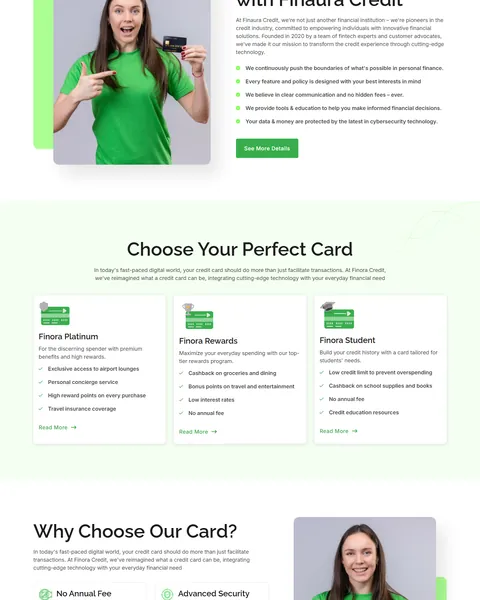
“Revolutionizing Finance with Finaura Credit” pairs a smiling customer holding a card with a short founding story. Five checkmarks cover innovation, customer focus, no hidden fees, financial education and data security.
Trust is the biggest barrier for a new financial brand. A clear story and plain promises, like “no hidden fees, ever”, answer the first questions people ask before sharing personal details. A See More Details button links to your full terms.
Three Card Plans and Benefits
“Choose Your Perfect Card” compares three cards side by side. Platinum offers lounge access, concierge and travel insurance. Rewards offers cashback on groceries and dining with no annual fee. Student helps young people build credit with a low limit and education resources.
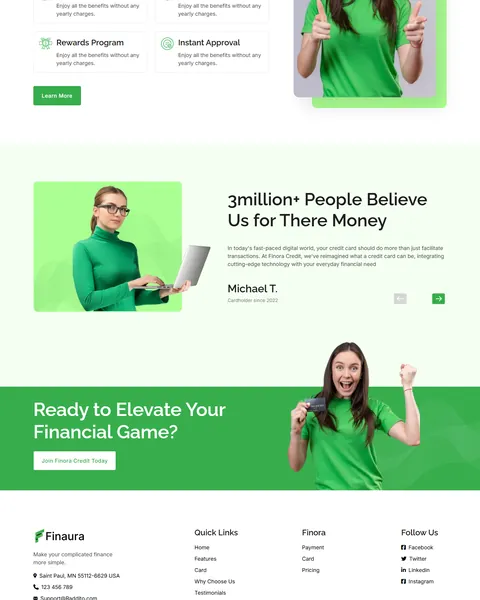
“Why Choose Our Card?” then highlights four benefits with icons: no annual fee, advanced security, a rewards program and instant approval. A Learn More button and a happy customer photo complete the section.
Reviews, Sign-Up Banner and Footer
“3 Million+ People Believe Us” shows cardholder reviews in a slider with a photo, name and “Cardholder since” line. Real member quotes are one of the strongest trust signals for any money brand.
A bold green closing banner with a smiling customer gives one last Join button. The footer lists your address, phone, email, quick links, product links and social profiles, so nothing important is hidden.
Research-Driven Design for Digital Banks
We looked at how people pick a credit card or a new bank online. They compare fees, rewards and security, and they want proof that the brand is safe and popular. Most decide on their phone, often after seeing an ad. This digital banking Bricks Builder landing page is designed to show the product, explain the benefits simply and make applying feel easy and safe.
Fresh green and charcoal. Fresh green, #37AE4C, marks buttons, icons and the final banner. Green suggests growth and money, and it feels more friendly than traditional bank blue. Deep charcoal headings and soft mint backgrounds keep the page calm and readable.
Raleway and Inter. Raleway headlines are elegant and modern, which suits a premium card brand. Inter keeps benefits, fees and footer details clear on every screen size.
Happy people with cards. Photos of smiling customers holding cards and phones make finance feel personal and positive rather than cold and technical. Swap in your own card design for instant brand recognition.
Plain-language benefits. Short phrases like “no annual fee” and “instant approval” answer the questions people actually search for when comparing cards.
One clear action. Get Your Card, Read More and Join buttons all point toward applying, so visitors are never unsure what to do next. A single goal per page usually converts better than many competing links.
Mobile friendly. On phones, the menu opens as a popup, card plans stack and buttons stay large enough to tap. Most card applications start on a phone.
What’s Included With the Finaura Bricks Builder Landing Page
- Finaura Bricks templates. The full landing page and a mobile menu popup as JSON files.
- Theme Style file. Global colors, typography and buttons in one JSON file.
- Assets folder. The images and icons the page references.
- READ_ME guide and changelog. Setup steps, mobile menu steps and the version history, with the latest update on July 29, 2025.
Need help with the template files? Our product support team can help. If you would rather have the whole page built with your own cards and branding, see our done-for-you website service.
How to Import the Finaura Digital Banking Bricks Builder Landing Page
Finaura needs nothing besides Bricks. Follow these steps:
- In Bricks > Settings > General, enable custom breakpoints, SVG uploads and smooth scroll (CSS), then save.
- In the builder’s breakpoint settings, set Tablet Portrait to 1025px and Mobile Landscape to 768px.
- Go to Bricks > Templates and import the Finaura template file.
- Import the Theme Style and set its condition to the entire website or individual pages.
- Import the mobile menu template, link it to the bar icon in the header, set its condition and select it from the close icon. Then save and refresh.
The video below walks through a full Bricks import. It also shows WooCommerce steps, which you can skip because Finaura does not use WooCommerce.
Finaura vs Other Bricks Options for Fintech Websites
Comparing ways to build a card or banking landing page in Bricks? Here is how Finaura compares with other popular options online.
| Finaura | Other popular Bricks template libraries online* | |
|---|---|---|
| Complete digital banking landing page | Yes, ready to import | No, all three are libraries of sections |
| Card plan comparison section | Yes, three cards | Not mentioned on any of them |
| Card benefits and trust sections | Yes | Not as a ready section on any of them |
| Same design also sold for Elementor | Yes | No, not on any of them |
Why fintech teams choose Finaura:
- Made for cards. Plans, benefits, story and reviews are ready.
- Pure Bricks. No add-ons, so your page stays fast.
- One payment. $8.97 once, with no yearly plan.
*We compared Finaura with two paid Bricks layout libraries and a free community Bricks template library, each listed on its own website. Details come from each product page on October 26, 2026. Prices and features may change.
More Finance Templates by Raddito
Prefer Elementor? Finaura is also available as a digital banking Elementor landing page with the same look. For other finance businesses, compare these Bricks options.
FinanceX – fintech Bricks Builder landing page
Best for finance management apps and agencies.
Single landing page · No extra plugins · Live Preview
Upgrade – finance app Bricks Builder landing page
Best for money management and budgeting tools.
Single landing page · No extra plugins · Live Preview
Relvise – financial consulting Bricks Builder landing page
Best for financial advisors and consultancies.
Single landing page · No extra plugins · Live Preview
Want more choices? Browse our finance and law website templates or every WordPress Bricks Builder template we sell.
Frequently Asked Questions
Is Finaura a WordPress theme?
No. Finaura is a digital banking Bricks Builder landing page, a ready one-page design you import into Bricks. Bricks is the theme, and you need your own Bricks license.
Do I need any plugins besides Bricks?
No. Every section, including the review slider and mobile menu, uses built-in Bricks elements, so there is nothing else to install.
Can people apply for a card on this page?
Link the Get Your Card buttons to your secure application system. Sensitive applications should run on your bank’s own platform.
Can I show more or fewer card plans?
Yes. Duplicate or remove plan cards in Bricks and edit each benefit list to match your products.
Is it suitable for a savings or investment app?
Yes. Rename the cards to account types or plans, and update the features to describe your app.
Can I add rates and fee tables?
Yes. Add a table or a pricing section in Bricks, and keep legal disclosures in the footer or a linked page.
Should I replace the sample figures and reviews?
Yes, please. The user counts, founding year, reviews and card benefits are placeholders, so use only your own real, compliant details.