


Relvise is a financial consulting Bricks Builder landing page for WordPress, made for financial advisors, small consulting firms, business advisors and finance professionals going solo. It is a single scrolling page with three service cards, result counters, practice advice cards, a video section, a newsletter and contact cards.
The demo opens with “Finance and Consultancy Solution” beside two smiling consultants working together at a computer. Learn More and Get Quote Now buttons sit below, with a Contact Us button in the header. Deep navy, calm teal and bright orange give your firm a modern, confident and approachable look.
Relvise is built only with native Bricks elements, including its newsletter form, so no extra plugins are required. Bricks itself is a premium theme and is not included.

Quick Template Details
- Template Name: Relvise
- Template Type: Single landing page
- Required Theme: Bricks (Premium, not included)
- Required Plugins: None
- Landing Page Sections: 10
- Responsive: Desktop, Tablet, Mobile
- Coding Required: No
Who Is This Financial Consulting Bricks Builder Landing Page For?
- Financial advisors. A financial services card and Get Quote Now button suit advisors winning new clients.
- Small consulting firms. Three service cards and four advice cards cover a focused range of services.
- Business advisory practices. Counters for clients served across sectors show breadth of experience.
- Environmental and ESG consultants. An environmental consulting card is ready next to finance services.
- Finance professionals going solo. One clean page is enough to look established from day one.
Advising on growth, digital strategy and product launches? Our Fortify business consulting Bricks Builder landing page may suit you better.
See Every Section of the Relvise Financial Consulting Bricks Builder Landing Page
Click any section below to open it in the live demo.

A Friendly Hero and Three Service Cards
People choose a financial advisor they feel comfortable with. Relvise opens with a warm photo of two consultants at work, a clear headline and two buttons, one to learn more and one to request a quote.
Three service cards overlap the bottom of the hero: environmental consulting, finance and consultancy, and financial services consulting. The last card is set in teal to highlight your main offer.
Result Counters and Practice Advice
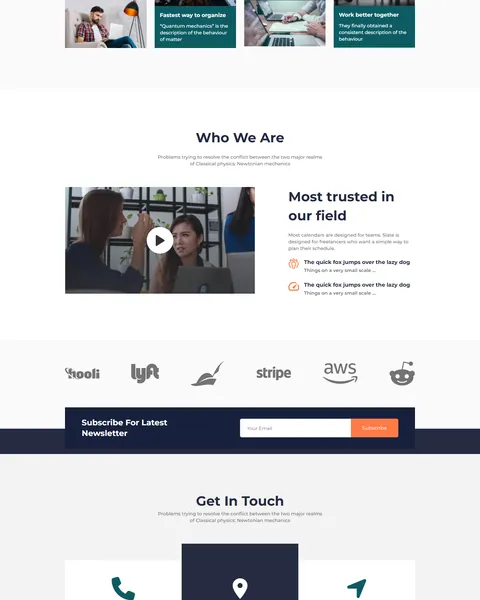
“Designing Better Experience” shows four counters with icons, ideal for clients served, services delivered and success rates. Numbers give visitors quick proof before they read further.
“Practice Advice” alternates four teal text cards with photos of offices and meetings, each card a short tip or service highlight. The checkerboard layout keeps a text-heavy topic easy to scan and adds rhythm to the page.
Who We Are, Partner Logos and Newsletter
“Who We Are” pairs a video thumbnail of a client meeting with “Most trusted in our field” and two checked points. A short video lets prospects meet you before they call.
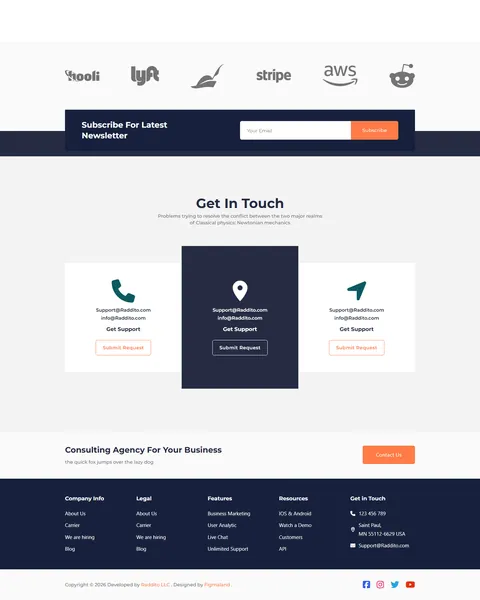
A row of partner logos follows. A navy “Subscribe For Latest Newsletter” bar with an orange button collects emails from people not yet ready to book, so you can stay in touch with market notes and tips.
Contact Cards and Footer
“Get In Touch” shows three contact cards for phone, location and messages, the middle one in navy. Each has email details and a Submit Request button, so prospects can pick the channel they prefer.
A “Consulting Agency For Your Business” strip with a Contact Us button comes next. The navy footer below lists company, legal, feature and resource links, plus your phone, address and email.
Research-Driven Design for Financial Consultants
We looked at how business owners and individuals choose a financial consultant online. They want someone approachable, with proof of results and a clear way to ask for a quote. Money is personal, so trust and clarity matter more than flashy design. This financial consulting Bricks Builder landing page is designed to feel friendly and professional, with numbers and contact options close at hand.
Deep navy, calm teal and bright orange. Deep navy, #252B42, frames headings, the newsletter bar and the footer and feels steady and serious. Calm teal, #0D5C63, highlights key service and advice cards. Bright orange, #FF7B47, marks the main buttons so they are easy to spot.
Montserrat throughout. Montserrat is clean and modern, with bold headlines and light body text that stay readable even in small cards. One typeface keeps the page tidy and consistent.
Warm, human photography. Smiling consultants, meetings and offices show that real people stand behind your advice. Use photos of your own team and office where you can.
Numbers before words. Counters near the top give quick proof of experience, which helps cautious visitors trust you sooner. Use real figures you can stand behind.
Several ways to reach you. Quote buttons, contact cards and a newsletter mean every visitor has a next step, whatever their stage. Some will call today, others will read your emails for months first.
Mobile friendly. On phones, service cards, counters and contact cards stack neatly. Many business owners look for advisors on their phone between meetings or while traveling.
What’s Included With the Relvise Bricks Builder Landing Page
- Relvise Bricks template. The full landing page as one JSON file.
- Theme Style file. Global colors, typography and buttons in one JSON file.
- Assets folder. The images and icons the page references.
- READ_ME guide and changelog. Setup steps and the version history, with the latest update on July 29, 2025.
Need help with the template file? Our product support team can help. If you would rather have the whole page built with your own services and branding, see our done-for-you website service.
How to Import the Relvise Financial Consulting Bricks Builder Landing Page
Relvise only needs Bricks. Follow these steps:
- In Bricks > Settings > General, enable custom breakpoints, SVG uploads and smooth scroll (CSS), then save.
- In the builder’s breakpoint settings, set Tablet Portrait to 1025px and Mobile Landscape to 768px.
- Go to Bricks > Templates and import the Relvise template file.
- Import the Theme Style and set its condition to the entire website or individual pages.
- Insert the template into a page, add your email to the newsletter form actions, then save and refresh.
The video below walks through a full Bricks import. It also shows WooCommerce steps, which you can skip because Relvise does not use WooCommerce.
Relvise vs Other Bricks Options for Consulting Websites
Comparing ways to build a financial consulting page in Bricks? Here is how Relvise compares with other popular options online.
| Relvise | Other popular Bricks template libraries online* | |
|---|---|---|
| Complete financial consulting landing page | Yes, ready to import | No, all three are libraries of sections |
| Result counters and practice advice cards | Yes | Not mentioned on any of them |
| Contact cards with request buttons | Yes | Not as a ready section on any of them |
| Same design also sold for Elementor | Yes | No, not on any of them |
Why consultants choose Relvise:
- Made for advisory firms. Services, results, advice and contact are ready.
- Pure Bricks. No add-ons, so your page stays fast.
- One payment. $8.97 once, with no yearly plan.
*We compared Relvise with two paid Bricks layout libraries and a free community Bricks template library, each listed on its own website. Details come from each product page on October 26, 2026. Prices and features may change.
More Finance and Consulting Templates by Raddito
Prefer Elementor? Relvise is also available as a financial consulting Elementor landing page with the same look. For related businesses, compare these Bricks options.
Fortify – business consulting Bricks Builder landing page
Best for consultants and growth strategy firms.
Single landing page · No extra plugins · Live Preview
FinanceX – fintech Bricks Builder landing page
Best for payment platforms and finance management agencies.
Single landing page · No extra plugins · Live Preview
Upgrade – finance app Bricks Builder landing page
Best for money management and budgeting apps.
Single landing page · No extra plugins · Live Preview
Want more choices? Browse our finance and law website templates or every WordPress Bricks Builder template we sell.
Frequently Asked Questions
Is Relvise a WordPress theme?
No. Relvise is a financial consulting Bricks Builder landing page, a ready one-page design you import into Bricks. Bricks is the theme, and you need your own Bricks license.
Do I need any plugins besides Bricks?
No. The counters, video and newsletter form all use built-in Bricks elements, so there is nothing else to install.
Can clients request a quote?
Link the Get Quote Now and Submit Request buttons to a Bricks form or your scheduling tool.
Can I add a detailed contact form?
Yes. Add a Bricks form above the contact cards with fields for name, company and the help needed.
Does it include a mobile menu?
The zip has no separate menu popup, so set up the header’s mobile menu with the Bricks nav menu element.
Is it suitable for an accounting or tax firm?
Yes. Rename the services to bookkeeping, tax and payroll, and update the counters and advice cards.
Should I replace the sample text and logos?
Yes, please. The demo text, counters and partner logos are placeholders, so write your own copy and use only real clients.