


FinanceX is a fintech Bricks Builder landing page for WordPress, made for card issuers, payment apps, neobanks and money transfer startups. It is a single scrolling page with a logo strip, service cards, global counters, a transaction report, three solution cards, testimonials and a newsletter footer.
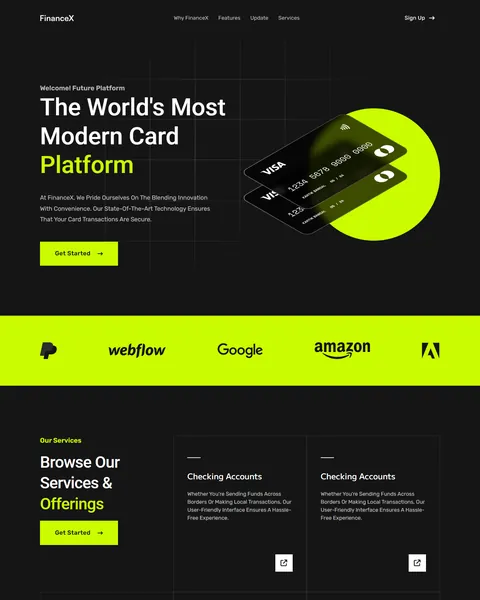
The demo opens with the bold headline “The World’s Most Modern Card Platform” beside two glossy black payment cards on a neon circle. A “Welcome! Future Platform” tag sits above, and a Get Started button below. Deep black and electric lime give your product a sharp, high-tech and confident look.
FinanceX is built only with native Bricks elements, including its service slider and newsletter form, so no extra plugins are required. Bricks itself is a premium theme and is not included.

Quick Template Details
- Template Name: FinanceX
- Template Type: Single landing page
- Required Theme: Bricks (Premium, not included)
- Required Plugins: None
- Landing Page Sections: 8
- Responsive: Desktop, Tablet, Mobile
- Coding Required: No
Who Is This Fintech Bricks Builder Landing Page For?
- Card issuers. Payment card mockups in the hero and transaction section put your card at the center.
- Payment apps. Global payments and money transfer messages suit wallets and payment gateways.
- Neobanks. A checking accounts service and a modern dark design fit digital-first banks.
- Money transfer startups. A world map with user, country and transaction counters shows global reach.
- B2B finance platforms. A local business finance card speaks to small business customers.
Launching a credit card with plans and card benefits? Our Finaura digital banking Bricks Builder landing page may suit you better.
See Every Section of the FinanceX Fintech Bricks Builder Landing Page
Click any section below to open it in the live demo.
A Card Hero and a Bright Logo Strip
Fintech buyers expect a sleek, modern first screen. FinanceX shows two dark payment cards tilted over a glowing lime circle, beside a headline with a lime highlight and a Get Started button. A faint grid pattern in the background adds a technical feel.
A full-width lime strip below the hero holds a row of partner logos in black. Use it for the banks, card networks or investors you work with.
Services, Global Reach and Transaction Report
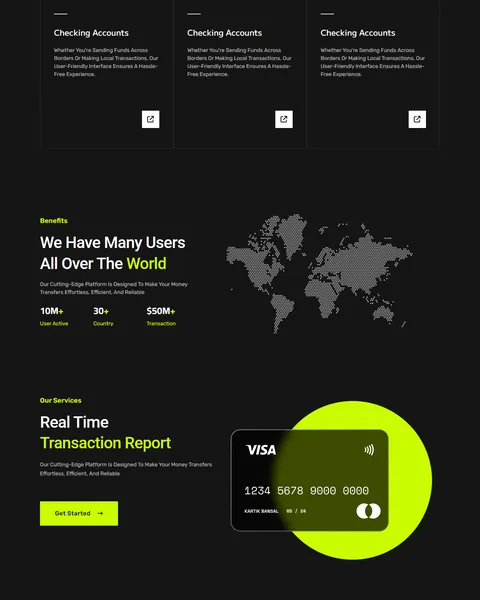
“Browse Our Services & Offerings” shows outlined service cards in a slider, each with a title, short description and arrow icon. Checking accounts, transfers and cards can each get their own card.
“We Have Many Users All Over The World” pairs counters for active users, countries and transaction volume with a dotted world map. “Real Time Transaction Report” then shows a card on a lime circle with a Get Started button, ideal for explaining live tracking.
Solutions, Testimonials and Call to Action
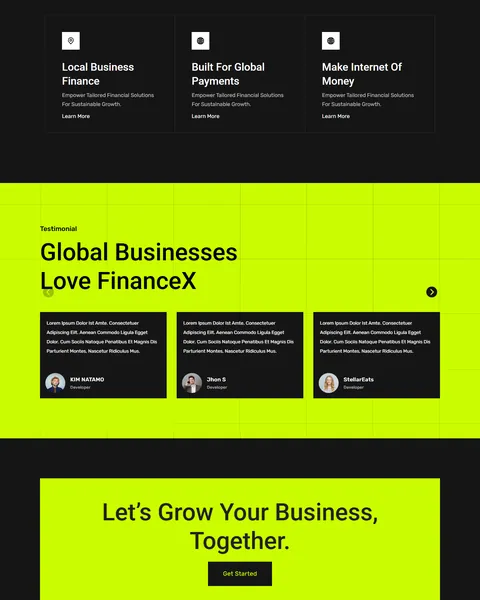
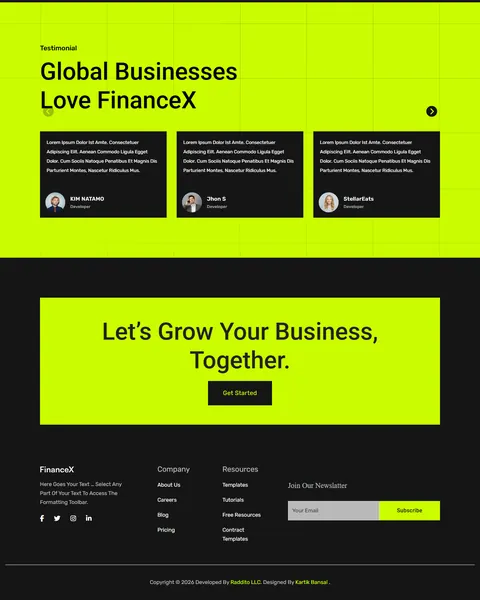
Three dark solution cards cover local business finance, global payments and the internet of money. Each has an icon and a Learn More link. A full lime “Global Businesses Love FinanceX” section shows customer quotes on black cards in a slider.
A lime “Let’s Grow Your Business, Together” box with a Get Started button closes the page. The footer adds company and resource links, social icons and a newsletter field.
Research-Driven Design for Fintech Brands
We looked at how people and businesses judge a new payment or banking product online. They want a modern, trustworthy look, clear benefits, proof of scale and an easy way to sign up. Dark, high-contrast designs are common in fintech because they feel secure and premium. This fintech Bricks Builder landing page is designed to look advanced and premium while keeping each message short and clear.
Deep black and electric lime. Deep black, #151515, fills most sections and feels secure and premium. Electric lime, #CBFC01, lights up buttons, highlights, circles and full sections, giving the page bold energy. Soft gray text keeps long lines readable on dark backgrounds.
Roboto and Rubik. Roboto headlines are clean and confident, while Rubik’s rounded shapes keep descriptions and buttons friendly.
Card mockups as heroes. Glossy card images make your product tangible, even for a digital service. Swap in renders of your own card design to build recognition from the first visit.
Scale in numbers. User, country and transaction counters next to a world map show that people already trust the platform. Newcomers feel safer joining a service others already use.
Big color blocks. Full lime sections break up the dark page and draw attention to logos, reviews and the final call to action. The contrast also keeps long scrolls from feeling heavy.
Mobile friendly. On phones, the card mockups, counters and service cards stack neatly and buttons stay easy to tap. Most fintech users will sign up on the same phone they use to pay.
What’s Included With the FinanceX Bricks Builder Landing Page
- FinanceX Bricks template. The full landing page as one JSON file.
- Theme Style file. Global colors, typography and buttons in one JSON file.
- Assets folder. The images and icons the page references.
- READ_ME guide and changelog. Setup steps and the version history, with the latest update on July 29, 2025.
Need help with the template file? Our product support team can help. If you would rather have the whole page built with your own product and branding, see our done-for-you website service.
How to Import the FinanceX Fintech Bricks Builder Landing Page
FinanceX only needs Bricks. Follow these steps:
- In Bricks > Settings > General, enable custom breakpoints, SVG uploads and smooth scroll (CSS), then save.
- In the builder’s breakpoint settings, set Tablet Portrait to 1025px and Mobile Landscape to 768px.
- Go to Bricks > Templates and import the FinanceX template file.
- Import the Theme Style and set its condition to the entire website or individual pages.
- Insert the template into a page, add your email to the newsletter form, then save and refresh.
The video below walks through a full Bricks import. It also shows WooCommerce steps, which you can skip because FinanceX does not use WooCommerce.
FinanceX vs Other Bricks Options for Fintech Websites
Comparing ways to build a fintech page in Bricks? Here is how FinanceX compares with other popular options online.
| FinanceX | Other popular Bricks template libraries online* | |
|---|---|---|
| Complete fintech landing page | Yes, ready to import | No, all three are libraries of sections |
| Payment card mockups and transaction section | Yes | Not mentioned on any of them |
| Global reach counters with world map | Yes | Not as a ready section on any of them |
| Same design also sold for Elementor | Yes | No, not on any of them |
Why fintech teams choose FinanceX:
- Made for payments. Cards, services, reach and reviews are ready.
- Pure Bricks. No add-ons, so your page stays fast.
- One payment. $8.97 once, with no yearly plan.
*We compared FinanceX with two paid Bricks layout libraries and a free community Bricks template library, each listed on its own website. Details come from each product page on October 26, 2026. Prices and features may change.
More Finance Templates by Raddito
Prefer Elementor? FinanceX is also available as a fintech Elementor landing page with the same look. For other finance products, compare these Bricks options.
Finaura – digital banking Bricks Builder landing page
Best for credit card brands and neobanks.
Single landing page · No extra plugins · Live Preview
Upgrade – finance app Bricks Builder landing page
Best for money management and budgeting apps.
Single landing page · No extra plugins · Live Preview
Relvise – financial consulting Bricks Builder landing page
Best for financial advisors and business consultants.
Single landing page · No extra plugins · Live Preview
Want more choices? Browse our finance and law website templates or every WordPress Bricks Builder template we sell.
Frequently Asked Questions
Is FinanceX a WordPress theme?
No. FinanceX is a fintech Bricks Builder landing page, a ready one-page design you import into Bricks. Bricks is the theme, and you need your own Bricks license.
Do I need any plugins besides Bricks?
No. The slider, counters and newsletter form all use built-in Bricks elements, so there is nothing else to install.
Can users sign up from this page?
Link the Sign Up and Get Started buttons to your app store pages or your secure sign-up flow.
Can I change the lime color?
Yes. Update the accent color in the Theme Style and section backgrounds to match your brand.
Does it include a mobile menu popup?
The zip has no separate menu popup, so set up the header’s mobile menu with the Bricks nav menu element.
Is it suitable for a crypto exchange?
Yes. Replace the card mockups with app screens and rename the services to trading, wallets and staking.
Should I replace the sample logos and reviews?
Yes, please. The partner logos, card designs, counters and testimonials are placeholders, so use only your own brand, real partners and real customers.