


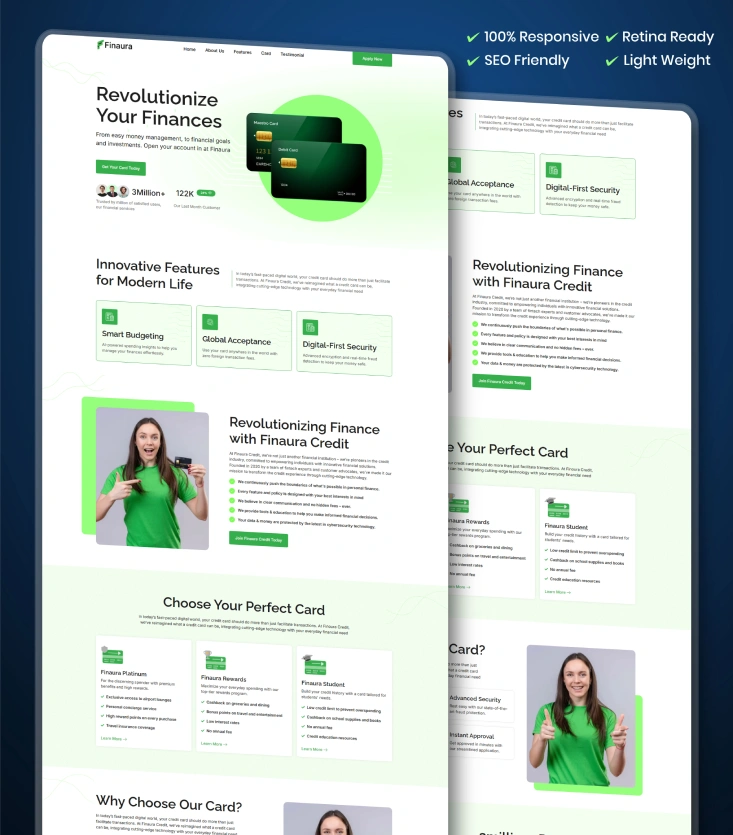
Finaura is a free digital banking HTML template built with Tailwind CSS and Vite. It suits credit card brands, online banks, banking apps and lending startups that want a fresh, trustworthy site without WordPress. It is a single scrolling page with 9 sections, from a card hero and features to card plans, reviews and an apply now call to action.
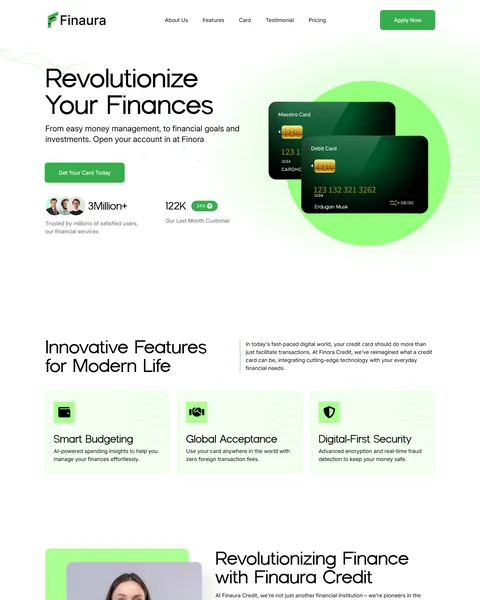
The live demo opens with “Revolutionize Your Finances” in large black type on a white background with soft green waves. Two dark green debit cards float on a bright green circle beside it. Fresh green, white and near-black give your bank a clean, friendly and secure look.
Finaura is static HTML with Tailwind CSS. There is nothing to install on a server: edit index.html, build with Vite and upload the result.
Quick Template Details
- Template Name: Finaura
- Template Type: Single landing page
- Built With: HTML, Tailwind CSS 3 and Vite 5
- Extra Libraries: Swiper, Lenis, AOS and Font Awesome from public CDNs
- Landing Page Sections: 9
- WordPress Required: No
- Price: Free
- Responsive: Desktop, Tablet, Mobile
Who Is This Digital Banking HTML Template For?
- Credit card brands. Three card plans with benefit lists make it easy to compare premium, rewards and student cards.
- Online banks. Feature cards for budgeting, global use and security cover what people expect from a digital bank.
- Banking apps. A bright, simple layout suits a mobile-first money app.
- Lending and credit startups. Apply Now buttons and an instant approval message fit a fast application flow.
- Developers building finance sites. A compact Tailwind and Vite project is easy to rebrand for a client.
Prefer to run your banking site on WordPress? The same Finaura design is sold as a digital banking Elementor landing page.
See Every Section of the Finaura Digital Banking HTML Template
Click any section below to open it in the live demo.
A Card Hero, Three Features and Your Story
People want a bank that feels modern and safe. Finaura opens with a short promise about money management and goals, a green Get Your Card Today button and two trust numbers with customer avatars. The menu links to about, features, cards, testimonials and pricing, with a green Apply Now button.
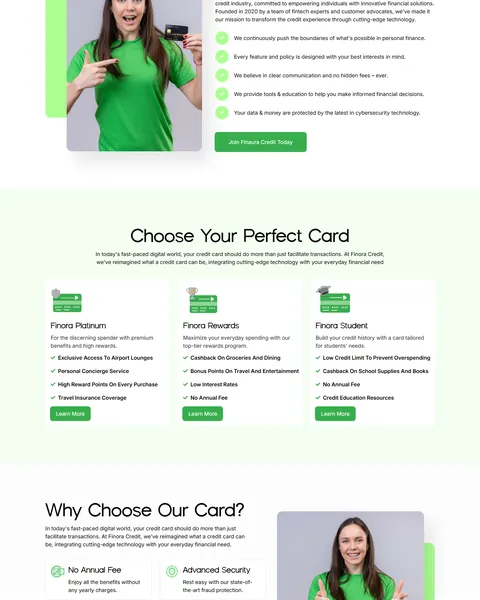
“Innovative Features for Modern Life” follows with three cards: smart budgeting, global acceptance and digital-first security. “Revolutionizing Finance with Finaura Credit” then shares your story beside a smiling customer photo, with five green-check values and a Join Finaura Credit Today button.
Card Plans and Reasons to Choose You
“Choose Your Perfect Card” sits on a pale green band with three white plan cards: Platinum, Rewards and Student. Each card has an icon, a short description, four green-check benefits and a Learn More button.
“Why Choose Our Card?” pairs four small benefit cards, no annual fee, advanced security, rewards program and instant approval, with a customer photo on a green backdrop. A Join button sits below the cards.
Reviews, Apply Now and Footer
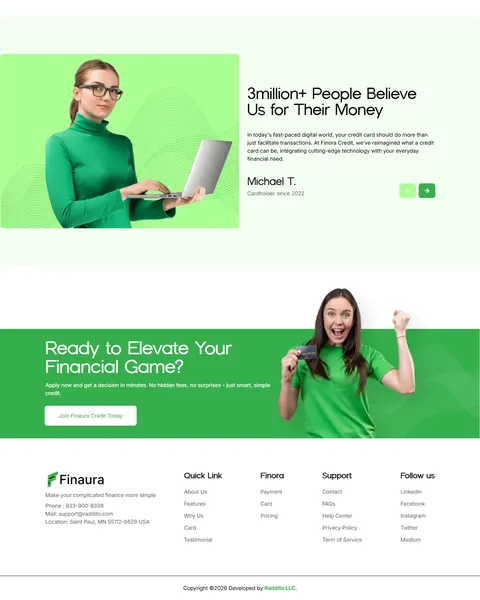
“3million+ People Believe Us for Their Money” shows a customer review beside a photo of a happy cardholder. Arrows move between quotes. A bold green band then invites visitors to apply, with a promise of a quick decision, a white button and a photo of a customer holding a card.
The footer lists your phone, email and address, plus quick links, company pages, support links and social links.
Research-Driven Design for Digital Banks
We looked at how people choose a new bank account or credit card online. They compare benefits and fees, look for signs of security and want to know how quickly they can apply and get a decision. Trust is everything, because people are handing over their money and personal details. This digital banking HTML template is designed to feel calm and honest, compare cards clearly and keep the apply button close at every step.
Fresh green. The Tailwind config sets a clean green, #37AE4C, as the primary color, with a light lime, #ACFF93, and a pale mint background, #F5FFF2. Green is linked with money, growth and approval, and the soft tints keep the page light.
A geometric heading font and Inter. Headings use a wide geometric display font from the fonts folder, and Inter keeps descriptions, benefits and buttons easy to read.
People, not just cards. Photos of smiling customers make a bank feel human. Use real photos of your team or customers where you can, since stock faces are easy to spot and weaken trust.
Plans side by side. Three cards with matching benefit lists let visitors compare at a glance and pick the plan that fits their spending.
Repeated calls to apply. Apply and Join buttons appear after the story, the reasons and the reviews, so visitors can act as soon as they feel ready.
Mobile friendly. The hero, plan cards and benefit cards stack on phones. Most people manage their money on a phone, so many will find your bank there first.
What’s Included With the Finaura HTML Template
- index.html. The full landing page, written with Tailwind utility classes.
- Tailwind and Vite config. tailwind.config.js with the Finaura colors and fonts, plus package.json with the build scripts.
- main.js, style.css and font.css. The review slider, smooth scrolling, scroll animations, the heading font setup and custom styles.
- Assets folder. Card images, customer photos, plan icons, background images and the heading font files.
- README. Setup, development and build steps.
Need help with the files? Our product support team can help. If you would rather have the site built for you with your own plans and copy, see our done-for-you website service.
How to Set Up the Finaura Digital Banking HTML Template
Make sure Node.js is installed. Then:
- Unzip Finaura and open its folder in a terminal.
- Run npm install to download Tailwind CSS and Vite.
- Run npm run dev to preview the site locally while you edit.
- Replace the headline, features, card plans, reviews, photos and contact details in index.html and the assets folder.
- Run npm run build, then upload the dist folder to your host.
Finaura vs Other Tailwind Options for Banking Websites
Comparing ways to build a digital banking page with Tailwind CSS? Here is how Finaura compares with other popular options online.
| Finaura | Other popular Tailwind CSS libraries online* | |
|---|---|---|
| Complete digital banking landing page | Yes, ready to use | No, none of the three offers one |
| Credit card plan comparison with benefit lists | Yes | Not as a ready section on any of them |
| Plain HTML project with a Vite build setup | Yes | No, they offer copy-paste blocks or React templates |
| Same design also sold for Elementor and Bricks | Yes | No, not on any of them |
Why banks choose Finaura:
- Made for banking. Hero, features, story, card plans and reviews are ready.
- No WordPress needed. A fast static site with nothing to update.
- Free download. No license fee and no yearly plan.
*We compared Finaura with two paid Tailwind CSS libraries, Tailwind Plus and Flowbite Pro, and the free HyperUI collection, using each product’s own website. Details were checked on November 1, 2026. Prices and features may change.
More Finance and Law Templates by Raddito
Prefer WordPress? Finaura is also available as a digital banking Bricks Builder landing page with the same look. For related businesses, compare these HTML templates.
FinanceX – fintech HTML template
Best for card platforms and payment apps.
Single landing page · Free · Tailwind CSS · Live Preview
SaaSify – SaaS HTML template
Best for software products and web apps.
Single landing page · Free · Tailwind CSS · Live Preview
Veritas – law firm HTML template
Best for law firms and legal consultancies.
Single landing page · Free · Tailwind CSS · Live Preview
Want more choices? Browse our finance and law website templates or every HTML website template we offer.
Frequently Asked Questions
Do I need WordPress for Finaura?
No. Finaura is a static digital banking HTML template, so it runs on any web host without WordPress, plugins or a database.
Is Finaura free?
Yes. It is a free download that you can use for your own bank, app or a client project.
Do the Apply Now buttons take applications?
No. Link the Apply Now, Join and Get Your Card buttons to your real application form or app sign-up page.
Can I add or remove card plans?
Yes. Copy or delete a plan card in index.html and change its name, description and benefit list.
Can I use the heading font commercially?
Check its license first. The heading font files in the assets folder may need a paid license for commercial use. Buy one or switch to a free Google font before launch.
Can I change the green color?
Yes. Change the primary color in tailwind.config.js and rebuild, and the buttons, checks and bands update.
Should I replace the sample text and reviews?
Yes, please. Some text says Finora instead of Finaura, the three reviews repeat one sample quote, and the numbers, address and card names are samples, so use your own brand, figures and customer feedback.