


LegalMark is a free notary HTML template built with Tailwind CSS and Vite. It suits notary publics, mobile notaries, document signing services and small legal offices that want a trustworthy site without WordPress. It is a single scrolling page with 11 sections, from a video hero and services to a six-step process, FAQs, a contact form and blog posts.
The live demo opens with “Secure Your Legacy with Expert Notary Services” in white on deep navy, beside a portrait of a smiling notary with a play button. A gold frame and a red Get Consultations button complete the hero. Navy, antique gold and deep red give your office a formal, established and trustworthy look.
LegalMark is plain HTML with Tailwind CSS, so there is nothing to install on a server. Edit index.html, run the Vite build and upload the result.

Quick Template Details
- Template Name: LegalMark
- Template Type: Single landing page
- Built With: HTML, Tailwind CSS 3 and Vite 5
- Extra Libraries: Swiper and Lenis from npm, plus AOS and Font Awesome from public CDNs
- Landing Page Sections: 11
- WordPress Required: No
- Price: Free
- Responsive: Desktop, Tablet, Mobile
Who Is This Notary HTML Template For?
- Notary publics. Services for authentication, witnessing, certified copies and oaths are ready to edit.
- Mobile notaries. The step-by-step process and FAQs explain visits to the client’s location.
- Document signing services. A real estate closings card and a contact form suit signing agents.
- Small legal offices. Eight practice area cards cover family, business, estate and immigration law.
- Developers building legal sites. A tidy Tailwind and Vite project is easy to rebrand for a client.
Prefer to run your notary site on WordPress? The same LegalMark design is sold as a notary Elementor template kit.
See Every Section of the LegalMark Notary HTML Template
Click any section below to open it in the live demo.

A Video Hero, Your Story and Five Services
People need to trust a notary with important papers. LegalMark opens with a top bar for phone, email and social links, then a white menu with a red Register Now button. The hero photo has a play button that opens a video in a popup, ideal for a short welcome from your notary.
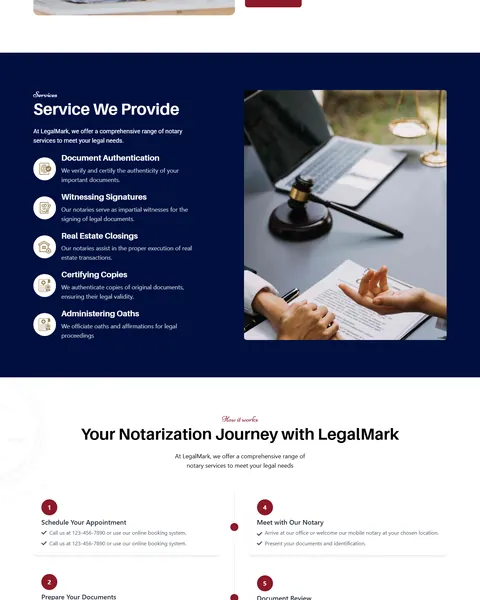
“Notarization with a Personal Touch” shares your history beside a team photo, with boxes for your team and your commitment. “Service We Provide” then lists five services with gold icons on navy, next to a photo of a signing with a gavel.
A Six-Step Process, FAQs and Practice Areas
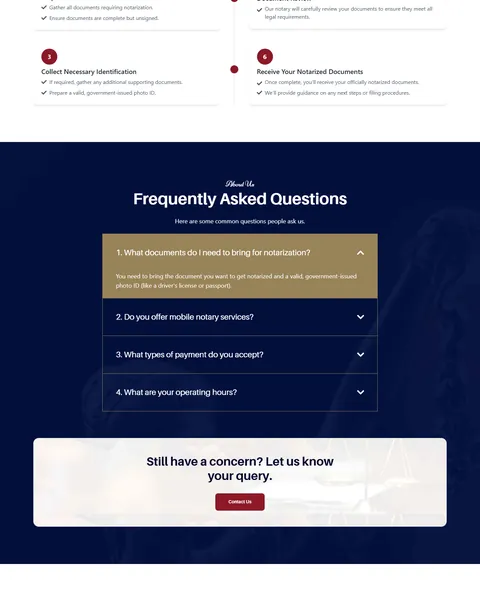
“Your Notarization Journey with LegalMark” explains six numbered steps on a timeline. They run from booking an appointment and preparing documents to receiving notarized papers. Clear steps help nervous first-time clients know exactly what to bring.
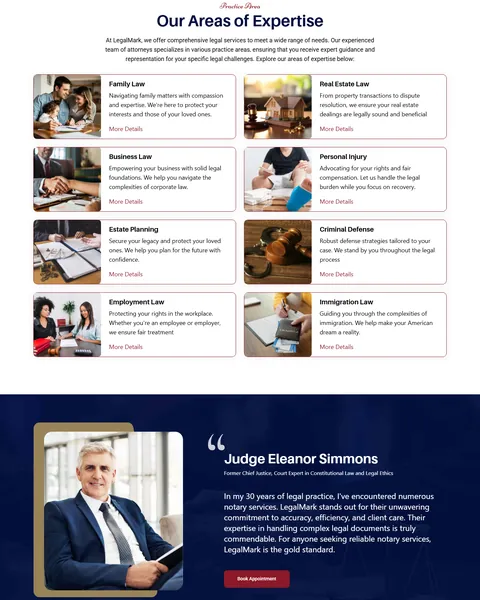
A navy FAQ block answers common questions in an accordion, with the open answer on a gold bar. A “Still have a concern?” box with a Contact Us button follows. “Our Areas of Expertise” then shows eight practice area cards with photos and More Details links.
Endorsements, Contact Form and Blog
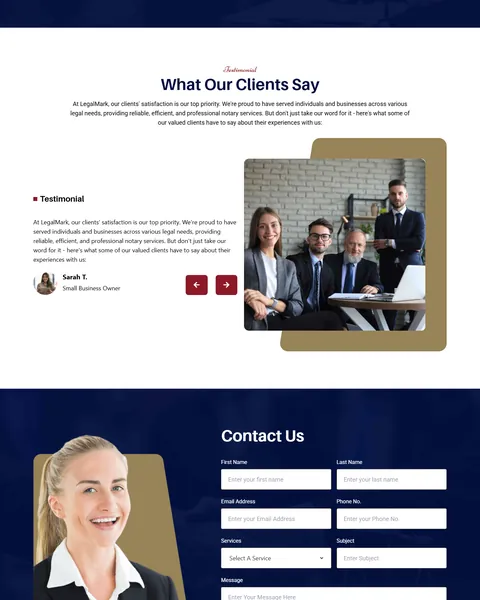
A large quote from a senior legal figure sits on navy with a Book Appointment button. “What Our Clients Say” adds a client review slider beside a team photo on a gold frame.
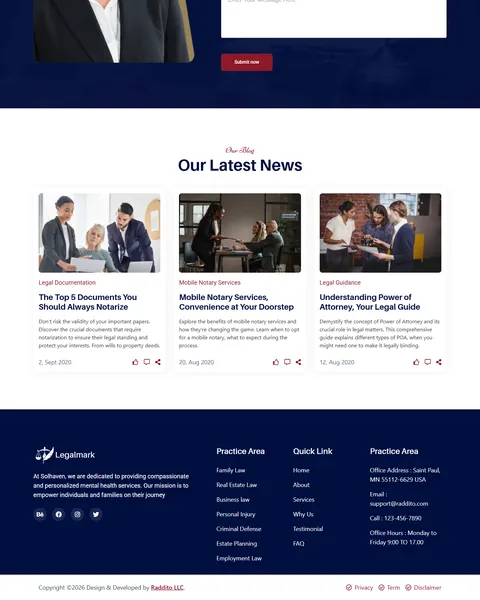
“Contact Us” pairs a portrait with fields for name, email, phone, service, subject and message. “Our Latest News” shows three article cards, and a navy footer lists practice areas, quick links, office details and hours.
Research-Driven Design for Notary Services
We looked at how people find a notary online. Most need one quickly for a specific document. They check which services are offered, what to bring, whether the notary can come to them and how to book. Because legal papers carry real weight, they also look for signs of experience and professionalism. This notary HTML template is designed to answer those questions in order and make contact easy at every step.
Navy, gold and deep red. The Tailwind config sets a deep navy, #000F3F, as the primary color, with antique gold, #988358, as the secondary color and a deep red, #8C1928, for buttons. Navy and gold feel formal and established, like a legal seal.
Quagera, Raleway, Roboto and Niconne. Bold headings use Quagera, body text uses Raleway and Roboto, and Niconne adds a handwritten touch to the small labels above each heading.
Process over jargon. A numbered six-step timeline turns a legal task into a simple checklist, which reduces calls asking what to bring and cuts down on wasted visits.
Answers before contact. The FAQ covers documents, mobile visits, payment and hours, the four questions people ask most before booking.
Proof of experience. Your history, a featured endorsement and client reviews show that clients and peers trust your work. Use only real, approved quotes, since legal clients notice when praise feels invented.
Mobile friendly. The timeline, practice cards and contact form stack on phones, where many people search for a notary near them, often on the same day they need a signature.
What’s Included With the LegalMark HTML Template
- index.html. The full landing page, written with Tailwind utility classes.
- Tailwind and Vite config. tailwind.config.js with the LegalMark colors and fonts, plus package.json with the build scripts.
- main.js and style.css. The review slider, FAQ accordion, video popup, smooth scrolling and custom styles.
- Assets folder. Hero, team, service, practice area, contact and blog images, plus icons and logos.
- README. Setup, development and build steps.
Need help with the files? Our product support team can help. If you would rather have the site built for you with your own services and photos, see our done-for-you website service.
How to Set Up the LegalMark Notary HTML Template
You need Node.js installed first. Then:
- Unzip LegalMark and open its folder in a terminal.
- Run npm install to download Tailwind CSS, Vite, Swiper and Lenis.
- Run npm run dev to preview the site locally while you edit.
- Replace the services, steps, FAQs, practice areas, reviews, photos and contact details in index.html and the assets folder.
- Run npm run build, then upload the dist folder to your host.
LegalMark vs Other Tailwind Options for Notary Websites
Comparing ways to build a notary page with Tailwind CSS? Here is how LegalMark compares with other popular options online.
| LegalMark | Other popular Tailwind CSS libraries online* | |
|---|---|---|
| Complete notary landing page | Yes, ready to use | No, none of the three offers one |
| Notarization steps, FAQs and practice areas | Yes | Not as ready sections on any of them |
| Plain HTML project with a Vite build setup | Yes | No, they offer copy-paste blocks or React templates |
| Same design also sold for Elementor and Bricks | Yes | No, not on any of them |
Why notaries choose LegalMark:
- Made for notaries. Services, process, FAQs, contact and blog are ready.
- No WordPress needed. A fast static site with nothing to update.
- Free download. No license fee and no yearly plan.
*We compared LegalMark with two paid Tailwind CSS libraries, Tailwind Plus and Flowbite Pro, and the free HyperUI collection, using each product’s own website. Details were checked on November 1, 2026. Prices and features may change.
More Finance and Law Templates by Raddito
Prefer WordPress? LegalMark is also available as a notary Bricks Builder template with the same look. For related businesses, compare these HTML templates.
Veritas – law firm HTML template
Best for law firms and legal consultancies.
Single landing page · Free · Tailwind CSS · Live Preview
Finaura – digital banking HTML template
Best for online banks and credit card brands.
Single landing page · Free · Tailwind CSS · Live Preview
FinanceX – fintech HTML template
Best for card platforms and payment apps.
Single landing page · Free · Tailwind CSS · Live Preview
Want more choices? Browse our finance and law website templates or every HTML website template we offer.
Frequently Asked Questions
Do I need WordPress for LegalMark?
No. LegalMark is a static notary HTML template, so it runs on any web host without WordPress, plugins or a database.
Is LegalMark free?
Yes. It is a free download that you can use for your own office or a client project.
Does the contact form send messages?
Not yet. The fields are not wrapped in a working form, so connect them to a form service or your own email handler.
How do I change the hero video?
Replace the video link in the iframe near the top of index.html with your own YouTube or Vimeo embed link.
Can I remove the practice areas?
Yes. If you only offer notary services, delete that section in index.html or turn the cards into more notary services.
Are the heading fonts free to use?
Quagera and Aileron load from a third-party font site. Check each font’s license before launch, or switch to Raleway or another free Google font.
Should I replace the sample text and quotes?
Yes, please. The featured judge quote, reviews, history, contact details and blog posts are samples, and the footer text mentions another brand, so use your own real details.