


Yogajoy is a yoga studio Bricks Builder landing page for WordPress, made for yoga studios, independent yoga teachers, meditation centers and prenatal yoga programs. It is a single scrolling page with six classes, a weekly schedule, instructor profiles, membership plans, a photo gallery, client reviews and a contact form.
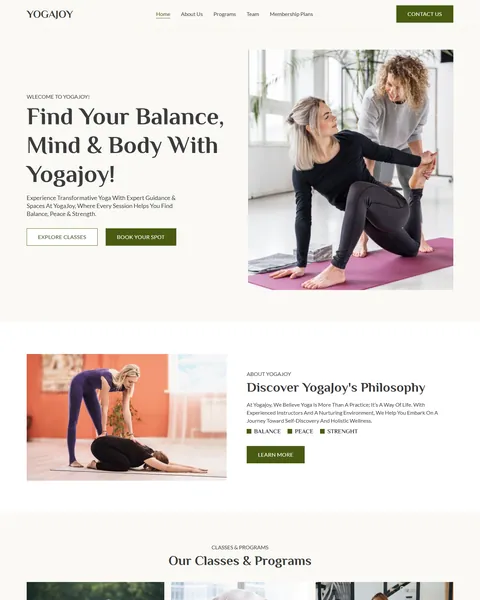
The demo opens with “Find Your Balance, Mind & Body With Yogajoy!” beside a teacher gently adjusting a student’s pose. Explore Classes and Book Your Spot buttons sit below. Earthy olive green, soft ivory and warm charcoal give your studio a calm, natural and grounded look.
Yogajoy is built only with native Bricks elements, including its contact and newsletter forms, so no extra plugins are required. Bricks itself is a premium theme and is not included.

Quick Template Details
- Template Name: Yogajoy
- Template Type: Single landing page
- Required Theme: Bricks (Premium, not included)
- Required Plugins: None
- Landing Page Sections: 12
- Forms: Built-in Bricks contact and newsletter forms
- Responsive: Desktop, Tablet, Mobile
- Coding Required: No
Who Is This Yoga Studio Bricks Builder Landing Page For?
- Yoga studios. Six classes, a weekly timetable and membership plans cover the full studio offer.
- Independent yoga teachers. Remove a few instructor cards and the page works well for a solo teacher with their own classes.
- Meditation and mindfulness centers. Meditation sessions and relaxation yoga are ready as classes.
- Prenatal yoga programs. A prenatal class and a dedicated instructor suit pregnancy wellness.
- Studios running intro offers. A newsletter banner promotes a discount on the first membership to win new students.
Teaching yoga mostly online? Our Namaste online yoga classes Bricks Builder landing page may suit you better.
See Every Section of the Yogajoy Yoga Studio Bricks Builder Landing Page
Click any section below to open it in the live demo.
A Calm Hero and Studio Philosophy
People choose a yoga studio by feel. Yogajoy opens with a gentle, warm photo of a teacher helping a student, an elegant headline and two clear buttons to explore classes or book a spot.
“Discover YogaJoy’s Philosophy” pairs a photo of two students in a pose with a short belief statement. Three small tags for balance, peace and strength sum up what your classes offer.
Six Classes and a Weekly Schedule
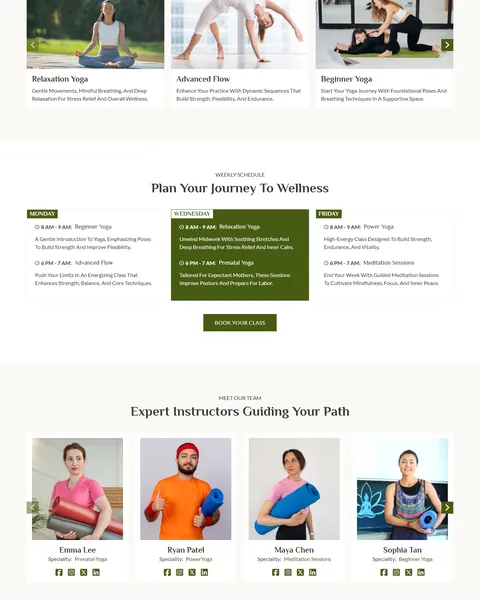
“Our Classes & Programs” shows six photo cards: relaxation yoga, advanced flow, beginner yoga, meditation sessions, prenatal yoga and power yoga. Each has a short description so newcomers can find the right level.
“Plan Your Journey To Wellness” lays out a weekly timetable in three columns for Monday, Wednesday and Friday, with morning and evening classes. The middle day is highlighted in green, and a Book Your Class button sits below.
Instructors and Membership Plans
“Expert Instructors Guiding Your Path” shows six teachers in a slider with photos, names, specialties and social links. Students like knowing who will guide them before their first class.
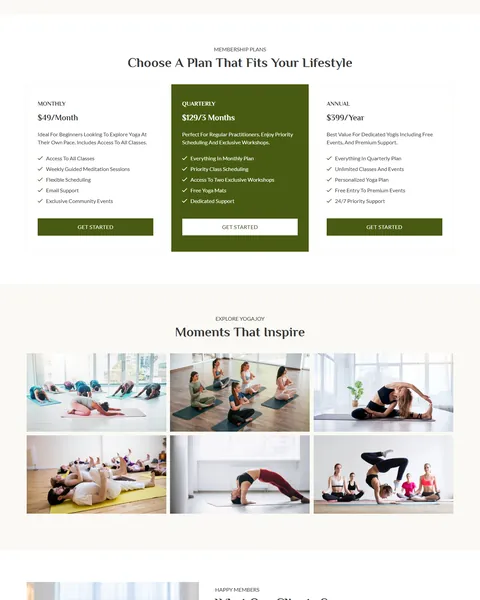
“Choose A Plan That Fits Your Lifestyle” offers monthly, quarterly and annual memberships with clear prices and benefits. The quarterly plan is highlighted, and perks range from guided meditation to free yoga mats and priority booking.
Gallery, Reviews and Contact
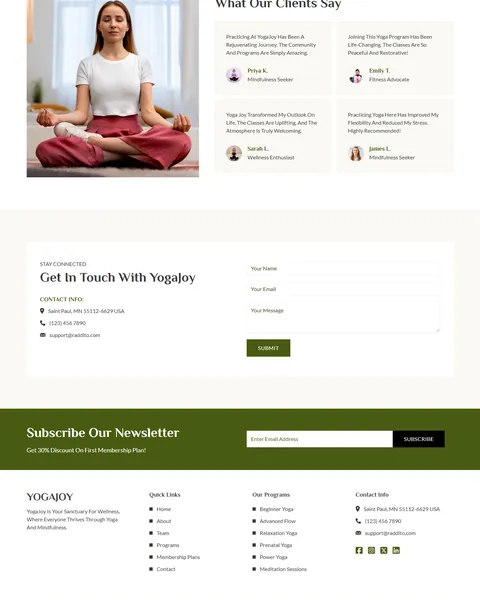
“Moments That Inspire” fills a photo grid with group classes and poses. “What Our Clients Say” shows four short reviews beside a photo of a student meditating.
“Get In Touch With YogaJoy” pairs contact details with a form. A green newsletter bar offers a discount on the first membership, and the footer lists links, programs and contact details. A welcome offer like this turns curious visitors into first-time students.
Research-Driven Design for Yoga Studios
We looked at how people choose a yoga studio online. They want a calm, welcoming feeling first, then they check class types, the schedule, the teachers and the price. Beginners in particular want to know they will feel comfortable. Many also look for a teacher whose style suits them. This yoga studio Bricks Builder landing page is designed to feel peaceful and natural while answering every practical question in a clear order.
Earthy olive and soft ivory. Earthy olive green, #485B12, marks buttons, the highlighted plan and the newsletter bar and connects to nature and growth. Soft ivory and beige backgrounds feel warm and quiet, like a sunlit studio.
Philosopher and Lato. Philosopher headlines have a graceful, slightly spiritual character. Lato keeps class descriptions, times and prices simple to read.
Gentle, real photography. Teachers adjusting poses, group classes and quiet meditation show the experience, not just flexibility. Use photos of your own studio and community, including students of different ages and body types.
Schedule and prices in plain view. A visible timetable and clear membership prices remove the two biggest reasons people delay booking. Students can plan their week right on the page.
Plenty of breathing room. Generous spacing and soft tones keep the page calm, which matches the feeling people seek from yoga. A busy, crowded layout would send the opposite message.
Mobile friendly. On phones, the menu folds into a toggle, class cards stack and the schedule stays readable. Many students check class times on their phone before leaving home.
What’s Included With the Yogajoy Bricks Builder Landing Page
- Yogajoy Bricks template. The full landing page as one JSON file.
- Theme Style file. Global colors, typography and buttons in one JSON file.
- Assets folder. The images and icons the page references.
- READ_ME guide and changelog. Setup steps and the version history.
Need help with the template file? Our product support team can help. If you would rather have the whole page built with your own classes and branding, see our done-for-you website service.
How to Import the Yogajoy Yoga Studio Bricks Builder Landing Page
Yogajoy only needs Bricks. Follow these steps:
- In Bricks > Settings > General, enable custom breakpoints, SVG uploads and smooth scroll (CSS), then save.
- In the builder’s breakpoint settings, set Tablet Portrait to 1025px and Mobile Landscape to 768px.
- Go to Bricks > Templates and import the Yogajoy template file.
- Import the Theme Style and set its condition to the entire website or individual pages.
- Insert the template into a page, add your email to the form actions, then save and refresh.
The video below walks through a full Bricks import. It also shows WooCommerce steps, which you can skip because Yogajoy does not use WooCommerce.
Yogajoy vs Other Bricks Options for Yoga Websites
Comparing ways to build a yoga studio landing page in Bricks? Here is how Yogajoy compares with other popular options online.
| Yogajoy | Other popular Bricks template libraries online* | |
|---|---|---|
| Complete yoga studio landing page | Yes, ready to import | No, all three are libraries of sections |
| Weekly class schedule | Yes | Not mentioned on any of them |
| Membership plans and instructor profiles | Yes | Not as a ready section on any of them |
| Same design also sold for Elementor | Yes | No, not on any of them |
Why yoga studios choose Yogajoy:
- Made for yoga. Classes, schedule, teachers and plans are ready.
- Pure Bricks. No add-ons, so your page stays fast.
- One payment. $9.90 once, with no yearly plan.
*We compared Yogajoy with two paid Bricks layout libraries and a free community Bricks template library, each listed on its own website. Details come from each product page on October 26, 2026. Prices and features may change.
More Yoga and Fitness Templates by Raddito
Prefer Elementor? Yogajoy is also available as a yoga studio Elementor landing page with the same look. For other fitness businesses, compare these Bricks options.
Namaste – online yoga classes Bricks Builder landing page
Best for teachers who run online yoga and fitness classes.
Single landing page · No extra plugins · Live Preview
Fithub Pro – gym Bricks Builder landing page
Best for gyms and fitness centers.
Single landing page · No extra plugins · Live Preview
Fitnova – fitness Bricks Builder template kit
Best for fitness brands that need a full website and shop.
17 pages · Bricks with WooCommerce · Live Preview
Want more choices? Browse our sport and fitness website templates or every WordPress Bricks Builder template we sell.
Frequently Asked Questions
Is Yogajoy a WordPress theme?
No. Yogajoy is a yoga studio Bricks Builder landing page, a ready one-page design you import into Bricks. Bricks is the theme, and you need your own Bricks license.
Do I need any plugins besides Bricks?
No. The slider, schedule, plans and forms all use built-in Bricks elements, so there is nothing else to install.
Can students book classes online?
Link the Book Your Spot and Book Your Class buttons to your booking app, or use the contact form for class requests.
Can I add more days to the schedule?
Yes. Duplicate a day column in Bricks and edit the times and classes for each day of your week.
Can I sell memberships online?
Link each plan’s Get Started button to your payment or membership system so students can join and pay securely.
Is it suitable for a pilates or barre studio?
Yes. Rename the classes, swap the photos and keep the schedule, instructors and plans as they are.
Should I replace the sample teachers and prices?
Yes, please. The instructor names, plan prices, discount and reviews are placeholders, so use only your own real team and pricing.