


Fithub Pro is a gym Bricks Builder landing page for WordPress, made for gyms, fitness centers, personal training studios and boutique fitness clubs that want more members. It is a single scrolling page with a bold hero, a class schedule, facilities, trainer profiles, three membership plans and a contact form.
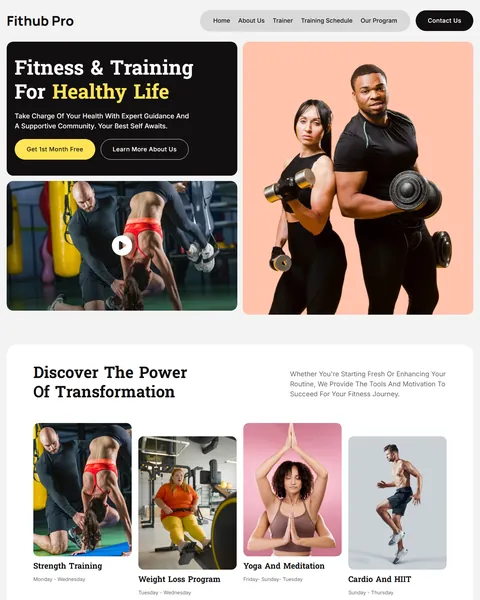
The demo opens with “Fitness & Training For Healthy Life” on a black card beside two athletes with dumbbells. A yellow Get 1st Month Free button and a workout video sit below. Bold black, bright lemon yellow and soft peach give your gym an energetic, modern and motivating look.
Fithub Pro is built only with native Bricks elements, including its contact form, so no extra plugins are required. Bricks itself is a premium theme and is not included.

Quick Template Details
- Template Name: Fithub Pro
- Template Type: Single landing page
- Required Theme: Bricks (Premium, not included)
- Required Plugins: None
- Landing Page Sections: 9
- Forms: Built-in Bricks contact form
- Responsive: Desktop, Tablet, Mobile
- Coding Required: No
Who Is This Gym Bricks Builder Landing Page For?
- Local gyms. A free first month offer and clear membership plans are built to win new sign-ups.
- Fitness centers with classes. Strength, weight loss, yoga and HIIT programs show their weekly days.
- Personal training studios. Personal training and mentor profiles put your coaches front and center.
- Boutique fitness clubs. A stylish black and yellow design feels premium and fresh.
- Gyms running membership drives. One focused page works well for social ads and January campaigns.
Need a full gym website with a shop and member pages? Our Fitnova fitness Bricks Builder template kit is a better fit.
See Every Section of the Fithub Pro Gym Bricks Builder Landing Page
Click any section below to open it in the live demo.
A Bold Hero With a Free Trial Offer
People thinking about joining a gym need a nudge. Fithub Pro’s hero combines a strong headline, a short promise of expert guidance and community, and a yellow Get 1st Month Free button. A second button invites visitors to learn more about you.
A workout photo with a play button sits under the headline, ideal for a short gym tour video. A large photo of two athletes on a peach background fills the right side and sets an energetic tone.
Programs With Weekly Days and Facilities
“Discover The Power Of Transformation” shows four programs as tall photo cards: strength training, weight loss, yoga and meditation, and cardio and HIIT. Each lists the days it runs, so visitors can check if it fits their week.
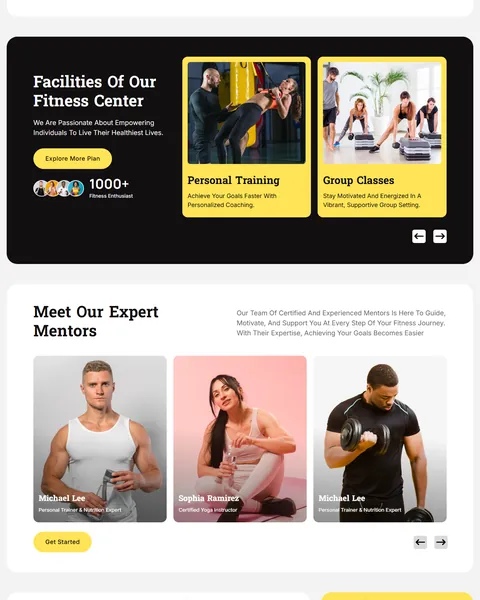
“Facilities Of Our Fitness Center” uses a black panel with a slider of facility cards, such as personal training and group classes, on yellow backgrounds. A “1000+ Fitness Enthusiasts” badge with member photos and an Explore More Plan button add social proof.
Expert Mentors and Membership Plans
“Meet Our Expert Mentors” shows trainer cards in a slider with photos, names and specialties, such as personal trainer and nutrition expert or certified yoga instructor. A “Ready To Train With The Best Mentors?” banner with a Book a Session button follows.
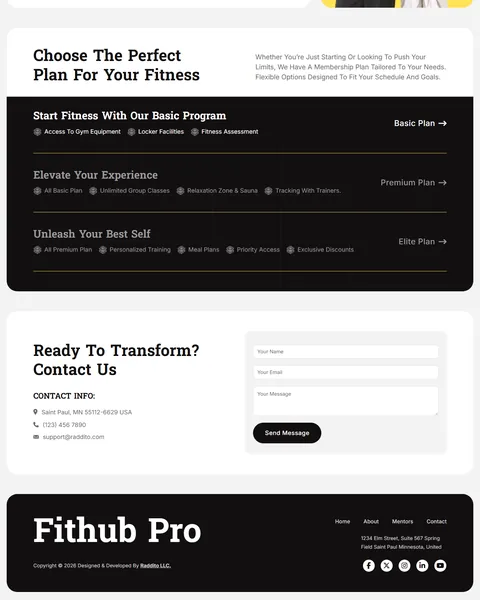
“Choose The Perfect Plan For Your Fitness” lists three plans on a black panel: Basic at $29, Premium at $49 and Elite at $69 per month. Each row shows what is included, from locker facilities to meal plans and priority access.
Contact Form and Footer
“Ready To Transform? Contact Us” pairs your address, phone and email with a short form for name, email and message. A Send Message button sends the inquiry straight to your inbox, so you can reply the same day.
A simple footer repeats your logo, main links and address. Keeping the end of the page short means visitors who are ready to join reach the form without distractions.
Research-Driven Design for Gyms
We looked at how people choose a gym online. They want to see the space, the classes, the trainers and the price, and they respond strongly to a free trial or first-month offer. Many feel nervous about starting, so a friendly, motivating tone matters. This gym Bricks Builder landing page is designed to feel energetic, answer the practical questions quickly and make the first step feel easy.
Bold black and lemon yellow. Near-black, #120F10, fills panels and buttons and feels strong and serious about training. Lemon yellow, #FFE456, marks offers and highlights and adds the energy of a busy gym floor.
Manrope, Hanuman and Inter. Heavy Manrope and Hanuman headlines feel powerful and confident. Inter keeps schedules, plan details and form labels clean and easy to read.
Athletic photography. Real people lifting, stretching and running show effort and results. Replace them with photos of your own members and trainers for the most authentic feel.
Price clarity. Three simple plans with clear inclusions remove the biggest barrier to joining: not knowing the cost. Hidden pricing often sends people to a competitor.
Rounded cards and buttons. Soft corners and pill buttons balance the bold colors, so the page feels welcoming rather than intimidating. This matters for beginners who feel unsure about walking into a gym.
Mobile friendly. On phones, the menu folds into a toggle, program and trainer cards stack and the contact form stays easy to fill in. Most people compare gyms on their phone, often right after a New Year resolution or a doctor’s advice.
What’s Included With the Fithub Pro Bricks Builder Landing Page
- Fithub Pro Bricks template. The full landing page as one JSON file.
- Theme Style file. Global colors, typography and buttons in one JSON file.
- Assets folder. The images and icons the page references.
- READ_ME guide and changelog. Setup steps and the version history.
Need help with the template file? Our product support team can help. If you would rather have the whole page built with your own classes and branding, see our done-for-you website service.
How to Import the Fithub Pro Gym Bricks Builder Landing Page
Fithub Pro only needs Bricks. Follow these steps:
- In Bricks > Settings > General, enable custom breakpoints, SVG uploads and smooth scroll (CSS), then save.
- In the builder’s breakpoint settings, set Tablet Portrait to 1025px and Mobile Landscape to 768px.
- Go to Bricks > Templates and import the Fithub Pro template file.
- Import the Theme Style and set its condition to the entire website or individual pages.
- Insert the template into a page, add your email to the contact form, then save and refresh.
The video below walks through a full Bricks import. It also shows WooCommerce steps, which you can skip because Fithub Pro does not use WooCommerce.
Fithub Pro vs Other Bricks Options for Gym Websites
Comparing ways to build a gym landing page in Bricks? Here is how Fithub Pro compares with other popular options online.
| Fithub Pro | Other popular Bricks template libraries online* | |
|---|---|---|
| Complete gym landing page | Yes, ready to import | No, all three are libraries of sections |
| Programs with weekly schedule days | Yes | Not mentioned on any of them |
| Membership plan section | Yes, three plans | Not as a ready section on any of them |
| Same design also sold for Elementor | Yes | No, not on any of them |
Why gyms choose Fithub Pro:
- Built to sign up members. Offer, programs, trainers and plans are ready.
- Pure Bricks. No add-ons, so your page stays fast.
- One payment. $9.90 once, with no yearly plan.
*We compared Fithub Pro with two paid Bricks layout libraries and a free community Bricks template library, each listed on its own website. Details come from each product page on October 26, 2026. Prices and features may change.
More Fitness Templates by Raddito
Prefer Elementor? Fithub Pro is also available as a gym Elementor landing page with the same look. For a full website or a yoga studio, compare these Bricks options.
Fitnova – fitness Bricks Builder template kit
Best for gyms that sell products and memberships online.
17 pages · Bricks with WooCommerce · Live Preview
Yogajoy – yoga Bricks Builder landing page
Best for yoga studios and instructors.
Single landing page · No extra plugins · Live Preview
Namaste – fitness studio Bricks Builder landing page
Best for modern fitness and wellness studios.
Single landing page · No extra plugins · Live Preview
Want more choices? Browse our sport and fitness website templates or every WordPress Bricks Builder template we sell.
Frequently Asked Questions
Is Fithub Pro a WordPress theme?
No. Fithub Pro is a gym Bricks Builder landing page, a ready one-page design you import into Bricks. Bricks is the theme, and you need your own Bricks license.
Do I need any plugins besides Bricks?
No. The sliders, plans and contact form all use built-in Bricks elements, so there is nothing else to install.
Can members sign up and pay online?
Link the plan buttons to your gym management software or a payment page so members can join and pay securely.
Can I add a full class timetable?
Yes. Edit the program cards with your days and times, or add a schedule table in Bricks below them.
Can I change the free month offer?
Yes. Edit the button text to any offer you run, such as a free week, a free class or a joining fee waiver.
Is it suitable for a CrossFit box or martial arts gym?
Yes. Rename the programs, swap the photos and adjust the plans, and the layout works for any training facility.
Should I replace the sample trainers and prices?
Yes, please. The trainer names, member count and plan prices are placeholders, so use only your own real team and pricing.