


Yogajoy is a yoga studio Elementor landing page for WordPress, designed for yoga studios, wellness centers, prenatal yoga teachers and meditation studios with in-person classes. It is a single scrolling page with six classes, a weekly schedule, an instructor team, three membership plans, a photo gallery, reviews and a contact form.
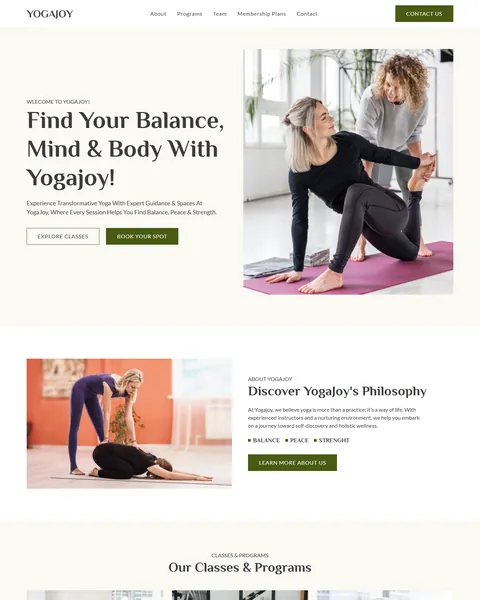
The demo opens with the headline “Find Your Balance, Mind & Body With Yogajoy!” beside a bright photo of an instructor gently adjusting a student’s pose. Explore Classes and Book Your Spot buttons sit below. Olive green, warm cream and clean white give your studio a calm, natural and welcoming look.
Yogajoy is built with Elementor. Yogajoy needs Elementor Pro, and we don’t provide paid plugins, so please have your Pro license ready before we begin. Our team installs the page for you at no cost.

Quick Template Details
- Template Name: Yogajoy
- Template Type: Single landing page, 12 sections
- Required Theme: Hello Elementor (Free)
- Elementor Pro Required: Yes
- Premium Plugins Required: Yes, Elementor Pro
- Forms: Elementor Pro Forms
- Responsive: Desktop, Tablet, Mobile
- Coding Required: No
Who Is This Yoga Studio Landing Page For?
- Yoga studios. Classes, a timetable, instructors and memberships cover everything a new student asks.
- Wellness centers. Relaxation, meditation and power classes suit centers with a broad program.
- Prenatal yoga teachers. A prenatal class and a weekly schedule slot speak directly to expectant mothers.
- Meditation studios. Guided meditation sessions and a calm, quiet design fit mindfulness-focused spaces.
- Studios running membership offers. Monthly, quarterly and annual plans plus a newsletter discount help fill classes.
Need a full multi-page website for a yoga studio instead? Our Asanra yoga studio Elementor template kit is a better fit.
See Every Section of the Yogajoy Yoga Studio Landing Page
Click any section below to open it in the live demo.
A Welcoming Hero and Your Philosophy
New students often feel nervous about their first class, so Yogajoy opens with a supportive image of an instructor helping a student. A short promise of balance, peace and strength sets the tone, and two buttons let visitors explore classes or book straight away.
A “Discover YogaJoy’s Philosophy” section follows beside a photo of a gentle stretch. It explains that yoga is a way of life, highlights balance, peace and strength, and adds a Learn More About Us button.
Six Yoga Classes and a Weekly Schedule
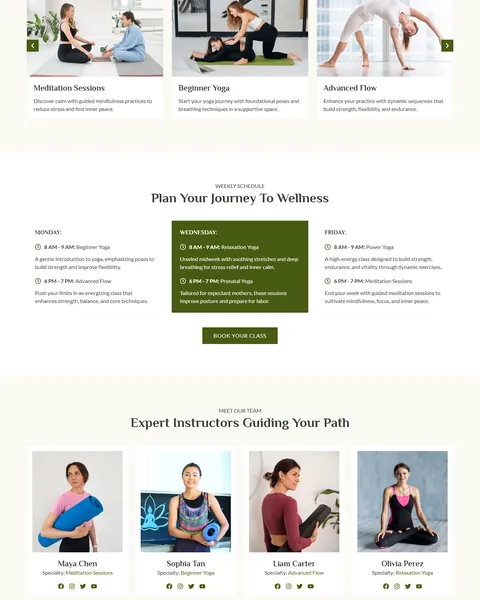
The “Our Classes & Programs” carousel presents six classes with photos and short descriptions: beginner yoga, advanced flow, relaxation yoga, prenatal yoga, power yoga and meditation sessions. Each one helps a different student find the right fit.
A “Plan Your Journey to Wellness” section then shows a weekly timetable for Monday, Wednesday and Friday, with morning and evening classes and a short note on each. The middle day is highlighted in olive green, and a Book Your Class button sits below.
Expert Instructors and Membership Plans
An “Expert Instructors Guiding Your Path” carousel introduces your teachers with portraits, names, specialties and social links. Students like to know who will guide them, especially for prenatal or advanced classes.
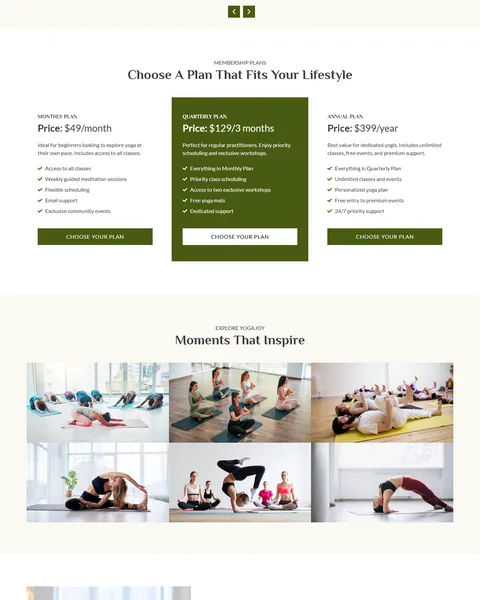
A “Choose a Plan That Fits Your Lifestyle” section shows three membership options: monthly, quarterly and annual. Each lists its price and benefits, such as class access, guided meditation, priority scheduling, workshops and personal plans, with the quarterly plan highlighted.
A Gallery, Reviews and Contact
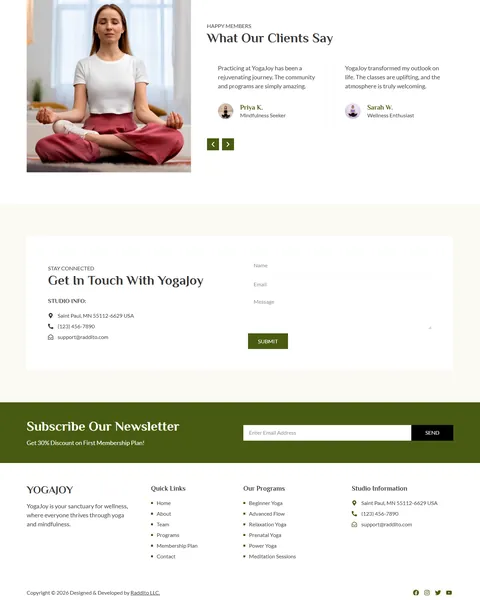
A “Moments That Inspire” gallery shows six photos of group classes and poses, giving visitors a feel for the studio atmosphere. A “What Our Clients Say” slider follows with short reviews from members.
A “Get in Touch with YogaJoy” section lists your studio address, phone and email beside a contact form. An olive newsletter band offers a first-membership discount, and the footer adds quick links and program links.
Research-Driven Design for Yoga Studios
We looked at how people choose a yoga studio online. Most want a welcoming space, classes that match their level, a schedule that fits their week, friendly teachers and clear membership prices. Beginners especially look for reassurance that they will feel comfortable. This yoga studio Elementor landing page is designed to feel calm and inviting while making it easy to pick a class and book.
Olive green and cream. Olive green feels natural, grounded and restful, and it marks buttons, the highlighted schedule day, the featured plan and the newsletter band. Warm cream sections feel soft and peaceful, like a sunlit studio.
Philosopher and Lato. Elegant Philosopher headings feel thoughtful and slightly spiritual, and clean Lato body text keeps class details and plans easy to read.
Supportive photography. Photos show instructors guiding students, group classes and quiet meditation, which helps beginners picture themselves in the room. Swap in photos of your own studio and teachers so visitors recognize the space when they arrive.
Schedule and plans together. Showing the timetable, teachers and prices on one page answers the three questions that decide most sign-ups: when, with whom and how much.
Booking at every step. Book Your Spot, Book Your Class and Choose Your Plan buttons give students a clear next step wherever they are on the page. No one leaves unsure how to join or which class to try first.
Mobile friendly. On phones, the menu folds into a toggle, headlines scale down and every section stacks without sideways scrolling.
Free Installation for This Yoga Studio Elementor Landing Page
We install Yogajoy on your WordPress site free of charge, set up exactly like the demo, once your Pro license is ready. No other paid plugin is needed.
The demo photos come from Envato and are not included. Adding your own classes, schedule and plans, or connecting a class booking or membership system, is not part of the free installation. If you want the full site built for you, see our done-for-you website service.
How to Install the Yogajoy Yoga Studio Landing Page
Prefer to set it up yourself? This video shows each step of the import.
Yogajoy vs Other Yoga Studio Elementor Templates
Comparing yoga templates? Here is how Yogajoy compares with other popular yoga studio templates online.
| Yogajoy | Other popular yoga templates online* | |
|---|---|---|
| Cost to get started | $9.90 one-time | $14 to $24 one-time |
| Free installation | Yes, included | No, not listed on any of them |
| One focused page for local ads | Yes | No, all three are multi-page kits |
| Schedule, instructors and plans on one page | Yes | No, they sit on separate pages |
Why yoga studios choose Yogajoy:
- Built for class bookings. Classes, schedule and plans are ready on one page.
- Calm and inviting. Olive and cream tones help beginners relax.
- Lower price, free setup. $9.90 once, installed for you.
*We compared Yogajoy with three popular yoga Elementor templates that appear in Google results, sold on ThemeForest, KitPapa and Techeshta. Details come from each product page on October 26, 2026. Prices and features may change.
More Yoga and Wellness Templates by Raddito
Yogajoy is our yoga studio Elementor landing page. If you need a full studio website, sell online classes or coach weight loss, compare these.
Asanra – yoga studio Elementor template kit
Best for yoga studios that need a full website.
12 pages · Works with Elementor Free · Live Preview
Namaste – online yoga classes Elementor landing page
Best for yoga teachers selling video courses.
Single landing page · Works with Elementor Free · Live Preview
Wellnest – weight loss coach Elementor landing page
Best for women’s fitness and weight loss coaches.
Single landing page · Needs Elementor Pro · Live Preview
Want more choices? Browse our sport and fitness website templates or every WordPress Elementor template we sell.
Frequently Asked Questions
Is Yogajoy a WordPress theme?
No. Yogajoy is a yoga studio Elementor landing page, a ready one-page design you import into Elementor. It runs on the free Hello Elementor theme.
Does Yogajoy need a Pro license?
Yes. The contact form, newsletter, carousels, header and footer use Elementor Pro widgets. You need your own license before we install the page.
Can I add more days to the schedule?
Yes. Duplicate the day cards in Elementor to show a full seven-day timetable with your own class times.
Can students book classes online?
Link the Book Your Class and Choose Your Plan buttons to your booking or membership tool, such as Mindbody.
Can I change the membership prices?
Yes. Edit the three plan cards to show your own prices, class packs or drop-in rates.
Should I replace the demo instructors and reviews?
Yes, please. The instructor names, schedule, prices and reviews are samples, so use your own real details.
Is the installation really free?
Yes. We install Yogajoy exactly like the demo at no cost once your Pro license is ready. Adding your own content is up to you, or our Done For You team can build the full site.