


ResidenceX is a construction company Bricks Builder landing page for WordPress, made for design-and-build firms, general contractors, commercial and industrial builders and residential developers. It is a single scrolling page with three service sectors, four strengths, an architect spotlight, your story with counters, news, a project gallery and client reviews.
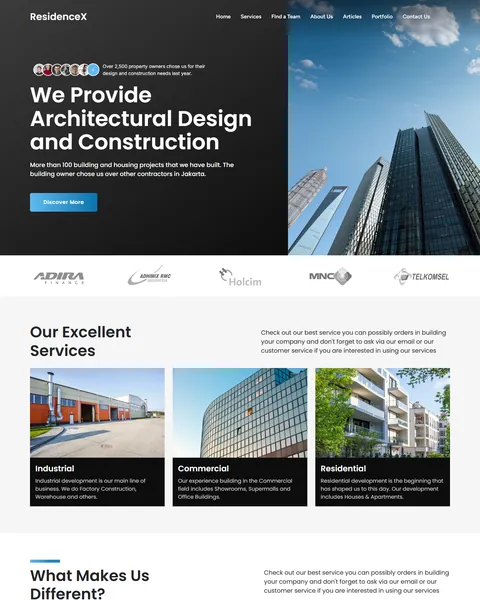
The demo opens with “We Provide Architectural Design and Construction” on a black panel beside soaring glass towers against a blue sky. A Discover More button sits below, with a row of client faces and a note about property owners served. Deep black, sky blue and clean white give your company a bold, modern and dependable look.
ResidenceX is built only with native Bricks elements, including its review slider, so no extra plugins are required. Bricks itself is a premium theme and is not included.

Quick Template Details
- Template Name: ResidenceX
- Template Type: Single landing page
- Required Theme: Bricks (Premium, not included)
- Required Plugins: None
- Landing Page Sections: 11, plus a mobile menu popup
- Responsive: Desktop, Tablet, Mobile
- Coding Required: No
Who Is This Construction Company Bricks Builder Landing Page For?
- Design-and-build firms. Architectural design and construction are presented together from the hero onward.
- General contractors. Strengths like on-time delivery, fair pricing and quality materials answer common client worries.
- Commercial and industrial builders. Factory, warehouse, showroom and office projects fit the service cards.
- Residential developers. A residential card covers houses, townhomes and apartment buildings.
- Firms with a lead architect. An architect spotlight puts a trusted, experienced face on your team.
Need a multi-page construction website with services, projects and team pages? Our Buildx construction company Elementor template kit is a better fit.
See Every Section of the ResidenceX Construction Company Bricks Builder Landing Page
Click any section below to open it in the live demo.
A Split Hero, Partner Logos and Three Sectors
Construction clients want to see scale and capability. ResidenceX pairs a strong headline on black with a tall photo of glass towers, plus a social proof note with client avatars. A row of partner logos sits below.
Three photo cards cover industrial, commercial and residential work. Each has a short line on the projects you build, such as warehouses, showrooms and apartments.
Four Strengths and an Architect Spotlight
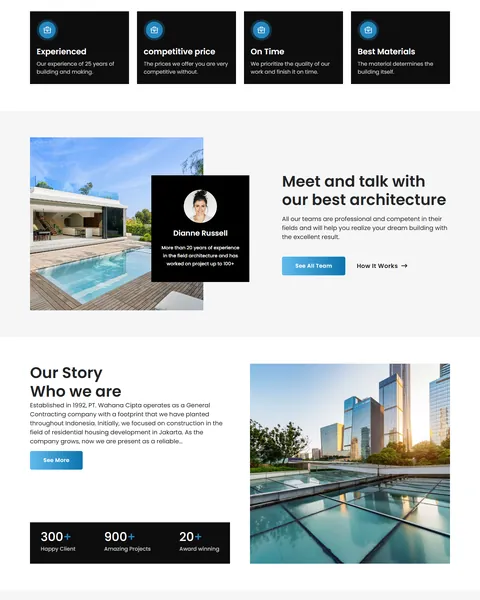
“What Makes Us Different?” lists four black cards with blue icons: experience, competitive prices, on-time delivery and the best materials. These are the four questions most clients ask a builder.
A modern home with a pool sits beside a profile card for your lead architect. See All Team and How It Works links sit below. A named expert makes a large project feel safer.
Your Story, News and Project Gallery
Your company history sits beside a photo of glass buildings reflected in water, with counters for happy clients, projects and awards. A See More button can lead to a full about page.
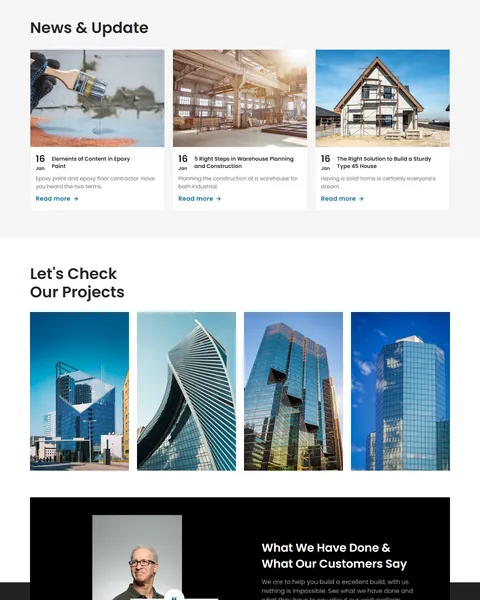
“News & Update” shows three dated articles on construction topics like epoxy floors and warehouse planning. “Let’s Check Our Projects” fills a gallery with four tall tower photos marked as completed projects.
Client Reviews and Footer
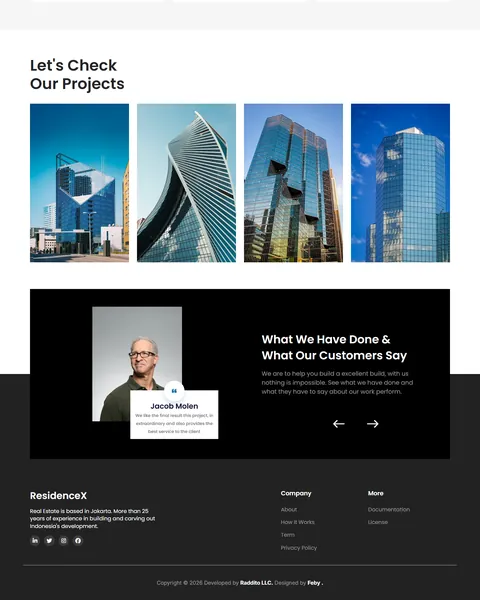
“What We Have Done & What Our Customers Say” shows client reviews on a dark card with a portrait and slider arrows. Reviews from building owners prove you deliver on large, costly projects, where trust matters most. Each card can show the client’s name and the project you built for them.
The footer adds a short company description, company links, documentation and license links, and social icons. Keep it simple so contact details stand out.
Research-Driven Design for Construction Companies
We looked at how property owners and businesses choose a construction partner. They want proof of similar projects, a sense of the company’s size and history and confidence in deadlines and costs. Big decisions need trust, so the design must feel solid and professional. This construction company Bricks Builder landing page is designed to show scale, experience and finished work at every scroll.
Deep black and sky blue. Deep black, #0D0D0D and #242527, gives the hero, strength cards and reviews a bold, premium weight. Sky blue, #0A72AD, marks buttons and icons like a clear sky over a new building. Light gray sections keep the page airy.
Poppins throughout. Poppins is clean and geometric, a natural match for architecture. Bold headings feel strong, while light body text stays easy to read.
Tall architectural photography. Towers, modern homes and glass facades show ambition and finish quality. Use photos of your own completed projects wherever possible, from groundbreaking to final handover.
Strengths framed as answers. Experience, price, timing and materials are the concerns clients raise first, so the page answers them early. Clients feel understood before they even call.
History and numbers. A founding story and counters give the company weight and show it will be around after handover. Long-term warranties mean more from a company with a long track record.
Mobile friendly. On phones, the menu opens as a popup, photo cards stack and the gallery stays easy to scroll. Many property owners first research builders on their phone, often while visiting a site.
What’s Included With the ResidenceX Bricks Builder Landing Page
- ResidenceX Bricks templates. The full landing page and a mobile menu popup as JSON files.
- Theme Style file. Global colors, typography and buttons in one JSON file.
- Assets folder. The images and icons the page references.
- READ_ME guide and changelog. Setup steps and the version history, with the latest update on July 29, 2025.
Need help with the template files? Our product support team can help. If you would rather have the whole page built with your own projects and branding, see our done-for-you website service.
How to Import the ResidenceX Construction Company Bricks Builder Landing Page
ResidenceX only needs Bricks. Follow these steps:
- In Bricks > Settings > General, enable custom breakpoints, SVG uploads and smooth scroll (CSS), then save.
- In the builder’s breakpoint settings, set Tablet Portrait to 1025px and Mobile Landscape to 768px.
- Go to Bricks > Templates and import the ResidenceX and mobile menu templates.
- Import the Theme Style and set its condition to the entire website or individual pages.
- Link the mobile menu popup to the bar icon and its close icon, then save and refresh.
The video below walks through a full Bricks import. It also shows WooCommerce steps, which you can skip because ResidenceX does not use WooCommerce.
ResidenceX vs Other Bricks Options for Construction Websites
Comparing ways to build a construction company page in Bricks? Here is how ResidenceX compares with other popular options online.
| ResidenceX | Other popular Bricks template libraries online* | |
|---|---|---|
| Complete construction company landing page | Yes, ready to import | No, all three are libraries of sections |
| Industrial, commercial and residential sectors | Yes | Not mentioned on any of them |
| Architect spotlight and project gallery | Yes | Not as a ready section on any of them |
| Same design also sold for Elementor | Yes | No, not on any of them |
Why builders choose ResidenceX:
- Made for construction. Sectors, strengths, story and projects are ready.
- Pure Bricks. No add-ons, so your page stays fast.
- One payment. $8.97 once, with no yearly plan.
*We compared ResidenceX with two paid Bricks layout libraries and a free community Bricks template library, each listed on its own website. Details come from each product page on October 26, 2026. Prices and features may change.
More Construction and Architecture Templates by Raddito
Prefer Elementor? ResidenceX is also available as a construction company Elementor landing page with the same look. For related businesses, compare these.
Structura – architecture firm Bricks Builder landing page
Best for architecture and design-build firms.
Single landing page · No extra plugins · Live Preview
RevoHome – home remodeling Bricks Builder landing page
Best for small remodeling businesses.
Single landing page · No extra plugins · Live Preview
Buildx – construction company Elementor template kit
Best for construction and project management companies.
11 pages · Works with Elementor Free · Live Preview
Want more choices? Browse our real estate and construction website templates or every WordPress Bricks Builder template we sell.
Frequently Asked Questions
Is ResidenceX a WordPress theme?
No. ResidenceX is a construction company Bricks Builder landing page, a ready one-page design you import into Bricks. Bricks is the theme, and you need your own Bricks license.
Do I need any plugins besides Bricks?
No. The slider, counters and cards all use built-in Bricks elements, so there is nothing else to install.
Does it include a contact or quote form?
Not by default. Add a Bricks form above the footer so clients can request a quote or a site visit.
Can I add more projects to the gallery?
Yes. Duplicate a project card in Bricks and change the photo and title, or link it to a case study.
Is it suitable for a real estate developer?
Yes. Use the sectors for your developments and the gallery for current and completed projects.
Do the news cards update automatically?
You can switch them to a Bricks query loop so your latest WordPress posts appear on their own.
Should I replace the sample company story and logos?
Yes, please. The company history, counters, logos, project names and reviews are placeholders, so use only your own real details.