


RevoHome is a home remodeling Bricks Builder landing page for WordPress, made for remodeling contractors, renovation companies and builders who work on both homes and commercial spaces. It is a single scrolling page with trust counters, eight renovation services, a project slider, a team, client reviews, blog tips and a consultation form.
The demo opens with “Home Renovation, Reinvented” beside a smiling contractor in a hard hat. Let’s Talk and Learn More buttons sit below. Deep navy, bright safety orange and soft off-white give your company a clean, professional and energetic look.
RevoHome is built only with native Bricks elements, including its consultation form, so no extra plugins are required. Bricks itself is a premium theme and is not included.

Quick Template Details
- Template Name: RevoHome
- Template Type: Single landing page
- Required Theme: Bricks (Premium, not included)
- Required Plugins: None
- Landing Page Sections: 11
- Forms: Built-in Bricks consultation form
- Responsive: Desktop, Tablet, Mobile
- Coding Required: No
Who Is This Home Remodeling Bricks Builder Landing Page For?
- Remodeling contractors. Kitchen, bathroom and full home renovation lead the service list.
- Renovation companies with a team. A team section introduces a project manager, carpenter, designer and client relations lead.
- Commercial renovators. A commercial renovation service covers offices and retail shops.
- Home extension builders. Room extensions and carpentry work are ready as services.
- Contractors who sell on trust. Counters for projects, satisfaction, experience and repeat clients build confidence fast.
Prefer a darker design with residential and commercial tabs? Our Revixo house renovation Bricks Builder landing page may suit you better.
See Every Section of the RevoHome Home Remodeling Bricks Builder Landing Page
Click any section below to open it in the live demo.

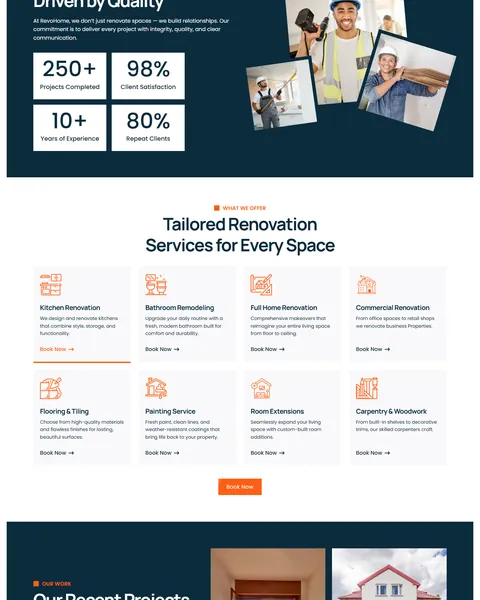
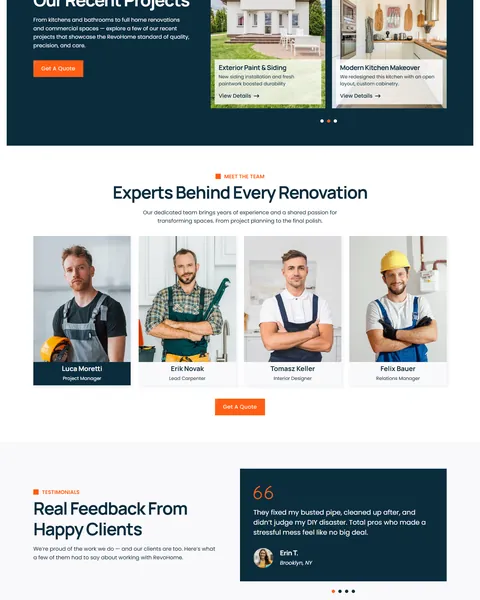
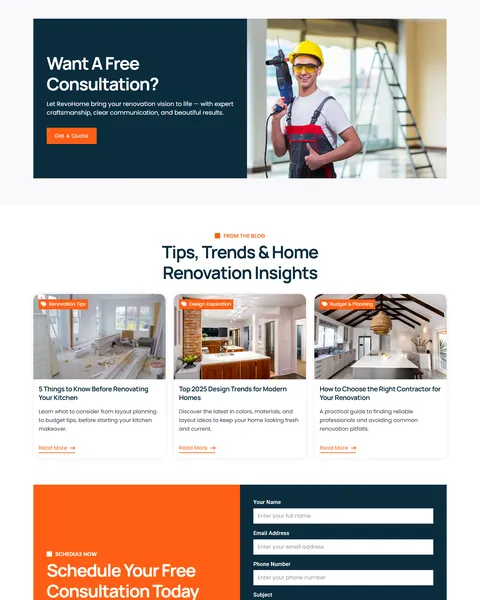
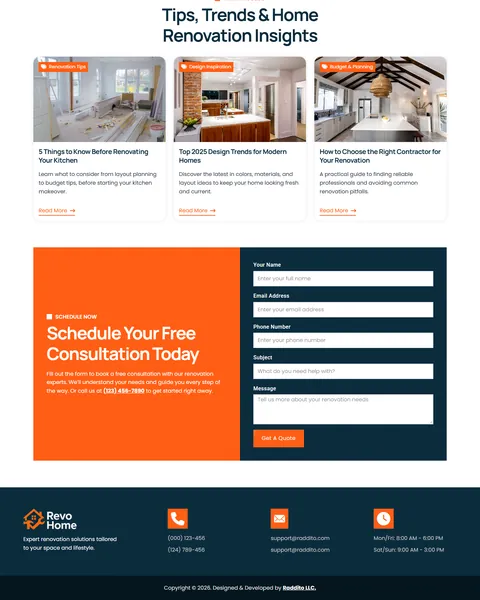
A Friendly Hero and Trust Numbers
Homeowners want a contractor who feels capable and approachable. RevoHome’s hero pairs a short, confident promise with a friendly contractor photo, so the page feels personal from the first second.
“Renovation Solutions for Homes & Businesses” explains that you handle both residential and commercial work. “Built on Trust, Driven by Quality” then shows four counters for projects completed, client satisfaction, years of experience and repeat clients beside photos of your crew.
Eight Renovation Services
“Tailored Renovation Services for Every Space” presents eight services with orange line icons. They cover kitchen renovation, bathroom remodeling, full home renovation, commercial renovation, flooring and tiling, painting, room extensions and carpentry. Each has a short description and a Book Now link.
A clear grid helps visitors find their exact project in seconds. Remove or rename services to match your trade, and link each card to a quote form with that service selected.
Projects, Team and Reviews
“Our Recent Projects” shows a slider of finished jobs on a navy band. Examples include a full home transformation, a bathroom redesign, a room extension, new siding and a kitchen makeover. Each card has a short summary and a View Details link.
“Experts Behind Every Renovation” introduces four team members with photos and roles. “Real Feedback From Happy Clients” then shows client quotes with names and cities in a slider. Faces and names make your company feel real and accountable.
Free Consultation, Blog and Footer
“Want A Free Consultation?” uses a bold navy banner with a contractor photo and a Get A Quote button. “Tips, Trends & Home Renovation Insights” shares three articles on kitchen planning, design trends and choosing a contractor.
“Schedule Your Free Consultation Today” sits on an orange panel beside a form for name, email, phone, subject and message. The footer lists phone numbers, emails and opening hours, so customers know when to call.
Research-Driven Design for Remodeling Contractors
We looked at how homeowners choose a remodeling contractor online. They worry about budgets, timelines and whether the crew will respect their home. They look at past projects, team photos and reviews before they ask for a quote, and they often compare several contractors. This home remodeling Bricks Builder landing page is designed to look clean and professional, show real proof and make the free consultation the easy next step.
Deep navy and safety orange. Deep navy, #0B2C3D, fills headlines, the project slider and the footer and feels steady and trustworthy. Bright safety orange, #FF5E15, marks buttons, icons and the consultation panel, like the gear on a building site.
Manrope and Poppins. Manrope headlines are modern and bold, and they stay clear even at large sizes. Poppins keeps service details, reviews and form labels easy to read.
Friendly crew photography. Smiling workers in hard hats and finished rooms show both the people and the result. Use photos of your own team and projects for the most local trust.
Proof before price. Counters, projects, a named team and reviews all appear before the consultation form. By the time visitors reach it, most of their doubts are already answered.
Clean, square buttons. Sharp orange buttons look practical and confident and stand out on both light and dark sections. Their color matches the hard hats in the photos, which ties the brand together.
Mobile friendly. On phones, the menu folds into a toggle, service cards stack and the form stays easy to fill in. Many homeowners research contractors on their phone in the evening.
What’s Included With the RevoHome Bricks Builder Landing Page
- RevoHome Bricks template. The full landing page as one JSON file.
- Theme Style file. Global colors, typography and buttons in one JSON file.
- READ_ME guide and changelog. Setup steps and the version history, with the latest update on July 28, 2025.
Need help with the template file? Our product support team can help. If you would rather have the whole page built with your own projects and branding, see our done-for-you website service.
How to Import the RevoHome Home Remodeling Bricks Builder Landing Page
No plugins are needed, so you can start right after installing Bricks:
- In Bricks > Settings > General, enable custom breakpoints, SVG uploads and smooth scroll (CSS), then save.
- In the builder’s breakpoint settings, set Tablet Portrait to 1025px and Mobile Landscape to 768px.
- Go to Bricks > Templates and import the RevoHome template file.
- Import the Theme Style and set its condition to the entire website or individual pages.
- Insert the template into a page, set the email address for the form, then save and refresh.
The video below walks through a full Bricks import. It also shows WooCommerce steps, which you can skip because RevoHome does not use WooCommerce.
RevoHome vs Other Bricks Options for Remodeling Websites
Comparing ways to build a remodeling contractor landing page in Bricks? Here is how RevoHome compares with other popular options online.
| RevoHome | Other popular Bricks template libraries online* | |
|---|---|---|
| Complete home remodeling landing page | Yes, ready to import | No, all three are libraries of sections |
| Eight renovation service cards | Yes | Not mentioned on any of them |
| Project slider and team section | Yes | Not as a ready section on any of them |
| Free consultation form | Yes | Not as a ready section on any of them |
Why contractors choose RevoHome:
- Made for remodeling. Services, projects, team and quotes are ready.
- Pure Bricks. No add-ons, so your page stays fast.
- One payment. $9.90 once, with no yearly plan.
*We compared RevoHome with two paid Bricks layout libraries and a free community Bricks template library, each listed on its own website. Details come from each product page on October 26, 2026. Prices and features may change.
More Renovation and Construction Templates by Raddito
RevoHome is our home remodeling Bricks Builder landing page. For a different style or a full website, compare these Bricks options.
UpFix – home renovation Bricks Builder template kit
Best for remodeling and renovation contractors.
17 pages · Bricks with JetFormBuilder · Live Preview
Revixo – house renovation Bricks Builder landing page
Best for residential and commercial renovators.
Single landing page · No extra plugins · Live Preview
Structura – architecture Bricks Builder landing page
Best for architectural design agencies.
Single landing page · No extra plugins · Live Preview
Want more choices? Browse our real estate and construction website templates or every WordPress Bricks Builder template we sell.
Frequently Asked Questions
Is RevoHome a WordPress theme?
No. RevoHome is a home remodeling Bricks Builder landing page, a ready one-page design you import into Bricks. Bricks is the theme, and you need your own Bricks license.
Do I need any plugins besides Bricks?
No. The sliders, counters and consultation form all use built-in Bricks elements, so there is nothing else to install.
How do I receive consultation requests?
Open the form element in Bricks and enter your email under its actions. Every new request then lands in your inbox with the client’s details.
Can I change the eight services?
Yes. Rename, remove or add service cards in Bricks to match the remodeling work you actually do.
Can each project open a case study?
Yes. Build a simple page per project with photos, budget and timeline, then point its View Details link there.
Can I show my opening hours and service area?
Yes. The footer already has opening hours. Add a line with the towns you cover so local visitors know you serve them.
Should I replace the sample team and reviews?
Yes, please. The team names, counters, reviews and phone numbers are placeholders, so use only your own real team and licenses.