


Structura is an architecture firm Bricks Builder landing page for WordPress, made for architecture studios, interior architects, design-and-build firms and space planning consultants. It is a single scrolling page with three design services, a four-step process, a portfolio by sector, client reviews, design articles and a contact form.
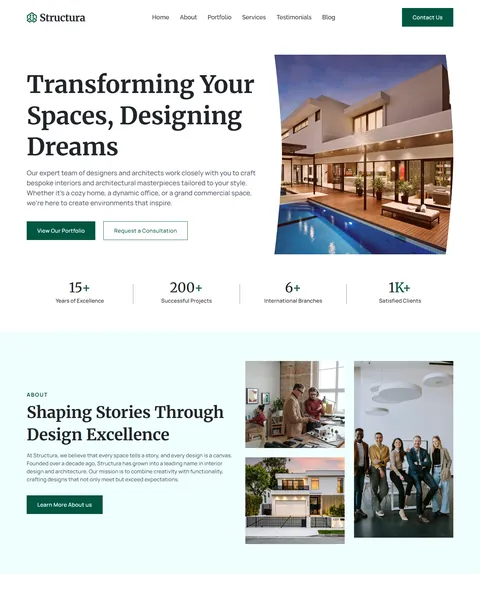
The demo opens with “Transforming Your Spaces, Designing Dreams” beside a modern lit-up house at dusk. View Our Portfolio and Request a Consultation buttons sit below. Deep forest green, warm amber and pale mint give your studio a refined, confident and modern look.
Structura is built only with native Bricks elements, including its contact form, so no extra plugins are required. Bricks itself is a premium theme and is not included.

Quick Template Details
- Template Name: Structura
- Template Type: Single landing page
- Required Theme: Bricks (Premium, not included)
- Required Plugins: None
- Landing Page Sections: 12
- Forms: Built-in Bricks contact and newsletter forms
- Responsive: Desktop, Tablet, Mobile
- Coding Required: No
Who Is This Architecture Firm Bricks Builder Landing Page For?
- Architecture studios. Architectural design, space planning and a sector portfolio are ready to use for homes and buildings.
- Interior architects. Interior design sits beside architecture in the service list.
- Design-and-build firms. A four-step process runs from consultation to handover.
- Commercial and industrial designers. The portfolio splits work into residential, commercial and industrial projects.
- Firms with several offices. Counters show years in business, completed projects, international branches and satisfied clients.
Focused on interiors and need a full studio website? Our Selhono interior design Bricks Builder template kit is a better fit.
See Every Section of the Structura Architecture Firm Bricks Builder Landing Page
Click any section below to open it in the live demo.
A Project Hero and Studio Counters
Clients choose architects by their work. Structura opens with an elegant serif headline beside a striking house photo, so your best project is the first thing people see. Two buttons lead to the portfolio or a consultation request.
Four counters sit under the hero: years of excellence, successful projects, international branches and satisfied clients. “Shaping Stories Through Design Excellence” then shares your studio story beside a collage of interiors and exteriors.
Three Services and a Four-Step Process
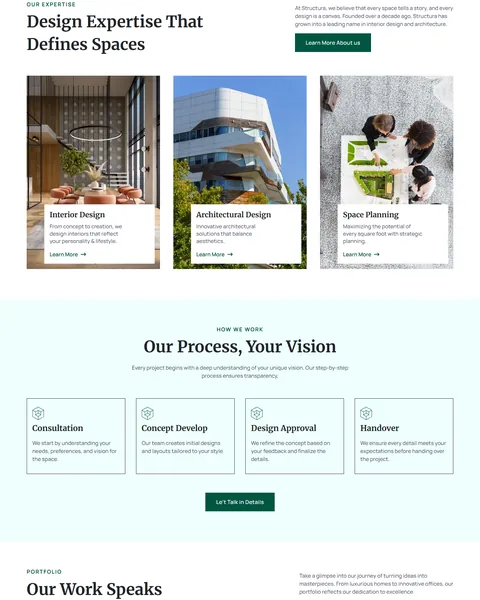
“Design Expertise That Defines Spaces” shows three services as photo cards: interior design, architectural design and space planning. Each card has a short description and a Learn More link.
“Our Process, Your Vision” explains the journey in four cards: consultation, concept development, design approval and handover. A “Let’s Talk in Details” button follows. A clear process reassures clients who are about to make a large investment.
A Portfolio by Sector and Client Reviews
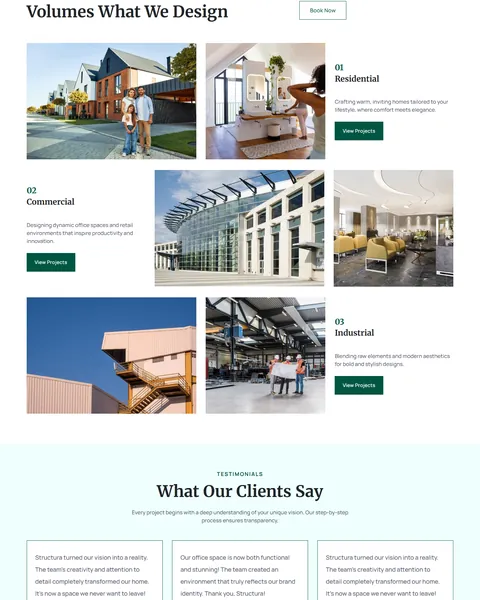
“Our Work Speaks Volumes” splits your portfolio into three numbered sectors: residential, commercial and industrial. Each sector shows two large project photos, a short description and a View Projects button.
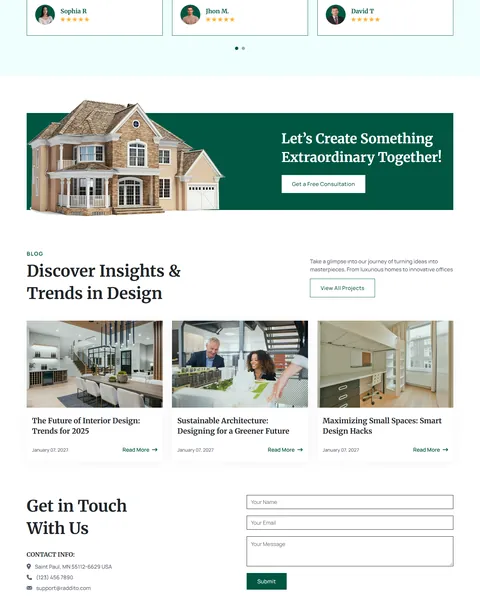
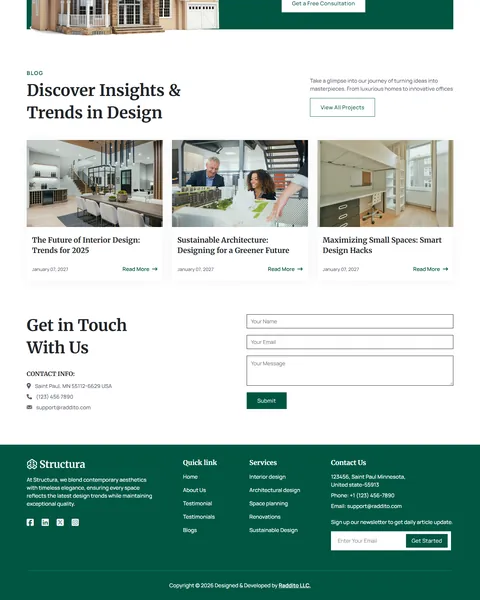
“What Our Clients Say” shows client quotes with names and star ratings in a slider on a pale mint background. A wide banner with a house photo and a Get a Free Consultation button follows.
Design Articles and Contact
“Discover Insights & Trends in Design” shares three article cards on interior trends, sustainable architecture and small-space design. Helpful articles show expertise and bring in search visitors who are still planning a project.
“Get in Touch With Us” pairs your address, phone and email with a short form. The deep green footer adds quick links, a services list, contact details and a newsletter signup.
Research-Driven Design for Architecture Firms
We looked at how clients choose an architect online. They study portfolios, look for projects similar to their own and want to understand the process and timeline. Trust and taste matter most, because the project is expensive and personal. Many also read articles on trends and costs while they plan, long before they call anyone. This architecture firm Bricks Builder landing page is designed to show your work beautifully, explain how you work and make a first consultation easy to request.
Deep forest green and warm amber. Deep forest green, #005642, fills buttons, the consultation banner and footer and feels calm, natural and premium. Warm amber, #FFB22D, adds star ratings and small highlights. Pale mint, #F0FFFE, softens alternating sections.
Merriweather and Manrope. Merriweather headlines are a classic serif that feels established and thoughtful. Manrope keeps descriptions, buttons and forms clean and modern.
Architecture-first photography. Houses at dusk, glass offices and industrial spaces show range and quality. Replace them with your own built projects for instant credibility.
Sector-based portfolio. Splitting work into residential, commercial and industrial helps each client find relevant examples quickly. A homeowner and a factory owner care about very different projects.
Square, confident buttons. Sharp-cornered buttons echo clean architectural lines and suit a professional studio. They give the page the same precise feel as a technical drawing.
Mobile friendly. On phones, the menu folds into a toggle, project photos stack and the contact form stays easy to fill in. Many clients first see a studio’s work on their phone.
What’s Included With the Structura Bricks Builder Landing Page
- Structura Bricks template. The full landing page as one JSON file.
- Theme Style file. Global colors, typography and buttons in one JSON file.
- Assets folder. The images and icons the page references.
- READ_ME guide and changelog. Setup steps and the version history, with the latest update on September 28, 2025.
Need help with the template file? Our product support team can help. If you would rather have the whole page built with your own projects and branding, see our done-for-you website service.
How to Import the Structura Architecture Firm Bricks Builder Landing Page
Structura only needs Bricks. Follow these steps:
- In Bricks > Settings > General, enable custom breakpoints, SVG uploads and smooth scroll (CSS), then save.
- In the builder’s breakpoint settings, set Tablet Portrait to 1025px and Mobile Landscape to 768px.
- Go to Bricks > Templates and import the Structura template file.
- Import the Theme Style and set its condition to the entire website or individual pages.
- Insert the template into a page, add your email to the form actions, then save and refresh.
The video below walks through a full Bricks import. It also shows WooCommerce steps, which you can skip because Structura does not use WooCommerce.
Structura vs Other Bricks Options for Architecture Websites
Comparing ways to build an architecture firm landing page in Bricks? Here is how Structura compares with other popular options online.
| Structura | Other popular Bricks template libraries online* | |
|---|---|---|
| Complete architecture firm landing page | Yes, ready to import | No, all three are libraries of sections |
| Portfolio split by sector | Yes | Not mentioned on any of them |
| Four-step design process | Yes | Not as a ready section on any of them |
| Same design also sold for Elementor | Yes | No, not on any of them |
Why architects choose Structura:
- Portfolio first. Projects, process and reviews are ready.
- Pure Bricks. No add-ons, so your page stays fast.
- One payment. $9.90 once, with no yearly plan.
*We compared Structura with two paid Bricks layout libraries and a free community Bricks template library, each listed on its own website. Details come from each product page on October 26, 2026. Prices and features may change.
More Architecture and Interior Templates by Raddito
Prefer Elementor? Structura is also available as an architecture firm Elementor landing page with the same look. For interior-focused studios, compare these Bricks options.
Selhono – interior design Bricks Builder template kit
Best for interior designers who need a full website.
14 pages · No extra plugins · Live Preview
Serene – luxury interior Bricks Builder landing page
Best for high-end interior studios.
Single landing page · No extra plugins · Live Preview
Artisian – home decor Bricks Builder landing page
Best for decor stylists and home interior brands.
Single landing page · Bricks · Live Preview
Want more choices? Browse our real estate and construction website templates or every WordPress Bricks Builder template we sell.
Frequently Asked Questions
Is Structura a WordPress theme?
No. Structura is an architecture firm Bricks Builder landing page, a ready one-page design you import into Bricks. Bricks is the theme, and you need your own Bricks license.
Do I need any plugins besides Bricks?
No. The review slider, portfolio sections and forms all use built-in Bricks elements, so there is nothing else to install.
Can each sector link to a full project page?
Yes. Build a project page in Bricks for each case study, then point its View Projects button there.
Can I add more sectors, like hospitality?
Yes. Duplicate a portfolio row in Bricks, rename it and swap the photos and text.
Is it suitable for a landscape architect?
Yes. Rename the services and sectors to gardens, parks and public spaces, and use your own outdoor project photos.
Can I show my design awards?
Yes. Replace a counter with your award count, or add a logo row for publications and awards below the hero.
Should I replace the sample figures and reviews?
Yes, please. The counters, branches, reviews and articles are placeholders, so use only your own real projects and client feedback.