


Artisian is a home decor Bricks Builder landing page for WordPress, made for decor stores, designers who sell products, home stagers and lighting boutiques. It is a single scrolling page with design services, a three-step work process, a decor catalog with category tabs, recent projects, an image gallery and a newsletter.
The demo opens with “Modern Living Interior For Your Home” beside a grid of bright, calm rooms with soft furniture, pendant lamps and green plants. Explore Now and Watch Video buttons sit below. Deep forest teal, warm orange and clean white give your brand a natural, modern and inviting look.
Artisian’s newsletter form is built with the free JetFormBuilder plugin, so install it before importing. Bricks itself is a premium theme and is not included.

Quick Template Details
- Template Name: Artisian
- Template Type: Single landing page
- Required Theme: Bricks (Premium, not included)
- Plugin Used: JetFormBuilder (Free), for the newsletter form
- Landing Page Sections: 10, plus mobile menu and video popups
- Responsive: Desktop, Tablet, Mobile
- Coding Required: No
Who Is This Home Decor Bricks Builder Landing Page For?
- Home decor stores. A catalog with bedroom, kitchen, dining and wall decor tabs shows a wide range of pieces.
- Interior designers who sell products. Design services and a product catalog sit on one page.
- Home staging companies. Recent projects and a gallery show finished rooms to buyers and sellers.
- Furniture and lighting boutiques. Chandeliers, hanging chairs, sofas and mirrors fill the demo catalog.
- Plant and green interior studios. A plants service card suits indoor greenery styling.
Need a full online store with a cart and checkout? Our ModVista furniture store Bricks Builder landing page may suit you better.
See Every Section of the Artisian Home Decor Bricks Builder Landing Page
Click any section below to open it in the live demo.
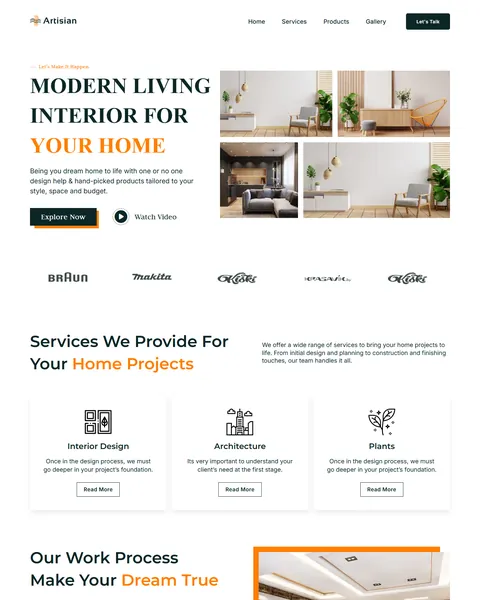
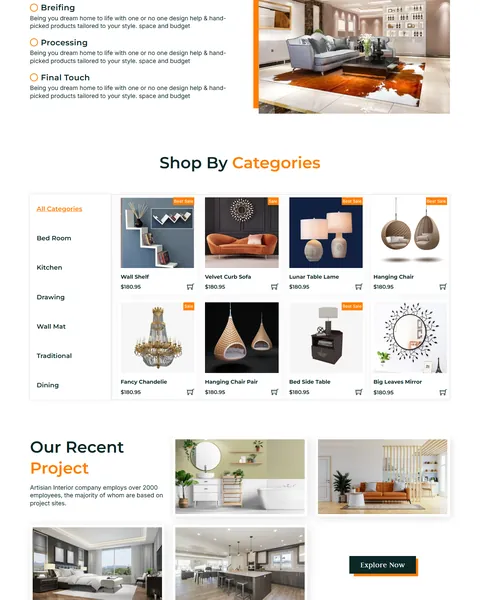
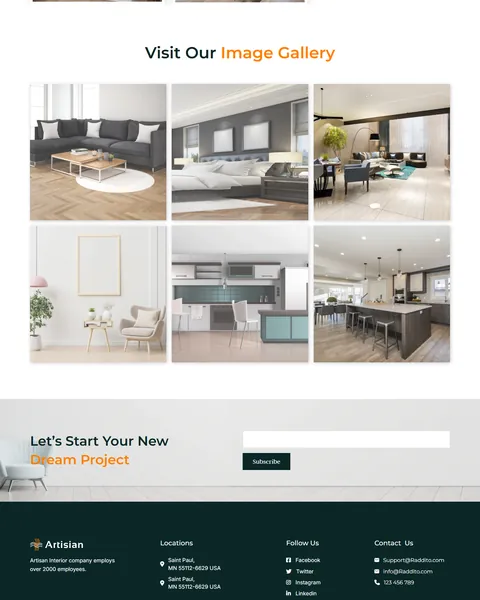
A Room Grid Hero and Three Design Services
Decor shoppers buy a feeling as much as a product. Artisian opens with a bold serif headline beside a grid of four bright, styled rooms. Explore Now leads to the catalog, and Watch Video opens a popup for a studio or showroom tour.
A row of brand logos sits under the hero. “Services We Provide For Your Home Projects” then shows three outlined cards for interior design, architecture and plants, each with a Read More button.
A Three-Step Process and a Decor Catalog
“Our Work Process Make Your Dream True” explains your approach in three steps: briefing, processing and final touch. A wide room photo with an orange frame sits beside the steps.
“Shop By Categories” shows a vertical list of room categories beside a grid of product cards with photos, prices, sale badges and cart icons. Visitors can switch between bedroom, kitchen, dining and more without leaving the page.
Recent Projects, Gallery and Newsletter
“Our Recent Project” shows finished rooms in a card grid, each with Visit Project and View Image links. An Explore Now button invites visitors to see more of your work.
“Visit Our Image Gallery” fills a six-photo grid with living rooms, kitchens and calm corners. A “Let’s Start Your New Dream Project” band collects newsletter emails above a deep teal footer with locations, social links and contact details.
Research-Driven Design for Home Decor Brands
We looked at how people shop for decor and choose an interior designer online. They want inspiration first, then real products with prices, and finally proof that you can deliver a finished room. Calm photos and a clear catalog keep them browsing longer. This home decor Bricks Builder landing page is designed to blend services and products so each visitor finds what they came for.
Deep forest teal and warm orange. Deep forest teal, #0B2727, frames buttons and the footer and feels natural and grounded. Warm orange, #FF7E01, highlights key words, sale badges and photo frames like a pop of terracotta. Plenty of white keeps rooms and products bright.
Judson and Montserrat. Judson’s classic serif headlines feel crafted and timeless, suited to interiors. Montserrat and Inter keep product names, prices and buttons modern and easy to read.
Bright, styled room photos. Natural light, soft furniture and plants make every section feel calm and livable. Use your own project and product photos for best results.
Prices on every product. Clear prices and sale badges help shoppers decide quickly and add to their wish list. Hidden prices often send decor shoppers to a competitor.
Services and products together. Pairing design services with a catalog lets you earn from both projects and product sales, and each one promotes the other.
Mobile friendly. On phones, the menu opens as a popup, product cards stack and the category list stays easy to tap. Many shoppers browse decor on their phone for ideas while relaxing at home.
What’s Included With the Artisian Bricks Builder Landing Page
- Artisian Bricks templates. The full landing page, a mobile menu popup and a video popup as JSON files.
- Theme Style file. Global colors, typography and buttons in one JSON file.
- Assets folder. The images and icons the page references.
- READ_ME guide and changelog. Setup steps and the version history, with the latest update on July 29, 2025.
Need help with the template files? Our product support team can help. If you would rather have the whole page built with your own products and branding, see our done-for-you website service.
How to Import the Artisian Home Decor Bricks Builder Landing Page
Install JetFormBuilder first. Then follow these steps:
- In Bricks > Settings > General, enable custom breakpoints, SVG uploads and smooth scroll (CSS), then save.
- In the builder’s breakpoint settings, set Tablet Portrait to 1025px and Mobile Landscape to 768px.
- Go to Bricks > Templates and import the Artisian, mobile menu and video popup templates.
- Import the Theme Style and set its condition to the entire website or individual pages.
- Link the mobile menu popup to the bar icon and its close icon, then save and refresh.
The video below walks through a full Bricks import. It also shows WooCommerce steps, which you can skip because Artisian does not use WooCommerce.
Artisian vs Other Bricks Options for Home Decor Websites
Comparing ways to build a home decor page in Bricks? Here is how Artisian compares with other popular options online.
| Artisian | Other popular Bricks template libraries online* | |
|---|---|---|
| Complete home decor landing page | Yes, ready to import | No, all three are libraries of sections |
| Product catalog with room category tabs | Yes | Not mentioned on any of them |
| Design services and recent projects | Yes | Not as a ready section on any of them |
| Same design also sold for Elementor | Yes | No, not on any of them |
Why decor brands choose Artisian:
- Made for interiors. Services, catalog, projects and gallery are ready.
- One free plugin. JetFormBuilder handles the newsletter.
- One payment. $8.97 once, with no yearly plan.
*We compared Artisian with two paid Bricks layout libraries and a free community Bricks template library, each listed on its own website. Details come from each product page on October 26, 2026. Prices and features may change.
More Interior and Furniture Templates by Raddito
Prefer Elementor? Artisian is also available as a home decor Elementor landing page with the same look. For other interior businesses, compare these Bricks options.
ModVista – furniture store Bricks Builder landing page
Best for furniture shops that sell online.
Single landing page · Bricks with WooCommerce · Live Preview
Serene – luxury interior design Bricks Builder landing page
Best for high-end interior design studios.
Single landing page · No extra plugins · Live Preview
Selhono – interior design Bricks Builder template kit
Best for studios that need a full multi-page website.
14 pages · No extra plugins · Live Preview
Want more choices? Browse our creative and design website templates or every WordPress Bricks Builder template we sell.
Frequently Asked Questions
Is Artisian a WordPress theme?
No. Artisian is a home decor Bricks Builder landing page, a ready one-page design you import into Bricks. Bricks is the theme, and you need your own Bricks license.
Why do I need JetFormBuilder?
The newsletter form at the bottom of the page is a JetFormBuilder form, and the plugin is free.
Can customers buy products from the catalog?
Not out of the box. The product cards are design elements, so link them to your store or connect WooCommerce.
Can I add more categories?
Yes. Add a tab to the category list in Bricks and fill it with new product cards.
How do I add my own video?
Open the video popup template in Bricks and paste the link to your own YouTube video.
Is it suitable for an interior designer without products?
Yes. Remove the catalog section and expand the services, projects and gallery to show more of your finished rooms.
Should I replace the sample products and logos?
Yes, please. The products, prices, brand logos, project names and company claims are placeholders, so use only your own real details.