


Buildx is a construction company Elementor template kit for WordPress, built for general contractors, construction firms and project management companies. It includes 11 ready pages, including Services, Service Details, Projects, Project Details, FAQ and Contact.
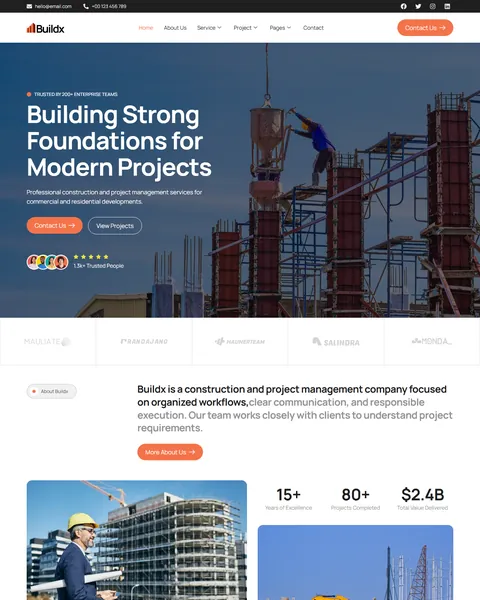
The demo opens with a worker on a steel frame against the sky under the headline “Building Strong Foundations for Modern Projects”. Contact Us and View Projects buttons sit beside a trusted clients badge, with partner logos just below. Deep charcoal, safety orange and clean white give your company a strong, dependable look that fits commercial and residential work alike.
Buildx runs on free plugins only: Elementor, ElementsKit Lite, Jeg Kit for Elementor and MetForm. You don’t need Elementor Pro, and we install the kit for you free of charge.
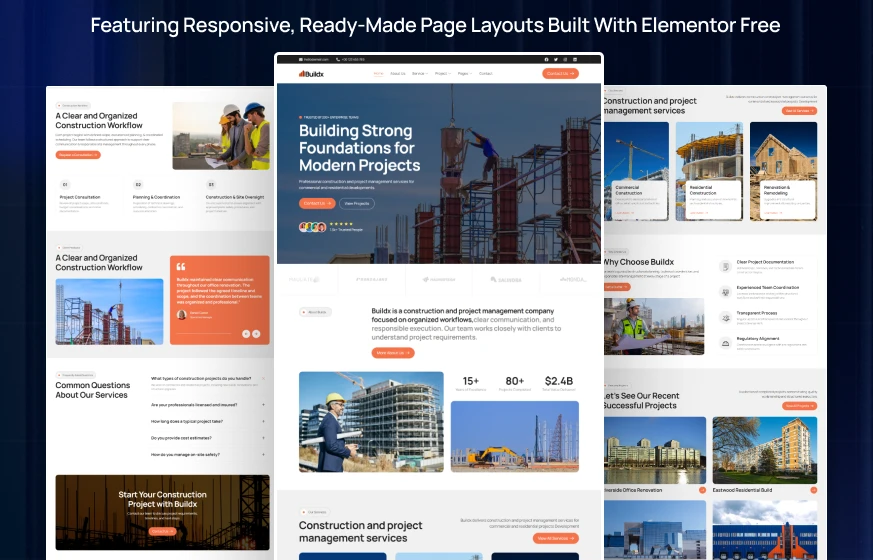
Quick Template Details
- Template Name: Buildx
- Required Theme: Hello Elementor (Free)
- Elementor Pro Required: No
- Premium Plugins Required: No
- Page Templates: 11
- Forms: MetForm
- Responsive: Desktop, Tablet, Mobile
- Coding Required: No
Who Is This Construction Website Template For?
- General contractors and builders. Commercial construction, residential construction and renovation lead a list of nine services.
- Construction project management firms. A three-step workflow, documentation and milestone planning show how you keep projects on track.
- Commercial fit-out and renovation companies. Interior fit-out, remodeling and structural repair are ready as separate services.
- Specialty trade and MEP contractors. MEP systems coordination, permit support and material procurement cover the technical side of a build.
- Firms bidding for larger contracts. Case studies, an awards timeline and an eight-person team page help you look established to developers and facility managers.
Leading with design as well as building? Our Arcton architecture and construction Elementor template kit puts architecture first.
See Every Page in the Buildx Construction Template
All 11 pages are below. Click any page to see it in the live demo.
Project Case Studies That Win New Contracts
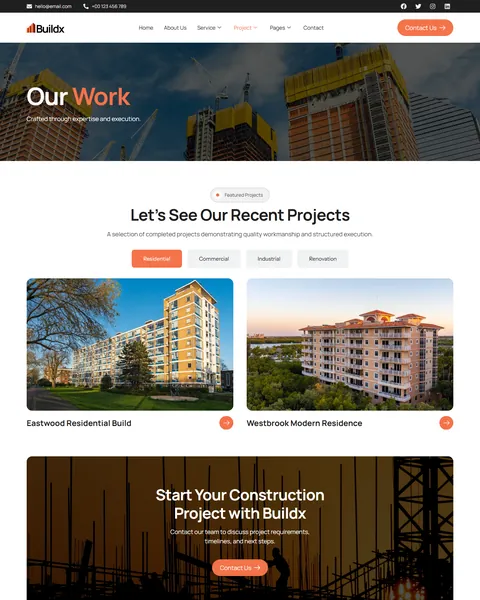
Clients hire builders based on past work, so your portfolio needs to do the selling. The Projects page shows completed builds in a large photo grid, with filter tabs for residential, commercial, industrial and renovation. A prospect looking for a warehouse expansion can jump straight to similar jobs.
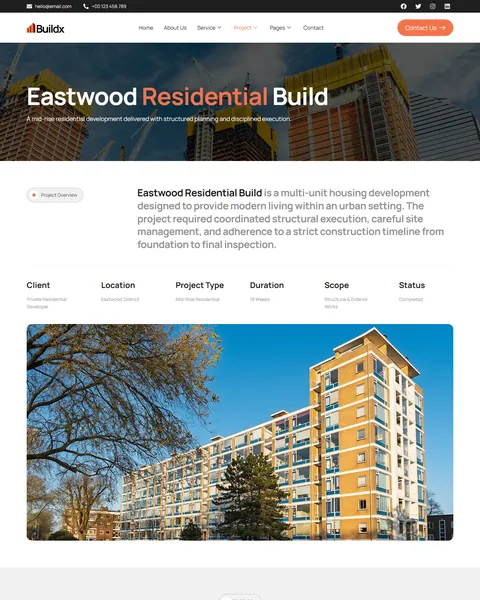
Each project opens a full case study. The demo for Eastwood Residential Build starts with a project overview and a fact row: client, location, project type, duration, scope and status. Six numbered highlights follow, from structural framework and facade installation to site safety oversight and final quality inspection. A client quote and a “Visual Journal” photo gallery of the build close the page.
Nine Construction Services and a Detailed Service Page
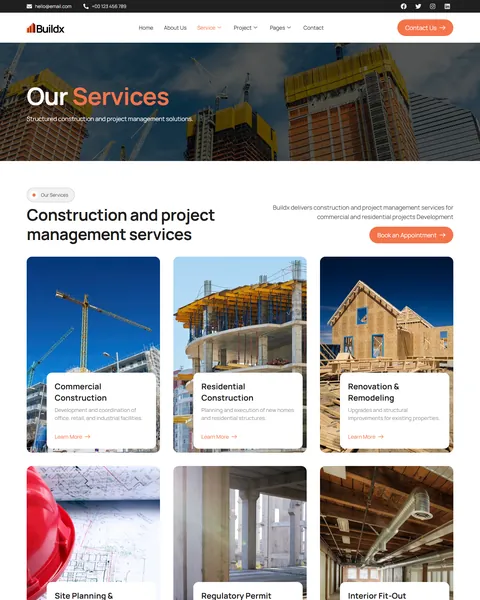
The Services page lists nine services in photo cards. The core three are Commercial Construction, Residential Construction and Renovation & Remodeling. The other six cover site planning, permit support, interior fit-out, MEP systems coordination, structural repair and material procurement. Each card has a short description and a Learn More link.
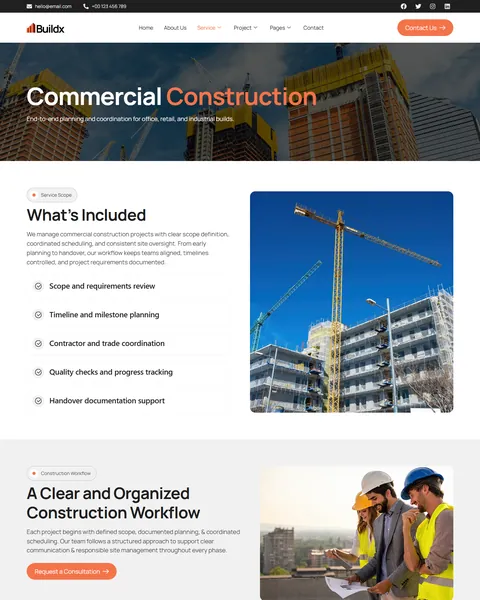
The Service Details page explains commercial construction in depth. A “What’s Included” list covers scope review, milestone planning, contractor coordination, quality checks and handover documentation. A three-step workflow, project consultation, planning and coordination, and construction and site oversight, shows clients exactly how you work. Client reviews and a contact form close the page, so interested clients can ask for a quote straight away.
A Homepage Built Around Trust and Process
After the hero, the homepage introduces your company with counters for years of excellence, projects completed and total value delivered. Three main services follow, then four reasons to choose you: clear project documentation, experienced team coordination, a transparent process and regulatory alignment. A Get a Quote button sits right beside them.
Four featured projects, the three-step workflow and client reviews come next. An FAQ answers common questions about licensing, timelines, estimates and safety. A “Start Your Construction Project with Buildx” call to action and three recent articles finish the page. A top bar with your email, phone and social links stays visible above the menu.
About Page, Team and Recognition
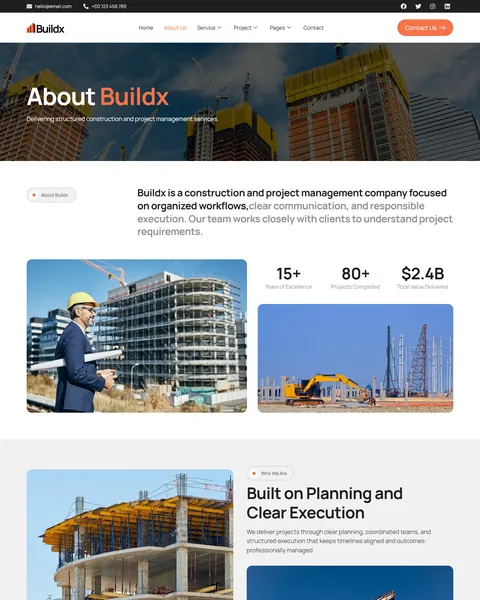
The About page shares your mission and vision and a “Built on Planning and Clear Execution” story. An Awards & Recognition timeline highlights milestones from 2016 to 2024, such as safety-first site management and quality control. This kind of track record matters to developers who are choosing a contractor for a large project.
An “Experienced Professionals Behind Every Project” section introduces eight team members by role. The roles range from project manager and project architect to structural engineer, electrical engineer and construction foreman. Showing the people on site tells clients their project will be handled by qualified hands.
Project Inquiry Form, FAQ and Insights
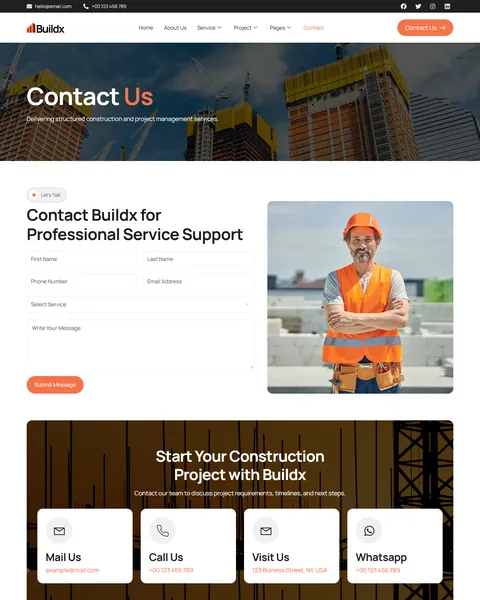
The Contact page form asks for first and last name, phone, email, the service needed and a message. A service dropdown lists eight services plus an Others option, so every inquiry arrives already sorted. Cards for email, phone, office address and WhatsApp sit beside it, and the same form appears on the About, FAQ and Service Details pages.
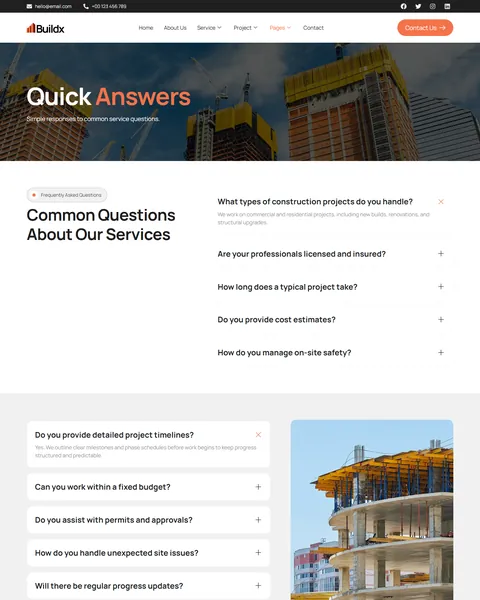
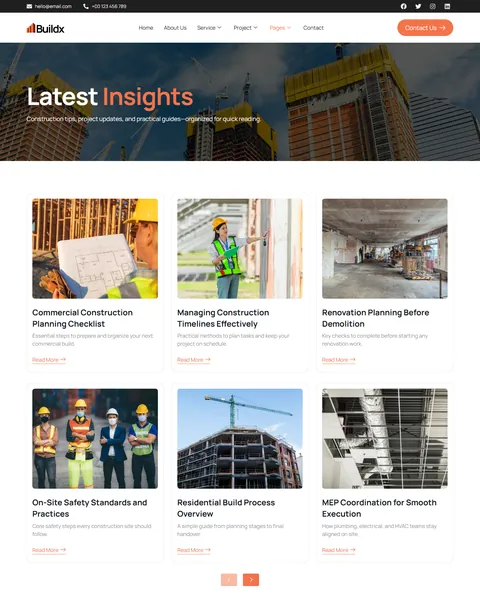
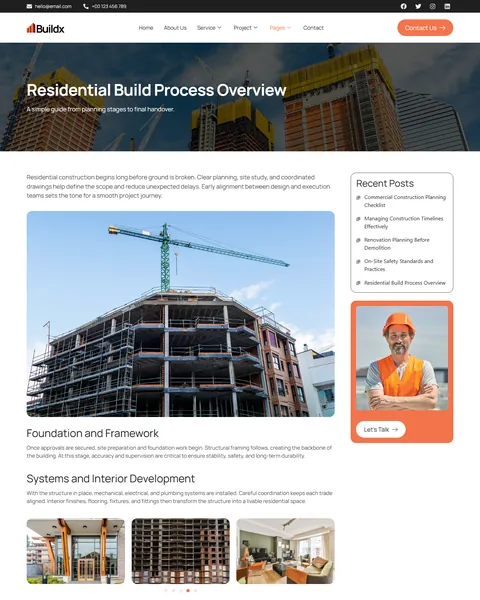
The FAQ page answers eleven questions about fixed budgets, permits, unexpected site issues, subcontractors and progress updates. The blog covers construction insights, such as a commercial planning checklist and on-site safety standards. The Single Post layout adds a photo gallery, recent posts and a “Let’s Talk” card.
Research-Driven Design for Construction Companies & Contractors
We looked at how developers, business owners and homeowners choose a construction company. They want proof of similar projects, clear processes and signs that the firm is licensed, safe and reliable. A construction site that looks dated or thin makes them worry about the work itself. Buildx’s design is built to look solid and professional from the first scroll.
Charcoal and safety orange. Deep charcoal frames the header, page banners and footer, giving the site a strong, industrial base. Safety orange marks rounded buttons and key words in headings, a color everyone links with construction sites, energy and action. Light gray sections keep services and FAQs easy to read.
Modern, solid type. Buildx uses Manrope throughout, with bold 72px hero headlines. Page titles split into white and orange, such as “About Buildx”, for a confident, branded feel on every inner page.
Real site photography. Photos show cranes, steel frames, finished buildings and workers in hard hats. They prove capability in a way words alone cannot.
Process made visible. The three-step workflow repeats across key pages, reassuring clients that every project follows a clear, documented method.
Numbers that build confidence. Counters for years, projects and total value delivered, plus project durations in case studies, speak the language of developers and procurement teams.
Quote requests everywhere. Contact Us, Get a Quote and Request a Consultation buttons appear across the site, and the inquiry form sits on four pages.
Solid on mobile. On phones, the menu folds into a toggle, the headline scales to about 42px and every section stacks without sideways scrolling.
Free Installation for This Construction Company Elementor Template Kit
We install Buildx on your WordPress site at no cost, set up exactly like the demo. Every plugin it uses is free, so there is nothing more to buy.
The demo photos come from Envato and are not included. Adding your own projects, services, team, awards and blog posts is not part of the free installation. If you want the full site built for you, see our done-for-you website service.
How to Install the Buildx Construction Template Kit
Installing it on your own? This video guides you through every import step.
Buildx vs Other Construction Elementor Template Kits
Comparing construction templates? Here is how Buildx compares with other popular contractor and building company kits online.
| Buildx | Other popular construction kits online* | |
|---|---|---|
| Free installation | Yes, included | No, not listed on any of them |
| Project filter by type | Yes, four categories | Not listed on any of them |
| Inquiry form with service dropdown | Yes | Not listed on any of them |
| Dedicated FAQ page | Yes, eleven questions | Listed on 2 of 3 |
| Last updated | Recently updated | January 2023, or not listed |
Why contractors choose Buildx:
- Portfolio that sells. Filterable projects and full case studies show your track record.
- Leads arrive sorted. Every inquiry names the service needed.
- Free plugins, free setup. No Pro license, and we install it for you.
*We compared Buildx with three popular construction company Elementor template kits that appear on Google’s first page, sold on ThemeForest, KitPapa and Etsy. Details come from each product page on October 24, 2026. Prices and features may change.
More Construction and Industry Templates by Raddito
Buildx is our construction and project management kit. If you lead with architecture, run an industrial business or specialize in roofing, compare these.
Arcton – architecture and construction Elementor template kit
Best for architects, design-build firms and engineers.
12 pages · Works with Elementor Free · Live Preview
Indux – industrial engineering Elementor template kit
Best for factories, manufacturers and engineering companies.
12 pages · Works with Elementor Free · Live Preview
Roofly – roof repair and replacement Elementor template kit
Best for roofing contractors and exterior specialists.
13 pages · Works with Elementor Free · Live Preview
Want more options? Browse our real estate and construction website templates or every WordPress Elementor template kit we offer.
Frequently Asked Questions
Is Buildx a WordPress theme?
No. Buildx is a construction company Elementor template kit, a set of ready pages you import into Elementor. It runs on the free Hello Elementor theme.
Does Buildx need Elementor Pro?
No. It works with Elementor Free and three other free plugins: MetForm for the forms, ElementsKit Lite and Jeg Kit for Elementor.
How do I add a new project case study?
Duplicate the Project Details page in Elementor, then update the photos, project facts and highlights. Add a card for it on the Projects page under the right filter tab.
Can clients request a quote online?
Yes. The inquiry form sends each request, with the selected service, to your email through MetForm. You can add fields such as budget range or project location if you need them.
Will Buildx work for a small renovation business?
Yes. Remove the services you don’t offer, keep the renovation and remodeling pages, and feature your own home projects. The layout suits small teams and large firms alike.
Can I change the orange to my brand color?
Yes. Buildx uses Elementor’s global colors and fonts, so you can change the brand color once and it updates across every page.
Is the installation really free?
Yes. We install Buildx exactly like the demo at no cost. Adding your own content is up to you, or our Done For You team can build the full site.