


MetroNest is a real estate agency Bricks Builder landing page for WordPress, made for property agencies, brokerages and agent teams that take bookings online. It is a single scrolling page with a search hero, sale and rent listings, a virtual tour, six services, agent profiles and a booking form.
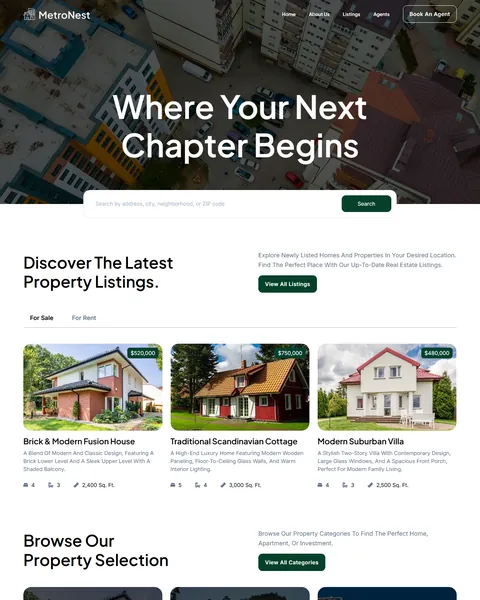
The demo opens with “Where Your Next Chapter Begins” over an aerial city view, with a location search bar below. A Book An Agent button stays in the header. Deep forest green, charcoal and crisp white give your agency a calm, premium and trustworthy look.
MetroNest’s consultation booking form is built with the free JetFormBuilder plugin, so install it before importing. Bricks itself is a premium theme and is not included.

Quick Template Details
- Template Name: MetroNest
- Template Type: Single landing page
- Required Theme: Bricks (Premium, not included)
- Plugin Used: JetFormBuilder (Free), for the booking form
- Landing Page Sections: 11
- Responsive: Desktop, Tablet, Mobile
- Coding Required: No
Who Is This Real Estate Agency Bricks Builder Landing Page For?
- Real estate agencies. For Sale and For Rent tabs show listings with prices, rooms and size.
- Agent teams in several states. The booking form lets clients pick a state, then an agent from that office.
- Property management firms. Property management with tenant screening and rent collection is one of six services.
- Investment advisors. Investment consultation and market analysis services are ready to edit.
- Agencies running listing ads. One page with a search bar, listings and booking works well for paid campaigns.
Need a full website with property and agent pages? Our Dwellzone real estate Bricks Builder template kit is a better fit.
See Every Section of the MetroNest Real Estate Agency Bricks Builder Landing Page
Click any section below to open it in the live demo.
A Search Hero and Sale or Rent Listings
Buyers and renters want to search right away. MetroNest’s hero places a location search bar over a wide aerial photo, under a short, hopeful headline about a new chapter in life.
“Discover The Latest Property Listings” switches between For Sale and For Rent tabs. Each card shows a photo, price badge, name, short description, bedrooms, bathrooms and square footage, with a View All Listings button above.
Property Categories and Why Choose Us
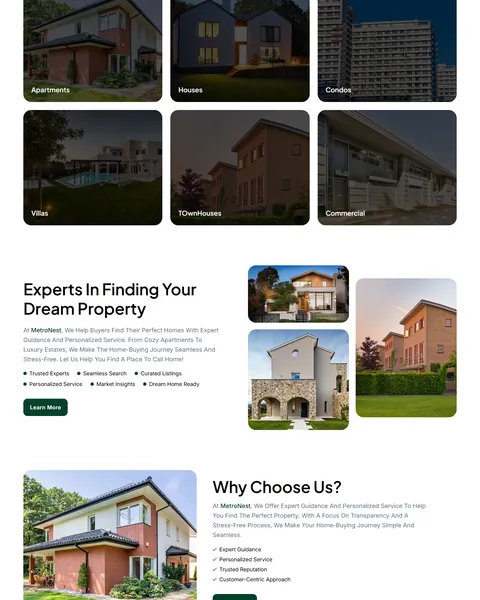
“Browse Our Property Selection” shows six large photo tiles for apartments, houses, condos, villas, townhouses and commercial property. Visitors can jump straight to the type they want.
“Experts In Finding Your Dream Property” and “Why Choose Us?” pair house photos with short checklists, such as trusted experts, curated listings, expert guidance and a customer-centric approach. Each section has a Learn More button. Replace the checklist points with the real strengths of your agency, such as local awards or years in the market.
Virtual Tour, Services and Agents
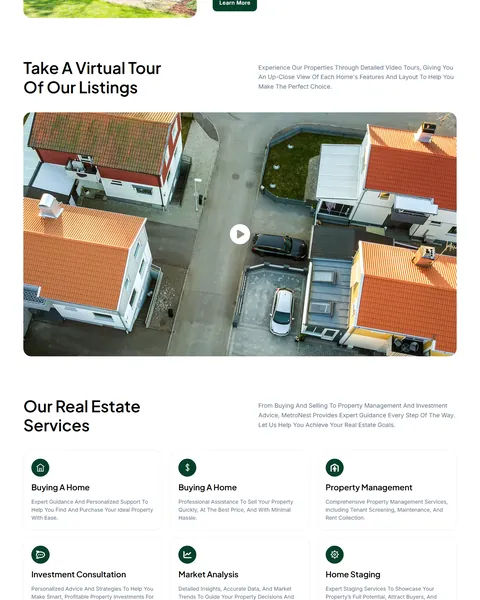
“Take A Virtual Tour Of Our Listings” shows a large aerial video thumbnail with a play button. Use it for a drone tour or a walkthrough of your best listing. Video tours help out-of-town buyers shortlist homes before they travel.
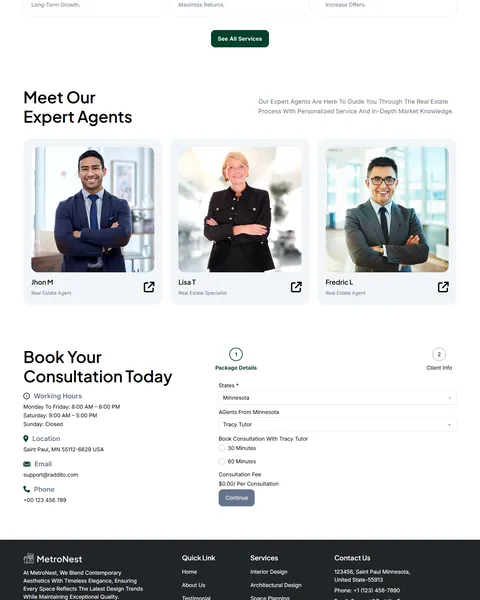
“Our Real Estate Services” lists six services with icons, covering buying, selling, property management, investment consultation, market analysis and home staging. “Meet Our Expert Agents” then introduces three agents with photos and profile links.
A Two-Step Consultation Booking Form
“Book Your Consultation Today” is the standout feature. The first step asks the client to pick a state, then an agent from that state, then a 30 or 60 minute session. A calculated field shows the consultation fee.
The second step collects name, email, phone, subject and message. Working hours, address, email and phone sit beside the form, and a dark footer adds quick links and a newsletter signup.
Research-Driven Design for Real Estate Agencies
We looked at how people choose a real estate agent online. They browse listings first, then look for a local expert they can trust. Many want to speak to a person before visiting homes, but they dislike phone tag. This real estate agency Bricks Builder landing page is designed to show listings quickly and introduce your agents. Clients can then book a time with the right agent in a few clicks.
Deep forest green and charcoal. Deep forest green, #06402B, marks buttons and accents and feels stable and premium, like money and well-kept gardens. Charcoal and slate gray keep text and the footer calm and readable.
Plus Jakarta Sans and Inter. Plus Jakarta Sans headlines are modern and elegant, with large hero type that feels confident. Inter keeps listing details and form labels sharp.
Architecture photography. Real houses, aerial views and dusk shots of homes help buyers picture the lifestyle. Replace them with your own listings for local relevance.
Booking without phone tag. A guided booking form with agent choice and session length turns interest into a confirmed appointment. Your agents start each call already knowing what the client needs.
Clear listing cards. Price, rooms and size appear on every card, so visitors can compare homes at a glance. Price badges on the photos help people filter by budget without reading.
Mobile friendly. On phones, the menu folds into a toggle, listing cards stack and the booking steps stay easy to complete. Many buyers browse homes on their phone, often while driving through a neighborhood they like.
What’s Included With the MetroNest Bricks Builder Landing Page
- MetroNest Bricks template. The full landing page as one JSON file.
- Theme Style file. Global colors, typography and buttons in one JSON file.
- Assets folder. The images and icons the page references.
- READ_ME guide and changelog. Setup steps and the version history.
Need help with the template file? Our product support team can help. If you would rather have the whole page built with your own listings and agents, see our done-for-you website service.
How to Import the MetroNest Real Estate Agency Bricks Builder Landing Page
Install and activate JetFormBuilder first, then follow these steps:
- In Bricks > Settings > General, enable custom breakpoints, SVG uploads and smooth scroll (CSS), then save.
- In the builder’s breakpoint settings, set Tablet Portrait to 1025px and Mobile Landscape to 768px.
- Go to Bricks > Templates and import the MetroNest template file.
- Import the Theme Style and set its condition to the entire website or individual pages.
- Insert the template into a page, check the booking form settings, then save and refresh.
The video below walks through a full Bricks import. It also shows WooCommerce steps, which you can skip because MetroNest does not use WooCommerce.
MetroNest vs Other Bricks Options for Real Estate Websites
Comparing ways to build a real estate agency landing page in Bricks? Here is how MetroNest compares with other popular options online.
| MetroNest | Other popular Bricks template libraries online* | |
|---|---|---|
| Complete real estate agency landing page | Yes, ready to import | No, all three are libraries of sections |
| Sale and rent listing tabs | Yes | Not mentioned on any of them |
| Agent consultation booking form | Yes, two steps | Not mentioned on any of them |
| Property category tiles and virtual tour | Yes | Not as a ready section on any of them |
Why agencies choose MetroNest:
- Booking built in. Clients pick an agent and a time slot.
- One free plugin. JetFormBuilder runs the booking form.
- One payment. $9.90 once, with no yearly plan.
*We compared MetroNest with two paid Bricks layout libraries and a free community Bricks template library, each listed on its own website. Details come from each product page on October 26, 2026. Prices and features may change.
More Real Estate Templates by Raddito
MetroNest is our real estate agency Bricks Builder landing page. For a full website or a different style, compare these Bricks options.
Dwellzone – real estate Bricks Builder template kit
Best for agencies with listings and agent teams.
12 pages · Bricks with ACF and JetFormBuilder · Live Preview
Hyperstate – realtor Bricks Builder landing page
Best for independent realtors and small teams.
Single landing page · No extra plugins · Live Preview
Nestpeak – property listing Bricks Builder landing page
Best for showcasing a few premium listings.
Single landing page · No extra plugins · Live Preview
Want more choices? Browse our real estate and construction website templates or every WordPress Bricks Builder template we sell.
Frequently Asked Questions
Is MetroNest a WordPress theme?
No. MetroNest is a real estate agency Bricks Builder landing page, a ready one-page design you import into Bricks. Bricks is the theme, and you need your own Bricks license.
Why does it need JetFormBuilder?
The two-step consultation booking form, with agent choice and a calculated fee, is a JetFormBuilder form. The rest of the page uses Bricks.
Can I change the states and agents in the form?
Yes. Edit the form fields in JetFormBuilder to list your own offices, agents and session lengths.
Can I charge for consultations?
The form shows a fee field. To take payment, connect JetFormBuilder to a payment gateway or link to your booking tool.
Does the property search work?
The hero search is a design element. Link it to your IDX or listings page, or replace it with your listing plugin’s search.
Can I show more listings?
Yes. Duplicate listing cards in Bricks, or connect them to a property post type with a Bricks query loop.
Should I replace the sample agents and listings?
Yes, please. The agent names, photos, prices and addresses are placeholders, so use only your own real team and properties.