


Nestpeak is a property listing Bricks Builder landing page for WordPress, made for real estate agencies with many listings, property marketplaces, multi-city brokers and new home sales teams. It is a single scrolling page with a search hero, filterable listings, city browsing, a buying process and reviews. Featured homes, a team and a contact form follow.
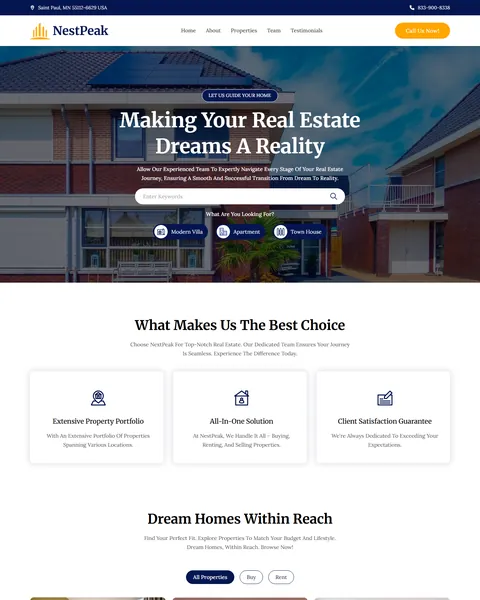
The demo opens with “Making Your Real Estate Dreams A Reality” over a modern brick house with solar panels. A rounded search bar sits in the middle, with quick buttons for modern villas, apartments and town houses. Deep navy, warm orange and crisp white give your agency a premium, confident and welcoming look.
Nestpeak is built only with native Bricks elements, including its listing filter tabs, contact form and newsletter field, so no extra plugins are required. Bricks itself is a premium theme and is not included.

Quick Template Details
- Template Name: Nestpeak
- Template Type: Single landing page
- Required Theme: Bricks (Premium, not included)
- Required Plugins: None
- Landing Page Sections: 10, plus a mobile menu popup
- Responsive: Desktop, Tablet, Mobile
- Coding Required: No
Who Is This Property Listing Bricks Builder Landing Page For?
- Agencies with many listings. A grid of property cards with Buy, Rent and Sell tabs shows a large portfolio.
- Property marketplaces. A search bar and quick property type buttons help visitors start browsing at once.
- Multi-city brokers. A city slider and a trending locations list cover many markets.
- New home sales teams. Featured properties and a 300+ properties card highlight new developments.
- Agencies with a sales team. Four team cards introduce support, marketing and design staff.
Need a full real estate website with listing detail pages? Our Dwellzone real estate Bricks Builder template kit is a better fit.
See Every Section of the Nestpeak Property Listing Bricks Builder Landing Page
Click any section below to open it in the live demo.

A Search Hero and Filterable Listings
Home buyers come to search, not to read. Nestpeak puts a rounded search bar right in the hero, with quick buttons for villas, apartments and town houses. Your address, phone and a Call Us Now button stay in the header.
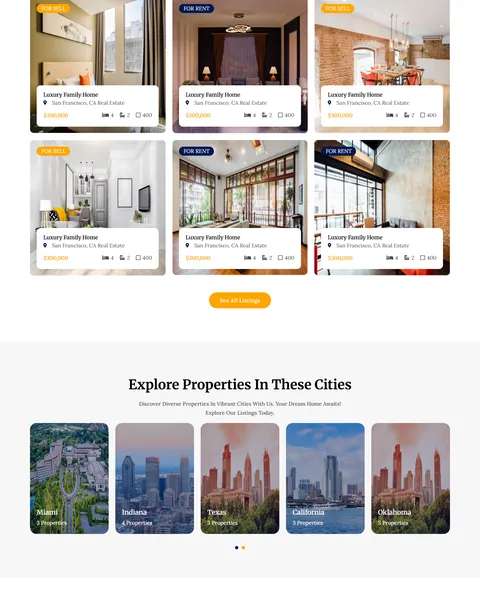
“What Makes Us The Best Choice” adds three cards on your portfolio, one-stop service and client care. “Dream Homes Within Reach” then shows property cards with photos, price, beds, baths and size. All, Buy, Rent and Sell tabs filter the grid, and a See All Listings button sits below.
Cities, Process and Customer Reviews
“Explore Properties In These Cities” shows city photos in a slider, each with a count of listings. Visitors moving to a new area can jump straight to the right market.
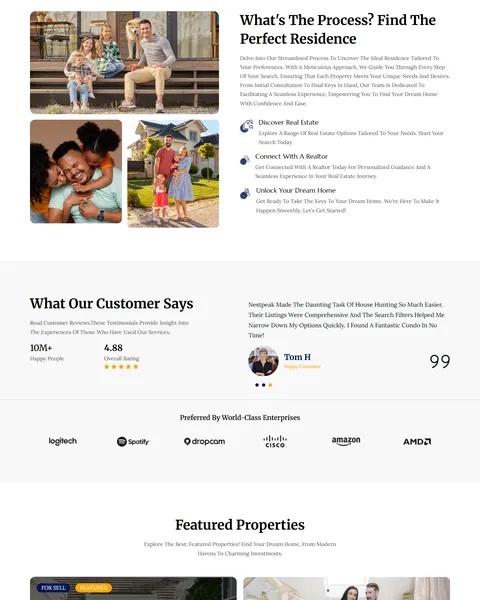
“What’s The Process?” explains buying in three steps: discover homes, connect with a realtor and get the keys, beside photos of happy families. “What Our Customer Says” shows a reviews slider with a happy clients counter and an overall rating, followed by a partner logo strip.
Featured Properties, Team and Locations
“Featured Properties” spotlights a large listing in a slider, next to a video tile and a navy card counting your total properties. Use it for new launches or price drops.
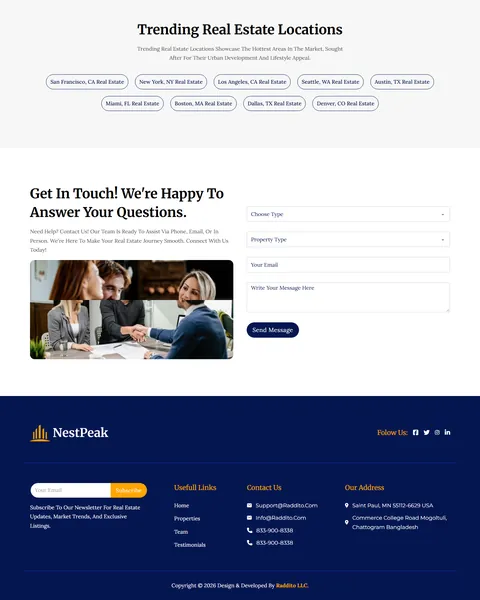
“The Brains Behind The Success” introduces four team members on bright colored backgrounds. “Trending Real Estate Locations” lists popular city searches as rounded tags, which can link to filtered listings.
Contact Form and Footer
“Get In Touch! We’re Happy To Answer Your Questions” pairs a photo of an agent meeting clients with a form. Visitors choose buy or rent and a property type, then add their email and message.
A navy footer adds a newsletter field, useful links, contact details, social icons and two office addresses, which suits agencies with more than one branch.
Research-Driven Design for Real Estate Agencies
We looked at how people search for property online. They want to search and filter first, then compare photos, prices and locations, and only then contact an agent. Clear prices, many photos and a sense of the local area keep them browsing. This property listing Bricks Builder landing page is designed to put search and listings first, with trust and contact details close behind.
Deep navy and warm orange. Deep navy, #051650, fills the header bar, footer and key cards and feels established and trustworthy. Warm orange, #FFA500, marks buttons, prices and tags like a sold sign. Light gray sections keep long listing grids easy on the eyes.
Marcellus and Montserrat. Marcellus serif headlines feel classic and upscale, suited to property. Montserrat keeps prices, room counts and form labels clean and readable.
Large, bright property photos. Every listing card leads with a big photo, because buyers decide in seconds whether a home is worth a click. Use your own professional listing photos.
Key facts on every card. Price, beds, baths and size appear on each card, so visitors can compare homes without opening every listing. A sale or rent badge shows the deal type at a glance.
Local area focus. City and trending location sections help people who are new to an area find where they want to live. They also give you natural places to link to neighborhood guides.
Mobile friendly. On phones, the menu opens as a popup, listing cards stack and the search bar stays easy to use. Most property searches now start on a phone.
What’s Included With the Nestpeak Bricks Builder Landing Page
- Nestpeak Bricks templates. The full landing page and a mobile menu popup as JSON files.
- Theme Style file. Global colors, typography and buttons in one JSON file.
- Assets folder. The images and icons the page references.
- READ_ME guide and changelog. Setup steps and the version history, with the latest update on July 29, 2025.
Need help with the template files? Our product support team can help. If you would rather have the whole page built with your own listings and branding, see our done-for-you website service.
How to Import the Nestpeak Property Listing Bricks Builder Landing Page
Nestpeak only needs Bricks. Follow these steps:
- In Bricks > Settings > General, enable custom breakpoints, SVG uploads and smooth scroll (CSS), then save.
- In the builder’s breakpoint settings, set Tablet Portrait to 1025px and Mobile Landscape to 768px.
- Go to Bricks > Templates and import the Nestpeak and mobile menu templates.
- Import the Theme Style and set its condition to the entire website or individual pages.
- Link the mobile menu popup to the bar icon and its close icon, then save and refresh.
The video below walks through a full Bricks import. It also shows WooCommerce steps, which you can skip because Nestpeak does not use WooCommerce.
Nestpeak vs Other Bricks Options for Real Estate Websites
Comparing ways to build a property listing page in Bricks? Here is how Nestpeak compares with other popular options online.
| Nestpeak | Other popular Bricks template libraries online* | |
|---|---|---|
| Complete property listing landing page | Yes, ready to import | No, all three are libraries of sections |
| Listing grid with Buy, Rent and Sell tabs | Yes | Not mentioned on any of them |
| City browsing and trending locations | Yes | Not as a ready section on any of them |
| Same design also sold for Elementor | Yes | No, not on any of them |
Why real estate agencies choose Nestpeak:
- Made for listings. Search, filters, cities and a lead form are ready.
- Pure Bricks. No add-ons, so your page stays fast.
- One payment. $8.97 once, with no yearly plan.
*We compared Nestpeak with two paid Bricks layout libraries and a free community Bricks template library, each listed on its own website. Details come from each product page on October 26, 2026. Prices and features may change.
More Real Estate Templates by Raddito
Prefer Elementor? Nestpeak is also available as a property listing Elementor landing page with the same look. For other real estate businesses, compare these Bricks options.
Dwellzone – real estate Bricks Builder template kit
Best for agencies with listings and agent teams.
12 pages · Bricks with ACF and JetFormBuilder · Live Preview
Hyperestate – realtor Bricks Builder landing page
Best for independent realtors and small teams.
Single landing page · No extra plugins · Live Preview
MetroNest – real estate agency Bricks Builder landing page
Best for agencies that want a one-page site.
Single landing page · Bricks · Live Preview
Want more choices? Browse our real estate and construction website templates or every WordPress Bricks Builder template we sell.
Frequently Asked Questions
Is Nestpeak a WordPress theme?
No. Nestpeak is a property listing Bricks Builder landing page, a ready one-page design you import into Bricks. Bricks is the theme, and you need your own Bricks license.
Do I need any plugins besides Bricks?
No. The tabs, sliders and forms all use built-in Bricks elements, so there is nothing else to install.
Are the listings dynamic?
The demo cards are static. You can connect them to a custom post type with a Bricks query loop, or link them to your MLS or IDX listings.
Does the search bar filter properties?
Point the search form to your listings page or IDX search so visitors land on real results.
Can I add more cities?
Yes. Duplicate a city card in the slider and change the photo, name and listing count.
Is it suitable for a rental agency?
Yes. Use the Rent tab and the contact form’s buy or rent choice to focus on rental listings.
Should I replace the sample listings and team?
Yes, please. The listings, prices, team, reviews, counters and partner logos are placeholders, so use only your own real details.