


Hyperstate is a realtor Bricks Builder landing page for WordPress, made for independent real estate agents, small agencies and property sellers who want a sleek one-page site. It is a single scrolling page with a property search hero, featured listings, a founder quote, a buyer FAQ, blog posts and a final search call to action.
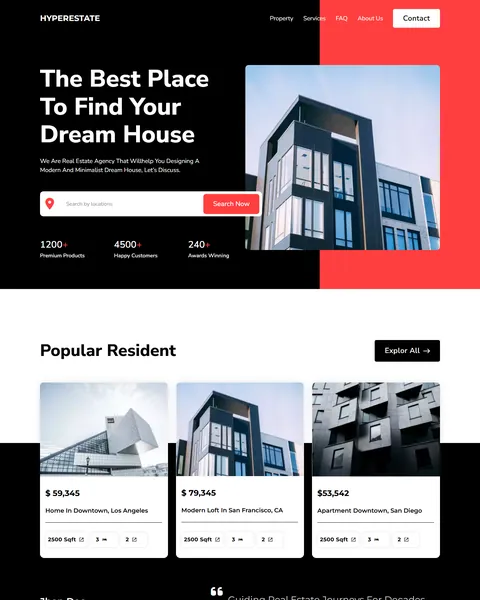
The demo opens with “The Best Place To Find Your Dream House” on a black and coral hero beside a tall modern building. A location search bar with a Search Now button sits below. Bold black, bright coral red and clean white give your brand a sharp, modern and confident look.
Hyperstate is built only with native Bricks elements, so no extra plugins are required. Bricks itself is a premium theme and is not included.

Quick Template Details
- Template Name: Hyperstate
- Template Type: Single landing page
- Required Theme: Bricks (Premium, not included)
- Required Plugins: None
- Landing Page Sections: 6
- Responsive: Desktop, Tablet, Mobile
- Coding Required: No
Who Is This Realtor Bricks Builder Landing Page For?
- Independent realtors. A founder quote and a short listing grid suit an agent who sells under their own name.
- Small real estate agencies. Counters for listings, happy customers and awards build trust fast.
- Luxury and modern property sellers. A black and white design with tall architecture photos fits upscale homes and lofts.
- Agents running listing ads. One focused page works well as the landing spot for social and search ads.
- Real estate investors and coaches. Blog cards about investing and wealth creation suit an educational brand.
Need a full agency website with property and agent pages? Our Dwellzone real estate Bricks Builder template kit is a better fit.
See Every Section of the Hyperstate Realtor Bricks Builder Landing Page
Click any section below to open it in the live demo.
A Search-First Hero With Trust Counters
Home buyers arrive with one question: do you have what I want? Hyperstate puts a location search bar right in the hero, under a big white headline and a short line about modern, minimalist homes.
Three counters for premium listings, happy customers and awards sit at the bottom of the hero. A coral block behind the building photo adds energy and draws the eye to the search button. Replace the counters with your real sales numbers and years in business.
Featured Listings and a Founder Quote
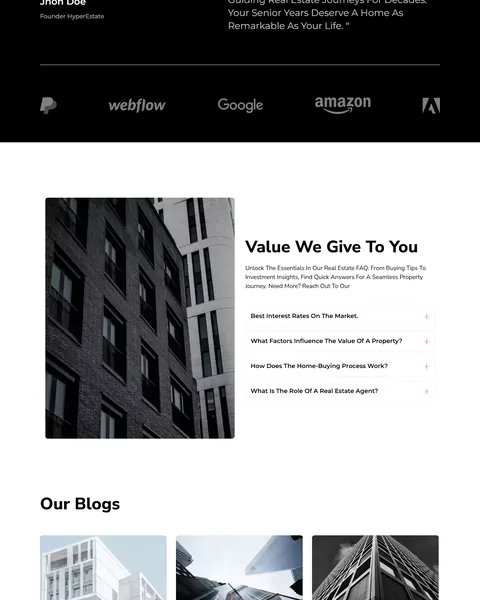
“Popular Resident” shows three featured homes in cards, each with a photo, price, title and city, square footage, bedrooms and bathrooms. An Explore All button leads to your full listings or MLS search.
A black band then shares a short founder quote with a portrait, followed by a row of partner logos. A personal message from the lead agent turns a list of properties into a business people feel they can trust.
A Buyer FAQ and Real Estate Blog
“Value We Give To You” combines a tall building photo with an accordion of buyer questions. It covers interest rates, what affects a property’s value, how the home-buying process works and what a real estate agent does.
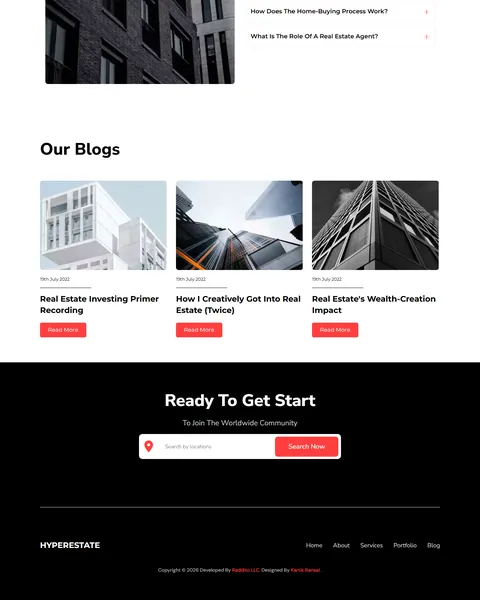
“Our Blogs” shows three article cards with dates and Read More buttons, on topics like real estate investing and wealth creation. Answering common questions builds trust and gives search engines more reasons to show your site.
A Final Search Call to Action
The closing banner repeats the location search on a black background. It invites visitors to begin their search one more time before they leave, which catches people who read everything first.
A simple footer follows with your logo and links to home, about, services, portfolio and blog. The page stays short and focused, so visitors reach the search or contact button quickly. Add your phone number or a Book a Viewing button here if most of your leads prefer to call.
Research-Driven Design for Realtors
We looked at how home buyers use realtor websites. They want to search right away, scan a few listings and get a sense of the agent before calling. Long pages with too much text slow them down. Sellers also judge an agent by how their website looks, because it hints at how their own home will be marketed. This realtor Bricks Builder landing page is designed to put search, listings and a personal touch on one short, stylish page.
Black, white and coral red. Black and white sections feel premium and architectural, like a modern home. Bright coral red, #FF3F3F, marks the search buttons and accent blocks, so the main action always stands out.
Nunito Sans throughout. Nunito Sans has rounded, friendly letter shapes. In heavy weights it gives headlines a bold, modern feel, while lighter weights keep listing details and FAQ answers easy to read.
Architecture-led photography. Tall black-and-white building shots give the page a clean, editorial style. Swap in photos of your own listings or local skyline for a stronger local identity.
Search twice. A search bar appears in the hero and again at the end. Visitors who scroll the whole page still have an obvious next step, without scrolling back to the top.
Personal trust. A founder quote and portrait add a human face, which matters in a business built on relationships and referrals. Buyers often choose the agent first and the house second.
Mobile friendly. On phones, the menu folds into a toggle, listing cards stack and the search bar stays full width. Many buyers browse homes on their phone in spare moments.
What’s Included With the Hyperstate Bricks Builder Landing Page
- Hyperstate Bricks template. The full landing page as one JSON file.
- Theme Style file. Global colors, typography and buttons in one JSON file.
- Assets folder. The icons and images the page references.
- READ_ME guide and changelog. Setup steps and the version history, with the latest update on July 29, 2025.
Need help with the template file? Our product support team can help. If you would rather have the whole page built with your own listings and branding, see our done-for-you website service.
How to Import the Hyperstate Realtor Bricks Builder Landing Page
Hyperstate needs nothing besides Bricks. Follow these steps:
- In Bricks > Settings > General, enable custom breakpoints, SVG uploads and smooth scroll (CSS), then save.
- In the builder’s breakpoint settings, set Tablet Portrait to 1025px and Mobile Landscape to 768px.
- Go to Bricks > Templates and import the Hyperstate template file.
- Import the Theme Style and set its condition to the entire website or individual pages.
- Insert the template into a page, then save and refresh.
The video below walks through a full Bricks import. It also shows WooCommerce steps, which you can skip because Hyperstate does not use WooCommerce.
Hyperstate vs Other Bricks Options for Realtor Websites
Comparing ways to build a realtor landing page in Bricks? Here is how Hyperstate compares with other popular options online.
| Hyperstate | Other popular Bricks template libraries online* | |
|---|---|---|
| Complete realtor landing page | Yes, ready to import | No, all three are libraries of sections |
| Featured listing cards with home details | Yes | Not as a ready section on any of them |
| Buyer FAQ accordion | Yes | Not mentioned on any of them |
| Same design also sold for Elementor | Yes | No, not on any of them |
Why realtors choose Hyperstate:
- Short and stylish. Search, listings and trust on one page.
- Pure Bricks. No add-ons, so your page stays fast.
- One payment. $8.97 once, with no yearly plan.
*We compared Hyperstate with two paid Bricks layout libraries and a free community Bricks template library, each listed on its own website. Details come from each product page on October 26, 2026. Prices and features may change.
More Real Estate Templates by Raddito
Prefer Elementor? Hyperstate is also available as a realtor Elementor landing page with the same look. If you need a full website or a different style, compare these Bricks options.
Dwellzone – real estate Bricks Builder template kit
Best for agencies with listings and agent teams.
12 pages · Bricks with ACF and JetFormBuilder · Live Preview
Nestpeak – property listing Bricks Builder landing page
Best for showcasing a few premium listings.
Single landing page · No extra plugins · Live Preview
MetroNest – real estate agency Bricks Builder landing page
Best for agencies that want a one-page site.
Single landing page · Bricks · Live Preview
Want more choices? Browse our real estate and construction website templates or every WordPress Bricks Builder template we sell.
Frequently Asked Questions
Is Hyperstate a WordPress theme?
No. Hyperstate is a realtor Bricks Builder landing page, a ready one-page design you import into Bricks. Bricks is the theme, and you need your own Bricks license.
Do I need any plugins besides Bricks?
No. Every section, including the FAQ accordion, uses built-in Bricks elements, so there is nothing else to install.
Does the property search work?
The search bar is a design element. Link it to your IDX or MLS search page, or replace it with your listing plugin’s search form.
Can I show more than three listings?
Yes. Duplicate the listing cards in Bricks, or connect them to a property post type with a Bricks query loop.
Can I add a contact form?
Yes. Add a Bricks form element to any section, such as a “Book a viewing” form under the listings.
Is it suitable for a property developer?
Yes. Use the listing cards for units in your project and the FAQ for buyer questions about pricing and handover.
Should I replace the demo logos and figures?
Yes, please. The brand logos, counters, prices and founder name are placeholders, so use only your own real details.