


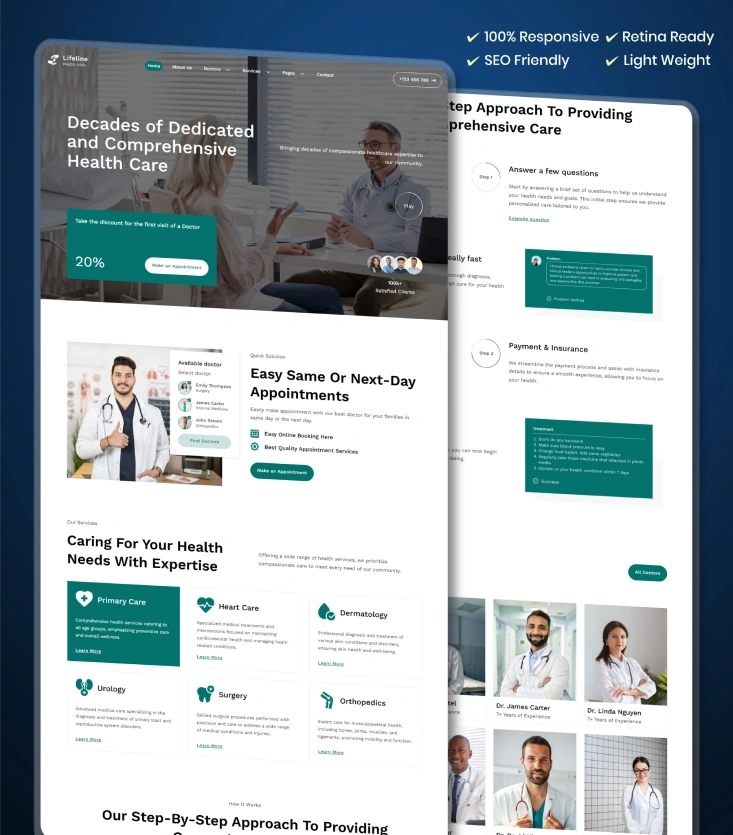
LifeLine is a medical clinic Elementor landing page for WordPress, designed for family clinics, multi-specialty practices, urgent care centers and private doctors who take appointments. It is a single scrolling page with an available-doctor card, six services, a four-step care process, a team of eight doctors, patient reviews and an appointment form.
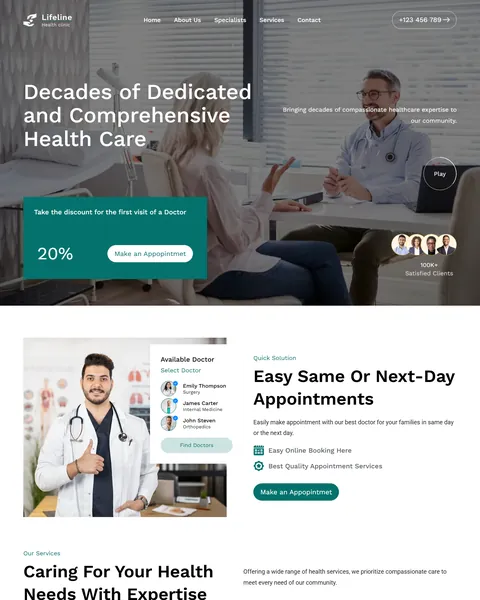
The demo opens with the headline “Decades of Dedicated and Comprehensive Health Care” over a photo of a doctor talking with a patient. A teal box offers 20% off the first visit with a Make an Appointment button, beside a 100K+ satisfied clients badge. Deep teal and clean white give your clinic a calm, modern and trustworthy look.
LifeLine runs on free plugins only: Elementor, MetForm and ElementsKit Lite. No Elementor Pro is needed, and our team installs it for you at no cost.
Quick Template Details
- Template Name: LifeLine
- Template Type: Single landing page, 9 sections
- Required Theme: Hello Elementor (Free)
- Elementor Pro Required: No
- Premium Plugins Required: No
- Forms: MetForm
- Responsive: Desktop, Tablet, Mobile
- Coding Required: No
Who Is This Medical Clinic Landing Page For?
- Family and primary care clinics. Primary care leads the services, and same-day booking suits everyday health needs.
- Multi-specialty practices. Service cards and doctor profiles cover surgery, dermatology, orthopedics and more.
- Urgent and walk-in care centers. The “Easy Same Or Next-Day Appointments” message speaks to patients who need help soon.
- Private doctors and small practices. One page gives a small team a professional website without a big build.
- Clinics running ads or promotions. A first-visit discount box turns campaign traffic into bookings.
Need a full multi-page website for a medical clinic instead? Our Clinara medical clinic Elementor template kit is a better fit.
See Every Section of the LifeLine Medical Clinic Landing Page
Click any section below to open it in the live demo.
An Available-Doctor Card for Quick Booking
Most patients visit a clinic website for one reason: to see a doctor soon. LifeLine answers that right after the hero. An “Available Doctor” card lists doctors with their specialties, such as surgery, internal medicine and orthopedics, with a Find Doctors button below.
Beside it, an “Easy Same Or Next-Day Appointments” section promises fast access, with points for easy online booking and quality appointment services. A Make an Appointment button sits underneath. Link the buttons to your booking system or the form at the bottom of the page, and update the doctor list to show who is available this week.
Six Medical Services in Clean Cards
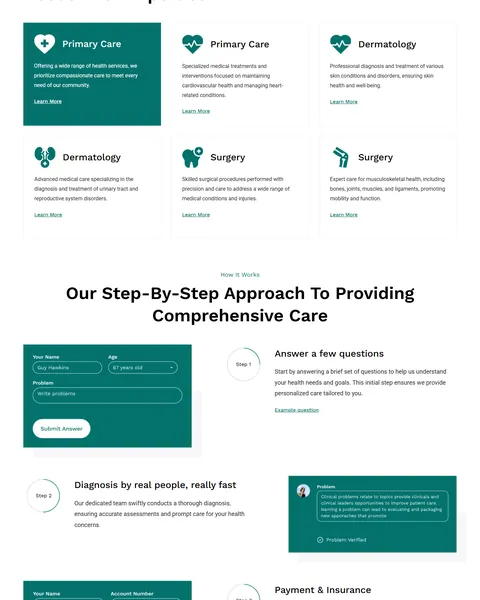
The “Caring For Your Health Needs With Expertise” section shows six service cards with teal icons and Learn More links. The descriptions cover primary care, heart care, dermatology, urology, surgery and orthopedics, so patients can quickly see the range of care you offer.
One card is highlighted in teal to draw attention to your main service. Rename the cards, update the icons and link each one to a detailed service page as your site grows. Clear service names help patients who search by condition find the right doctor faster.
A Four-Step Care Process
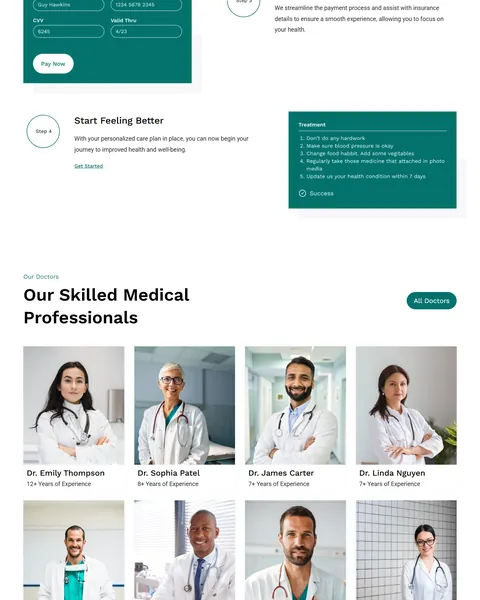
New patients often feel unsure about what happens after they reach out. The “Our Step-By-Step Approach To Providing Comprehensive Care” section explains it in four steps. They are answering a few questions, diagnosis by real people, payment and insurance, and starting to feel better.
Each step comes with a small illustrated card, such as a short health questionnaire, a verified problem note or a treatment checklist. These visuals make the journey feel simple and organized, and a Get Started button invites visitors to take the first step.
Eight Doctors, Patient Reviews and an Appointment Form
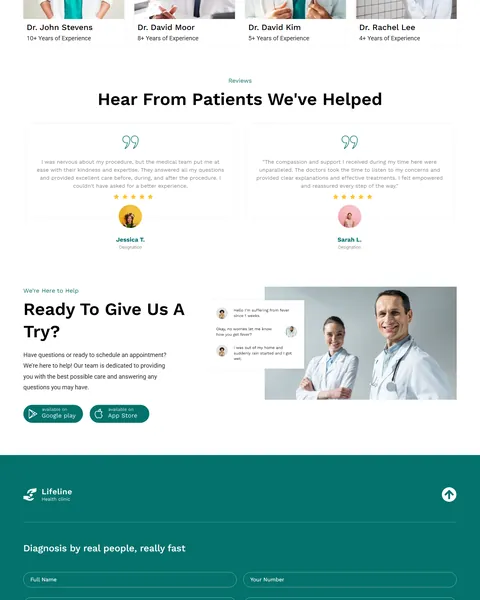
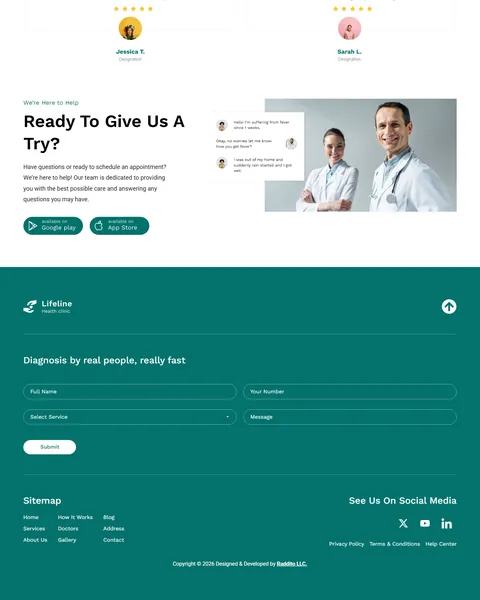
An “Our Skilled Medical Professionals” section introduces eight doctors with portraits and years of experience, plus an All Doctors button. A “Hear From Patients We’ve Helped” slider follows, with star ratings and patient photos.
A “Ready To Give Us A Try?” section adds a chat-style image and Google Play and App Store buttons for clinics with a patient app. The teal footer then holds the appointment form, which asks for full name, phone number, the service needed and a message. Sitemap and social links complete the page.
Research-Driven Design for Medical Clinics
We looked at how patients choose a medical clinic online. Most are feeling unwell or worried about a family member, and they want to see a qualified doctor quickly. They look for available appointments, the services offered, real doctors with experience and an easy way to book. This medical clinic Elementor landing page is designed to feel calm and dependable while keeping the path to an appointment short.
Deep teal and white. Deep teal is a classic healthcare color that feels clean, calm and professional. It marks the offer box, the highlighted service, the process cards and the footer. Plenty of white space keeps the page bright and easy to scan, which helps visitors who arrive stressed.
Work Sans throughout. LifeLine uses the clean, friendly Work Sans font for every heading and paragraph. Large, medium-weight headlines feel modern and approachable, and body text stays readable on any screen.
Real doctors, real faces. Smiling doctors in white coats appear in the booking card, the team grid and the final section. Seeing the people behind the care builds confidence before the first visit.
Proof right away. A satisfied clients badge with patient faces sits in the hero, and star-rated reviews appear later on. Replace both with your own real numbers and feedback before launch.
Booking in every view. A phone button stays in the header, and appointment buttons repeat through the page, ending with the footer form.
Mobile friendly. On phones, the menu folds into a toggle, headlines scale down and every section stacks without sideways scrolling.
Free Installation for This Medical Clinic Elementor Landing Page
We install LifeLine on your WordPress site free of charge, set up exactly like the demo. Every plugin it uses is free, so there is nothing more to buy.
The demo photos come from Envato and are not included. Adding your own doctors, services and reviews, or connecting an online booking or patient portal system, is not part of the free installation. If you want the full site built for you, see our done-for-you website service.
How to Install the LifeLine Medical Clinic Landing Page
Prefer to set it up yourself? This video shows each step of the import.
LifeLine vs Other Medical Clinic Elementor Templates
Comparing medical clinic templates? Here is how LifeLine compares with other popular medical clinic templates online.
| LifeLine | Other popular medical clinic templates online* | |
|---|---|---|
| Cost to get started | $9.90 one-time | $19.99 to $29 one-time |
| Free installation | Yes, included | No, not listed on any of them |
| One focused page for local ads | Yes | No, all three are multi-page kits |
| Works without Elementor Pro | Yes | Not all of them, one needs it |
| Available-doctor card with a Find Doctors button | Yes | Not described on any of them |
Why clinics choose LifeLine:
- Built for appointments. Doctors, services and booking are ready on one page.
- Calm and dependable. A clean teal design reassures worried patients.
- Free plugins, free setup. $9.90 once, installed for you.
*We compared LifeLine with three popular medical clinic Elementor templates that appear on Google’s first page, sold on ThemeForest, KitPapa and Darrel Wilson. Details come from each product page on October 26, 2026. Prices and features may change.
More Medical and Healthcare Templates by Raddito
LifeLine is our medical clinic Elementor landing page. If you need a full clinic website, offer online consultations or run a larger healthcare center, compare these.
Clinara – medical clinic Elementor template kit
Best for medical clinics that need a full website.
11 pages · Works with Elementor Free · Live Preview
Easycare – telemedicine Elementor landing page
Best for online doctor and telehealth services.
Single landing page · Needs Elementor Pro · Live Preview
Healvia – healthcare Elementor template kit
Best for healthcare centers with many departments.
11 pages · Needs Elementor Pro · Live Preview
Want more choices? Browse our health and medical website templates or every WordPress Elementor template we sell.
Frequently Asked Questions
Is LifeLine a WordPress theme?
No. LifeLine is a medical clinic Elementor landing page, a ready one-page design you import into Elementor. It runs on the free Hello Elementor theme.
Do I need Elementor Pro for LifeLine?
No. LifeLine works with the free Elementor plugin plus the free MetForm and ElementsKit Lite plugins. You don’t need to buy anything extra.
Where do appointment requests go?
The MetForm appointment form sends each request to your email, and MetForm also saves entries in your WordPress dashboard.
Can I add more services to the form?
Yes. Edit the Select Service menu in MetForm to list every service your clinic offers.
Can I remove the app download buttons?
Yes. If your clinic has no patient app, delete the Google Play and App Store buttons or replace them with a phone button.
Should I replace the demo doctors and reviews?
Yes, please. The doctor names, experience, reviews and client numbers are samples, so use your own real details.
Is the installation really free?
Yes. We install LifeLine exactly like the demo at no cost. Adding your own content is up to you, or our Done For You team can build the full site.