


Easycare is a telemedicine Elementor landing page for WordPress, designed for telehealth providers, online doctor services and virtual clinics. It is a single scrolling page with 8 sections, including a symptom self-check, a three-step booking flow, services, FAQs and a contact form.
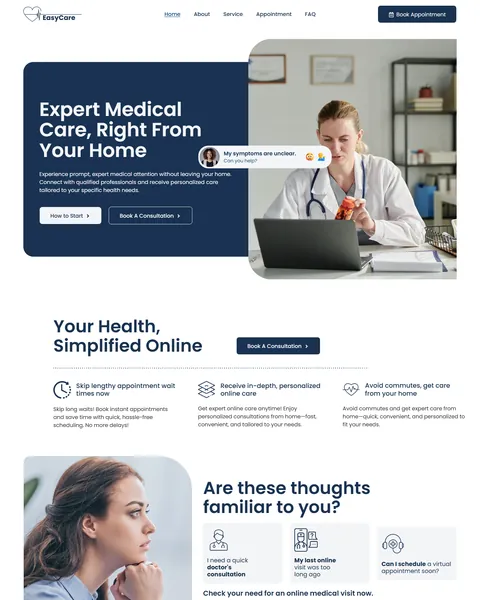
The demo opens with the headline “Expert Medical Care, Right From Your Home” on a deep navy card beside a photo of a smiling doctor at a laptop. A small chat bubble asks, “My symptoms are unclear. Can you help?”, with How to Start and Book A Consultation buttons below. Deep navy, soft gray and clean white give your service a calm, trustworthy and professional look.
Easycare is built with Elementor. Easycare needs Elementor Pro, and we don’t provide paid plugins, so please have your Pro license ready before we begin. Our team installs the page for you at no cost.

Quick Template Details
- Template Name: Easycare
- Template Type: Single landing page, 8 sections
- Required Theme: Hello Elementor (Free)
- Elementor Pro Required: Yes
- Premium Plugins Required: Yes, Elementor Pro
- Forms: Elementor Pro Forms
- Responsive: Desktop, Tablet, Mobile
- Coding Required: No
Who Is This Telemedicine Landing Page For?
- Telehealth startups. Virtual visits, a booking flow and a symptom self-check are ready for launch.
- Online doctor and urgent care services. Copy about skipping wait times and avoiding commutes speaks to busy patients.
- Clinics adding video visits. A focused page lets an existing practice promote its new online service.
- Specialist networks. A section on board-certified specialists suits services that connect patients with experts.
- Chronic care and follow-up programs. Personalized plans and health education support ongoing virtual care.
Need a full multi-page telemedicine website with doctor and service pages instead? Our TelMed telemedicine Elementor template kit is a better fit.
See Every Section of the Easycare Telemedicine Landing Page
Click any section below to open it in the live demo.
A Symptom Self-Check That Starts the Visit
Many people are not sure whether they need a doctor at all. Easycare meets them with an “Are these thoughts familiar to you?” section. Three thought cards, such as “I need a quick doctor’s consultation” and “Can I schedule a virtual appointment soon?”, mirror what visitors are thinking.
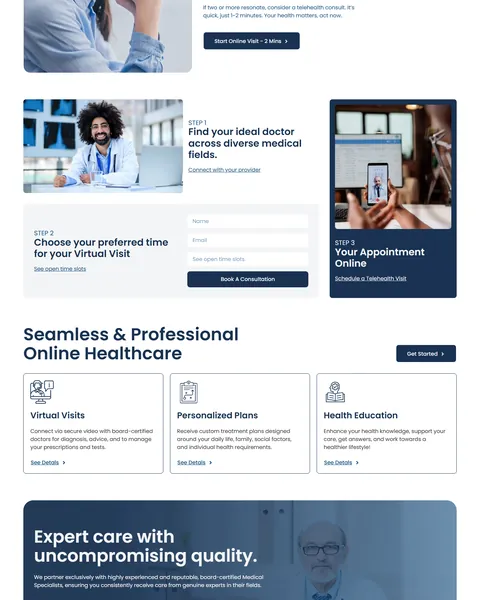
A short note suggests a telehealth consult if two or more resonate, and a “Start Online Visit – 2 Mins” button turns that moment of recognition into action. This gentle, personal approach converts better than a plain list of services, because it speaks to the visitor’s own situation.
A Three-Step Booking Flow
Online visits only work when booking feels simple. Easycare lays out the process in three clear cards. Step 1 helps patients find the right doctor across medical fields, with a small form for name and email. Step 2 lets them choose a preferred time, and Step 3 confirms the appointment online.
Each step pairs a short heading with a photo or a booking button, so the path from interest to appointment is obvious. Connect the form and buttons to your scheduling or telehealth platform, and patients can book a video visit in minutes.
Services and a Specialist Promise
A “Professional Online Healthcare” section presents three services in clean cards: virtual visits over secure video, personalized care plans and health education. Each card has an icon, a short description and a link to more details.
A wide navy band then explains your quality promise: patients are seen by experienced, board-certified specialists rather than assistants. Earlier on the page, a “Your Health, Simplified Online” section highlights three benefits: skip long waits, get personalized online care and avoid commutes. Together they answer why patients should choose your service.
FAQs and a Contact Form
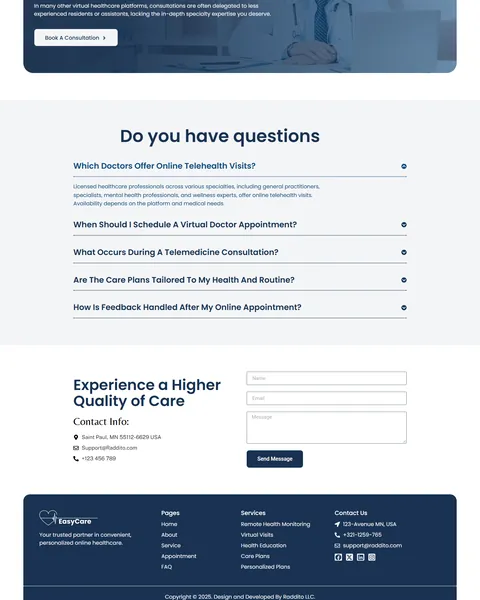
Telehealth is still new for many patients, so questions are common. Easycare’s FAQ section answers five of them in a tidy accordion. It explains which doctors offer online visits, when to book one, what happens during a consultation, how care plans are personalized and how feedback works.
An “Experience a Higher Quality of Care” section closes the page with your address, email and phone beside a short message form. A navy footer adds page links, a list of services and your contact details, so patients can reach you however they prefer.
Research-Driven Design for Telemedicine and Online Doctors
We looked at how patients choose an online doctor. Most want fast access to a qualified professional without traveling or waiting. They need to trust that the service is safe and private, understand how a video visit works and see a simple way to book. Many are already worried about a symptom, so a calm, clear page matters. This telemedicine Elementor landing page is designed to feel reassuring and professional while moving visitors to a booking quickly.
Deep navy and soft gray. Deep navy suggests trust, expertise and privacy, qualities patients look for in a medical service. Soft gray and white sections keep the page light and easy to read, and navy buttons stand out without feeling loud.
Poppins throughout. Easycare uses the friendly, geometric Poppins font for headings and text. It is clear on small screens and feels modern, which suits a digital healthcare brand.
Warm, human photography. Photos show friendly doctors at laptops and patients on their phones. They help visitors picture a real conversation with a doctor from their own home.
Conversational touches. The chat bubble in the hero and the thought cards make the page feel like a dialogue, which lowers anxiety for first-time users and keeps them reading.
Booking in every view. A Book Appointment button stays in the header, and Book A Consultation buttons repeat through the page, so patients never have to scroll back to find the next step.
Mobile friendly. On phones, the menu folds into a toggle, headlines scale down and every section stacks without sideways scrolling.
Free Installation for This Telemedicine Elementor Landing Page
We install Easycare on your WordPress site free of charge, set up exactly like the demo, once your Pro license is ready. No other paid plugin is needed.
The demo photos come from Envato and are not included. Adding your own doctors and services, or connecting a video visit, scheduling or patient portal platform, is not part of the free installation. If you want the full site built for you, see our done-for-you website service.
How to Install the Easycare Telemedicine Landing Page
Prefer to set it up yourself? This video shows each step of the import.
Easycare vs Other Telemedicine Elementor Templates
Comparing telehealth templates? Here is how Easycare compares with other popular telemedicine and online doctor templates online.
| Easycare | Other popular telemedicine templates online* | |
|---|---|---|
| Cost to get started | $9.90 one-time | $19 to $26 one-time |
| Free installation | Yes, included | No, not listed on any of them |
| Symptom self-check section | Yes | Not listed on any of them |
| Step-by-step booking section | Yes, three steps | Not listed on any of them |
Why telehealth providers choose Easycare:
- Built for online care. Self-check, booking steps and services are ready.
- Calm and credible. A clear design reassures worried patients.
- Lower price, free setup. $9.90 once, installed for you.
*We compared Easycare with three popular telemedicine and online doctor Elementor templates that appear on Google’s first page, sold on ThemeForest. Details come from each product page on October 26, 2026. Prices and features may change.
More Online Health Templates by Raddito
Easycare is our telemedicine Elementor landing page. If you need a full telehealth website, offer online therapy or run a weight loss program, compare these.
TelMed – telemedicine Elementor template kit
Best for telehealth services that need a full website.
12 pages · Needs Elementor Pro · Live Preview
MindEase – online therapy Elementor landing page
Best for online therapists and mental health services.
Single landing page · Needs Elementor Pro · Live Preview
FitWellRX – medical weight loss Elementor landing page
Best for medical weight loss and telehealth programs.
Single landing page · Works with Elementor Free · Live Preview
Want more choices? Browse our health and medical website templates or every WordPress Elementor template we sell.
Frequently Asked Questions
Is Easycare a WordPress theme?
No. Easycare is a telemedicine Elementor landing page, a ready one-page design you import into Elementor. It runs on the free Hello Elementor theme.
Does Easycare need a Pro license?
Yes. The booking and contact forms, header and footer use Elementor Pro widgets. You need your own license before we install the page.
Can patients start a video visit from the page?
Link the booking buttons to your telehealth or scheduling platform, and patients can book and join video visits from there.
Can I add doctor profiles?
Yes. Add a doctors section with photos and specialties using Elementor, or move to our TelMed kit for full doctor pages.
Can I change the self-check questions?
Yes. Edit the three thought cards and the note below them to match the conditions and services you offer.
Should I review the medical wording?
Yes, please. Have your medical team check every claim and FAQ answer so they match your service and local telehealth rules.
Is the installation really free?
Yes. We install Easycare exactly like the demo at no cost once your Pro license is ready. Adding your own content is up to you, or our Done For You team can build the full site.