


Pharma is a healthcare center Bricks Builder landing page for WordPress, made for multi-specialty clinics, medical centers and pharmacies with in-house clinics. It is a single scrolling page with medical services, an appointment banner, specialist highlights, patient feedback, doctor profiles, counters and health articles.
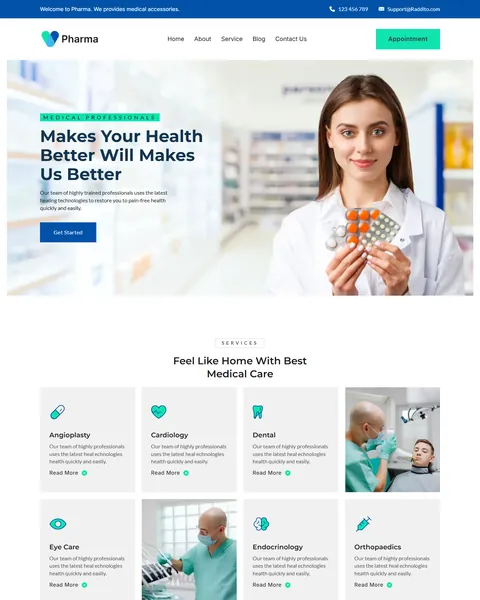
The demo opens with “Makes Your Health Better Will Makes Us Better” beside a smiling pharmacist holding medicine. A Get Started button sits below, and a top bar shows your phone and email. Medical blue, fresh mint and warm gold stars give your center a clean, caring and professional look.
Pharma is built only with native Bricks elements, so no extra plugins are required. Bricks itself is a premium theme and is not included.

Quick Template Details
- Template Name: Pharma
- Template Type: Single landing page
- Required Theme: Bricks (Premium, not included)
- Required Plugins: None
- Landing Page Sections: 11
- Responsive: Desktop, Tablet, Mobile
- Coding Required: No
Who Is This Healthcare Center Bricks Builder Landing Page For?
- Multi-specialty clinics. Six service cards cover cardiology, dental, eye care, endocrinology, orthopaedics and angioplasty.
- Medical centers. Counters, doctor profiles and a 24-hour service highlight suit a larger facility.
- Pharmacies with a clinic. The hero shows a pharmacist with medicine, ideal for a pharmacy-led health brand.
- Practices offering virtual visits. A banner invites patients to book in-person or virtual appointments.
- Clinics running local ads. One page with clear booking buttons works well for search and social campaigns.
Need a full multi-page clinic website instead? Our LifeLine medical clinic Bricks Builder template kit is a better fit.
See Every Section of the Pharma Healthcare Center Bricks Builder Landing Page
Click any section below to open it in the live demo.

Medical Services in a Clean Card Grid
“Feel Like Home With Best Medical Care” presents six specialties as cards with mint icons and Read More links: angioplasty, cardiology, dental, eye care, endocrinology and orthopaedics. Two doctor photos break up the grid, so it never feels like a plain list.
Patients can scan the cards in seconds and see if you treat their problem. Link each Read More to a service page or an appointment form with that specialty already selected.
About, Partners and an Appointment Banner
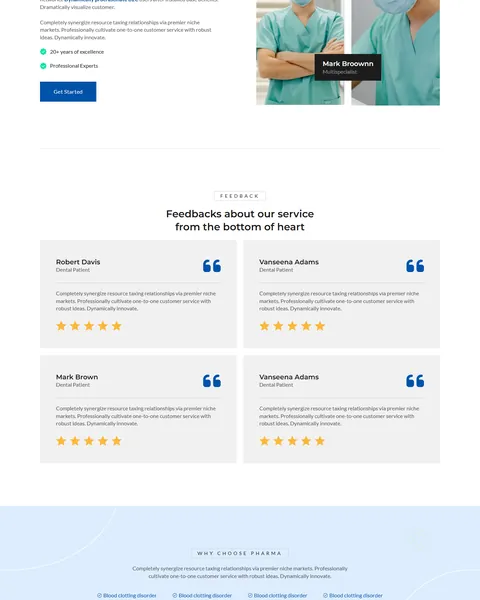
The About section pairs a large photo of a doctor on the phone with a white card. The card highlights two strengths: multi-specialty treatment and 24-hour medical service, plus a Get Started button.
A strip of partner logos follows. Then a bold blue banner says “Schedule an in-person or virtual appointment today” with a mint Book an Appointment button. It sits at the point where many visitors are ready to act.
Specialists, Patient Feedback and Doctors
“We provide a best care for your health with specialist” introduces your lead doctor with a portrait, a “20+ years of excellence” note and a professional experts badge. “Feedbacks about our service” shows four patient reviews with gold star ratings on light gray cards.
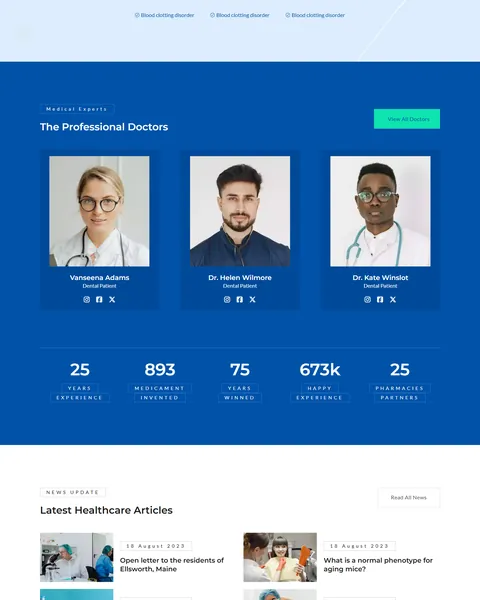
“The Professional Doctors” presents three doctors on a deep blue background, each with a photo and social links, plus a View All Doctors button. A row of five counters follows, for years of experience, partners and happy patients.
Health Articles and an Appointment Footer
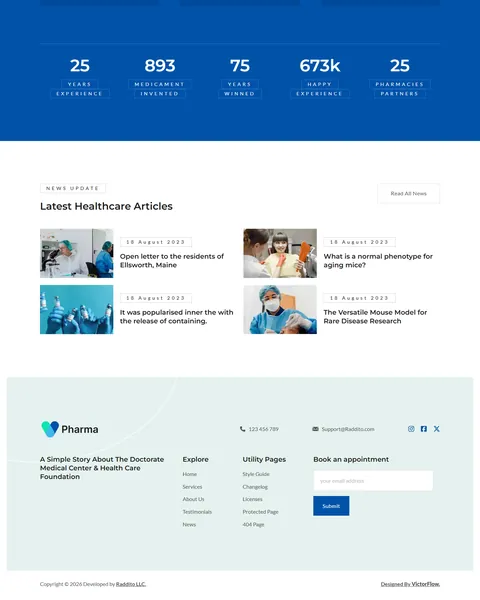
“Latest Healthcare Articles” shows four news cards with photos and dates, plus a Read All News button. Regular health tips help patients and give search engines fresh content to find.
The footer combines your logo, phone and email with link columns and a short “Book an appointment” email form. Patients can request a callback from the very bottom of the page. Add your opening hours and address here so local patients can find you.
Research-Driven Design for Healthcare Centers
We looked at how patients choose a clinic online. They want to know if you treat their condition, who the doctors are and how fast they can be seen. Many compare two or three clinics on their phone, often while unwell. This healthcare center Bricks Builder landing page is designed to answer those questions in a calm, clean layout and keep booking within reach at every step.
Medical blue and mint. Medical blue, #0152A8, fills the appointment banner and doctor section. Blue is the color patients most link with hospitals and trust. Fresh mint, #0FE3AF, marks buttons and icons and adds a clean, healthy feel.
Montserrat, Lato and Inter. Montserrat headlines look modern and confident. Lato body text stays friendly and readable for service details, and Inter keeps buttons crisp.
Warm, human photography. Smiling pharmacists, doctors on the phone and friendly specialists make the center feel approachable. Replace them with photos of your own team for the strongest local trust.
Gold stars for social proof. Gold star ratings, #FBB837, catch the eye in the feedback section and signal patient satisfaction at a glance. Real reviews with first names and treatments build the most trust.
Several booking points. An Appointment button in the header, a mid-page banner and a footer form mean a patient never has to scroll far to book. Fewer steps lead to more requests.
Mobile friendly. On phones, the menu folds into a toggle, service cards stack and buttons stay large enough to tap. Many patients look up clinics on their phone.
What’s Included With the Pharma Bricks Builder Landing Page
- Pharma Bricks template. The full landing page as one JSON file.
- Theme Style file. Global colors, typography and buttons in one JSON file.
- Assets folder. The icons and images the page references.
- READ_ME guide and changelog. Setup steps and the version history, with the latest update on July 29, 2025.
Need help with the template file? Our product support team can help. If you would rather have the whole page built with your own doctors and services, see our done-for-you website service.
How to Import the Pharma Healthcare Center Bricks Builder Landing Page
Pharma needs nothing besides Bricks. Follow these steps:
- In Bricks > Settings > General, enable custom breakpoints, SVG uploads and smooth scroll (CSS), then save.
- In the builder’s breakpoint settings, set Tablet Portrait to 1025px and Mobile Landscape to 768px.
- Go to Bricks > Templates and import the Pharma template file.
- Import the Theme Style and set its condition to the entire website or individual pages.
- Insert the template into a page, set the email address for the footer form, then save and refresh.
The video below walks through a full Bricks import. It also shows WooCommerce steps, which you can skip because Pharma does not use WooCommerce.
Pharma vs Other Bricks Options for Healthcare Websites
Comparing ways to build a clinic landing page in Bricks? Here is how Pharma compares with other popular options online.
| Pharma | Other popular Bricks template libraries online* | |
|---|---|---|
| Complete healthcare center landing page | Yes, ready to import | No, all three are libraries of sections |
| Medical service cards and doctor profiles | Yes | Not as a ready section on any of them |
| Appointment banner and footer form | Yes | Not mentioned on any of them |
| Same design also sold for Elementor | Yes | No, not on any of them |
Why clinics choose Pharma:
- Made for healthcare. Services, doctors, reviews and booking are ready.
- Pure Bricks. No add-ons, so your page stays fast.
- One payment. $8.97 once, with no yearly plan.
*We compared Pharma with two paid Bricks layout libraries and a free community Bricks template library, each listed on its own website. Details come from each product page on October 26, 2026. Prices and features may change.
More Medical Bricks Templates by Raddito
Prefer Elementor? Pharma is also available as a healthcare center Elementor landing page with the same look. If you need a full website or a different style, compare these Bricks options.
LifeLine – medical clinic Bricks Builder template kit
Best for primary care and multi-specialty clinics.
9 demo pages · Bricks with JetFormBuilder · Live Preview
PeopleCare – hospital Bricks Builder template kit
Best for hospitals and larger healthcare centers.
12 pages · Bricks with JetFormBuilder · Live Preview
VitalCare – wellness clinic Bricks Builder landing page
Best for wellness and preventive care clinics.
Single landing page · No extra plugins · Live Preview
Want more choices? Browse our health and medical website templates or every WordPress Bricks Builder template we sell.
Frequently Asked Questions
Is Pharma a WordPress theme?
No. Pharma is a healthcare center Bricks Builder landing page, a ready one-page design you import into Bricks. Bricks is the theme, and you need your own Bricks license.
Do I need any plugins besides Bricks?
No. Every section, including the footer appointment form, uses built-in Bricks elements, so there is nothing else to install.
Can patients book an appointment from the page?
Yes. Link the Appointment buttons to your booking system, or expand the footer form with fields for name, phone and preferred date.
Can I change the six specialties?
Yes. Rename the service cards, swap the icons and update the text to match the treatments your center offers.
Is it suitable for a pharmacy?
Yes. Use the service cards for pharmacy services such as prescriptions, vaccinations and health checks, and keep the booking banner.
Does the demo include finished text?
No. Several sections use placeholder copy, so write your own about, specialist and review text before launch.
Should I replace the sample doctors and figures?
Yes, please. The doctor names, counters, reviews, partner logos and articles are placeholders, so use only your own real team and data.