


VitalCare is a primary care Bricks Builder landing page for WordPress, made for family practices, preventive health clinics, chronic care programs and integrated health centers. It is a single scrolling page with a care-focused hero, three care highlights, an about section and clinic counters with a video. Four medical services, patient reviews and a newsletter footer follow.
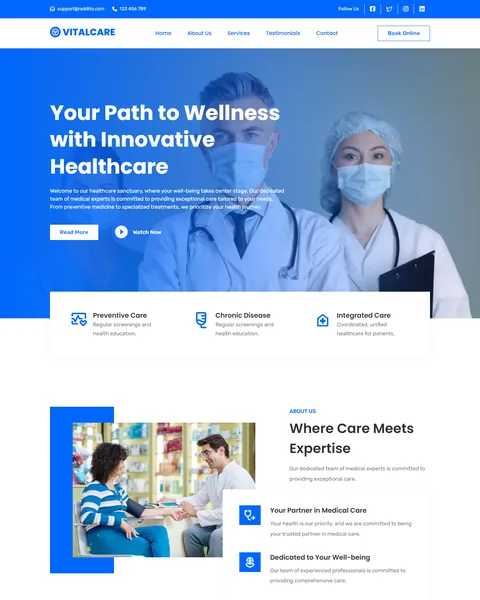
The demo opens with “Your Path to Wellness with Innovative Healthcare” over a photo of two doctors in masks and scrubs, washed in bright blue. Read More and Watch Now buttons sit below the headline. Bright medical blue, crisp white and charcoal give your practice a clean, modern and trustworthy look.
VitalCare is built only with native Bricks elements, including its video player and newsletter form, so no extra plugins are required. Bricks itself is a premium theme and is not included.

Quick Template Details
- Template Name: VitalCare
- Template Type: Single landing page
- Required Theme: Bricks (Premium, not included)
- Required Plugins: None
- Landing Page Sections: 9, plus a mobile menu popup
- Responsive: Desktop, Tablet, Mobile
- Coding Required: No
Who Is This Primary Care Bricks Builder Landing Page For?
- Family and primary care practices. Primary care leads the services, with diagnostics and specialists close by.
- Preventive health clinics. Regular screenings and health education are highlighted right under the hero.
- Chronic care programs. A chronic disease card speaks to patients managing long-term conditions.
- Integrated health centers. Coordinated care between doctors and specialists is a theme across the page.
- Clinics with rehab services. Rehabilitation sits among the four ready service cards.
Need a multi-page clinic website with service and doctor pages? Our LifeLine medical clinic Bricks Builder template kit is a better fit.
See Every Section of the VitalCare Primary Care Bricks Builder Landing Page
Click any section below to open it in the live demo.
A Blue Hero and Three Care Highlights
Patients want to feel safe the moment a clinic page loads. VitalCare opens with two doctors in full protective wear, a short welcome about putting health first and two clear buttons. A slim top bar shows your email, phone and social links.
A white card overlaps the hero with three highlights: preventive care, chronic disease management and integrated care. Each has a blue icon and a short line, so visitors see your focus at a glance.
About Your Clinic, Counters and a Video
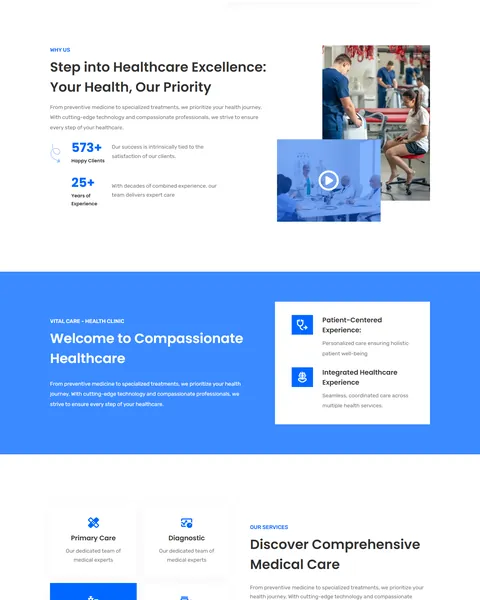
The about section shows a doctor with a young patient beside two short promises about partnership in care. A blue frame behind the photo adds depth.
A “Why Us” section follows with counters for happy clients and years of experience beside an embedded video of a clinic at work. A blue band then welcomes visitors to compassionate healthcare, with two cards on patient-centered and integrated care.
Four Services, Patient Reviews and Newsletter
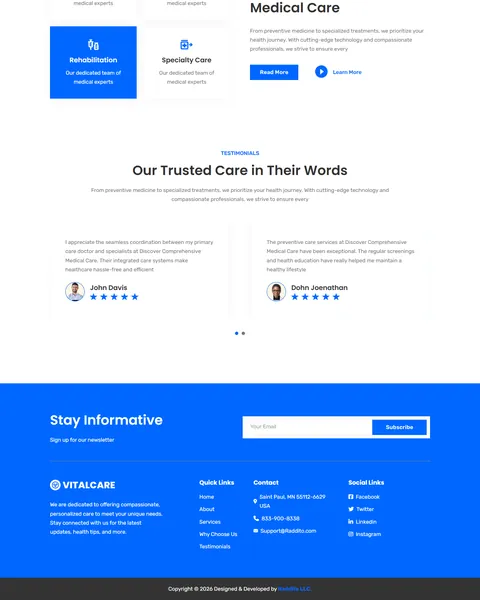
“Discover Comprehensive Medical Care” shows four service cards: primary care, diagnostics, rehabilitation and specialty care, with the active card in solid blue. Read More and Learn More buttons sit beside them.
“Our Trusted Care in Their Words” shows patient reviews with photos and five-star ratings in a slider. A blue “Stay Informative” band collects newsletter emails, and the footer adds links, contact details and social links.
Research-Driven Design for Primary Care Clinics
We looked at how patients choose a primary care clinic online. They want to know what kind of care you offer, whether it suits ongoing needs like chronic conditions and how experienced your team is. Calm, clean design and real reviews help them feel safe enough to book. This primary care Bricks Builder landing page is designed to explain your care model simply and keep the booking button close at every step.
Bright medical blue and white. Bright blue, #0067FF, fills the hero, the welcome band, the newsletter and the footer, and colors every icon. Blue is linked with trust and calm in healthcare. White sections keep the page airy and clean.
Poppins and Rubik. Poppins headlines are bold and modern. Rubik’s soft shapes keep service details, reviews and buttons friendly and easy to read.
Clinicians and patients together. Doctors in protective gear, a doctor with a young patient and clinic scenes show care in action. Use photos of your own team where you can.
Overlapping cards. Highlight cards that overlap the hero and section edges add depth without extra decoration, giving the page a polished feel. The effect also guides the eye smoothly from one section to the next.
Video for trust. A short video of your clinic in the Why Us section lets patients see the space and team before their first visit.
Mobile friendly. On phones, the menu opens as a popup, cards stack and Book Online stays easy to tap. Many patients search for a new doctor on their phone.
What’s Included With the VitalCare Bricks Builder Landing Page
- VitalCare Bricks templates. The full landing page and a mobile menu popup as JSON files.
- Theme Style file. Global colors, typography and buttons in one JSON file.
- Assets folder. The images and icons the page references.
- READ_ME guide and changelog. Setup steps and the version history.
Need help with the template files? Our product support team can help. If you would rather have the whole page built with your own services and branding, see our done-for-you website service.
How to Import the VitalCare Primary Care Bricks Builder Landing Page
VitalCare only needs Bricks. Follow these steps:
- In Bricks > Settings > General, enable custom breakpoints, SVG uploads and smooth scroll (CSS), then save.
- In the builder’s breakpoint settings, set Tablet Portrait to 1025px and Mobile Landscape to 768px.
- Go to Bricks > Templates and import the VitalCare and mobile menu templates.
- Import the Theme Style and set its condition to the entire website or individual pages.
- Link the mobile menu popup to the bar icon and its close icon, then save and refresh.
The video below walks through a full Bricks import. It also shows WooCommerce steps, which you can skip because VitalCare does not use WooCommerce.
VitalCare vs Other Bricks Options for Clinic Websites
Comparing ways to build a primary care page in Bricks? Here is how VitalCare compares with other popular options online.
| VitalCare | Other popular Bricks template libraries online* | |
|---|---|---|
| Complete primary care landing page | Yes, ready to import | No, all three are libraries of sections |
| Preventive, chronic and integrated care highlights | Yes | Not mentioned on any of them |
| Clinic counters with an embedded video | Yes | Not as a ready section on any of them |
| Same design also sold for Elementor | Yes | No, not on any of them |
Why clinics choose VitalCare:
- Made for primary care. Care highlights, services and reviews are ready.
- Pure Bricks. No add-ons, so your page stays fast.
- One payment. $8.97 once, with no yearly plan.
*We compared VitalCare with two paid Bricks layout libraries and a free community Bricks template library, each listed on its own website. Details come from each product page on October 26, 2026. Prices and features may change.
More Medical Clinic Templates by Raddito
Prefer Elementor? VitalCare is also available as a primary care Elementor landing page with the same look. For other clinic styles, compare these Bricks options.
LifeLine – medical clinic Bricks Builder template kit
Best for primary care and multi-specialty clinics.
9 demo pages · Bricks with JetFormBuilder · Live Preview
Evercare – doctor appointment Bricks Builder landing page
Best for clinics that show doctors and session prices.
Single landing page · Bricks with JetFormBuilder · Live Preview
Pharma – healthcare center Bricks Builder landing page
Best for multi-specialty clinics and medical centers.
Single landing page · No extra plugins · Live Preview
Want more choices? Browse our health and medical website templates or every WordPress Bricks Builder template we sell.
Frequently Asked Questions
Is VitalCare a WordPress theme?
No. VitalCare is a primary care Bricks Builder landing page, a ready one-page design you import into Bricks. Bricks is the theme, and you need your own Bricks license.
Do I need any plugins besides Bricks?
No. The video, slider and newsletter form all use built-in Bricks elements, so there is nothing else to install.
Can patients book appointments?
Link the Book Online button to your booking system or patient portal so patients can pick a time.
Can I add a contact form?
Yes. Add a Bricks form section above the newsletter band for questions and appointment requests.
Can I add more services?
Yes. Duplicate a service card in Bricks and change the icon, title and text, for example for pediatrics or vaccinations.
How do I change the clinic video?
Select the video element in the Why Us section and paste the link to your own YouTube or self-hosted video.
Should I replace the sample reviews and counters?
Yes, please. The reviews, counters and footer phone number are placeholders, so use only your own real details.