


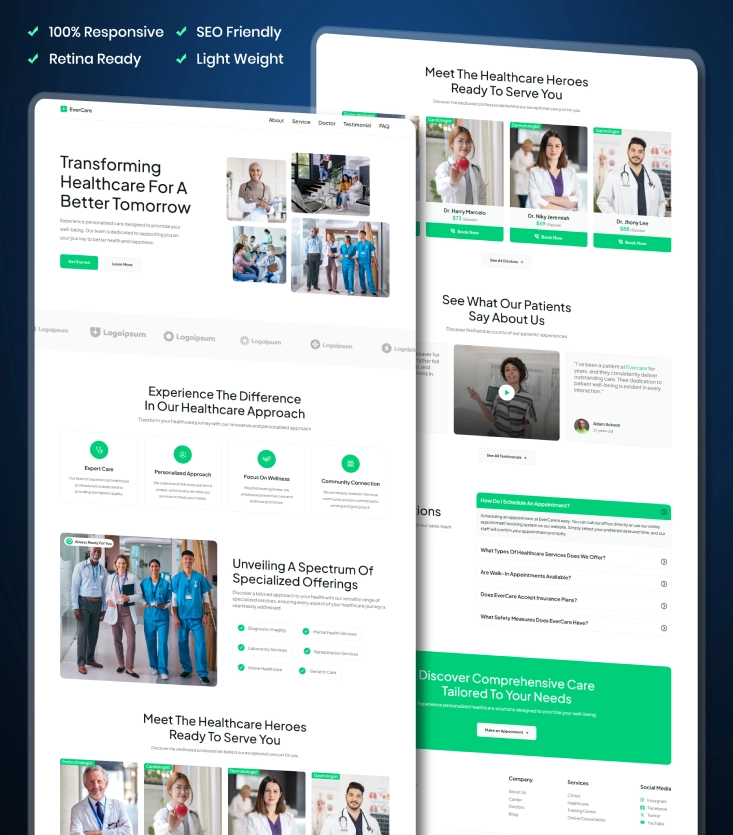
Evercare is a doctor appointment Bricks Builder landing page for WordPress, made for clinics, group practices, specialist doctors and healthcare centers that want patients to book online. It is a single scrolling page with a services list, doctor cards with session prices, patient reviews, an FAQ and a contact form.
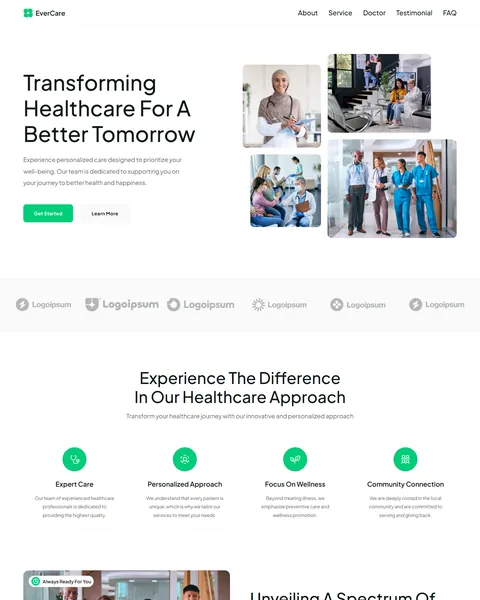
The demo opens with “Transforming Healthcare For A Better Tomorrow” beside a collage of doctors, nurses and patients. Get Started and Learn More buttons sit below, followed by a row of partner logos. Fresh mint green, deep charcoal and clean white give your clinic a modern, calm and trustworthy look.
Evercare’s setup guide lists one free plugin, JetFormBuilder. Bricks itself is a premium theme and is not included.
Quick Template Details
- Template Name: Evercare
- Template Type: Single landing page
- Required Theme: Bricks (Premium, not included)
- Required Plugin: JetFormBuilder (Free)
- Landing Page Sections: 10, plus a mobile menu popup
- Responsive: Desktop, Tablet, Mobile
- Coding Required: No
Who Is This Doctor Appointment Bricks Builder Landing Page For?
- Group practices. Doctor cards show each specialist with a Book Now button.
- Specialist clinics. Endocrinology, cardiology, dermatology and gastroenterology appear as doctor specialties.
- Private doctors who charge per visit. Each doctor card shows a clear price per session.
- Diagnostic and lab centers. Diagnostic imaging and laboratory services are part of the services list.
- Home and elderly care providers. Home healthcare and geriatric care are already listed as services.
Need a multi-page clinic website with service and doctor pages? Our LifeLine medical clinic Bricks Builder template kit is a better fit.
See Every Section of the Evercare Doctor Appointment Bricks Builder Landing Page
Click any section below to open it in the live demo.
A Collage Hero and Four Care Values
Patients want to see real people before they trust a clinic. Evercare’s hero shows a collage of doctors, nurses and patients beside a hopeful headline. Get Started and Learn More buttons lead visitors to book or read more.
“Experience The Difference In Our Healthcare Approach” follows with four icon cards: expert care, a personalized approach, a focus on wellness and community connection. Each card has one short line, so the section is easy to scan.
A Services List and Doctor Cards With Prices
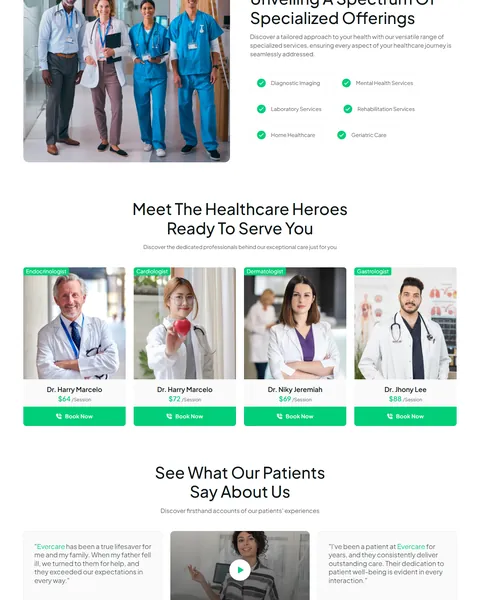
“Unveiling A Spectrum Of Specialized Offerings” pairs a group photo of your team with a checklist of six services. They include diagnostic imaging, mental health, laboratory tests, rehabilitation, home healthcare and geriatric care.
“Meet The Healthcare Heroes Ready To Serve You” shows four doctors with a specialty badge, name, price per session and a green Book Now button. Clear prices remove a major worry for patients without insurance or paying privately.
Patient Reviews and an FAQ
“See What Our Patients Say About Us” shows patient quotes beside a video thumbnail with a play button. A short patient video often builds more trust than written reviews alone.
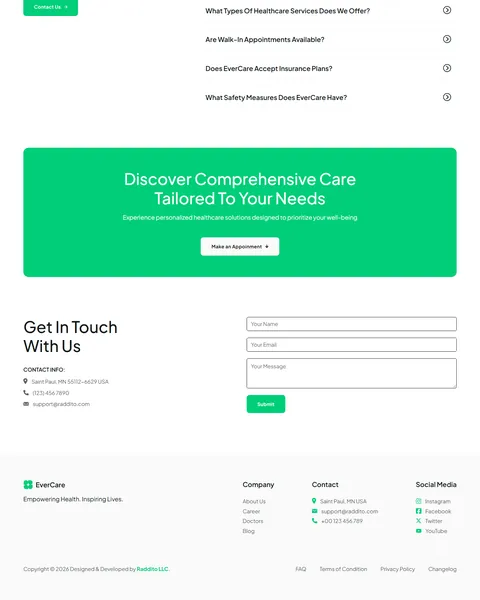
“Frequently Asked Questions” uses an accordion for scheduling, services, walk-ins, insurance and safety measures, with a Contact Us button for anything else. These are the questions front desks answer every day.
Appointment Banner and Contact
A bold green care banner with a Make an Appointment button. It catches visitors who have read the whole page and are ready to book, with one clear button and no distractions.
“Get In Touch With Us” pairs your address, phone and email with a short form. The footer adds company links, social links and legal pages, so patients can find policies easily.
Research-Driven Design for Clinics
We looked at how patients choose a doctor online. They want to know which specialists you have, what a visit costs and how fast they can be seen. Friendly photos of real staff and honest reviews help nervous patients take the first step. This doctor appointment Bricks Builder landing page is designed to show your team and prices clearly and make booking a visit take only a few clicks.
Fresh mint green and charcoal. Fresh mint green, #00CE78, marks buttons, badges and the appointment banner. Green feels healthy and positive. Deep charcoal, #101918, keeps headings strong, and soft gray backgrounds give the page a clean, clinical feel.
Plus Jakarta Sans throughout. Plus Jakarta Sans is clear and modern. Medium-weight headlines look calm and professional, and body text stays easy to read for patients of any age.
Real people in care. Doctors, nurses and patients appear in every major section, so the clinic feels human. Use photos of your own team for local trust.
Prices on every doctor card. Showing the cost per session answers a key question before patients call. Transparent pricing also builds trust with patients paying out of pocket.
Many booking points. Get Started, Book Now and Make an Appointment buttons appear from top to bottom, so patients never have to scroll back. Each one can open the same booking tool.
Mobile friendly. On phones, the menu opens as a popup, doctor cards stack and buttons stay large enough to tap. Most patients search for doctors on their phone.
What’s Included With the Evercare Bricks Builder Landing Page
- Evercare Bricks templates. The full landing page and a mobile menu popup as JSON files.
- Theme Style file. Global colors, typography and buttons in one JSON file.
- READ_ME guide and changelog. Setup steps and the version history, with the latest update on September 29, 2025.
Need help with the template files? Our product support team can help. If you would rather have the whole page built with your own doctors and branding, see our done-for-you website service.
How to Import the Evercare Doctor Appointment Bricks Builder Landing Page
Install and activate JetFormBuilder first, then follow these steps:
- In Bricks > Settings > General, enable custom breakpoints, SVG uploads and smooth scroll (CSS), then save.
- In the builder’s breakpoint settings, set Tablet Portrait to 1025px and Mobile Landscape to 768px.
- Go to Bricks > Templates and import the Evercare and mobile menu templates.
- Import the Theme Style and set its condition to the entire website or individual pages.
- Link the mobile menu popup to the header icon, then save and refresh.
The video below walks through a full Bricks import. It also shows WooCommerce steps, which you can skip because Evercare does not use WooCommerce.
Evercare vs Other Bricks Options for Clinic Websites
Comparing ways to build a doctor appointment page in Bricks? Here is how Evercare compares with other popular options online.
| Evercare | Other popular Bricks template libraries online* | |
|---|---|---|
| Complete doctor appointment landing page | Yes, ready to import | No, all three are libraries of sections |
| Doctor cards with session prices | Yes | Not mentioned on any of them |
| Healthcare FAQ and appointment banner | Yes | Not as a ready section on any of them |
| Patient review section with video | Yes | Not mentioned on any of them |
Why clinics choose Evercare:
- Made for appointments. Doctors, prices, FAQ and booking are ready.
- One free plugin. JetFormBuilder is all the setup guide asks for.
- One payment. $9.90 once, with no yearly plan.
*We compared Evercare with two paid Bricks layout libraries and a free community Bricks template library, each listed on its own website. Details come from each product page on October 26, 2026. Prices and features may change.
More Medical Templates by Raddito
Evercare is our doctor appointment Bricks Builder landing page. For a full clinic website or a different style, compare these Bricks options.
LifeLine – medical clinic Bricks Builder template kit
Best for primary care and multi-specialty clinics.
9 demo pages · Bricks with JetFormBuilder · Live Preview
Pharma – healthcare center Bricks Builder landing page
Best for multi-specialty clinics and medical centers.
Single landing page · No extra plugins · Live Preview
VitalCare – wellness clinic Bricks Builder landing page
Best for wellness and preventive care clinics.
Single landing page · No extra plugins · Live Preview
Want more choices? Browse our health and medical website templates or every WordPress Bricks Builder template we sell.
Frequently Asked Questions
Is Evercare a WordPress theme?
No. Evercare is a doctor appointment Bricks Builder landing page, a ready one-page design you import into Bricks. Bricks is the theme, and you need your own Bricks license.
Can patients book a specific doctor?
Yes. Link each doctor’s Book Now button to your booking system with that doctor preselected, or to a form with their name.
Can I hide the session prices?
Yes. Remove or edit the price line on each doctor card if you prefer to discuss fees by phone.
Can I add more doctors?
Yes. Duplicate a doctor card in Bricks and change the photo, specialty, name and price.
Is the contact form safe for medical details?
Keep the form short and avoid asking for medical history. Collect sensitive details through your secure patient portal instead.
Can I add a patient video?
Yes. Link the video thumbnail in the review section to a short patient story or a clinic tour on YouTube.
Should I replace the sample doctors and reviews?
Yes, please. The doctor names, prices, logos, reviews and FAQ answers are placeholders, so use only your own real team and patient consent.