


HopeUnit is a charity Bricks Builder landing page for WordPress, made for nonprofits, NGOs, community foundations and volunteer groups that want more donors and volunteers. It is a single scrolling page with featured causes, past projects, a volunteer call, an FAQ, a photo gallery, blog stories and a contact form.
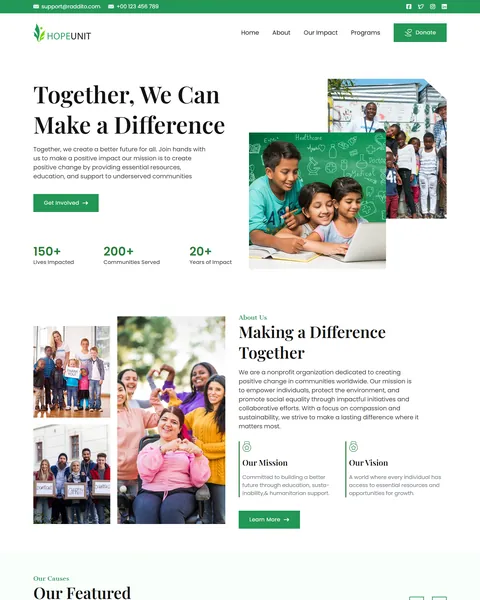
The demo opens with “Together, We Can Make a Difference” beside smiling children in a classroom, with a Get Involved button and impact counters. A green Donate button stays in the header. Fresh green, deep forest green and clean white give your organization a hopeful, caring and trustworthy look.
HopeUnit is built only with native Bricks elements, including its forms, so no extra plugins are required. Bricks itself is a premium theme and is not included.

Quick Template Details
- Template Name: HopeUnit
- Template Type: Single landing page
- Required Theme: Bricks (Premium, not included)
- Required Plugins: None
- Landing Page Sections: 11
- Forms: Built-in Bricks contact and newsletter forms
- Responsive: Desktop, Tablet, Mobile
- Coding Required: No
Who Is This Charity Bricks Builder Landing Page For?
- Nonprofits and NGOs. Mission, vision, causes and impact counters tell your story clearly.
- Education and child charities. Classroom photos and an education cause are ready to use.
- Clean water and health projects. Clean water and healthcare access causes are already in the demo.
- Environmental groups. An eco sustainability cause and field photos suit green projects.
- Volunteer-driven organizations. Become a Volunteer buttons and a “Join the Movement” section invite people to help.
Need a full multi-page charity website with donation and event pages? Our Seba charity Elementor template kit is a better fit.
See Every Section of the HopeUnit Charity Bricks Builder Landing Page
Click any section below to open it in the live demo.
An Impact Hero With Counters
Donors want to see that their money changes lives. HopeUnit opens with a warm photo of children learning, a short mission line and a Get Involved button. Three counters show lives impacted, communities served and years of impact.
A slim green top bar with your email and phone, plus a Donate button in the header, keep the main actions visible from the very first screen.
Mission, Vision and Featured Causes
“Making a Difference Together” pairs a collage of volunteers and families with a short story about your organization. Two small blocks state your mission and vision, followed by a Learn More button.
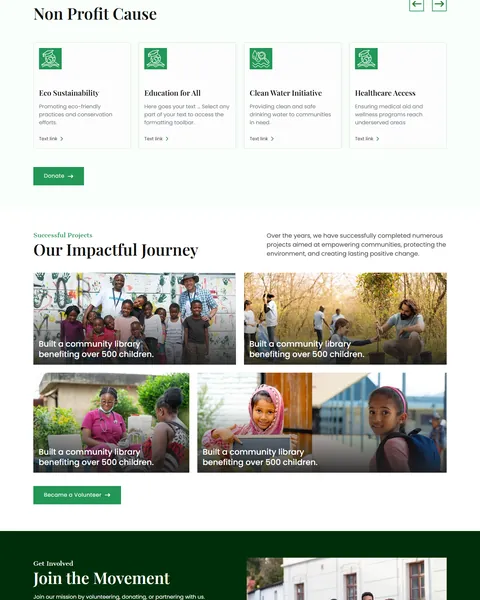
“Our Featured Non Profit Cause” shows four causes in a slider: education for all, clean water, healthcare access and eco sustainability. Each card has an icon and a link, and a Donate button sits below the slider.
Past Projects and a Volunteer Call
“Our Impactful Journey” shows four completed projects as photo cards with short results, such as a community library for children. Real outcomes build trust with new donors.
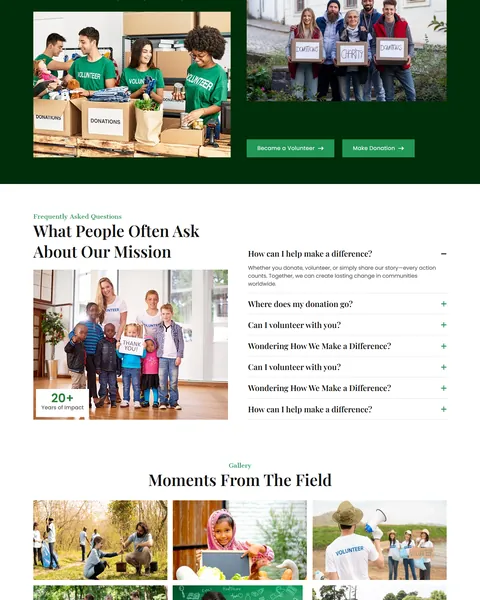
“Join the Movement” sits on a deep green band with photos of volunteers sorting donations. It offers two clear choices: Become a Volunteer or Make Donation, so every visitor can help in the way that suits them.
FAQ, Gallery, Stories and Contact
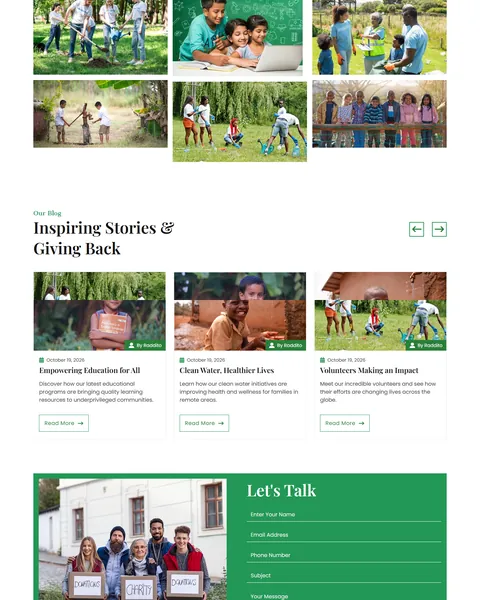
“What People Often Ask About Our Mission” answers questions about how to help, where donations go and how to volunteer. A photo with a “20+ Years of Impact” badge sits beside it. “Moments From The Field” fills a gallery with photos from your projects.
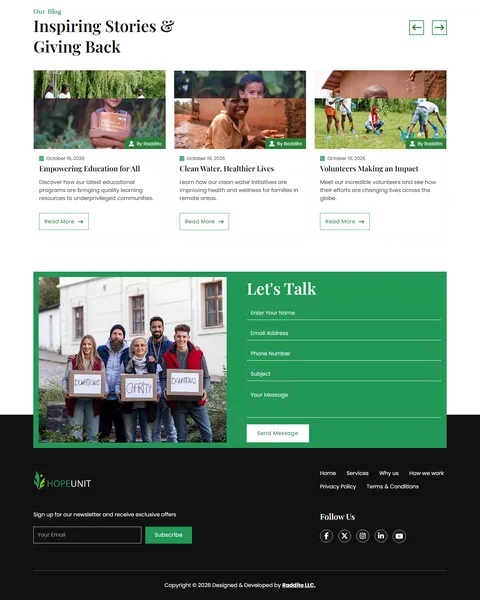
“Inspiring Stories & Giving Back” shows blog cards in a slider. A green “Let’s Talk” panel holds a contact form, and the dark footer adds links, a newsletter signup and social icons.
Research-Driven Design for Charities
We looked at how people decide to support a charity online. They want to know what you do, where their money goes and what difference it makes. Real photos and specific results matter far more than general promises. Many visitors want to help in more than one way, by giving, volunteering or sharing. This charity Bricks Builder landing page is designed to tell a clear story, prove your impact and offer easy ways to get involved.
Fresh green and deep forest green. Fresh green, #239756, marks buttons and highlights and suggests growth and hope. Deep forest green fills the volunteer band and feels steady and trustworthy. A soft mint background keeps sections light.
Playfair Display and Poppins. Elegant Playfair Display headlines give the page a caring, editorial tone. Poppins keeps cause descriptions, FAQ answers and forms simple to read.
Real people in the field. Photos of volunteers, children and families show the human side of your work. Always use your own photos with permission from the people shown.
Proof of impact. Counters, project results and field photos answer the donor’s main question: does my gift really help?
Two ways to help. Volunteer and donate buttons sit side by side, so nobody leaves without an option that fits them. People who volunteer today often become regular donors later.
Mobile friendly. On phones, the menu folds into a toggle, sliders swipe and the contact form stays easy to fill in. Many donations start from a link shared on social media and opened on a phone, so the mobile view gets as much care as desktop.
What’s Included With the HopeUnit Bricks Builder Landing Page
- HopeUnit Bricks template. The full landing page as one JSON file.
- Theme Style file. Global colors, typography and buttons in one JSON file.
- Assets folder. Images, icons and gallery photos the page references.
- READ_ME guide and changelog. Setup steps and the version history, with the latest update on September 28, 2025.
Need help with the template file? Our product support team can help. If you would rather have the whole page built with your own causes and branding, see our done-for-you website service.
How to Import the HopeUnit Charity Bricks Builder Landing Page
HopeUnit only needs Bricks. Follow these steps:
- In Bricks > Settings > General, enable custom breakpoints, SVG uploads and smooth scroll (CSS), then save.
- In the builder’s breakpoint settings, set Tablet Portrait to 1025px and Mobile Landscape to 768px.
- Go to Bricks > Templates and import the HopeUnit template file.
- Import the Theme Style and set its condition to the entire website or individual pages.
- Insert the template into a page, add your email to the form actions, then save and refresh.
The video below walks through a full Bricks import. It also shows WooCommerce steps, which you can skip because HopeUnit does not use WooCommerce.
HopeUnit vs Other Bricks Options for Charity Websites
Comparing ways to build a charity landing page in Bricks? Here is how HopeUnit compares with other popular options online.
| HopeUnit | Other popular Bricks template libraries online* | |
|---|---|---|
| Complete charity landing page | Yes, ready to import | No, all three are libraries of sections |
| Causes slider and project results | Yes | Not as a ready section on any of them |
| Volunteer and donate call to action | Yes | Not mentioned on any of them |
| Same design also sold for Elementor | Yes | No, not on any of them |
Why charities choose HopeUnit:
- Made for good causes. Mission, causes, impact and volunteering are ready.
- Pure Bricks. No add-ons, so your page stays fast.
- One payment. $9.90 once, with no yearly plan.
*We compared HopeUnit with two paid Bricks layout libraries and a free community Bricks template library, each listed on its own website. Details come from each product page on October 26, 2026. Prices and features may change.
More Charity and Impact Templates by Raddito
Prefer Elementor? HopeUnit is also available as a charity Elementor landing page with the same look. For a full charity website or an environmental project, compare these.
Seba – charity Elementor template kit
Best for charities that need a full website.
12 pages · Works with Elementor Free · Live Preview
Ecofarm – sustainable farming Bricks Builder landing page
Best for sustainable agriculture projects and farms.
Single landing page · No extra plugins · Live Preview
Evergreen – renewable energy Bricks Builder landing page
Best for clean energy and sustainability organizations.
Single landing page · No extra plugins · Live Preview
Want more choices? Browse our nonprofit and religion website templates or every WordPress Bricks Builder template we sell.
Frequently Asked Questions
Is HopeUnit a WordPress theme?
No. HopeUnit is a charity Bricks Builder landing page, a ready one-page design you import into Bricks. Bricks is the theme, and you need your own Bricks license.
Can I accept donations on this page?
Link the Donate buttons to your donation platform, or add a free donation plugin that works with your payment provider.
Do I need any plugins besides Bricks?
No. The sliders, FAQ, gallery and forms all use built-in Bricks elements, so nothing else is required for the design.
Can volunteers sign up through the page?
Yes. Link the Become a Volunteer buttons to a sign-up form, or use the contact form with a volunteer subject line.
Can I change the four causes?
Yes. Edit each cause card’s icon, title and text in Bricks to match your real programs.
Is it suitable for a church or community group?
Yes. Rename the causes to ministries or programs and use the gallery and stories for events and outreach.
Should I replace the sample figures and stories?
Yes, please. The counters, project results, FAQ answers and stories are placeholders, so use only your own verified impact and photos.