


Ecofarm is an agriculture Bricks Builder landing page for WordPress, made for agritech startups, sustainable farming companies, precision agriculture providers and organic farm brands. It is a single scrolling page with four technology cards, sector solutions, success stories, a farming blog, an FAQ and a contact form.
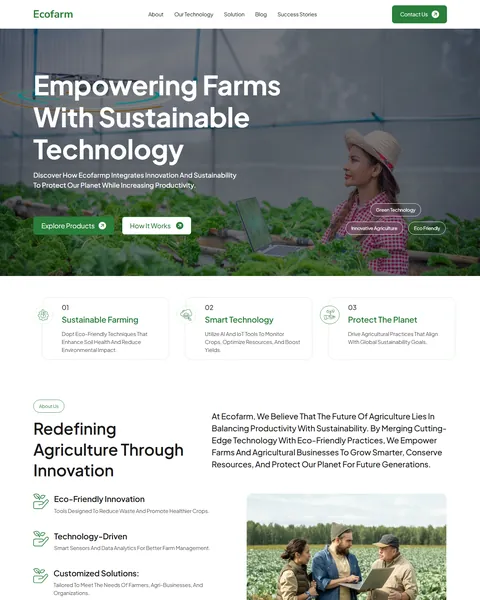
The demo opens with “Empowering Farms With Sustainable Technology” over a wide photo of farmers in a green field. Explore Products and How It Works buttons sit below, with tags for green technology and eco friendly farming. Fresh leaf green, soft cream and clean white give your brand a natural, modern and trustworthy look.
Ecofarm is built only with native Bricks elements, including its contact form, so no extra plugins are required. Bricks itself is a premium theme and is not included.

Quick Template Details
- Template Name: Ecofarm
- Template Type: Single landing page
- Required Theme: Bricks (Premium, not included)
- Required Plugins: None
- Landing Page Sections: 12
- Extras: Bricks global CSS classes file included
- Responsive: Desktop, Tablet, Mobile
- Coding Required: No
Who Is This Agriculture Bricks Builder Landing Page For?
- Agritech startups. Precision agriculture, IoT irrigation and data forecasting are ready as technology cards.
- Sustainable farming companies. Soil health, water saving and eco-friendly practices run through the whole page.
- Farm equipment and sensor sellers. An Explore Products button and technology cards suit product launches.
- Agricultural consultants. Support and training and customized solutions appear as key benefits.
- Organizations serving many sectors. Solutions for farmers, agri-businesses, environmental groups and governments are built in.
Running an organic farm that sells produce instead? Our Agreco organic farm Elementor template kit is a better fit.
See Every Section of the Ecofarm Agriculture Bricks Builder Landing Page
Click any section below to open it in the live demo.
A Field Hero and Three Core Values
Farmers and investors want to see real fields, not abstract graphics. Ecofarm opens with a full-width photo of farmers among crops and a bold promise about sustainable technology. Explore Products and How It Works buttons give two clear paths.
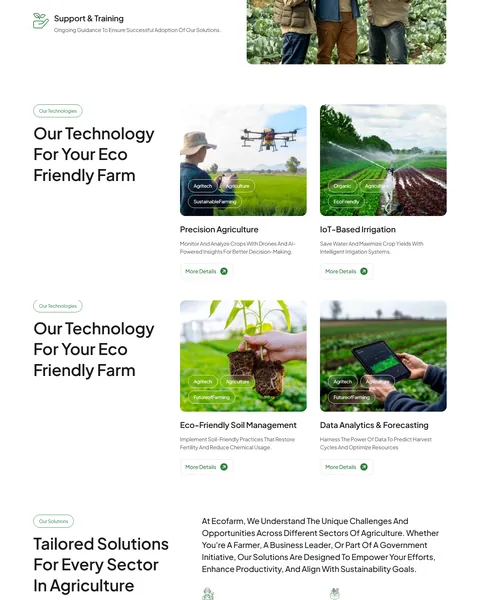
Three numbered cards below the hero sum up your values: sustainable farming, smart technology and protecting the planet. “Redefining Agriculture Through Innovation” then pairs your story with four benefits, from eco-friendly tools to support and training.
Four Technologies and Sector Solutions
“Our Technology For Your Eco Friendly Farm” shows four photo cards with hashtag-style tags. They cover precision agriculture with drones and AI, IoT irrigation, soil management, and data forecasting. Each has a More Details link.
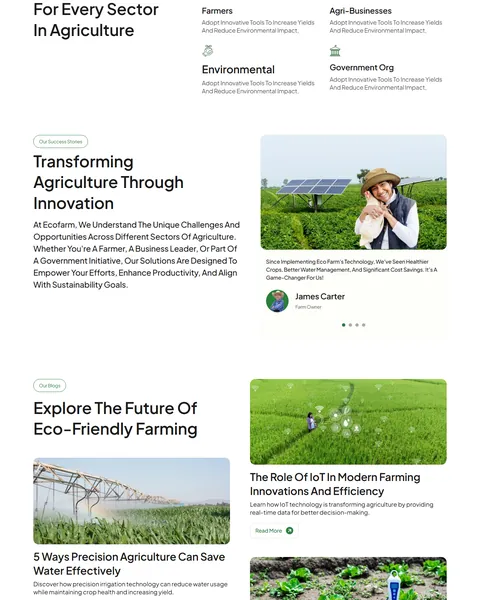
“Tailored Solutions For Every Sector” speaks to four audiences with icons: farmers, agri-businesses, environmental organizations and government bodies. Visitors can quickly see that your work applies to them.
Success Stories and a Farming Blog
“Transforming Agriculture Through Innovation” shares farmer testimonials in a slider beside a photo of a smiling farmer near solar panels. Real results like healthier crops and lower water bills are the strongest proof for new customers.
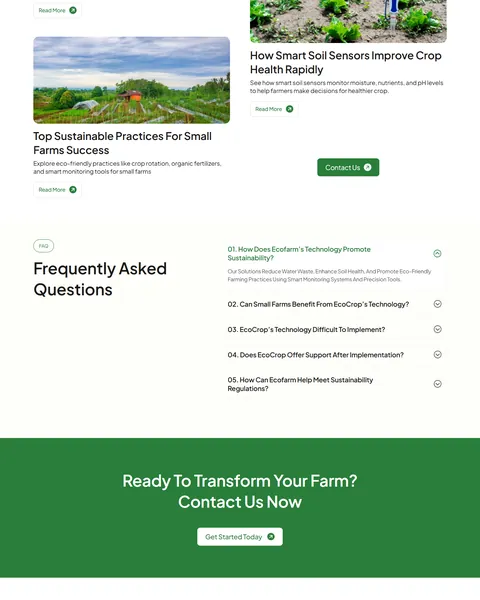
“Explore The Future Of Eco-Friendly Farming” shows four blog cards on saving water, IoT in farming, small-farm practices and soil sensors. Useful articles position you as an expert and attract search traffic from farmers researching new tools.
FAQ, Call to Action and Contact
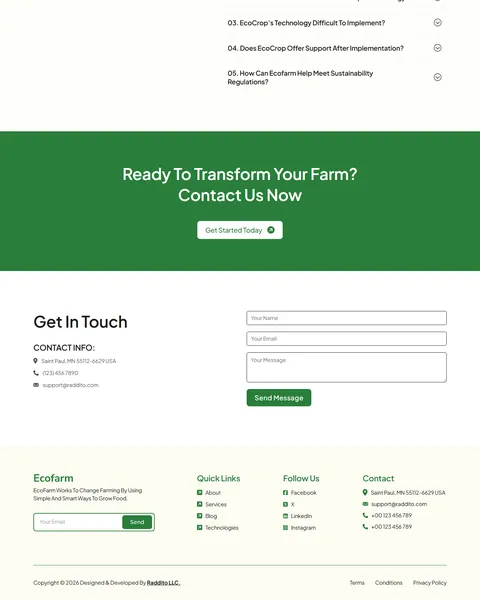
A five-question FAQ covers sustainability, small-farm benefits, ease of use, ongoing support and regulations. A bold green “Ready To Transform Your Farm?” banner with a Get Started Today button follows.
“Get In Touch” pairs your address, phone and email with a short form. The footer adds a newsletter field, quick links, social links and contact details. Ask for the farm size or crop type in the form to qualify leads before the first call.
Research-Driven Design for Agriculture Brands
We looked at how farmers and agribusinesses research new technology online. They want proof it works in real fields, a clear return on investment and support after purchase. Many are cautious about change, so trust and plain language matter. Buyers range from small family farms to large organizations and public agencies. This agriculture Bricks Builder landing page is designed to show real farms, explain technology simply and speak to every type of customer.
Fresh leaf green and soft cream. Fresh leaf green, #297E3A, marks buttons, tags and the call-to-action banner and connects instantly to crops and nature. Soft cream backgrounds feel warm and earthy, like natural grain.
Plus Jakarta Sans throughout. Plus Jakarta Sans is modern and highly readable. Bold weights make headlines confident, while regular weights keep technology details easy to follow.
Real farm photography. Fields, drones, irrigation and soil close-ups connect the technology to everyday farm work. Use photos from your own customers’ farms where you can.
Audience-specific solutions. Separate cards for farmers, businesses, environmental groups and governments help each visitor find their own reason to buy. Each card can link to a page with details for that group.
Support up front. Training and ongoing support appear early, which reassures buyers who worry about new technology. Few farmers want to buy a system they will have to figure out alone.
Mobile friendly. On phones, the menu folds into a toggle, cards stack and the contact form stays easy to fill in. Many farmers browse on their phone between jobs in the field.
What’s Included With the Ecofarm Bricks Builder Landing Page
- Ecofarm Bricks template. The full landing page in a zip file ready to import.
- Global CSS classes file. Bricks classes used across the page.
- Theme Style file. Global colors, typography and buttons in one JSON file.
- Assets folder. The images and icons the page references.
- READ_ME guide and changelog. Setup steps and the version history, with the latest update on September 28, 2025.
Need help with the template files? Our product support team can help. If you would rather have the whole page built with your own products and branding, see our done-for-you website service.
How to Import the Ecofarm Agriculture Bricks Builder Landing Page
Ecofarm only needs Bricks. Follow these steps:
- In Bricks > Settings > General, enable custom breakpoints, SVG uploads and smooth scroll (CSS), then save.
- In the builder’s breakpoint settings, set Tablet Portrait to 1025px and Mobile Landscape to 768px.
- Go to Bricks > Templates and import the Ecofarm template zip file.
- Import the Theme Style and set its condition to the entire website or individual pages.
- Import the global CSS classes, insert the template into a page, then save and refresh.
The video below walks through a full Bricks import. It also shows WooCommerce steps, which you can skip because Ecofarm does not use WooCommerce.
Ecofarm vs Other Bricks Options for Agriculture Websites
Comparing ways to build an agriculture landing page in Bricks? Here is how Ecofarm compares with other popular options online.
| Ecofarm | Other popular Bricks template libraries online* | |
|---|---|---|
| Complete agriculture landing page | Yes, ready to import | No, all three are libraries of sections |
| Agritech technology cards | Yes | Not mentioned on any of them |
| Solutions by sector | Yes, four sectors | Not as a ready section on any of them |
| Same design also sold for Elementor | Yes | No, not on any of them |
Why agritech brands choose Ecofarm:
- Made for agriculture. Technology, sectors, stories and FAQ are ready.
- Pure Bricks. No add-ons, so your page stays fast.
- One payment. $9.90 once, with no yearly plan.
*We compared Ecofarm with two paid Bricks layout libraries and a free community Bricks template library, each listed on its own website. Details come from each product page on October 26, 2026. Prices and features may change.
More Green and Sustainability Templates by Raddito
Prefer Elementor? Ecofarm is also available as an agriculture Elementor landing page with the same look. For other green businesses, compare these.
Evergreen – renewable energy Bricks Builder landing page
Best for clean energy and sustainability organizations.
Single landing page · No extra plugins · Live Preview
Flow – green energy Bricks Builder landing page
Best for solar and green energy companies.
Single landing page · No extra plugins · Live Preview
Agreco – organic farm Elementor template kit
Best for organic farms and produce sellers.
12 pages · Works with Elementor Free · Live Preview
Want more choices? Browse our technology and app website templates or every WordPress Bricks Builder template we sell.
Frequently Asked Questions
Is Ecofarm a WordPress theme?
No. Ecofarm is an agriculture Bricks Builder landing page, a ready one-page design you import into Bricks. Bricks is the theme, and you need your own Bricks license.
Do I need any plugins besides Bricks?
No. The sliders, FAQ and forms all use built-in Bricks elements, so there is nothing else to install.
Can I sell farm products from this page?
Not by default. Link the Explore Products button to your store, or add WooCommerce to sell online.
Can I change the four technologies?
Yes. Edit each card’s photo, tags, title and text in Bricks to match your own products or services.
Is it suitable for an organic farm?
Yes. Replace the technology cards with your crops, farming methods or farm tours, and keep the stories and contact form.
What is the CSS classes file for?
It adds the global Bricks classes the page uses, so styles stay consistent and easy to edit across sections.
Should I replace the sample stories and figures?
Yes, please. The testimonials, FAQ answers and blog posts are placeholders, so use only your own real results and customers.