


Solhaven is a counseling center Bricks Builder landing page for WordPress, made for counseling centers, group therapy practices, family counseling services and CBT and mindfulness therapists. It is a single scrolling page with a calming hero, four therapy types, a team of three experts, client stories, an FAQ and a contact form.
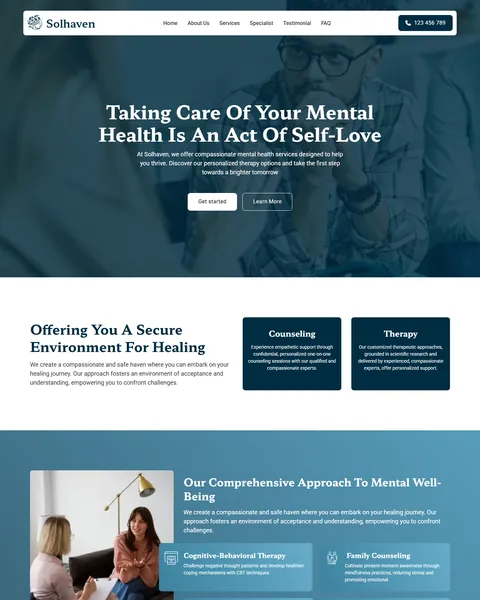
The demo opens with a warm serif headline about self-love over a soft, blue-gray photo of a man deep in thought. Get Started and Learn More buttons sit below, and your phone number stays in the header. Deep teal navy, steel blue and clean white give your practice a peaceful, safe and grounded look.
Solhaven is built only with native Bricks elements, including its contact form, so no extra plugins are required. Bricks itself is a premium theme and is not included.

Quick Template Details
- Template Name: Solhaven
- Template Type: Single landing page
- Required Theme: Bricks (Premium, not included)
- Required Plugins: None
- Landing Page Sections: 12, plus a mobile menu popup
- Responsive: Desktop, Tablet, Mobile
- Coding Required: No
Who Is This Counseling Center Bricks Builder Landing Page For?
- Counseling centers. One-on-one counseling and therapy lead the services, with a Book Now button close by.
- Group practices with several clinicians. Three expert cards show a psychologist, a family therapist and a social worker.
- Family counseling services. Family counseling has its own therapy card and a client story about family dynamics.
- CBT and mindfulness therapists. Cognitive-behavioral and mindfulness therapy are ready as services.
- Practices offering online sessions. An FAQ answer and a review already speak to virtual therapy.
Need a full mental health website with service, team and blog pages? Our Mentivia mental health Bricks Builder template kit is a better fit.
See Every Section of the Solhaven Counseling Center Bricks Builder Landing Page
Click any section below to open it in the live demo.
A Calming Hero and Two Core Services
People looking for therapy are often anxious, so the first screen must feel safe. Solhaven pairs a gentle self-love headline with a soft photo and two calm buttons. Your phone number sits in a rounded button in the header for anyone who prefers to call.
“Offering You A Secure Environment For Healing” follows with two dark cards for counseling and therapy, each with a short line about confidential, personal support.
Four Therapy Types and Your Commitment
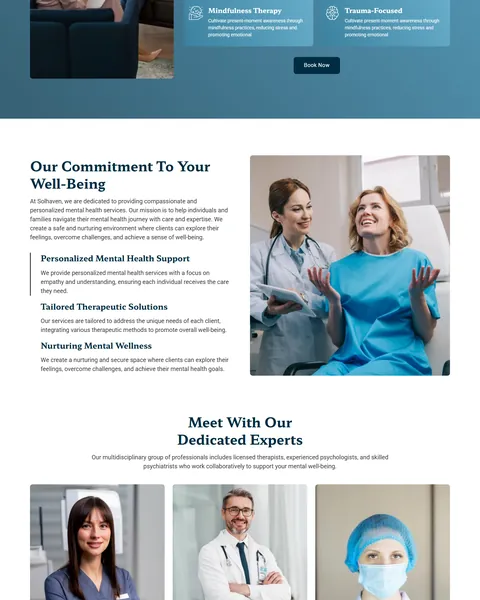
A steel blue section shows a counseling session photo beside four therapy cards. They cover CBT, family counseling, mindfulness and trauma-focused therapy, each with a short plain-language line. A Book Now button sits below.
“Our Commitment To Your Well-Being” shares your mission beside a photo of a therapist with a client. Three short points cover personal support, tailored methods and a nurturing space.
Experts, Client Stories and FAQ
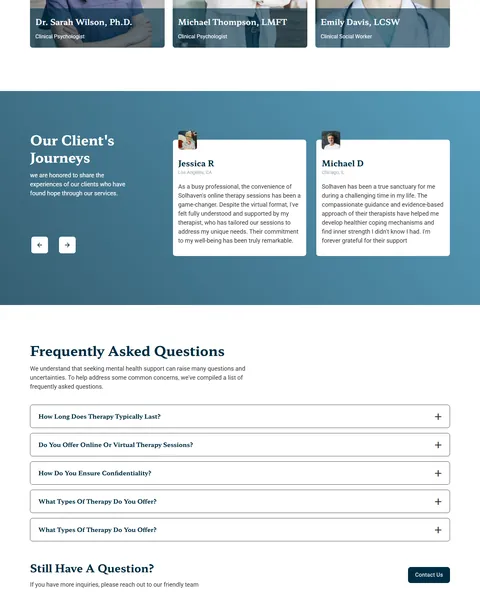
“Meet With Our Dedicated Experts” shows three clinicians with photos, credentials and roles. Clients want to know who they will talk to before they book, and a friendly face makes that first call much easier.
“Our Client’s Journeys” shares stories in a slider on a steel blue band. A five-question FAQ covers therapy length, online sessions, confidentiality and therapy types, with a Contact Us button for anything else.
Appointment Banner and Contact Form
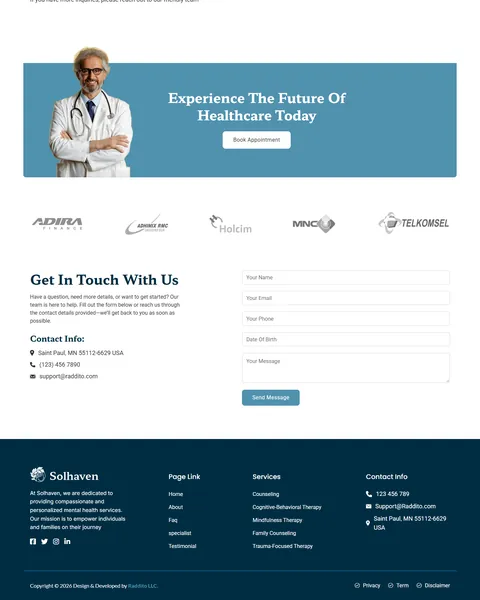
A blue banner with a doctor’s portrait and a Book Appointment button catches readers ready to act. A row of partner logos follows, which you can replace with insurers you accept.
“Get In Touch With Us” pairs your address, phone and email with a form for name, email, phone, date of birth and message. A deep navy footer adds page links, services and contact details.
Research-Driven Design for Counseling Centers
We looked at how people search for a counselor or therapist online. Many feel nervous and unsure, so they look for a calm, kind tone, clear information on the types of therapy, real credentials and privacy. Seeing the actual therapists and reading about others’ experiences makes the first step easier. This counseling center Bricks Builder landing page is designed to feel safe and gentle while still answering every practical question before someone books.
Deep teal navy and steel blue. Deep teal navy, #002D42, colors headings, cards, buttons and the footer and feels steady and serious. Steel blue, #5091AD, fills the therapy and client story bands like a calm sky. White space between sections gives the page room to breathe.
Hahmlet and Roboto. Hahmlet’s warm serif headlines feel human and thoughtful, never clinical. Roboto keeps longer text, FAQ answers and form labels easy to read.
Soft, real photography. Quiet moments, therapy sessions and friendly clinicians show support without drama. Use photos of your own team and space where you can.
Credentials in plain view. Titles like Ph.D., LMFT and LCSW next to each name show that clients are in qualified hands.
Privacy answered early. A confidentiality question in the FAQ addresses a key worry for people seeking help for the first time. Clear answers build the trust therapy depends on.
Mobile friendly. On phones, the menu opens as a popup, cards and expert profiles stack and the phone button stays easy to tap. Many people search for help late at night on their phone.
What’s Included With the Solhaven Bricks Builder Landing Page
- Solhaven Bricks templates. The full landing page and a mobile menu popup as JSON files.
- Theme Style file. Global colors, typography and buttons in one JSON file.
- Assets folder. The images and icons the page references.
- READ_ME guide and changelog. Setup steps and the version history.
Need help with the template files? Our product support team can help. If you would rather have the whole page built with your own team and branding, see our done-for-you website service.
How to Import the Solhaven Counseling Center Bricks Builder Landing Page
Solhaven only needs Bricks. Follow these steps:
- In Bricks > Settings > General, enable custom breakpoints, then save.
- In the builder’s breakpoint settings, set Tablet Portrait to 1025px.
- Import the Theme Style and set its condition to the entire website or individual pages.
- Go to Bricks > Templates and import the Solhaven and mobile menu templates.
- Link the mobile menu popup to the bar icon and its close icon, then save and refresh.
The video below walks through a full Bricks import. It also shows WooCommerce steps, which you can skip because Solhaven does not use WooCommerce.
Solhaven vs Other Bricks Options for Counseling Websites
Comparing ways to build a counseling center page in Bricks? Here is how Solhaven compares with other popular options online.
| Solhaven | Other popular Bricks template libraries online* | |
|---|---|---|
| Complete counseling center landing page | Yes, ready to import | No, all three are libraries of sections |
| Therapy type cards | Yes, four types | Not mentioned on any of them |
| Expert profiles with credentials | Yes | Not as a ready section on any of them |
| Same design also sold for Elementor | Yes | No, not on any of them |
Why counseling centers choose Solhaven:
- Made for therapy. Services, experts, stories and FAQ are ready.
- Pure Bricks. No add-ons, so your page stays fast.
- One payment. $8.97 once, with no yearly plan.
*We compared Solhaven with two paid Bricks layout libraries and a free community Bricks template library, each listed on its own website. Details come from each product page on October 26, 2026. Prices and features may change.
More Mental Health Templates by Raddito
Prefer Elementor? Solhaven is also available as a counseling center Elementor landing page with the same look. For other mental health practices, compare these Bricks options.
Mentivia – mental health Bricks Builder template kit
Best for therapy practices that need a full website.
14 pages · Bricks · Live Preview
MindEase – mental health Bricks Builder landing page
Best for counselors who want a one-page site.
Single landing page · Bricks with JetFormBuilder · Live Preview
Doctor X – psychiatry Bricks Builder template kit
Best for psychiatrists and mental health clinics.
9 pages · Bricks with JetFormBuilder · Live Preview
Want more choices? Browse our health and medical website templates or every WordPress Bricks Builder template we sell.
Frequently Asked Questions
Is Solhaven a WordPress theme?
No. Solhaven is a counseling center Bricks Builder landing page, a ready one-page design you import into Bricks. Bricks is the theme, and you need your own Bricks license.
Do I need any plugins besides Bricks?
No. The slider, accordion and form all use built-in Bricks elements, so there is nothing else to install.
Is the contact form safe for sensitive details?
Keep the form short and ask clients to share personal history only through your secure, private intake system.
Can clients book sessions online?
Link the Book Now and Book Appointment buttons to your practice management or scheduling software.
Can I add more therapists?
Yes. Duplicate an expert card in Bricks and change the photo, name, credentials and short bio.
Is it suitable for a solo therapist?
Yes. Keep one expert card, rewrite the text in the first person and remove the services you do not offer.
Should I replace the sample experts and stories?
Yes, please. The clinician names, credentials, client stories and partner logos are placeholders, so use only your own real team and client consent.