


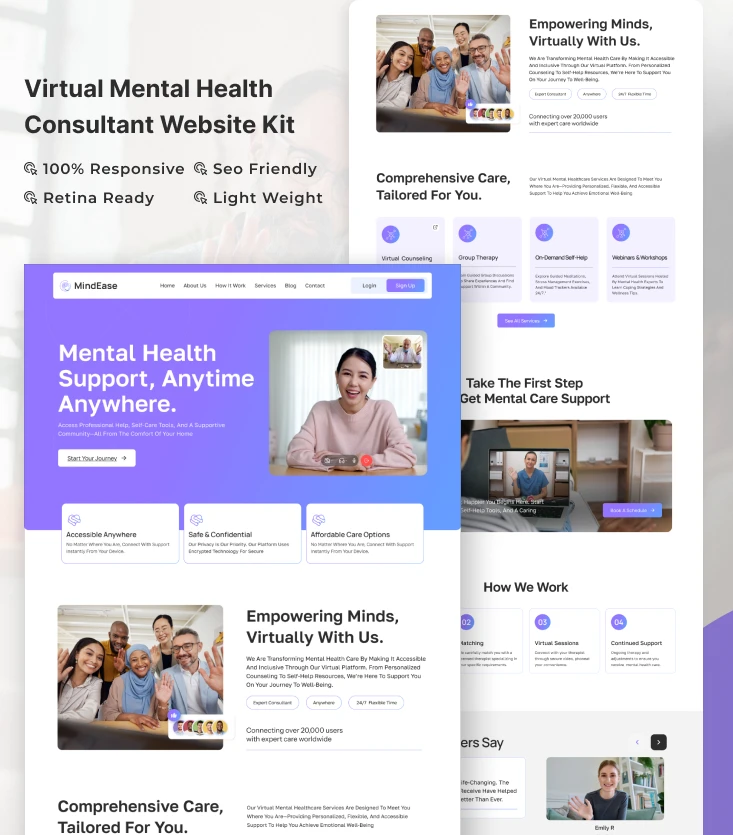
MindEase is an online therapy Bricks Builder landing page for WordPress, made for virtual counseling platforms, teletherapy practices, mental health startups and therapists who see clients by video. It is a single scrolling page with a calm hero, trust highlights, an about section, four services, a four-step process, client reviews and a consultation booking form.
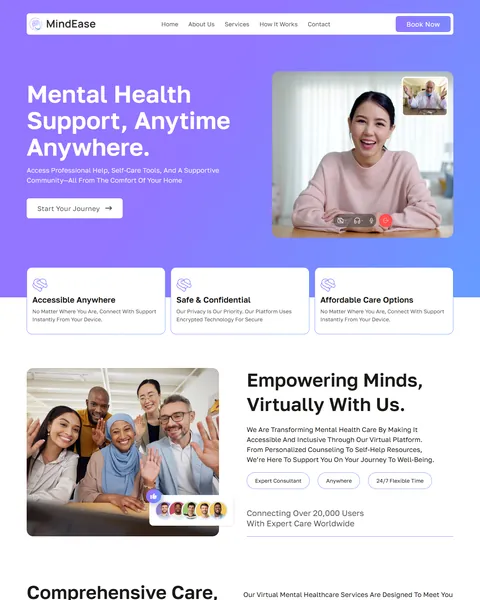
The demo opens with “Mental Health Support, Anytime Anywhere.” on a soft violet gradient beside a smiling client on a video call. A Start Your Journey button sits below. Gentle violet, pale sky blue and warm charcoal give your practice a calm, modern and welcoming look.
MindEase’s setup guide lists one free plugin, JetFormBuilder, and the zip includes a ready appointment form for it. Bricks itself is a premium theme and is not included.
Quick Template Details
- Template Name: MindEase
- Template Type: Single landing page
- Required Theme: Bricks (Premium, not included)
- Required Plugin: JetFormBuilder (Free)
- Landing Page Sections: 10
- Form File: Appointment form for JetFormBuilder included
- Responsive: Desktop, Tablet, Mobile
- Coding Required: No
Who Is This Online Therapy Bricks Builder Landing Page For?
- Virtual counseling platforms. Video and chat counseling lead the service list.
- Teletherapy practices. A four-step process explains how clients are matched with a licensed therapist.
- Mental health startups. On-demand self-help tools and a large user count suit an app-style service.
- Group therapy providers. Group therapy and regular workshops are ready as services.
- Therapists offering a free first call. A free consultation step and booking form lower the barrier to start.
Running an in-person practice with a full team? Our Mentivia mental health Bricks Builder template kit is a better fit.
See Every Section of the MindEase Online Therapy Bricks Builder Landing Page
Click any section below to open it in the live demo.
A Calm Hero and Three Trust Points
People looking for therapy online often feel anxious. MindEase opens gently, with a soft gradient, a simple promise of support from home and a real-looking video session photo. One clear button invites visitors to start.
Three white cards below the hero answer the first worries: accessible anywhere, safe and confidential, and affordable care options. Each has an icon and one short line. Answering these concerns early keeps hesitant visitors reading.
About and Four Services
“Empowering Minds, Virtually With Us.” pairs a warm group photo with a short mission and tags for expert consultants, anywhere access and 24/7 flexible time. A “20,000 users” line adds social proof.
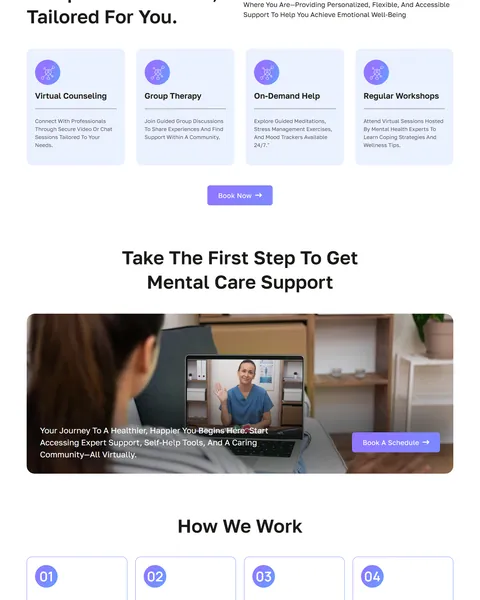
“Comprehensive Care, Tailored For You.” shows four service cards on soft blue: virtual counseling, group therapy, on-demand help with meditations and mood trackers, and regular workshops. A Book Now button follows.
A Clear Four-Step Process
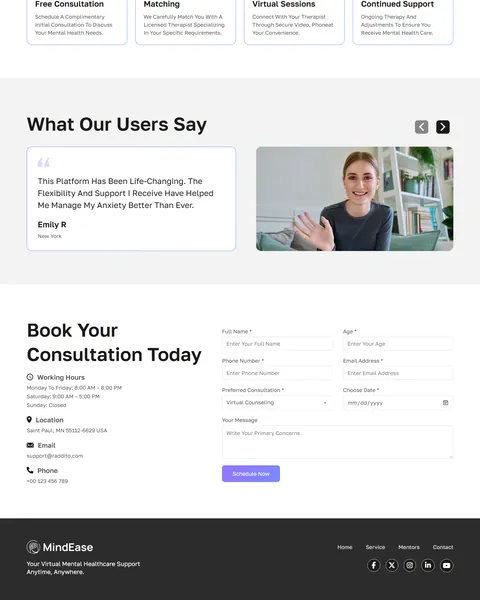
“Take The First Step” uses a large photo banner of a client on a video call with a Book A Schedule button. “How We Work” then explains the journey in four numbered cards: free consultation, therapist matching, virtual sessions and continued support.
A simple process removes uncertainty. People know what happens after they book, which is especially important when they are asking for help for the first time.
Reviews, Booking Form and Footer
“What Our Users Say” shows client quotes in a slider beside a photo of a happy client. “Book Your Consultation Today” lists working hours, location, email and phone next to a form for name, age, phone, email, consultation type, date and a message.
A dark footer repeats your tagline, main links and social icons. The page stays short so visitors reach the booking form quickly, before doubt sets in.
Research-Driven Design for Online Therapy
We looked at how people choose online therapy. They want to feel safe, understood and not judged. Privacy, cost and how quickly they can talk to someone are the biggest questions. Many browse late at night on their phone, often after a hard day. This online therapy Bricks Builder landing page is designed to feel calm and kind. It answers privacy and cost concerns early and makes the first booking feel small and easy.
Gentle violet and pale sky blue. Gentle violet, #9375FF, marks buttons, icons and the hero gradient. Violet is often linked with calm and reflection. Pale sky blue, #EBF1FF, softens service cards and keeps the page airy.
Golos Text throughout. Golos Text is a clear, modern sans serif with friendly letter shapes. It keeps headlines warm and body text easy to read for people who may feel stressed.
Real, relatable photos. People on video calls and small group sessions show online care as normal and human. Use photos that reflect your real clients and therapists.
Privacy up front. A “Safe & Confidential” card right below the hero answers the top worry before visitors scroll.
A gentle tone. Soft colors, rounded cards and plenty of white space make the page feel quiet, not pushy. There are no flashing offers or countdowns, which would feel wrong for mental health care.
Mobile friendly. On phones, the menu folds into a toggle, cards stack and the booking form stays easy to complete with one hand. That matters for someone reaching out privately from their bedroom or a quiet corner at work.
What’s Included With the MindEase Bricks Builder Landing Page
- MindEase Bricks template. The full landing page as one JSON file.
- JetFormBuilder appointment form. A ready booking form to import.
- Theme Style file. Global colors, typography and buttons in one JSON file.
- Assets folder. The images and icons the page references.
- READ_ME guide and changelog. Setup steps and the version history.
Need help with the template files? Our product support team can help. If you would rather have the whole page built with your own services and branding, see our done-for-you website service.
How to Import the MindEase Online Therapy Bricks Builder Landing Page
Install and activate JetFormBuilder first, then follow these steps:
- In Bricks > Settings > General, enable custom breakpoints, SVG uploads and smooth scroll (CSS), then save.
- In the builder’s breakpoint settings, set Tablet Portrait to 1025px and Mobile Landscape to 768px.
- Go to Bricks > Templates and import the MindEase template file.
- Import the Theme Style and set its condition to the entire website or individual pages.
- Import the appointment form into JetFormBuilder, insert the template into a page, then save and refresh.
The video below walks through a full Bricks import. It also shows WooCommerce steps, which you can skip because MindEase does not use WooCommerce.
MindEase vs Other Bricks Options for Therapy Websites
Comparing ways to build an online therapy landing page in Bricks? Here is how MindEase compares with other popular options online.
| MindEase | Other popular Bricks template libraries online* | |
|---|---|---|
| Complete online therapy landing page | Yes, ready to import | No, all three are libraries of sections |
| Four-step therapy process | Yes | Not mentioned on any of them |
| Appointment form file | Yes | Not mentioned on any of them |
| Same design also sold for Elementor | Yes | No, not on any of them |
Why therapists choose MindEase:
- Calm by design. Soft colors and a gentle tone that put clients at ease.
- One free plugin. JetFormBuilder powers the appointment form.
- One payment. $9.90 once, with no yearly plan.
*We compared MindEase with two paid Bricks layout libraries and a free community Bricks template library, each listed on its own website. Details come from each product page on October 26, 2026. Prices and features may change.
More Mental Health Templates by Raddito
Prefer Elementor? MindEase is also available as an online therapy Elementor landing page with the same look. For a full practice website or a different style, compare these Bricks options.
Mentivia – mental health Bricks Builder template kit
Best for counseling centers and therapy practices with several therapists.
14 pages · Bricks · Live Preview
Doctor X – psychiatrist Bricks Builder template kit
Best for solo psychiatrists and therapists.
9 pages · Bricks with JetFormBuilder · Live Preview
Solhaven – counseling Bricks Builder landing page
Best for counseling and therapy practices.
Single landing page · No extra plugins · Live Preview
Want more choices? Browse our health and medical website templates or every WordPress Bricks Builder template we sell.
Frequently Asked Questions
Is MindEase a WordPress theme?
No. MindEase is an online therapy Bricks Builder landing page, a ready one-page design you import into Bricks. Bricks is the theme, and you need your own Bricks license.
Why does it need JetFormBuilder?
The setup guide uses JetFormBuilder for the appointment form, and the zip includes that form ready to import.
Does MindEase include video sessions?
No. It is the website for your practice. Link the booking buttons to your secure telehealth platform for actual sessions.
Is the booking form private enough for health data?
Keep the form short and avoid asking for clinical details. Collect sensitive intake information on your secure practice platform instead.
Can I add crisis resources?
Yes, please. Add a visible note with local emergency and crisis line numbers, as online therapy is not for emergencies.
Can I change the services and steps?
Yes. Edit the four service cards and the four process steps in Bricks to match how your practice works.
Should I replace the sample reviews and figures?
Yes, please. The user count, reviews and contact details are placeholders, so use only your own real details and client consent.