


Medevice is a free shockwave therapy HTML template built with Tailwind CSS and Vite. It suits medical device makers, equipment distributors and physiotherapy suppliers that sell shockwave machines to clinics, without WordPress. It is a single scrolling page with 9 sections, from a video hero and a therapy explainer to a product range, support details, testimonials and a contact footer.
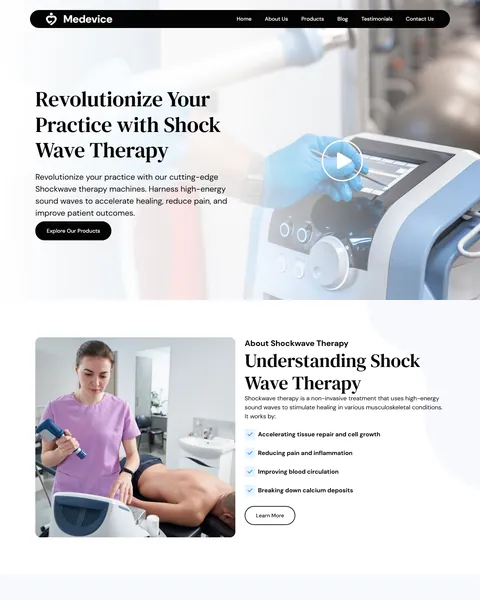
The live demo opens with “Revolutionize Your Practice with Shock Wave Therapy” in an elegant serif. Behind it, a soft, pale photo shows a gloved hand using a shockwave unit. A round play button opens a product video. White, near-black and a calm sky blue give your company a clean, clinical and modern look.
Medevice is plain HTML with Tailwind CSS. There is no theme or plugin to install: edit index.html, build with Vite and upload the files.

Quick Template Details
- Template Name: Medevice
- Template Type: Single landing page
- Built With: HTML, Tailwind CSS 3 and Vite 5
- Extra Libraries: Lenis from npm, plus jQuery, Owl Carousel, AOS and Font Awesome from public CDNs
- Landing Page Sections: 9
- WordPress Required: No
- Price: Free
- Responsive: Desktop, Tablet, Mobile
Who Is This Shockwave Therapy HTML Template For?
- Medical device makers. Product cards for portable, clinic and advanced units show a full range on one page.
- Equipment distributors. A training and support block explains the service that comes with each sale.
- Physiotherapy suppliers. A plain-language therapy explainer helps buyers understand the treatment.
- Clinic equipment resellers. The layout works for ultrasound, laser or other therapy devices too.
- Developers building healthcare sites. A compact Tailwind and Vite project is easy to rebrand for a client.
Prefer to run your device site on WordPress? The same Medevice design is sold as a shockwave therapy Elementor landing page.
See Every Section of the Medevice Shockwave Therapy HTML Template
Click any section below to open it in the live demo.
A Video Hero, a Therapy Explainer and Products
Clinic owners want to see a device in use before they ask for a price. Medevice opens with a short line about faster healing and better outcomes, a black Explore Our Products button and a play button for your demo video. A rounded black menu bar floats over the hero.
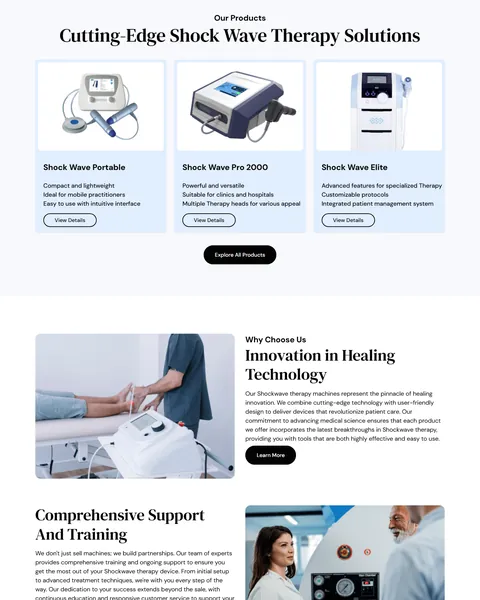
“Understanding Shock Wave Therapy” explains the treatment beside a photo of a therapist at work, with four blue-check benefits and a Learn More button. “Our Products” then shows three device cards on a pale blue band, each with a product photo, three key points and a View Details button.
Why Choose Us and Equipment Advantages
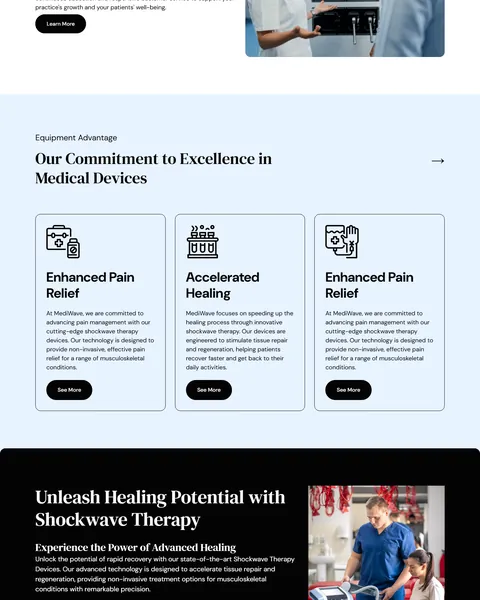
“Innovation in Healing Technology” and “Comprehensive Support And Training” sit in two alternating photo and text rows. They explain your technology and the training and service you offer after the sale, both big factors for a clinic investing in new equipment.
“Our Commitment to Excellence in Medical Devices” follows with three outlined cards, each with a line icon, a short benefit and a See More button.
A Dark Banner, Testimonials and Contact Footer
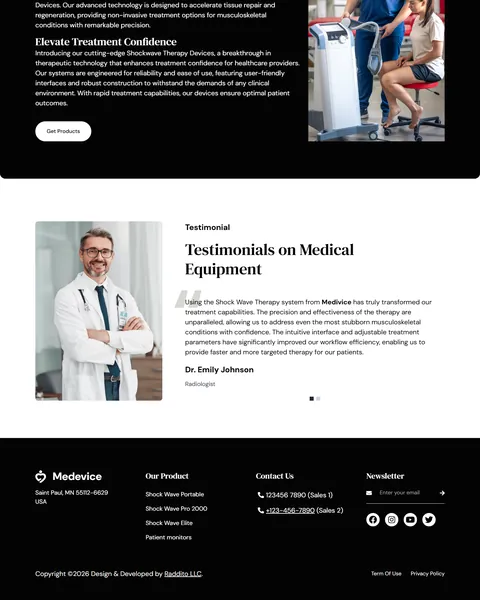
A bold black banner promotes the healing potential of shockwave therapy. It adds two short benefit blocks, a photo of a treatment session and a Get Products button. “Testimonials on Medical Equipment” shows a clinician quote beside a doctor’s portrait, with dots to move between reviews.
The black footer lists your address, products, sales phone numbers, social links and a newsletter email field.
Research-Driven Design for Medical Device Companies
We looked at how clinics research therapy equipment online. Buyers are usually clinic owners, physiotherapists or practice managers. They want to understand the treatment, compare models, see the device in use and know what training and support come with it. A purchase like this is a long-term investment, so trust and clarity matter more than flashy design. This shockwave therapy HTML template is designed to educate first, present the range clearly and give buyers several easy ways to get in touch.
Clinical white and sky blue. The Tailwind config sets a calm sky blue, #5EB1FF, as the primary color, with near-black, #040404, and a pale blue-white, #F8F9FE, for sections. Blue and white feel clean, medical and reliable.
DM Serif Text and DM Sans. Serif headings add a premium, established feel, while DM Sans keeps product details and explanations easy to read.
Video first. A demo video in the hero lets buyers see the device working, which answers many questions before a sales call and shortens the buying process for busy clinic teams.
Explain, then sell. The therapy explainer comes before the products, so buyers new to shockwave treatment understand the value first.
Support as a selling point. A full row on training and service reassures clinics that they will not be left alone after delivery, a common worry with expensive equipment.
Mobile friendly. Product cards, benefit cards and the footer stack on phones, so buyers can check a model between appointments. Sales reps can also share the page with clinics during visits.
What’s Included With the Medevice HTML Template
- index.html. The full landing page, written with Tailwind utility classes.
- Tailwind and Vite config. tailwind.config.js with the Medevice colors and fonts, plus package.json with the build scripts.
- main.js, owl-carousel.js and style.css. The hero video popup, testimonial slider, smooth scrolling, animations and custom styles.
- Assets folder. Device, treatment and team photos, icons and the logo.
- README. Setup, development and build steps.
Need help with the files? Our product support team can help. If you would rather have the site built for you with your own devices and photos, see our done-for-you website service.
How to Set Up the Medevice Shockwave Therapy HTML Template
Install Node.js first, then:
- Unzip Medevice and open its folder in a terminal.
- Run npm install to download Tailwind CSS, Vite and Lenis.
- Run npm run dev to preview the site locally while you edit.
- Replace the devices, benefits, testimonials, video link, photos and contact details in index.html and the assets folder.
- Run npm run build, then upload the dist folder to your host.
Medevice vs Other Tailwind Options for Medical Device Websites
Comparing ways to build a shockwave therapy page with Tailwind CSS? Here is how Medevice compares with other popular options online.
| Medevice | Other popular Tailwind CSS libraries online* | |
|---|---|---|
| Complete medical device landing page | Yes, ready to use | No, none of the three offers one |
| Therapy explainer with a device product range | Yes | Not as a ready section on any of them |
| Plain HTML project with a Vite build setup | Yes | No, they offer copy-paste blocks or React templates |
| Same design also sold for Elementor and Bricks | Yes | No, not on any of them |
Why device companies choose Medevice:
- Made for medical equipment. Explainer, products, support and testimonials are ready.
- No WordPress needed. A fast static site with nothing to update.
- Free download. No license fee and no yearly plan.
*We compared Medevice with two paid Tailwind CSS libraries, Tailwind Plus and Flowbite Pro, and the free HyperUI collection, using each product’s own website. Details were checked on November 1, 2026. Prices and features may change.
More Health and Medical Templates by Raddito
Prefer WordPress? Medevice is also available as a shockwave therapy Bricks Builder landing page with the same look. For related businesses, compare these HTML templates.
Telmed – telemedicine HTML template
Best for online doctor consultations.
Single landing page · Free · Tailwind CSS · Live Preview
VitalCare – primary care HTML template
Best for family clinics and wellness centers.
Single landing page · Free · Tailwind CSS · Live Preview
FirstCare – private GP HTML template
Best for private doctors and small practices.
Single landing page · Free · Tailwind CSS · Live Preview
Want more choices? Browse our health and medical website templates or every HTML website template we offer.
Frequently Asked Questions
Do I need WordPress for Medevice?
No. Medevice is a static shockwave therapy HTML template, so it runs on any web host without WordPress, plugins or a database.
Is Medevice free?
Yes. It is a free download that you can use for your own company or a client project.
Can I sell devices directly from the page?
Not on its own. Link the View Details buttons to product pages, a quote form or your online store.
How do I change the hero video?
Find the YouTube embed link near the top of index.html and replace it with the embed link of your own product video.
Is the newsletter field connected?
No. Connect it to your email marketing tool, such as Mailchimp or Brevo, using its form code or action URL.
Can I use it for other therapy equipment?
Yes. Change the explainer, product names and photos to suit ultrasound, laser or other clinic devices.
Should I replace the sample text and reviews?
Yes, please. Some cards mention another brand name, one feature card is repeated, and the reviews and contact details are samples. Use your own facts and approved medical claims.