


FirstCare is a free private GP HTML template built with Tailwind CSS and Vite. It is made for private general practitioners, family doctors, walk-in clinics and small practices that offer both in-person and video appointments. It is a single scrolling page with 10 sections, from a doctor hero and services to a team, reviews, blog posts and a newsletter sign-up.
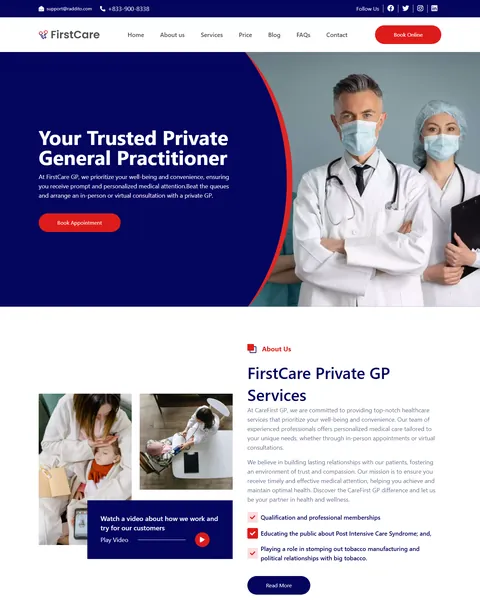
The live demo opens with “Your Trusted Private General Practitioner” in white on a deep navy panel, beside two doctors in masks and white coats. A red Book Appointment button sits under a short line about prompt, personalized care. Navy, clinical white and a confident red give your practice a trustworthy, professional look.
FirstCare is static HTML with Tailwind CSS, so you do not need WordPress, a theme or plugins. You edit index.html, build with Vite and upload the result to any web host.

Quick Template Details
- Template Name: FirstCare
- Template Type: Single landing page
- Built With: HTML, Tailwind CSS 3 and Vite 5
- Extra Libraries: Lenis from npm, plus jQuery, Owl Carousel, AOS and Font Awesome from public CDNs
- Landing Page Sections: 10
- WordPress Required: No
- Price: Free
- Responsive: Desktop, Tablet, Mobile
Who Is This Private GP HTML Template For?
- Private general practitioners. A clear hero promise and a Book Appointment button lead every visitor to booking.
- Family doctors. Personalized health, medicals and mental health service cards cover everyday care.
- Clinics with video visits. A full-width telemedicine banner explains that remote appointments are available.
- Small group practices. A team section with photos and names introduces several doctors.
- Developers building clinic sites. Plain Tailwind markup and a Vite setup make a quick base for a medical client.
Need a full clinic website with doctor and service detail pages? Our FirstCare general practitioner Bricks Builder template kit is a better fit.
See Every Section of the FirstCare Private GP HTML Template
Click any section below to open it in the live demo.
A Doctor Hero, About Block and Three Services
Patients look for a calm, competent first impression. FirstCare uses a split hero with a navy panel and a curved photo edge, so the doctors and the booking button stand out. A thin top bar shows an email, phone number and social icons, and the main menu ends with a red Book Online button.
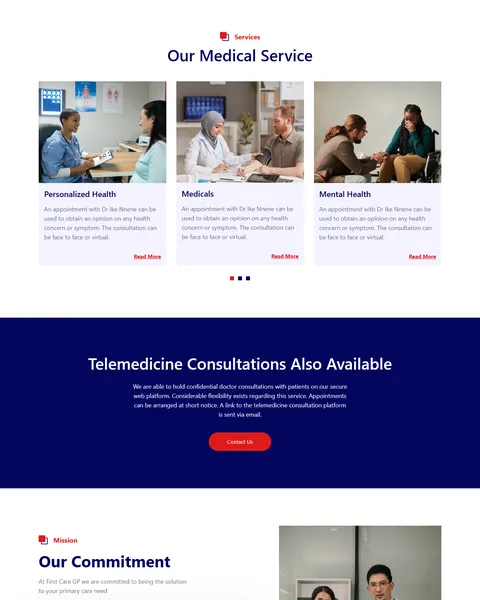
The about block pairs a photo collage and a “watch a video” card with a short practice story and three checklist points. “Our Medical Service” then shows three service cards, personalized health, medicals and mental health, each with a photo and a Read More link, in a carousel with dots.
Telemedicine, Commitment and the Team
A navy “Telemedicine Consultations Also Available” banner explains remote appointments in two lines, with a red Contact Us button. It answers a common patient question before it is asked.
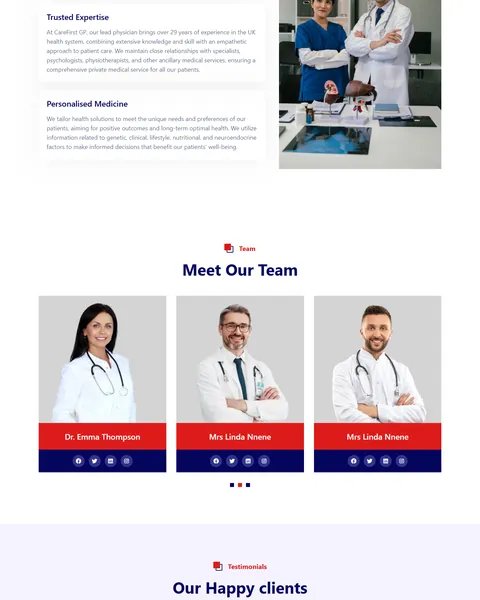
“Our Commitment” follows with two cards, trusted expertise and personalized medicine, next to a photo of doctors at work. “Meet Our Team” shows doctor portraits with names on red bars and social icons below each one.
Reviews, Blog and Newsletter
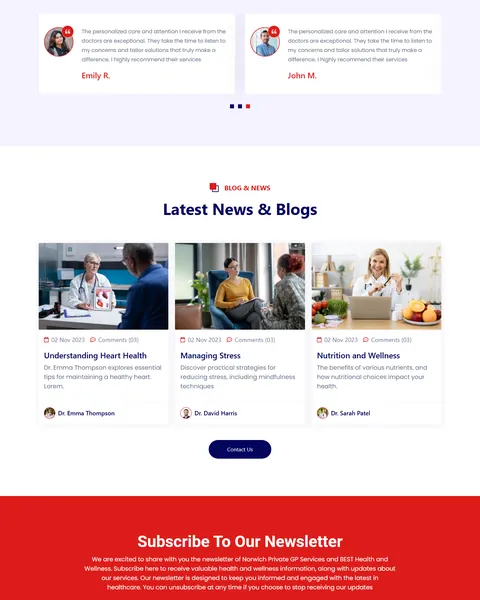
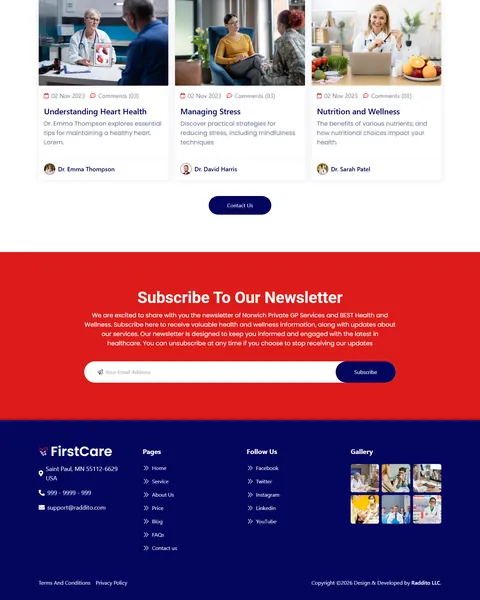
“Our Happy clients” shows patient quotes with names in a carousel. “Latest News & Blogs” lists three health articles with dates, authors and short summaries, which helps local search and gives patients useful reading.
A bold red “Subscribe To Our Newsletter” band with an email field comes next. The navy footer below holds page links, social links, contact details and a small photo gallery.
Research-Driven Design for Private GPs
We looked at how people choose a private GP online. They want to know who the doctors are, what services are offered, whether video visits are possible and how quickly they can book. Many search when they or a family member feel unwell, so the page has to feel calm and get to the point. This private GP HTML template is designed to build trust fast and keep the booking button in view.
Navy and red. The Tailwind config sets a deep navy, #04055E, as the primary color for the hero, banners and footer, and a strong red, #DD1C1A, for buttons and accents. Navy reads as reliable and professional, while red draws the eye to booking.
Poppins and Roboto. Poppins gives headings a friendly, modern shape, and Roboto keeps service text, reviews and blog summaries easy to read.
Real doctors on screen. Photos of clinicians in the hero, commitment block and team section put faces to the practice. Patients trust people they can see, so use your own team photos, ideally taken in your consulting rooms.
Telemedicine in plain view. A full-width banner makes video appointments obvious instead of hiding them in a menu. Busy parents and working adults often prefer a quick video visit.
Content that helps. The blog and newsletter keep patients coming back and give search engines fresh, relevant pages about the conditions you treat.
Mobile friendly. The hero, cards and team stack on phones, and the Book Online button stays in the menu. Many patients book from their phone.
What’s Included With the FirstCare HTML Template
- index.html. The full landing page, written with Tailwind utility classes.
- Tailwind and Vite config. tailwind.config.js with the FirstCare colors, plus package.json with the build scripts.
- main.js and style.css. The carousels, smooth scrolling and a few custom styles.
- Assets folder. The doctor, service, blog and gallery images used in the demo.
- README. Setup, development and build steps.
Need help with the files? Our product support team can help. If you would rather have the site built for you with your own doctors and services, see our done-for-you website service.
How to Set Up the FirstCare Private GP HTML Template
Install Node.js on your computer first. Then:
- Unzip FirstCare and open the folder in a terminal.
- Run npm install to add Tailwind CSS, Vite and Lenis.
- Run npm run dev to preview the page in your browser while you edit.
- Update the doctor names, services, contact details and images in index.html and the assets folder.
- Run npm run build, then upload everything in the dist folder to your hosting.
FirstCare vs Other Tailwind Options for Clinic Websites
Comparing ways to build a GP practice page with Tailwind CSS? Here is how FirstCare compares with other popular options online.
| FirstCare | Other popular Tailwind CSS libraries online* | |
|---|---|---|
| Complete private GP landing page | Yes, ready to use | No, none of the three offers one |
| Telemedicine banner and doctor team section | Yes | Not as a ready section on any of them |
| Plain HTML project with a Vite build setup | Yes | No, they offer copy-paste blocks or React templates |
| Same design also sold for Elementor and Bricks | Yes | No, not on any of them |
Why practices choose FirstCare:
- Made for GPs. Services, telemedicine, team, reviews and a blog are ready.
- No WordPress needed. A static site is quick and simple to host.
- Free download. No license fee and no yearly plan.
*We compared FirstCare with two paid Tailwind CSS libraries, Tailwind Plus and Flowbite Pro, and the free HyperUI collection, using each product’s own website. Details were checked on November 1, 2026. Prices and features may change.
More Healthcare Templates by Raddito
Prefer WordPress? FirstCare is also available as a private GP Elementor landing page with the same look. For other health services, compare these HTML templates.
Telmed – telemedicine HTML template
Best for online doctor and video consultation services.
Single landing page · Free · Tailwind CSS · Live Preview
VitalCare – primary care HTML template
Best for primary care and wellness clinics.
Single landing page · Free · Tailwind CSS · Live Preview
Solhaven – counseling center HTML template
Best for counseling and mental health practices.
Single landing page · Free · Tailwind CSS · Live Preview
Want more choices? Browse our health and medical website templates or every HTML website template we offer.
Frequently Asked Questions
Do I need WordPress for FirstCare?
No. FirstCare is a static private GP HTML template, so it runs on any web host without WordPress or a database.
Is FirstCare free to use?
Yes. It is a free download, and you can use it for your own practice or a client.
Can patients book appointments on this page?
The page has booking buttons but no booking system. Link them to your practice’s online booking or scheduling tool.
Is the newsletter form connected?
No. Connect it to your email service, such as Mailchimp or Brevo, using their embed code or form action.
Can I add more doctors or services?
Yes. Copy a team card or service card in index.html and change the photo, name and text.
Is patient data safe with this page?
The page itself stores no data. Keep medical details off simple forms and use your secure practice system for intake.
Should I replace the sample text?
Yes, please. Some demo text names a real doctor and a real practice, and the phone number, reviews and blog posts are samples, so use only your own details.