


Medevice is a shockwave therapy Bricks Builder landing page for WordPress, made for shockwave device makers, medical equipment distributors, rehab equipment suppliers and clinics that offer shockwave treatment. It is a single scrolling page with a treatment explainer, three device cards, advantage cards, testimonials and a newsletter footer.
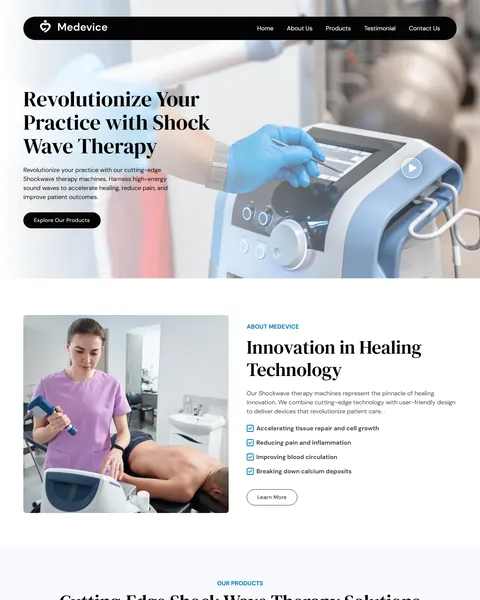
The demo opens with a large serif headline beside a close-up of a gloved hand adjusting a sleek machine. A play button on the photo opens a video popup, and a rounded black navigation bar floats at the top. Deep black, clean white and a touch of clinical blue give your brand a premium, precise and modern look.
Medevice is built only with native Bricks elements, including its video popup, so no extra plugins are required. Bricks itself is a premium theme and is not included.

Quick Template Details
- Template Name: Medevice
- Template Type: Single landing page
- Required Theme: Bricks (Premium, not included)
- Required Plugins: None
- Landing Page Sections: 9, plus mobile menu and video popups
- Responsive: Desktop, Tablet, Mobile
- Coding Required: No
Who Is This Shockwave Therapy Bricks Builder Landing Page For?
- Shockwave device makers. Three product cards show a portable unit, a standard model and a premium model.
- Medical equipment distributors. An Explore All Products button can lead to your full catalog or price list.
- Rehab and physiotherapy suppliers. Support and training content speaks to clinics buying their first device.
- Clinics offering shockwave treatment. A benefits list and treatment photos explain the therapy to patients in plain words.
- Brands launching a single device. The dark highlight banner can focus on one new model with a Get Product button.
Selling many medical products online with a cart and checkout? Our Medico medical supply store Bricks Builder template kit is a better fit.
See Every Section of the Medevice Shockwave Therapy Bricks Builder Landing Page
Click any section below to open it in the live demo.
A Device Hero and a Treatment Explainer
Clinicians judge medical equipment by how it looks in use. Medevice opens with a large photo of a machine being set up, a short line about using sound waves to support healing and an Explore Our Products button. The video popup is a good place for a short demonstration.
“Innovation in Healing Technology” then pairs a treatment photo with four benefit points the therapy is commonly used for, such as pain and circulation. Keep any claims here in line with your device approvals and local rules.
Three Devices and Two Reasons to Choose You
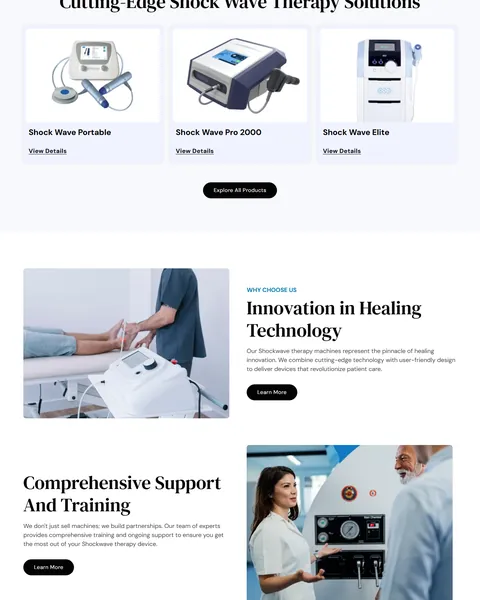
Three devices sit on pale blue cards: Shock Wave Portable, Pro 2000 and Elite. Each has a View Details link. A black Explore All Products button sits underneath.
A “Why Choose Us” section follows with two image blocks. One covers device design, and the other explains your training and ongoing support. For clinic buyers, support after the sale often matters as much as the machine itself.
Advantage Cards, a Highlight Banner and Testimonials
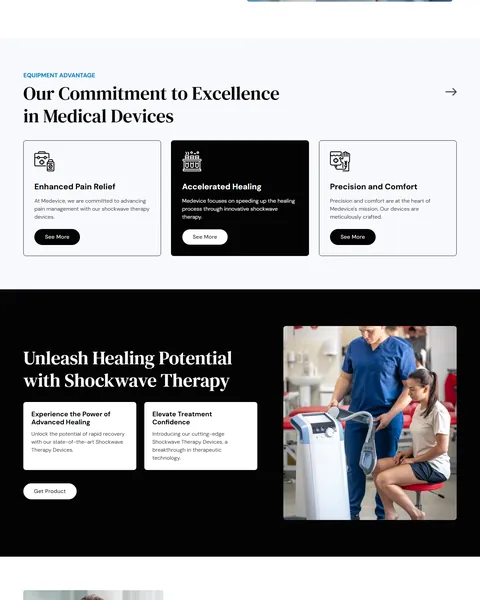
“Our Commitment to Excellence in Medical Devices” lists three advantage cards: pain relief, faster healing, and precision with comfort. The middle card is set in black to stand out.
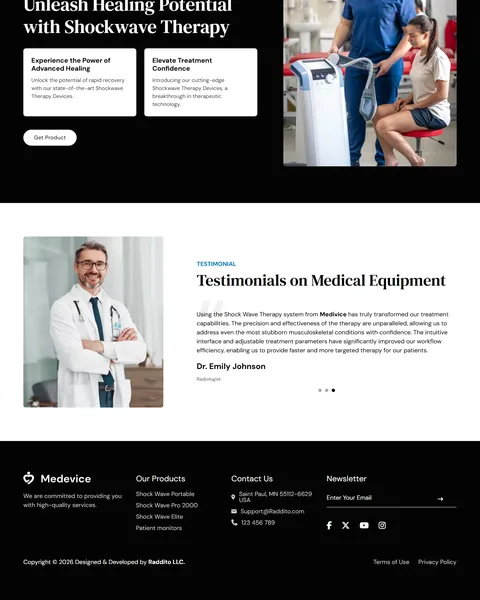
A black “Unleash Healing Potential with Shockwave Therapy” banner pairs two short benefit boxes with a photo of a clinician treating a patient’s knee. A testimonial slider with a doctor’s portrait follows, and the footer adds product links, contact details and a newsletter field.
Research-Driven Design for Medical Device Brands
We looked at how clinicians and practice owners research medical equipment online. They want to see the device clearly, understand what it treats, compare models and know that training and service are included. Trust in the brand matters because the purchase is large and long term. This shockwave therapy Bricks Builder landing page is designed to present your devices like premium products while keeping the facts easy to find.
Deep black and clean white. Deep black, #040404, fills the navigation bar, buttons, the featured card and the highlight banner. White and very pale blue backgrounds, #F8F9FE, keep the page bright and clinical. Clinical blue, #007CBA, marks small labels and check icons.
DM Serif Display and DM Sans. DM Serif Display headlines feel refined, like a premium medical brand. DM Sans keeps product names, benefits and buttons clean and modern.
Devices in real use. Hands on machines, treatment rooms and clinicians with patients show the equipment at work, not just on a white background. Use your own product and clinic photos where you can.
Product cards that stay simple. Each device card shows only a photo, a name and one link, so buyers can compare models at a glance and click for specifications.
Support up front. A training and support block early on answers a key worry for clinics buying new technology.
Mobile friendly. On phones, the menu opens as a popup, product cards stack and the hero photo stays sharp. Many buyers first see a device on their phone at a trade show or through social media.
What’s Included With the Medevice Bricks Builder Landing Page
- Medevice Bricks templates. The full landing page, a mobile menu popup and a video popup as JSON files.
- Theme Style file. Global colors, typography and buttons in one JSON file.
- Assets folder. The images and icons the page references.
- READ_ME guide and changelog. Setup steps and the version history, with the latest update on July 29, 2025.
Need help with the template files? Our product support team can help. If you would rather have the whole page built with your own devices and branding, see our done-for-you website service.
How to Import the Medevice Shockwave Therapy Bricks Builder Landing Page
Medevice only needs Bricks. Follow these steps:
- In Bricks > Settings > General, enable custom breakpoints, then save.
- In the builder’s breakpoint settings, set Tablet Portrait to 1025px.
- Import the Theme Style and set its condition to the entire website or individual pages.
- Go to Bricks > Templates and import the Medevice, mobile menu and video popup templates.
- Link the mobile menu popup to the bar icon and its close icon, then save and refresh.
The video below walks through a full Bricks import. It also shows WooCommerce steps, which you can skip because Medevice does not use WooCommerce.
Medevice vs Other Bricks Options for Medical Device Websites
Comparing ways to build a medical device page in Bricks? Here is how Medevice compares with other popular options online.
| Medevice | Other popular Bricks template libraries online* | |
|---|---|---|
| Complete shockwave therapy landing page | Yes, ready to import | No, all three are libraries of sections |
| Device product cards | Yes, three models | Not mentioned on any of them |
| Support and training section | Yes | Not as a ready section on any of them |
| Same design also sold for Elementor | Yes | No, not on any of them |
Why device brands choose Medevice:
- Made for medical devices. Products, benefits, support and reviews are ready.
- Pure Bricks. No add-ons, so your page stays fast.
- One payment. $8.97 once, with no yearly plan.
*We compared Medevice with two paid Bricks layout libraries and a free community Bricks template library, each listed on its own website. Details come from each product page on October 26, 2026. Prices and features may change.
More Medical Equipment and Therapy Templates by Raddito
Prefer Elementor? Medevice is also available as a shockwave therapy Elementor landing page with the same look. For related businesses, compare these.
Medico – medical supply store Bricks Builder template kit
Best for online medical supply and equipment shops.
12 pages · Bricks with WooCommerce and MC Wishlist · Live Preview
Alivio – chiropractic Bricks Builder template kit
Best for chiropractic and physiotherapy clinics.
12 pages · Bricks with WooCommerce Wishlist · Live Preview
Health Device – medical equipment Elementor landing page
Best for hospital and diagnostic equipment suppliers.
Single landing page · Needs Elementor Pro · Live Preview
Want more choices? Browse our health and medical website templates or every WordPress Bricks Builder template we sell.
Frequently Asked Questions
Is Medevice a WordPress theme?
No. Medevice is a shockwave therapy Bricks Builder landing page, a ready one-page design you import into Bricks. Bricks is the theme, and you need your own Bricks license.
Do I need any plugins besides Bricks?
No. The slider, video popup and newsletter field all use built-in Bricks elements, so there is nothing else to install.
Can I sell devices directly from this page?
Not by default. Link each View Details button to a product page, a quote form or your store.
Can I add a contact or quote form?
Yes. Add a Bricks form section above the footer so clinics can request a quote or a demo.
Can I use it for other medical equipment?
Yes. Replace the device photos and names with ultrasound, laser, electrotherapy or other therapy equipment, and update the benefit lines to match.
What about medical claims in the text?
Replace the sample benefit lines with wording approved for your device and market before you publish.
Should I replace the sample products and testimonials?
Yes, please. The device names, photos and testimonials are placeholders, so use only your own real products and customers.