


Savorium is a fine dining Bricks Builder landing page for WordPress, made for fine dining restaurants, upscale bistros, hotel restaurants and chef-led dining rooms. It is a single scrolling page with four dining highlights, your restaurant story, a tabbed dish menu with prices, a guest review and a table booking form.
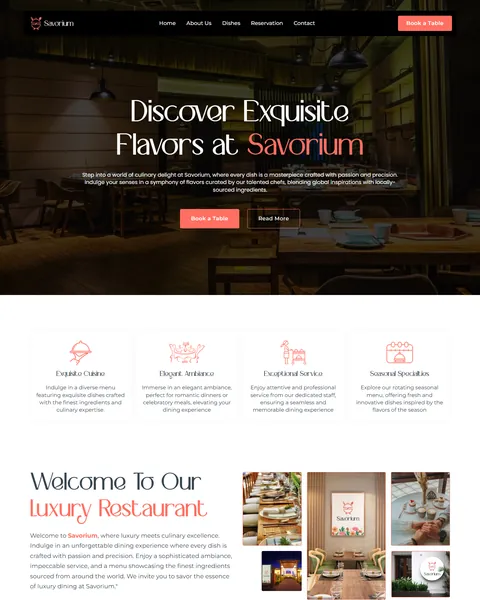
The demo opens with “Discover Exquisite Flavors at Savorium” in a thin, elegant display font over a softly lit, wood-paneled dining room. Book a Table and Read More buttons sit below, with a coral Book a Table button in the header. Warm coral, deep charcoal and crisp white give your restaurant a refined, romantic and welcoming look.
Savorium’s table booking form is built with the free JetFormBuilder plugin, and the zip includes the form ready to import. Bricks itself is a premium theme and is not included.

Quick Template Details
- Template Name: Savorium
- Template Type: Single landing page
- Required Theme: Bricks (Premium, not included)
- Plugin Used: JetFormBuilder (Free), for the booking form
- Landing Page Sections: 7, plus a mobile menu popup
- Form File: Booking form included
- Responsive: Desktop, Tablet, Mobile
- Coding Required: No
Who Is This Fine Dining Bricks Builder Landing Page For?
- Fine dining restaurants. An elegant hero, a premium dishes menu and a booking form cover the essentials.
- Upscale bistros. Breakfast, lunch and dinner tabs suit places open from morning to late evening.
- Hotel restaurants. A luxury welcome section and seasonal menu fit hotel dining rooms and rooftop venues.
- Chef-led dining rooms. Seasonal specialties and careful dish descriptions highlight the kitchen.
- Restaurants for special occasions. A romantic ambiance highlight speaks to anniversaries and celebrations.
Running a casual restaurant or fast food place? Our Maido restaurant reservation Bricks Builder landing page may suit you better.
See Every Section of the Savorium Fine Dining Bricks Builder Landing Page
Click any section below to open it in the live demo.
An Elegant Hero and Four Dining Highlights
Fine dining guests decide on atmosphere first. Savorium opens with a full-width photo of a warmly lit dining room, a centered headline and two buttons. A dark header keeps your menu links and Book a Table button in view.
Four line icons follow: exquisite cuisine, elegant ambiance, exceptional service and seasonal specialties. Each has a short line that sums up why guests should choose you for their next special meal.
Your Story and a Tabbed Premium Menu
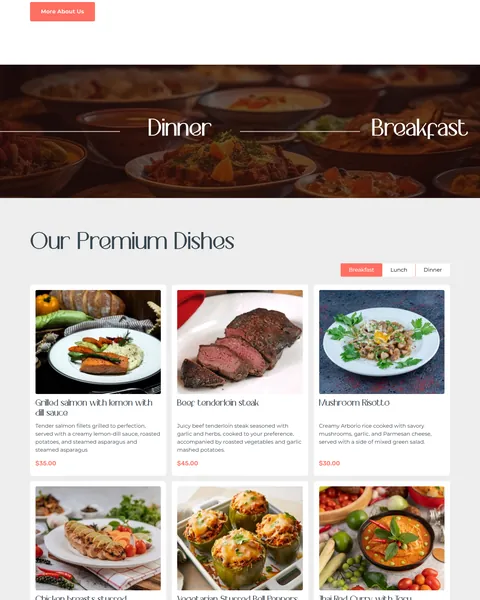
Your story sits beside a collage of interior, dish and chef photos, with a More About Us button. A dramatic banner with “Dinner” and “Breakfast” in large script runs across the page.
“Our Premium Dishes” shows six dish cards with photos, descriptions and prices, switched by Breakfast, Lunch and Dinner tabs. Detailed descriptions help guests imagine the plate before they arrive.
Guest Review and Table Booking
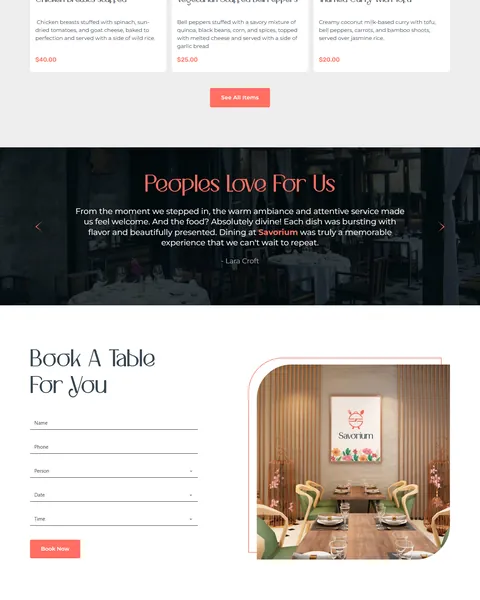
A guest review slider sits over a dark dining room photo, with your restaurant name highlighted in coral. Glowing words from past guests reassure people planning a special night.
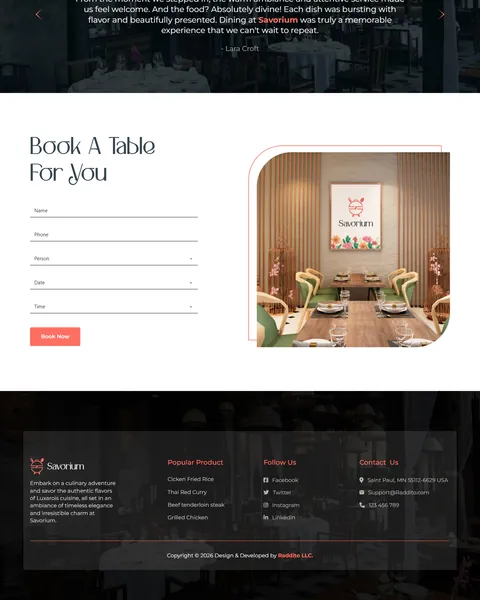
“Book A Table For You” pairs a photo of an elegant dining space with a form for name, phone, number of guests, date and time. The footer adds a short description, popular dishes, social links and contact details, so guests can call or visit with ease.
Research-Driven Design for Fine Dining Restaurants
We looked at how guests choose a fine dining restaurant online. They want to see the room, read the menu with prices and feel sure the evening will be special. Booking quickly, with a date and time, is the final step. This fine dining Bricks Builder landing page is designed to feel refined and calm, show the food at its best and make reserving a table simple.
Warm coral and deep charcoal. Warm coral, #FF6F61, marks buttons, highlighted names and the active menu tab like a glass of rosé. Deep charcoal, #36454F, and dark photo sections set a moody, intimate tone. Light gray, #EDEDED, keeps the menu cards fresh.
A thin display font with Montserrat. Thin, elegant display letters make headlines feel like a printed fine dining menu. Montserrat and Rubik keep dish descriptions, prices and form labels easy to read.
Rich food and interior photos. Plated dishes and warm interiors set expectations for the experience. Use your own professional photos, as guests will compare them with the real thing.
Prices in plain view. Showing prices on every dish helps guests plan their evening and builds trust before they book. Nobody wants a surprise on the bill at a celebration.
Booking with date and time. A short form for party size, date and time turns interest into a confirmed reservation request.
Mobile friendly. On phones, the menu opens as a popup, dish cards stack and the booking form stays easy to fill in. Many diners book on their phone the same day.
What’s Included With the Savorium Bricks Builder Landing Page
- Savorium Bricks templates. The full landing page and a mobile menu popup as JSON files.
- JetFormBuilder form. A ready booking form file to import.
- Theme Style file. Global colors, typography and buttons in one JSON file.
- Assets folder. The images and icons the page references.
- READ_ME guide and changelog. Setup steps and the version history, with the latest update on December 26, 2024.
Need help with the template files? Our product support team can help. If you would rather have the whole page built with your own menu and branding, see our done-for-you website service.
How to Import the Savorium Fine Dining Bricks Builder Landing Page
Install JetFormBuilder first. Then follow these steps:
- In Bricks > Settings > General, enable custom breakpoints, SVG uploads and smooth scroll (CSS), then save.
- In the builder’s breakpoint settings, set Tablet Portrait to 1025px and Mobile Landscape to 768px.
- Import the booking form into JetFormBuilder.
- Go to Bricks > Templates, import the Savorium and mobile menu templates, then import the Theme Style and set its condition.
- Link the mobile menu popup to the bar icon and its close icon, then save and refresh.
The video below walks through a full Bricks import. It also shows WooCommerce steps, which you can skip because Savorium does not use WooCommerce.
Savorium vs Other Bricks Options for Restaurant Websites
Comparing ways to build a fine dining page in Bricks? Here is how Savorium compares with other popular options online.
| Savorium | Other popular Bricks template libraries online* | |
|---|---|---|
| Complete fine dining landing page | Yes, ready to import | No, all three are libraries of sections |
| Menu with breakfast, lunch and dinner tabs | Yes | Not mentioned on any of them |
| Table booking form with date and time | Yes | Not as a ready section on any of them |
| Same design also sold for Elementor | Yes | No, not on any of them |
Why restaurants choose Savorium:
- Made for fine dining. Story, menu, reviews and booking are ready.
- One free plugin. JetFormBuilder handles the booking form.
- One payment. $8.97 once, with no yearly plan.
*We compared Savorium with two paid Bricks layout libraries and a free community Bricks template library, each listed on its own website. Details come from each product page on October 26, 2026. Prices and features may change.
More Restaurant and Cafe Templates by Raddito
Prefer Elementor? Savorium is also available as a fine dining Elementor landing page with the same look. For other dining styles, compare these Bricks options.
Flavor – restaurant Bricks Builder landing page
Best for restaurants and grill houses with happy hours.
Single landing page · Bricks with JetFormBuilder · Live Preview
Maido – restaurant reservation Bricks Builder landing page
Best for casual and fast food restaurants.
Single landing page · Bricks with JetFormBuilder · Live Preview
Beanery – coffee shop Bricks Builder landing page
Best for cafes and coffee shops.
Single landing page · No extra plugins · Live Preview
Want more choices? Browse our food and drink website templates or every WordPress Bricks Builder template we sell.
Frequently Asked Questions
Is Savorium a WordPress theme?
No. Savorium is a fine dining Bricks Builder landing page, a ready one-page design you import into Bricks. Bricks is the theme, and you need your own Bricks license.
Why do I need JetFormBuilder?
The table booking form is a JetFormBuilder form, and the zip includes it ready to import into the free plugin.
Where do booking requests go?
JetFormBuilder saves each request and can email your team, so you can confirm the table by phone or email.
Can I change the dates and time slots?
Yes. Edit the date and time fields in JetFormBuilder, or switch to a date picker for open bookings.
Can I add a wine or dessert menu?
Yes. Add a tab to the premium dishes section in Bricks and fill it with new item cards.
Is it suitable for a hotel restaurant?
Yes. Use the welcome section for the hotel story and link the booking form to your restaurant team.
Should I replace the sample dishes and review?
Yes, please. The dishes, prices, guest name and review are placeholders, so use only your own real menu and guests.