


Maido is a restaurant reservation Bricks Builder landing page for WordPress, made for casual restaurants, bistros, family dining spots and fast food places that want more table bookings. It is a single scrolling page with a signature dish, a tabbed food menu, a brand story, a reservation form, guest reviews and a newsletter.
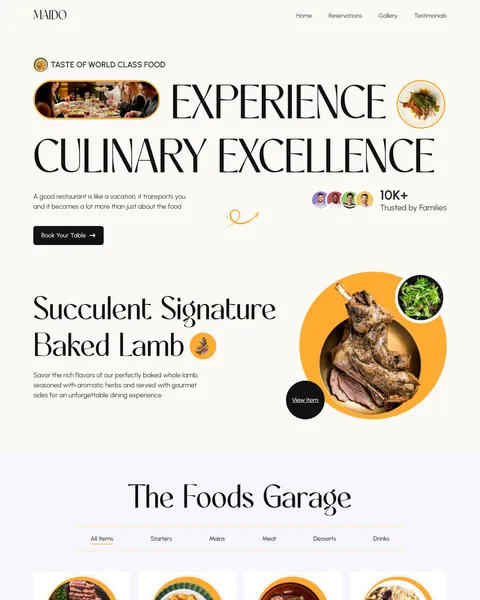
The demo opens with “Experience Culinary Excellence” in huge uppercase letters, decorated with food photos and a “Taste of World Class Food” badge. A Book Your Table button and a “10K+ Trusted by Families” badge sit below. Rich black, warm amber and soft ivory give your restaurant a bold, modern and appetizing look.
Maido’s setup guide lists one free plugin, JetFormBuilder. Bricks itself is a premium theme and is not included.

Quick Template Details
- Template Name: Maido
- Template Type: Single landing page
- Required Theme: Bricks (Premium, not included)
- Required Plugin: JetFormBuilder (Free)
- Landing Page Sections: 8, plus a mobile menu popup
- Responsive: Desktop, Tablet, Mobile
- Coding Required: No
Who Is This Restaurant Reservation Bricks Builder Landing Page For?
- Casual restaurants and bistros. A Book Your Table button and a reservation form drive bookings.
- Family dining spots. A “Trusted by Families” badge and a warm brand story suit family restaurants.
- Fast food and grill places. Starters, mains, meat, desserts and drinks tabs fit a varied menu.
- Restaurants with a signature dish. A large feature section shows off one star dish with a View Item button.
- Restaurants with two locations. The footer lists two addresses with their own phone numbers.
Prefer an elegant fine dining design with chef profiles? Our Flavor restaurant Bricks Builder landing page may suit you better.
See Every Section of the Maido Restaurant Reservation Bricks Builder Landing Page
Click any section below to open it in the live demo.
A Bold Hero and a Signature Dish
Maido makes a strong first impression with huge display lettering and small round food photos placed between the words. A short quote about dining, a Book Your Table button and a guest count badge complete the hero.
“Succulent Signature Baked Lamb” then gives one dish the spotlight, with a large circular photo on a bright amber shape and a View Item button. Featuring a hero dish gives guests a reason to choose you tonight.
A Tabbed Menu: The Foods Garage
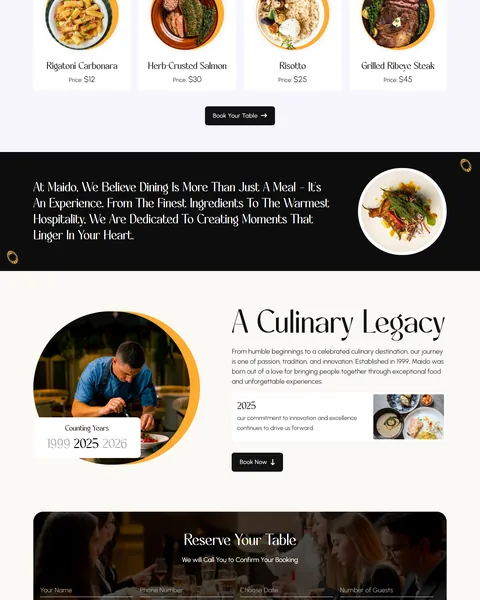
“The Foods Garage” shows your menu in a card grid with tabs for all items, starters, mains, meat, desserts and drinks. Each card has a round dish photo, a name and a price.
Clear prices help diners decide before they arrive, and the tabs keep a long menu easy to browse. A Book Your Table button sits below the grid so the next step is always obvious.
Brand Story and a Reservation Form
A dark band shares your dining philosophy beside a plated dish. “A Culinary Legacy” then tells your story with a chef photo, a year counter and a short timeline of key moments, from opening day to new locations.
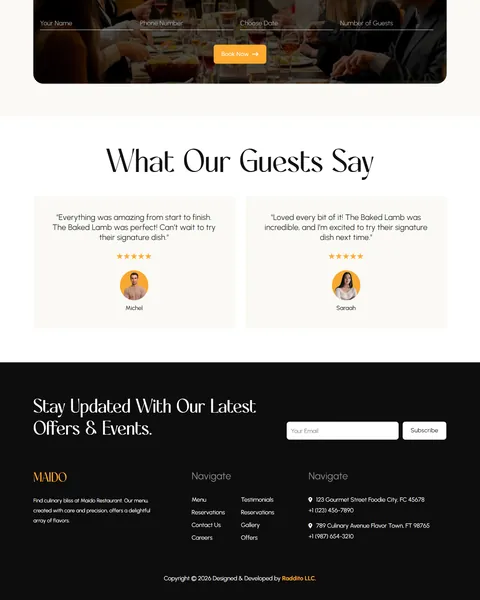
“Reserve Your Table” sits on a dark photo background with a form for name, phone, date and number of guests. A note explains that you will call to confirm, which reassures guests their booking is real.
Guest Reviews, Newsletter and Footer
“What Our Guests Say” shows guest quotes with photos and five-star ratings on soft cards. A black “Stay Updated With Our Latest Offers & Events” band collects emails for promotions.
The footer lists your logo, a short description, navigation links and two restaurant locations with phone numbers, so guests can call the branch nearest to them. Newsletter subscribers are your easiest guests to bring back on quiet weeknights.
Research-Driven Design for Restaurants
We looked at how people pick a restaurant and book a table online. They want to see the food, check prices and book in a few taps. A signature dish and real guest reviews often tip the decision. This restaurant reservation Bricks Builder landing page is designed to make the food look irresistible and the menu easy to browse. It also puts a booking button on every screen.
Rich black and warm amber. Rich black, #121212, gives the page a confident, modern edge and makes food photos pop. Warm amber, #FDAB31, frames dishes and accents, like candlelight on a table. Soft ivory keeps light sections warm.
Qualie and Urbanist. Qualie display lettering is tall and elegant, giving the hero a memorable, upscale feel. Urbanist keeps menu items, prices and form labels clean and readable.
Round, appetizing food photos. Circular dish photos feel like plates on a table and make the menu friendly to browse. Use your own dishes, shot from above in natural light.
A story that builds loyalty. A timeline from your opening year gives the restaurant history and heart, which turns first-time guests into regulars. People like supporting a place with roots in their town.
Booking everywhere. Book Your Table and Book Now buttons appear in the hero, after the menu and in the story section, so guests never have to scroll back.
Mobile friendly. On phones, the menu opens as a popup, food cards stack and the reservation form stays easy to fill in. Most diners book a table on their phone.
What’s Included With the Maido Bricks Builder Landing Page
- Maido Bricks templates. The full landing page and a mobile menu popup in one zip file.
- Theme Style file. Global colors, typography and buttons in one JSON file.
- READ_ME guide and changelog. Setup steps and the version history.
The demo photos are placeholders, so plan to add your own dish and restaurant photos after import. Need help? Our product support team can help. If you would rather have the whole page built with your own menu and branding, see our done-for-you website service.
How to Import the Maido Restaurant Reservation Bricks Builder Landing Page
Install and activate JetFormBuilder first, then follow these steps:
- In Bricks > Settings > General, enable custom breakpoints, SVG uploads and smooth scroll (CSS), then save.
- In the builder’s breakpoint settings, set Tablet Portrait to 1025px and Mobile Landscape to 768px.
- Go to Bricks > Templates and import the Maido template zip file.
- Import the Theme Style and set its condition to the entire website or individual pages.
- Link the mobile menu popup to the header icon, replace the photos with your own, then save and refresh.
The video below walks through a full Bricks import. It also shows WooCommerce steps, which you can skip because Maido does not use WooCommerce.
Maido vs Other Bricks Options for Restaurant Websites
Comparing ways to build a restaurant booking page in Bricks? Here is how Maido compares with other popular options online.
| Maido | Other popular Bricks template libraries online* | |
|---|---|---|
| Complete restaurant reservation landing page | Yes, ready to import | No, all three are libraries of sections |
| Tabbed menu with prices | Yes | Not mentioned on any of them |
| Table reservation form | Yes | Not as a ready section on any of them |
| Same design also sold for Elementor | Yes | No, not on any of them |
Why restaurants choose Maido:
- Built for bookings. Menu, story and reservation form are ready.
- One free plugin. JetFormBuilder is all the setup guide asks for.
- One payment. $9.90 once, with no yearly plan.
*We compared Maido with two paid Bricks layout libraries and a free community Bricks template library, each listed on its own website. Details come from each product page on October 26, 2026. Prices and features may change.
More Restaurant and Cafe Templates by Raddito
Prefer Elementor? Maido is also available as a restaurant reservation Elementor landing page with the same look. For other dining styles, compare these Bricks options.
Flavor – restaurant Bricks Builder landing page
Best for restaurants and grill houses with happy hours.
Single landing page · Bricks with JetFormBuilder · Live Preview
Savorium – fine dining Bricks Builder landing page
Best for luxury and fine dining restaurants.
Single landing page · Bricks · Live Preview
Beanery – coffee shop Bricks Builder landing page
Best for cafes and coffee shops.
Single landing page · Bricks · Live Preview
Want more choices? Browse our food and drink website templates or every WordPress Bricks Builder template we sell.
Frequently Asked Questions
Is Maido a WordPress theme?
No. Maido is a restaurant reservation Bricks Builder landing page, a ready one-page design you import into Bricks. Bricks is the theme, and you need your own Bricks license.
Where do reservation requests go?
Each request is sent to the email you set in the form. Your team can then call the guest to confirm, as the form promises.
Can I connect a booking platform instead?
Yes. Link the Book Your Table buttons to your online booking system, or embed its widget in the reservation section.
Can I add more menu categories?
Yes. Add a tab and new food cards in Bricks, for example for breakfast, vegan dishes or a kids menu.
Can I feature a different signature dish?
Yes. Swap the photo, name and text in the signature dish section to highlight your own best seller.
Is it suitable for a cafe or bakery?
Yes. Rename the menu tabs to coffee, pastries and lunch, and use the reservation form for group bookings.
Should I replace the sample menu and reviews?
Yes, please. The dishes, prices, timeline years, guest counts and reviews are placeholders, so use only your own real details.