


Flavor is a restaurant Bricks Builder landing page for WordPress, made for restaurants, bistros, grill houses and fine dining venues that want more reservations. It is a single scrolling page with happy hour deals, chef profiles, a signature menu, an FAQ, guest reviews, a food blog and a contact form.
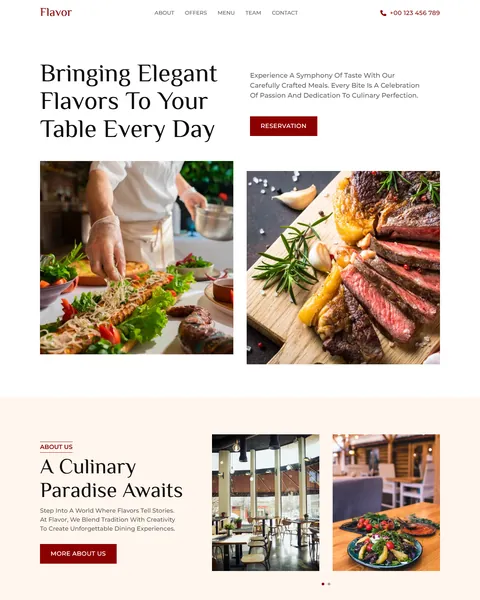
The demo opens with “Bringing Elegant Flavors To Your Table Every Day” above close-up photos of a chef plating food and a sizzling steak. A Reservation button sits beside the headline. Deep wine red, warm cream and rich black give your restaurant an elegant, warm and inviting look.
Flavor’s setup guide lists one free plugin, JetFormBuilder, and the zip includes a ready form for it. Bricks itself is a premium theme and is not included.

Quick Template Details
- Template Name: Flavor
- Template Type: Single landing page
- Required Theme: Bricks (Premium, not included)
- Required Plugin: JetFormBuilder (Free)
- Landing Page Sections: 11
- Form File: JetFormBuilder form included
- Responsive: Desktop, Tablet, Mobile
- Coding Required: No
Who Is This Restaurant Bricks Builder Landing Page For?
- Restaurants and bistros. A signature menu with prices and a Reservation button cover the essentials.
- Grill houses and steakhouses. Grilled dishes and a grill expert profile suit meat-focused kitchens.
- Bars with happy hour. A “Happy Hour Deals” slider shows daily discounts with times.
- Fine dining venues. Elegant serif headlines and deep red tones feel upscale.
- Restaurants that host events. FAQ answers cover private events, live entertainment and special occasions.
Prefer a lighter design focused on fast food and table bookings? Our Maido restaurant Bricks Builder landing page may suit you better.
See Every Section of the Flavor Restaurant Bricks Builder Landing Page
Click any section below to open it in the live demo.
A Food-Led Hero and About Section
Diners choose restaurants with their eyes first. Flavor opens with an elegant headline and two large food photos, a chef finishing a plate and a grilled steak. A Reservation button and your phone number sit in the header and hero.
“A Culinary Paradise Awaits” adds a short story about your kitchen with photos of the dining room and dishes. A More About Us button leads visitors deeper into your story.
Happy Hour Deals and Chef Profiles
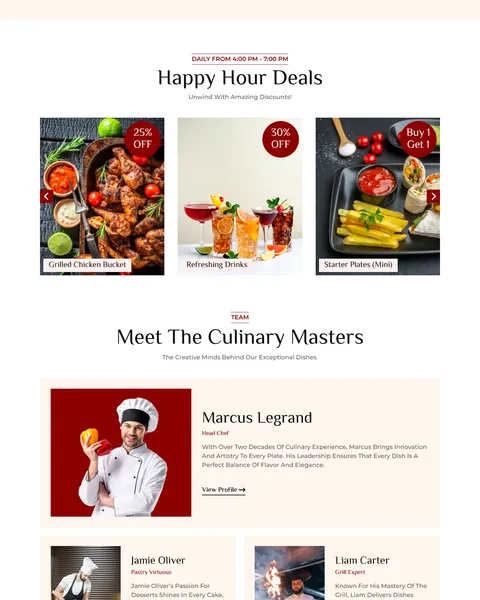
“Happy Hour Deals” runs daily from late afternoon and shows offers in a photo slider with round red discount badges. Examples include 25% off grilled chicken, 30% off drinks, buy one get one starters and burgers for $5.
“Meet the Culinary Masters” introduces your head chef in a large feature card, plus pastry and grill specialists. Each profile has a photo, title, short bio and a View Profile link. People love knowing who cooks their food.
Signature Menu, FAQ and Reviews
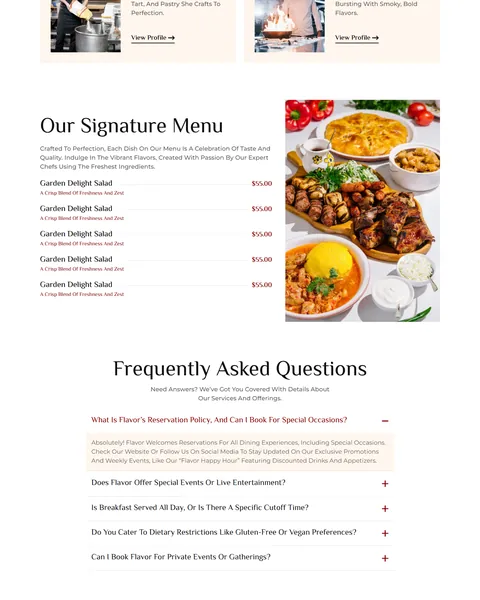
“Our Signature Menu” lists dishes with prices and short descriptions beside a large photo of a full table. Visitors can check prices before booking, which reduces surprises.
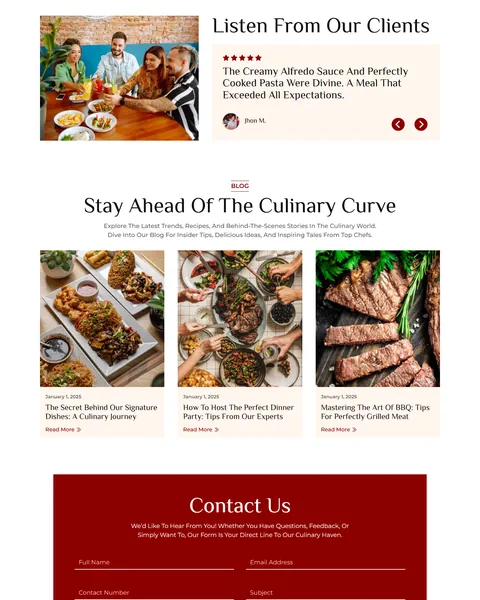
A five-question FAQ covers reservations, events, breakfast hours, dietary needs and private bookings. “Listen From Our Clients” shows guest reviews with star ratings in a slider beside a photo of friends sharing a meal.
Food Blog, Contact Form and Footer
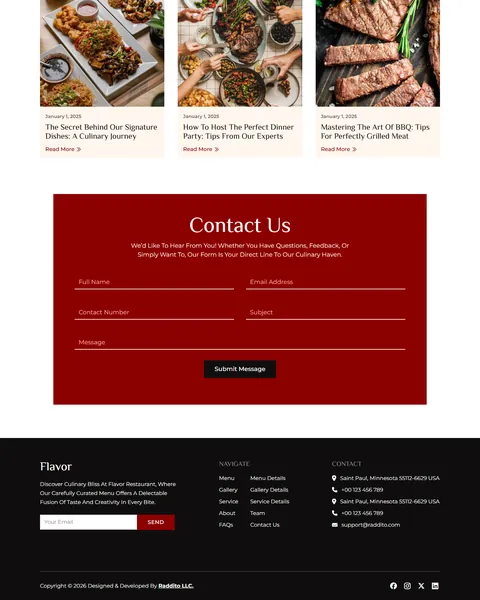
“Stay Ahead Of The Culinary Curve” shows three blog cards on signature dishes, dinner party tips and grilling. Recipes and stories keep regulars engaged and help new diners find you.
A bold red “Contact Us” panel holds a form for name, email, phone, subject and message. The black footer adds a newsletter field, navigation links, address and phone, so regulars can sign up for news about new dishes and events.
Research-Driven Design for Restaurants
We looked at how people choose a restaurant online. They want to see the food, check the menu and prices, read a few reviews and book quickly. Deals and events often decide where they go on a given night. This restaurant Bricks Builder landing page is designed to make the food look irresistible, keep prices and offers clear and put the Reservation button within easy reach.
Deep wine red and warm cream. Deep wine red, #8B0000, marks buttons, badges and the contact panel and suggests rich flavors and fine wine. Warm cream backgrounds, #FFF6ED, keep the page soft and appetizing. Black, #0F0E0E, grounds the footer.
El Messiri and Montserrat. El Messiri headlines feel elegant and a little classic, like a printed menu. Montserrat keeps descriptions, prices and form labels clean and easy to read.
Close-up food photography. Plated dishes, grilled meat and cocktails are shown up close to trigger appetite. Use your own dishes, shot in natural light, for the best results.
Deals that bring people in. Discount badges and clear happy hour times give guests a reason to visit tonight instead of someday.
Faces in the kitchen. Chef profiles add personality and trust, which matters more and more to diners who care where their food comes from. A named chef also gives local press something to write about.
Mobile friendly. On phones, the menu folds into a toggle, sliders swipe and the phone number stays easy to tap. Most restaurant searches happen on a phone, often within an hour of eating.
What’s Included With the Flavor Bricks Builder Landing Page
- Flavor Bricks template. The full landing page as one JSON file.
- JetFormBuilder form. A ready form file to import.
- Theme Style file. Global colors, typography and buttons in one JSON file.
- Assets folder. The images and icons the page references.
- READ_ME guide and changelog. Setup steps and the version history.
Need help with the template files? Our product support team can help. If you would rather have the whole page built with your own menu and branding, see our done-for-you website service.
How to Import the Flavor Restaurant Bricks Builder Landing Page
Install and activate JetFormBuilder first, then follow these steps:
- In Bricks > Settings > General, enable custom breakpoints, SVG uploads and smooth scroll (CSS), then save.
- In the builder’s breakpoint settings, set Tablet Portrait to 1025px and Mobile Landscape to 768px.
- Go to Bricks > Templates and import the Flavor template file.
- Import the Theme Style and set its condition to the entire website or individual pages.
- Import the form into JetFormBuilder, insert the template into a page, then save and refresh.
The video below walks through a full Bricks import. It also shows WooCommerce steps, which you can skip because Flavor does not use WooCommerce.
Flavor vs Other Bricks Options for Restaurant Websites
Comparing ways to build a restaurant landing page in Bricks? Here is how Flavor compares with other popular options online.
| Flavor | Other popular Bricks template libraries online* | |
|---|---|---|
| Complete restaurant landing page | Yes, ready to import | No, all three are libraries of sections |
| Happy hour deals slider | Yes | Not mentioned on any of them |
| Chef profiles and signature menu | Yes | Not as a ready section on any of them |
| Same design also sold for Elementor | Yes | No, not on any of them |
Why restaurants choose Flavor:
- Made for dining. Menu, deals, chefs and reservations are ready.
- One free plugin. JetFormBuilder handles the form.
- One payment. $9.90 once, with no yearly plan.
*We compared Flavor with two paid Bricks layout libraries and a free community Bricks template library, each listed on its own website. Details come from each product page on October 26, 2026. Prices and features may change.
More Restaurant and Cafe Templates by Raddito
Prefer Elementor? Flavor is also available as a restaurant Elementor landing page with the same look. For other dining styles, compare these Bricks options.
Maido – restaurant reservation Bricks Builder landing page
Best for casual and fast food restaurants.
Single landing page · Bricks with JetFormBuilder · Live Preview
Savorium – fine dining Bricks Builder landing page
Best for luxury and fine dining restaurants.
Single landing page · Bricks · Live Preview
Beanery – coffee shop Bricks Builder landing page
Best for cafes and coffee shops.
Single landing page · Bricks · Live Preview
Want more choices? Browse our food and drink website templates or every WordPress Bricks Builder template we sell.
Frequently Asked Questions
Is Flavor a WordPress theme?
No. Flavor is a restaurant Bricks Builder landing page, a ready one-page design you import into Bricks. Bricks is the theme, and you need your own Bricks license.
Why does it need JetFormBuilder?
The setup guide uses JetFormBuilder for the form, and the zip includes that form ready to import into the free plugin.
Can guests book a table online?
Link the Reservation buttons to your booking system, or use the contact form with date, time and party size fields.
Can I add a full menu?
Yes. Duplicate the menu rows in Bricks for each dish, or link to a separate menu page or PDF.
Can I change the happy hour deals?
Yes. Edit each deal card’s photo, badge and title to match your current offers and times.
Is it suitable for a cafe or bakery?
Yes. Swap the dishes and photos for coffee and pastries, and use the deals slider for morning specials.
Should I replace the sample chefs and reviews?
Yes, please. The chef names, menu prices, reviews and blog posts are placeholders, so use only your own real team and dishes.