


SecureMed is a health insurance Elementor landing page for WordPress, designed for health insurance agencies, independent brokers, medical coverage providers and benefits advisors. It is a single scrolling page with a family-focused hero, trust counters, four reasons to choose you, individual, family and group plans, member reviews and a consultation form.
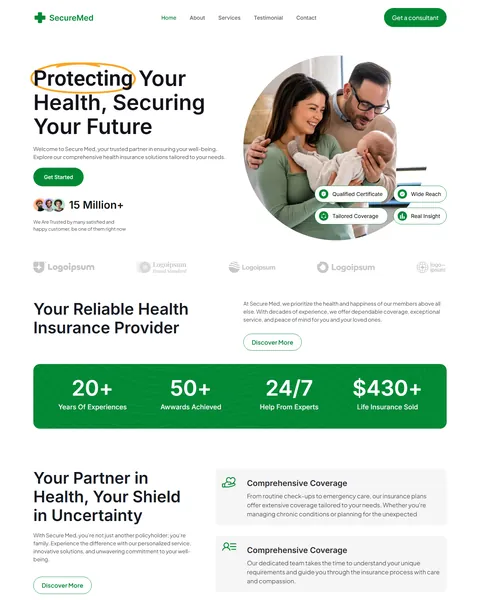
The demo opens with the headline “Protecting Your Health, Securing Your Future”, with the first word circled as if by hand. A happy family sits in a round photo beside it, framed by small trust badges. Fresh green, clean white and soft gray give your agency a reliable, friendly and modern look.
SecureMed is built with Elementor. SecureMed needs Elementor Pro, and we don’t provide paid plugins, so please have your Pro license ready before we begin. Our team installs the page for you at no cost.

Quick Template Details
- Template Name: SecureMed
- Template Type: Single landing page, 10 sections
- Required Theme: Hello Elementor (Free)
- Elementor Pro Required: Yes
- Premium Plugins Required: Yes, Elementor Pro
- Forms: Elementor Pro Forms
- Responsive: Desktop, Tablet, Mobile
- Coding Required: No
Who Is This Health Insurance Landing Page For?
- Health insurance agencies. Individual, family and group plans cover the core products most agencies sell.
- Independent insurance brokers. A Get a consultant button and a simple form suit brokers who advise one-to-one.
- Medical coverage providers. Coverage, financial security and track record messages fit insurers of any size.
- Employee benefits advisors. A group health plans card speaks to employers shopping for staff coverage.
- Agents running open enrollment ads. One focused page turns seasonal ad traffic into consultation requests.
Need a full multi-page website for a health insurance company instead? Our HealthGuard health insurance Elementor template kit is a better fit.
See Every Section of the SecureMed Health Insurance Landing Page
Click any section below to open it in the live demo.
A Family-Focused Hero and Trust Counters
People buying health insurance want to feel their family is protected. SecureMed opens with a warm family photo in a round frame, surrounded by badges for qualified certificates, wide reach, tailored coverage and real insight. A Get Started button and a customer count with small avatars add instant reassurance.
A partner logo strip follows, then a “Your Reliable Health Insurance Provider” section with a Discover More button. A bold green band shows four counters for years of experience, awards achieved, expert help and coverage sold, giving visitors quick proof of your reliability.
Four Reasons to Choose You
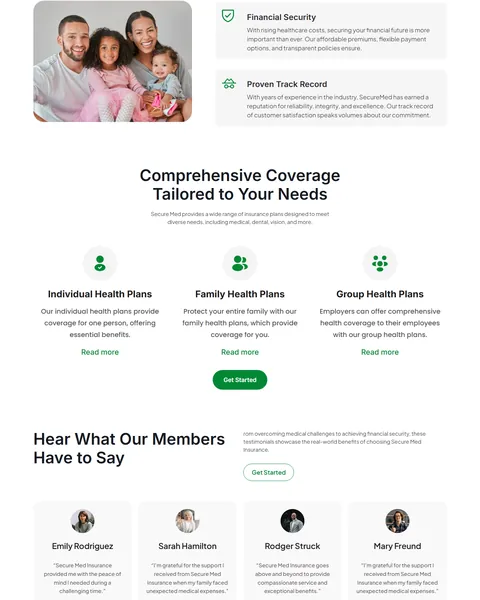
The “Your Partner in Health, Your Shield in Uncertainty” section explains your promise beside a photo of a smiling family. Four feature cards sit on the right with icons: comprehensive coverage, personal guidance, financial security and a proven track record.
Each card answers a real worry, from rising healthcare costs to finding someone who will explain the details with patience. Clear, human reasons like these help people choose an agent they trust with their family’s health.
Individual, Family and Group Plans
The coverage section presents three plan types with simple icons: individual health plans, family health plans and group health plans for employers. Each has a short description and a Read more link, with a Get Started button below.
Grouping plans by who they cover makes shopping simple. Link each card to a plan detail page or quote form, and add plan names, deductibles or monthly price ranges if you can share them.
Member Reviews and a Consultation Form
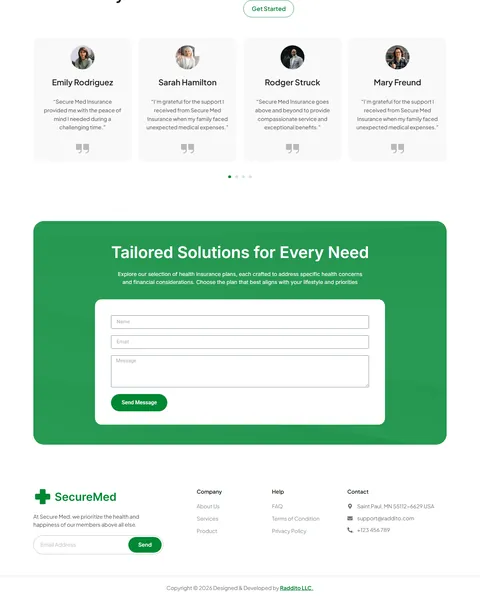
A “Hear What Our Members Have to Say” section shows four review cards with photos and names. The quotes talk about peace of mind and support during unexpected medical expenses. A Get Started button sits beside the intro.
The “Tailored Solutions for Every Need” section sits on a bright green panel with a form for name, email and message. A footer with a newsletter signup, company and help links and contact details completes the page.
Research-Driven Design for Health Insurance Agencies
We looked at how people choose health insurance online. Most find insurance confusing and worry about costs, coverage gaps and hidden terms. They look for a trustworthy provider, clear plan types, real reviews and a simple way to talk to a person who can explain their options. This health insurance Elementor landing page is designed to feel friendly and dependable while making a consultation the easy next step.
Fresh green and white. Green suggests health, growth and safety, and it fills buttons, the stats band and the contact panel. Clean white and light gray sections keep the page open and easy to scan, which matters for a topic that can feel complex and stressful for many families.
Inter and Plus Jakarta Sans. Clear Inter headlines feel modern and trustworthy, and rounded Plus Jakarta Sans buttons add a friendly finish that invites clicks without feeling pushy.
A hand-drawn highlight. The circled word in the hero adds a personal, human touch that softens a serious subject. It draws the eye to the core promise before visitors read anything else.
Families everywhere. Photos of parents, babies and children remind visitors why coverage matters and help them picture their own family protected. Swap in photos that reflect the communities you serve.
Proof at a glance. Badges, counters and member reviews build trust quickly. Use only real figures and verified certifications, since trust is everything in insurance.
Mobile friendly. On phones, the menu folds into a toggle, headlines scale down and every section stacks without sideways scrolling.
Free Installation for This Health Insurance Elementor Landing Page
We install SecureMed on your WordPress site free of charge, set up exactly like the demo, once your Pro license is ready. No other paid plugin is needed.
The demo photos come from Envato and are not included. Adding your own plans, reviews and figures, or connecting a quoting tool, CRM or enrollment system, is not part of the free installation. If you want the full site built for you, see our done-for-you website service.
How to Install the SecureMed Health Insurance Landing Page
Prefer to set it up yourself? This video shows each step of the import.
SecureMed vs Other Health Insurance Elementor Templates
Comparing insurance templates? Here is how SecureMed compares with other popular health insurance templates online.
| SecureMed | Other popular health insurance templates online* | |
|---|---|---|
| Cost to get started | $9.90 one-time | $19 to $29 one-time |
| Free installation | Yes, included | No, not listed on any of them |
| One focused page for enrollment campaigns | Yes | No, all three are full website kits |
| Individual, family and group plan cards | Yes | Not described on any of them |
Why insurance agencies choose SecureMed:
- Built for consultations. Plans, proof and a form are ready on one page.
- Friendly and dependable. A green, family-focused design builds trust.
- Lower price, free setup. $9.90 once, installed for you.
*We compared SecureMed with three popular health insurance Elementor templates that appear in Google results, sold on ThemeForest. Details come from each product page on October 26, 2026. Prices and features may change.
More Insurance Templates by Raddito
SecureMed is our health insurance Elementor landing page. If you need a full insurance website or run a multi-line agency, compare these.
HealthGuard – health insurance Elementor template kit
Best for health insurers that need a full website.
10 pages · Needs Elementor Pro · Live Preview
Lifora – insurance agency Elementor template kit
Best for multi-line insurance agencies.
12 pages · Works with Elementor Free · Live Preview
Life Guard – medical insurance Elementor template kit
Best for medical insurance consultants.
11 pages · Needs Elementor Pro · Live Preview
Want more choices? Browse our finance and law website templates or every WordPress Elementor template we sell.
Frequently Asked Questions
Is SecureMed a WordPress theme?
No. SecureMed is a health insurance Elementor landing page, a ready one-page design you import into Elementor. It runs on the free Hello Elementor theme.
Does SecureMed need a Pro license?
Yes. The consultation form, newsletter, header, footer and review carousel use Elementor Pro widgets. You need your own license before we install the page.
Can I add a quote form?
Yes. Add fields such as age, household size, zip code and coverage type to the form, or link the buttons to your quoting tool.
Can I show plan prices?
Yes. Add price ranges or a pricing table section with Elementor, as long as it follows the rules in your state or country.
Can I use it for life or dental insurance?
Yes. Rename the plan cards and update the copy to promote life, dental, vision or Medicare plans.
Should I replace the demo figures and reviews?
Yes, please. The customer count, awards, counters and reviews are samples, so use your own real, verifiable details.
Is the installation really free?
Yes. We install SecureMed exactly like the demo at no cost once your Pro license is ready. Adding your own content is up to you, or our Done For You team can build the full site.