


HealthGuard is a health insurance Elementor template kit for WordPress, designed for health insurance agencies, brokers and healthcare coverage providers. It includes 10 ready pages, including Services, Service Details, Claims Process, FAQ, Blog and Contact.
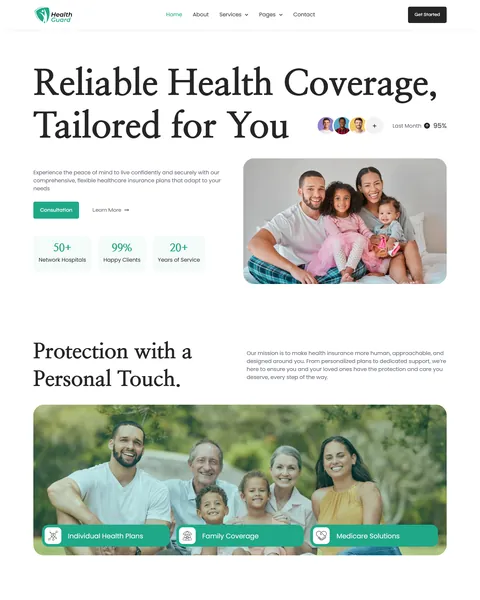
The demo opens with a smiling family beside the large serif headline “Reliable Health Coverage, Tailored for You”. Consultation and Learn More buttons sit below, next to counters for network hospitals, happy clients and years of service. Fresh green, charcoal and soft mint give your agency a calm, caring and trustworthy look.
HealthGuard is built with Elementor. HealthGuard needs Elementor Pro, and we don’t provide paid plugins, so please have your Pro license ready before we begin. Our team installs the kit for you at no cost.

Quick Template Details
- Template Name: HealthGuard
- Required Theme: Hello Elementor (Free)
- Elementor Pro Required: Yes
- Premium Plugins Required: Yes, Elementor Pro
- Page Templates: 10
- Forms: Elementor Pro Forms
- Responsive: Desktop, Tablet, Mobile
- Coding Required: No
Who Is This Health Insurance Website Template For?
- Health insurance agencies. Individual health plans, family coverage and Medicare solutions are ready to present.
- Independent health insurance brokers. Consultation buttons and a personal, human tone suit brokers who guide clients one on one.
- Group and employee benefits advisors. Group insurance for businesses appears in the FAQ, and a small-business owner shares a review.
- Insurers with hospital networks. Cashless claims at network hospitals and a network hospitals FAQ section are built in.
- Agencies that also offer retirement planning. A “Future-Ready Retirement Plans” card sits beside the health plans.
Selling life insurance and family protection plans instead? Our Lifora insurance agency Elementor template kit is a better fit.
See Every Page in the HealthGuard Health Insurance Template
All 10 pages are below. Click any page to open it in the live demo.


A Claims Process Page With Cashless and Reimbursement Steps
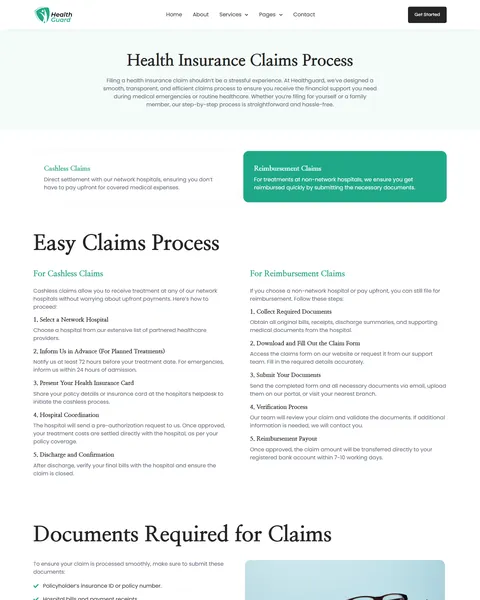
Claims are where clients judge an insurer. HealthGuard’s Claims Process page explains two claim types: cashless claims at network hospitals and reimbursement claims for treatment elsewhere. Each type has its own five numbered steps.
Cashless steps run from choosing a network hospital and notifying you in advance to hospital coordination and discharge. Reimbursement steps cover collecting documents, filling out the claim form, submitting, verification and payout within 7–10 working days. A “Documents Required for Claims” checklist and reasons to choose your claims team close the page.
A Plan Details Page That Explains Coverage
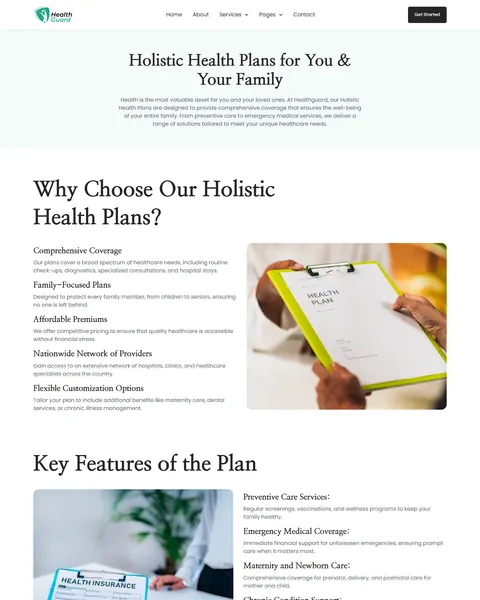
The Service Details page explains holistic health plans for individuals and families. Five reasons to choose the plan come first, such as comprehensive coverage, family-focused plans and a nationwide provider network. A “Key Features” list covers preventive care, emergency coverage, maternity care, chronic condition support and mental health services.
“Benefits of Enrolling”, a “Who Is It For?” list and a four-step “How to Get Started” guide follow, from exploring plan options to enrolling. Clear plan details help visitors understand what they are buying before they call.
A Tabbed FAQ Built Around Real Questions
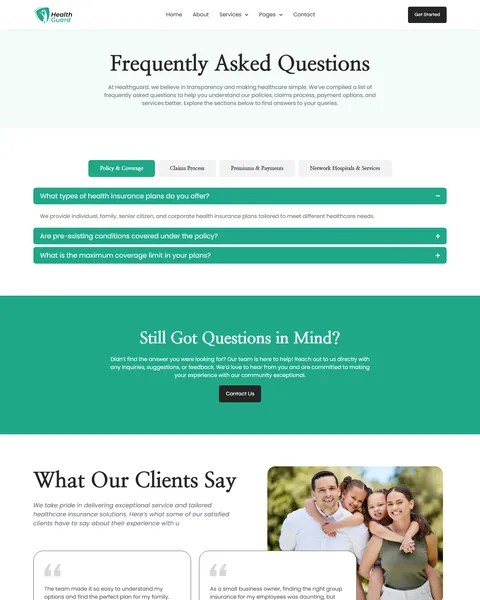
The FAQ page groups answers into four tabs: policy and coverage, claims process, premiums and payments, and network hospitals and services. Twelve answers cover pre-existing conditions, coverage limits, cashless claims, reimbursement timing and installment payments.
Other answers explain grace periods, tax deductions, finding a network hospital and treatment at non-network hospitals. A “Still Got Questions in Mind?” box links to the Contact page for anything the FAQ does not cover.
Services, About, Blog and Contact
The Services page shows four service cards: holistic health plans, quick claims handling, tailored coverage for every life stage and 24/7 healthcare assistance. Client testimonials and a “Do You Need Help?” call to action follow on most pages.
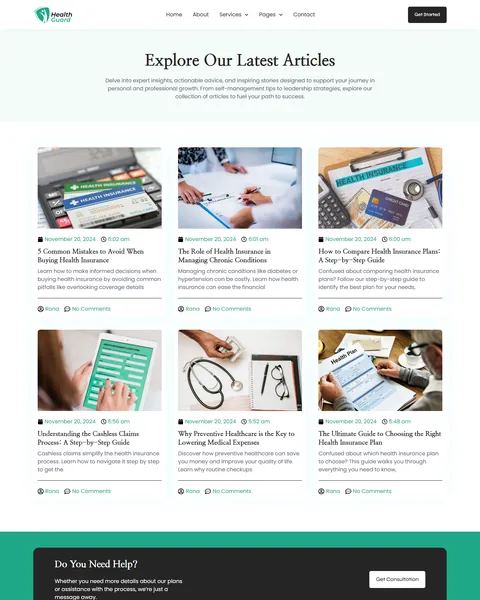
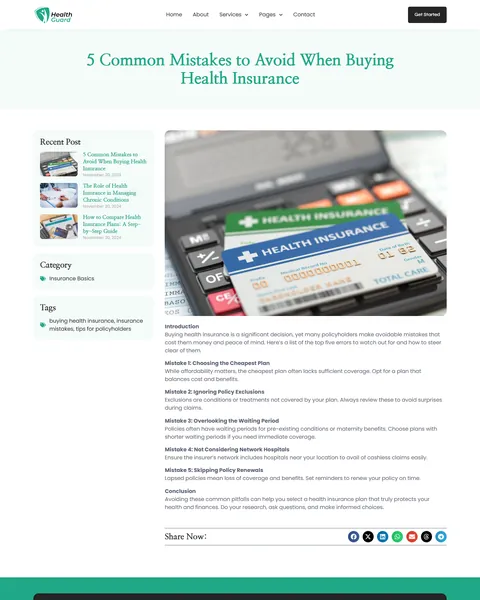
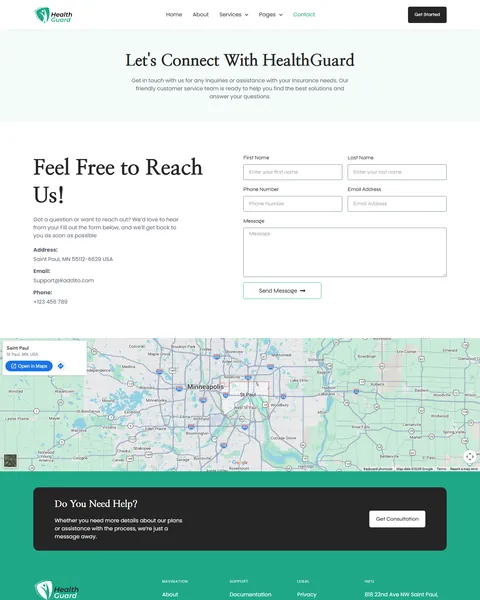
The About page shares your mission and three plan types. The blog shares six health insurance guides, such as common buying mistakes, comparing plans and managing chronic conditions. The Contact page offers a form with name, phone, email and message beside your address and a map.
Research-Driven Design for Health Insurance Agencies
We looked at how people choose health insurance. They worry about hidden exclusions, slow claims and finding the right hospital. They want plain answers, a caring tone and an easy way to talk to someone. This health insurance Elementor template kit is designed to feel human and make complex coverage easy to understand.
Fresh green and soft mint. A fresh green accent marks buttons, icons and active FAQ tabs. It feels healthy, fresh and reassuring, like a modern clinic. Soft mint sections and charcoal text keep long policy details calm, light and readable.
Elegant serif headlines. HealthGuard pairs Nanum Myeongjo, a classic serif, for headings with Poppins for body text. The serif headlines feel trustworthy and established, while the body text stays modern.
Families at the center. Photos of smiling families, seniors and children remind visitors what coverage protects and why it matters. Each inner page opens with a soft mint banner, a short intro and a centered title.
Process made visible. Numbered claim steps, document checklists and enrollment steps turn complex insurance tasks into simple, clear actions anyone can follow.
Trust signals up front. Counters, client avatars and named testimonials show that real people already rely on your agency for their health coverage.
Always ready to help. A Get Started button stays in the header, and a “Do You Need Help?” banner with a consultation button closes most pages.
Mobile friendly. On phones, the menu folds into a toggle, headlines scale down and every section stacks without sideways scrolling.
Free Installation for This Health Insurance Elementor Template Kit
We install HealthGuard on your WordPress site free of charge, set up exactly like the demo, once your Pro license is ready.
The demo photos are placeholders and are not included. Adding your own plans, claims rules, network hospitals and articles, or connecting a quoting tool or client portal, is not part of the free installation. If you want the full site built for you, see our done-for-you website service.
How to Install the HealthGuard Insurance Template Kit
Prefer to set it up yourself? This video shows each step of the import.
HealthGuard vs Other Health Insurance Elementor Template Kits
Comparing health insurance templates? Here is how HealthGuard compares with other popular health insurance kits online.
| HealthGuard | Other popular health insurance kits online* | |
|---|---|---|
| Free installation | Yes, included | No, not listed on any of them |
| Claims process page | Yes, cashless and reimbursement | Not listed on any of them |
| Claim documents checklist | Yes | Not listed on any of them |
| FAQ grouped into topic tabs | Yes, four topics | Not listed on any of them |
Why agencies choose HealthGuard:
- Built for health insurance. Plans, claims steps and network hospital FAQs are ready.
- Clear and caring. Plain language and family photos build trust.
- Free setup. $19.90 once, installed for you.
*We compared HealthGuard with three popular health insurance Elementor template kits sold on ThemeForest, found through Google’s first page for health insurance template kits. Details come from each product page on October 24, 2026. Prices and features may change.
More Insurance Templates by Raddito
HealthGuard is our health insurance Elementor template kit. If you sell life insurance, run a multi-line insurance service or offer insurance consulting, compare these.
Lifora – insurance agency Elementor template kit
Best for life insurance agencies and brokers.
12 pages · Works with Elementor Free · Live Preview
Trustins – insurance service template kit
Best for multi-line insurance companies with a Pro license.
9 pages · Needs Elementor Pro · Live Preview
Life Guard – insurance consulting template kit
Best for insurance consultants with a Pro license.
11 pages · Needs Elementor Pro · Live Preview
Want more choices? Browse our finance and law website templates or every WordPress Elementor template kit we sell.
Frequently Asked Questions
Is HealthGuard a WordPress theme?
No. HealthGuard is a health insurance Elementor template kit, a set of ready pages you import into Elementor. It runs on the free Hello Elementor theme.
Does HealthGuard need Elementor Pro?
Yes. The forms, header and footer use Pro widgets. You need your own Pro license before we install the kit.
Can I change the claims steps?
Yes. Every step, timeline and document on the Claims Process page is editable to match your insurer’s rules.
Can I add a network hospital list?
Yes. Add a list or table of hospitals to any page, or link to your insurer’s hospital locator.
Where do consultation requests go?
The contact form sends each message to your email. You can also connect it to a CRM through the Pro form integrations.
Can I add more plan detail pages?
Yes. Duplicate the Service Details page for family, senior or group plans, then update the features and steps.
Is the installation really free?
Yes. We install HealthGuard exactly like the demo at no cost once your Pro license is ready. Adding your own content is up to you, or our Done For You team can build the full site.