


SpineCare is a chiropractic Bricks Builder landing page for WordPress, made for chiropractors, physiotherapy practices, sports rehab centers and spine and posture clinics. It is a single scrolling page with six services, reasons to choose you, patient reviews and a four-step recovery process. An FAQ, a health blog, a contact form and a newsletter band complete it.
The demo opens with “Experience Relief and Wellness with SpineCare” beside a photo of a chiropractor gently adjusting a patient’s neck. Book Now and Watch Now buttons sit below, above three highlight cards. Deep navy, fresh lime green and soft gray give your clinic a clean, active and trustworthy look.
SpineCare is built only with native Bricks elements, including its contact form, newsletter field and video popup, so no extra plugins are required. Bricks itself is a premium theme and is not included.

Quick Template Details
- Template Name: SpineCare
- Template Type: Single landing page
- Required Theme: Bricks (Premium, not included)
- Required Plugins: None
- Landing Page Sections: 12, plus mobile menu and video popups
- Responsive: Desktop, Tablet, Mobile
- Coding Required: No
Who Is This Chiropractic Bricks Builder Landing Page For?
- Chiropractic clinics. Gentle adjustments and spinal care lead the hero and the services.
- Physiotherapy practices. Physiotherapy has its own highlight card and service, so mixed clinics are covered.
- Sports rehab centers. A sports rehabilitation service speaks to athletes recovering from injury.
- Pain management clinics. Chronic pain care with manual therapy and electrotherapy is ready as a service.
- Clinics caring for older adults. A geriatric care service focuses on mobility, strength and independence.
Need a full clinic website with team, pricing and service detail pages? Our Alivio chiropractic Bricks Builder template kit is a better fit.
See Every Section of the SpineCare Chiropractic Bricks Builder Landing Page
Click any section below to open it in the live demo.



A Calming Hero and Your Clinic’s Story
People in pain want reassurance that you can help. SpineCare opens with a gentle treatment photo, a short promise about pain relief and mobility, and a Watch Now button that plays a clinic video in a popup. Three cards below sum up your core care and experience.
The about section pairs a treatment photo with a therapists counter and your vision and mission. A navy card shows a free consultation phone number.
Six Services on a Navy Background
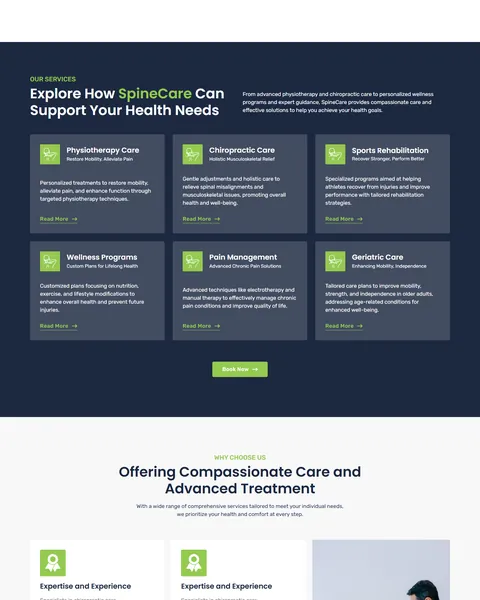
Six services sit in dark cards: physiotherapy, chiropractic care, sports rehab, wellness programs, pain management and geriatric care. Each card has a lime icon, a short tagline, two lines of detail and a Read More link.
The deep navy background makes the green icons stand out and keeps the section easy to scan. A Book Now button sits below the grid.
Why Choose Us, Reviews and a Four-Step Process
Four reason cards sit beside a photo of a therapist at work, with a happy clients counter. A review slider follows, pairing a photo of a smiling patient with star-rated quotes and a free consultation card.
“Our Proven Process for Your Recovery” explains care in four numbered steps: initial consultation, focused treatment, ongoing support and long-term wellness. A clear path helps first-time patients feel prepared.
FAQ, Health Blog and Contact
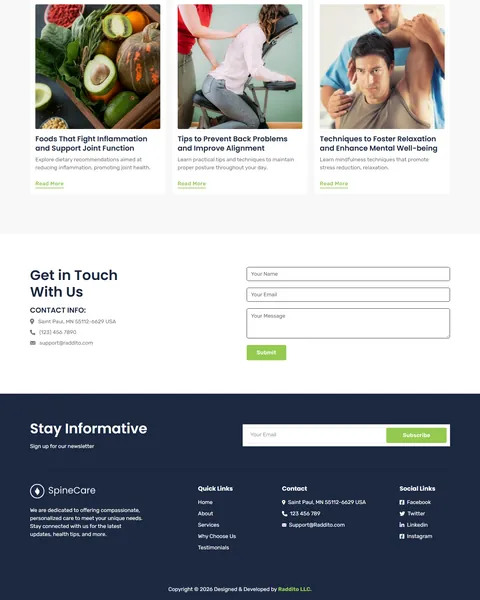
“Common Questions & Answers” covers services, booking, the first visit and the conditions you treat, with a Contact Now button. “Stay Updated on the Latest Health Trends and Tips” shows three blog cards on joint-friendly foods, posture and relaxation.
“Get in Touch With Us” pairs your contact details with a short form. A navy “Stay Informative” band collects newsletter emails above the footer.
Research-Driven Design for Chiropractic Clinics
We looked at how patients choose a chiropractor or physiotherapist online. Many arrive in pain and want to know quickly if you treat their problem, how a first visit works and how to book. Reviews and a friendly, professional look help nervous first-timers. This chiropractic Bricks Builder landing page is designed to calm, inform and guide patients to a consultation without pressure.
Deep navy and fresh lime green. Deep navy, #1C2840, frames the services, review card and footer and feels steady and professional. Fresh lime green, #94CA50, marks buttons, icons and the clinic name and suggests health and movement. Soft gray, #F8F8F8, keeps lighter sections calm.
Poppins and Rubik. Bold Poppins headlines are clear and modern. Rubik’s rounded letters keep service details, steps and FAQ answers friendly and easy to read.
Hands-on treatment photos. Therapists working with patients of different ages show real care, not stock smiles. Use photos from your own clinic for local trust.
Free consultation, front and center. A phone number for a free consultation appears in the about and review sections. It lowers the barrier for patients who are unsure about chiropractic care.
Plain-language FAQ. Answers about the first visit and the conditions you treat remove common fears before patients call. They also save your front desk from repeating the same answers every day.
Mobile friendly. On phones, the menu opens as a popup, service cards stack and Book Now stays easy to tap. Many patients look for a clinic on their phone while in pain.
What’s Included With the SpineCare Bricks Builder Landing Page
- SpineCare Bricks templates. The full landing page, a mobile menu popup and a video popup as JSON files.
- Theme Style file. Global colors, typography and buttons in one JSON file.
- Assets folder. The images and icons the page references.
- READ_ME guide and changelog. Setup steps and the version history, with the latest update on September 28, 2025.
Need help with the template files? Our product support team can help. If you would rather have the whole page built with your own services and branding, see our done-for-you website service.
How to Import the SpineCare Chiropractic Bricks Builder Landing Page
SpineCare only needs Bricks. Follow these steps:
- In Bricks > Settings > General, enable custom breakpoints, SVG uploads and smooth scroll (CSS), then save.
- In the builder’s breakpoint settings, set Tablet Portrait to 1025px and Mobile Landscape to 768px.
- Go to Bricks > Templates and import the SpineCare, mobile menu and video popup templates.
- Import the Theme Style and set its condition to the entire website or individual pages.
- Link the mobile menu popup to the bar icon and its close icon, then save and refresh.
The video below walks through a full Bricks import. It also shows WooCommerce steps, which you can skip because SpineCare does not use WooCommerce.
SpineCare vs Other Bricks Options for Chiropractic Websites
Comparing ways to build a chiropractic clinic page in Bricks? Here is how SpineCare compares with other popular options online.
| SpineCare | Other popular Bricks template libraries online* | |
|---|---|---|
| Complete chiropractic landing page | Yes, ready to import | No, all three are libraries of sections |
| Six therapy service cards | Yes | Not mentioned on any of them |
| Four-step recovery process | Yes | Not as a ready section on any of them |
| Same design also sold for Elementor | Yes | No, not on any of them |
Why clinics choose SpineCare:
- Made for spine care. Services, process, FAQ and booking are ready.
- Pure Bricks. No add-ons, so your page stays fast.
- One payment. $8.97 once, with no yearly plan.
*We compared SpineCare with two paid Bricks layout libraries and a free community Bricks template library, each listed on its own website. Details come from each product page on October 26, 2026. Prices and features may change.
More Chiropractic and Therapy Templates by Raddito
Prefer Elementor? SpineCare is also available as a chiropractic Elementor landing page with the same look. For related practices, compare these.
Alivio – chiropractic Bricks Builder template kit
Best for clinics that need a full multi-page website.
12 pages · Bricks with WooCommerce Wishlist · Live Preview
Medevice – shockwave therapy Bricks Builder landing page
Best for therapy device sellers and shockwave clinics.
Single landing page · No extra plugins · Live Preview
Physiora – chiropractic and physiotherapy Elementor template kit
Best for chiropractic clinics that prefer Elementor.
9 pages · Works with Elementor Free · Live Preview
Want more choices? Browse our health and medical website templates or every WordPress Bricks Builder template we sell.
Frequently Asked Questions
Is SpineCare a WordPress theme?
No. SpineCare is a chiropractic Bricks Builder landing page, a ready one-page design you import into Bricks. Bricks is the theme, and you need your own Bricks license.
Do I need any plugins besides Bricks?
No. The sliders, accordion, forms and video popup all use built-in Bricks elements, so there is nothing else to install.
Can patients book online?
Link the Book Now and Book Online buttons to your clinic’s booking software, or use the contact form for requests.
Can I add more services?
Yes. Duplicate a service card in Bricks and change the icon, title, tagline and text.
Is it suitable for a massage or acupuncture clinic?
Yes. Rename the services and process steps to match your treatments, and keep the reviews, FAQ and forms.
How do I add my own clinic video?
Open the video popup template in Bricks and paste the link to your own YouTube video.
Should I replace the sample reviews and counters?
Yes, please. The counters, reviews, vision and articles are placeholders, so use only your own real details and patient feedback.