


Pediya is a pediatric clinic Elementor template kit for WordPress, designed for pediatricians, children’s clinics and pediatric consultants who care for kids from birth to their teens. It includes 10 pages, including Services, Service Details, Doctors, Doctor Details, FAQs, Blog and Single Post.
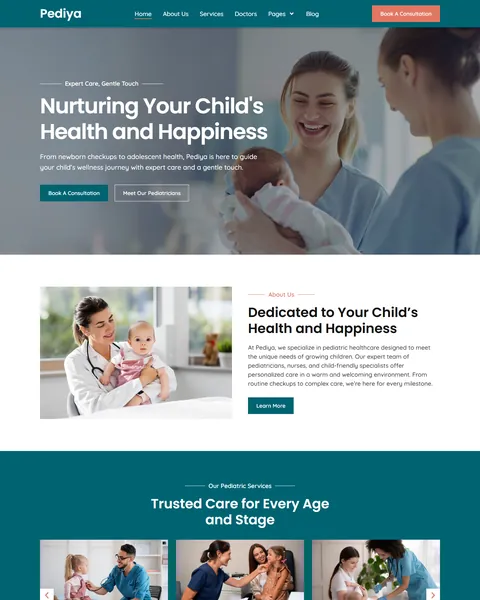
The demo opens with the gentle headline “Nurturing Your Child’s Health and Happiness” over a photo of a doctor caring for a smiling baby. Book a Consultation and Meet Our Pediatricians buttons sit right below. Deep teal, warm coral and clean white give your clinic a calm, friendly and trustworthy look.
Pediya is built with Elementor. Pediya needs Elementor Pro, and we don’t provide paid plugins, so please have your Pro license ready before we begin. Our team installs the kit for you at no cost.

Quick Template Details
- Template Name: Pediya
- Required Theme: Hello Elementor (Free)
- Elementor Pro Required: Yes
- Premium Plugins Required: Yes, Elementor Pro
- Page Templates: 10
- Forms: Elementor Pro Forms
- Responsive: Desktop, Tablet, Mobile
- Coding Required: No
Who Is This Pediatric Clinic Website Template For?
- Pediatric clinics. Newborn care, wellness exams, vaccinations and chronic care are ready to present.
- Pediatricians in private practice. A doctor profile page shows your experience, expertise and credentials.
- Multi-specialist children’s practices. A neonatal expert, an allergy specialist and an adolescent doctor fit one directory.
- Pediatric consultants. Friendly copy about guiding parents through health milestones suits consultancy services.
- Family practices with a child focus. Adolescent health services and a family pediatrician cover the whole family.
Running a daycare or preschool instead of a clinic? Our Bloomsy daycare Elementor template kit is a better fit.
See Every Page in the Pediya Pediatric Clinic Template
Click any page below to open it in the live demo.

Doctor Profiles Parents Can Trust
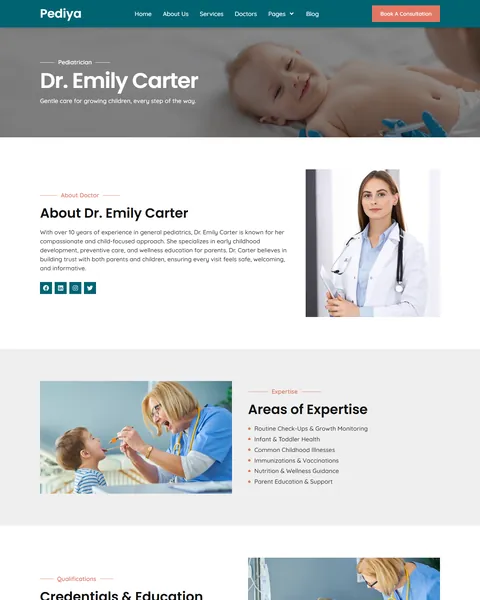
Parents want to know exactly who will care for their child. Pediya’s Doctors page introduces eight specialists with friendly portraits and clear roles, from a pediatrician and a neonatal expert to an allergy specialist and an adolescent doctor.
Each Doctor Details page adds a full profile: a warm introduction, years of experience, areas of expertise and credentials and education, plus social links. Parent testimonials and a “Schedule a Visit” banner with that doctor’s name close the page. The contact form even lets parents choose a doctor, so bookings reach the right person.
Six Services for Every Age and Stage
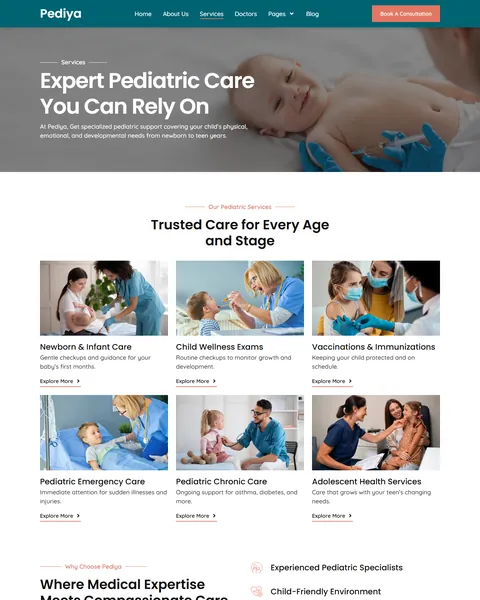
The Services page presents six services with photos: newborn and infant care, child wellness exams, vaccinations and immunizations, pediatric emergency care, chronic care for asthma and diabetes, and adolescent health services. A “Why Choose Pediya” section follows with five clear strengths.
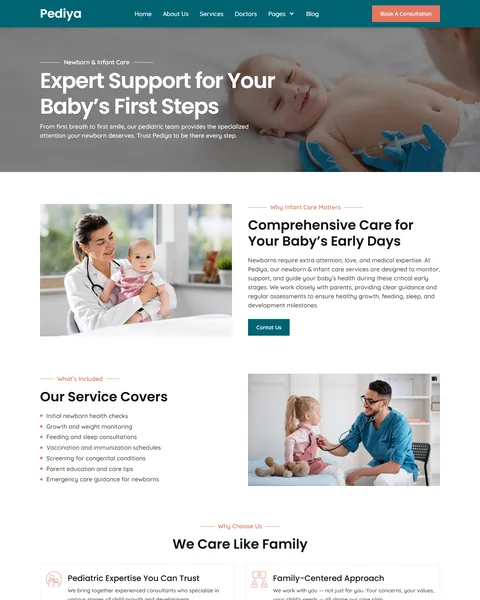
The Service Details page, shown with Newborn & Infant Care, explains why early care matters. It lists what is included, from newborn checks and growth monitoring to feeding advice, screenings and parent education. Four reasons to choose you close the page, with a booking banner for your infant specialists. Duplicate it for vaccinations or adolescent care.
FAQs That Answer Parents’ Questions Early
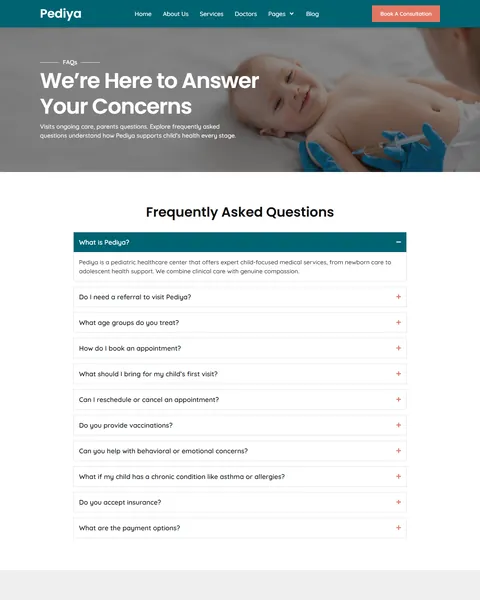
Parents often call with the same questions before booking. Pediya’s FAQs page answers eleven of them in a clean accordion. They include whether a referral is needed, which ages you treat and what to bring to the first visit.
Other answers cover rescheduling, vaccinations, behavioral and emotional concerns, chronic conditions, insurance and payment options. Clear answers like these save your front desk time and help nervous parents feel ready. A “Still Have Questions?” prompt invites anyone else to get in touch with your team, so no parent leaves without an answer.
Homepage, About, Blog and Contact
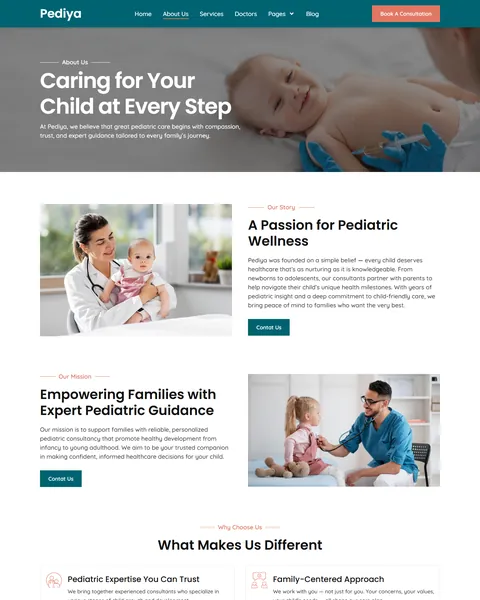
The homepage moves from a warm welcome to your services, your strengths, parenting tips, parent testimonials and a booking banner. The About page shares your story, mission and four things that make your clinic different, then introduces your experts with friendly photos and clear roles.
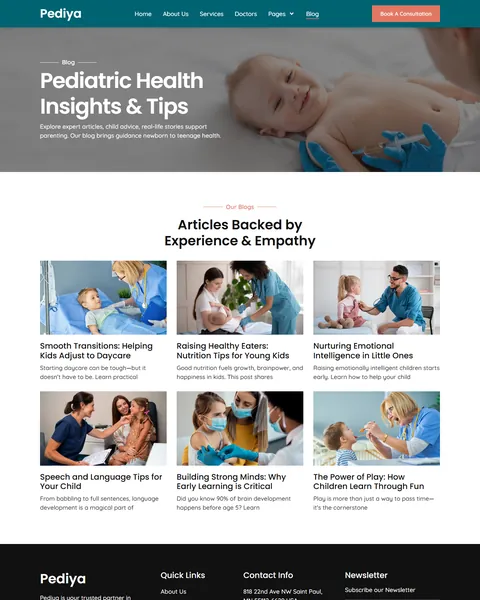
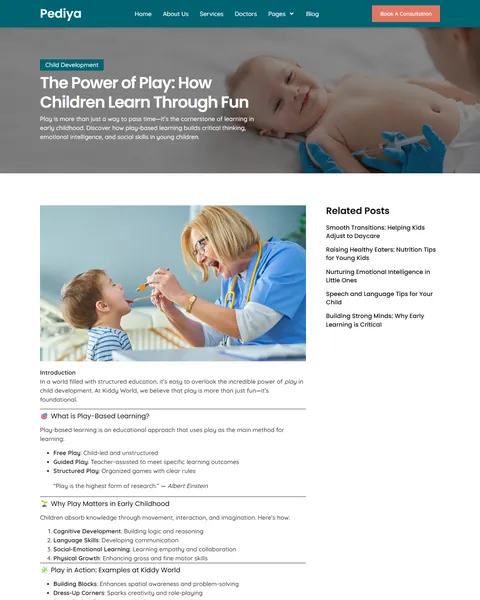
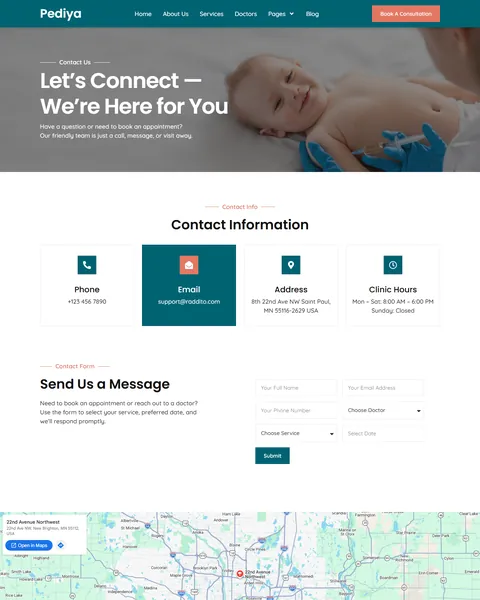
The blog offers six parenting and child health articles, such as nutrition tips and helping kids adjust to daycare, and each post links to related posts. The Contact page lists phone, email, address and clinic hours beside a booking form with doctor, service and date fields, plus a map.
Research-Driven Design for Pediatric Clinics & Children’s Healthcare
We looked at how parents choose a pediatric clinic online. Most are busy, sometimes worried, and often searching on a phone with a child nearby. They look for kind, experienced doctors, a child-friendly environment, clear services and an easy way to book, and they trust what other parents say. This pediatric clinic Elementor template kit is designed to feel gentle and professional while making it simple to find the right doctor and book a visit.
Deep teal and warm coral. Deep teal sections feel calm, clean and medical without looking cold. Warm coral buttons add friendliness and make Book a Consultation stand out on every page. White space keeps information clear and easy for parents to scan, even when they are reading in a hurry between appointments.
Soft, rounded type. Pediya pairs Poppins for headings with the rounded, playful Quicksand for buttons and details. Together they feel modern and gentle, which suits a clinic that wants to comfort both children and parents.
Tender, real photography. Photos show doctors with babies, toddlers and older children in bright exam rooms. They help parents picture a calm, caring visit for their own child and feel confident about choosing your team.
Parent voices throughout. Testimonials from mothers and fathers appear on the homepage and doctor profiles, where parents make their decision.
Booking always in reach. A coral Book a Consultation button stays in the header, and booking banners close most pages.
Mobile friendly. On phones, the menu folds into a toggle, headlines scale down and every section stacks without sideways scrolling.
Free Installation for This Pediatric Clinic Elementor Template Kit
We install Pediya on your WordPress site free of charge, set up exactly like the demo, once your Pro license is ready. No other paid plugin is needed.
The demo photos come from Envato and are not included. Adding your own doctors, services and articles, or connecting an online booking or patient portal, is not part of the free installation. If you want the full site built for you, see our done-for-you website service.
How to Install the Pediya Pediatric Clinic Template Kit
Prefer to set it up yourself? This video shows each step of the import.
Pediya vs Other Pediatric Clinic Elementor Template Kits
Comparing pediatric templates? Here is how Pediya compares with other popular pediatric clinic kits online.
| Pediya | Other popular pediatric clinic kits online* | |
|---|---|---|
| Cost to get started | $19.90 one-time | $27 to $29 one-time |
| Free installation | Yes, included | No, not listed on any of them |
| Doctor Details page | Yes, with credentials | Not listed on any of them |
| FAQ page | Yes, eleven answers | Not on all of them |
Why pediatric clinics choose Pediya:
- Built for children’s care. Services, doctors and parent FAQs are ready.
- Gentle and trustworthy. A calm design reassures busy parents.
- Lower price, free setup. $19.90 once, installed for you.
*We compared Pediya with three popular pediatric clinic Elementor template kits that appear on Google’s first page, sold on ThemeForest. Details come from each product page on October 24, 2026. Prices and features may change.
More Family Health Templates by Raddito
Pediya is our pediatric clinic Elementor template kit. If you run a maternity clinic, a general clinic or a daycare, compare these.
Matrizen – maternity clinic Elementor template kit
Best for maternity clinics and OB-GYN practices.
12 pages · Needs Elementor Pro · Live Preview
Clinara – medical clinic Elementor template kit
Best for small clinics on Elementor Free.
11 pages · Works with Elementor Free · Live Preview
Bloomsy – daycare Elementor template kit
Best for daycare centers and preschools.
10 pages · Needs Elementor Pro · Live Preview
Want more choices? Browse our health and medical website templates or every WordPress Elementor template kit we sell.
Frequently Asked Questions
Is Pediya a WordPress theme?
No. Pediya is a pediatric clinic Elementor template kit, a set of ready pages you import into Elementor. It runs on the free Hello Elementor theme.
Does Pediya need a Pro license?
Yes. The forms, header, footer and blog layouts use Pro widgets. You need your own license before we install the kit.
Can parents book with a specific doctor?
Yes. The contact form lets parents choose a doctor, a service and a date, and sends the request to your email.
Can I add more doctors?
Yes. Duplicate the Doctor Details page for each doctor, add a card to the Doctors page and include the name in the form menu.
Can I add a vaccination schedule page?
Yes. Duplicate the Service Details page and add your schedule as a list or table for parents to follow.
Should I review the demo credentials and articles?
Yes, please. The doctor credentials and blog articles are samples, so replace them with your own verified details and content.
Is the installation really free?
Yes. We install Pediya exactly like the demo at no cost once your Pro license is ready. Adding your own content is up to you, or our Done For You team can build the full site.