


FurNest is a pet care Bricks Builder landing page for WordPress, made for small animal clinics, pet wellness practices, mobile vets and pet care centers that offer grooming. It is a single scrolling page with an about section, six veterinary services and a three-step visit process. Pet owner reviews, a pet care blog and a contact form that asks for the pet type follow.
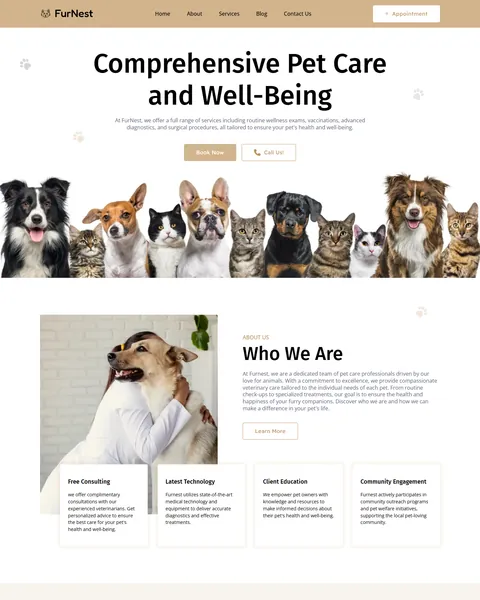
The demo opens with “Comprehensive Pet Care and Well-Being” centered above a long row of dogs and cats looking at the camera. Book Now and Call Us buttons sit just below. Warm caramel, soft tan and clean white give your practice a gentle, natural and welcoming look.
FurNest is built only with native Bricks elements, including its contact form, so no extra plugins are required. Bricks itself is a premium theme and is not included.

Quick Template Details
- Template Name: FurNest
- Template Type: Single landing page
- Required Theme: Bricks (Premium, not included)
- Required Plugins: None
- Landing Page Sections: 9, plus a mobile menu popup
- Responsive: Desktop, Tablet, Mobile
- Coding Required: No
Who Is This Pet Care Bricks Builder Landing Page For?
- Small animal clinics. Wellness exams, vaccinations and dental care are ready as service cards.
- Practices that treat many species. The contact form lets owners choose cats, dogs, rabbits, birds, turtles and more.
- Senior pet specialists. A senior pet care service and a blog post on aging pets suit older animals.
- Clinics that also groom. Grooming sits next to medical services, so one page covers both.
- Mobile and new vet practices. A simple three-step process explains how a first visit works.
Need a full clinic website with vet profiles and an online pet shop? Our FurClinic veterinary clinic Bricks Builder template is a better fit.
See Every Section of the FurNest Pet Care Bricks Builder Landing Page
Click any section below to open it in the live demo.
A Friendly Hero and Who We Are
Pet owners respond to happy animals first. FurNest’s hero lines up a dozen dogs and cats under a short promise about full care, from checkups to surgery. Book Now and Call Us give two easy ways to reach you.
“Who We Are” pairs a photo of a vet hugging a dog with your story and a Learn More button. Four small cards below highlight free consultations, modern equipment, owner education and community work.
Six Veterinary Services and a Three-Step Visit
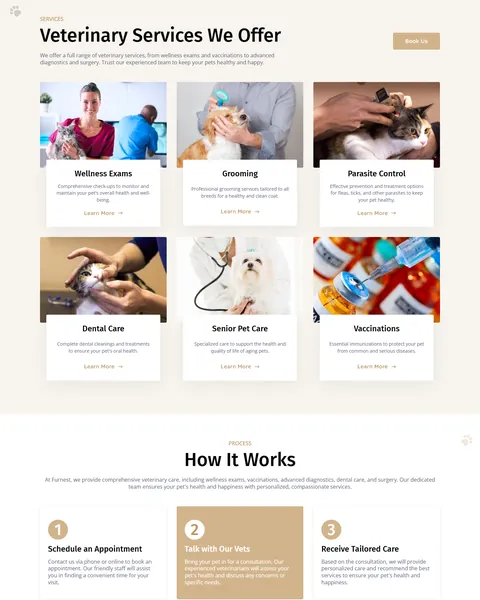
“Veterinary Services We Offer” shows six photo cards: wellness exams, grooming, parasite control, dental care, senior pet care and vaccinations. Each card has a short line and a Learn More link, and a Book Us button sits at the top.
“How It Works” explains a visit in three numbered steps: schedule an appointment, talk with a vet and receive tailored care. The middle step is set in caramel to guide the eye along the path.
Owner Reviews, a Pet Blog and Contact Form
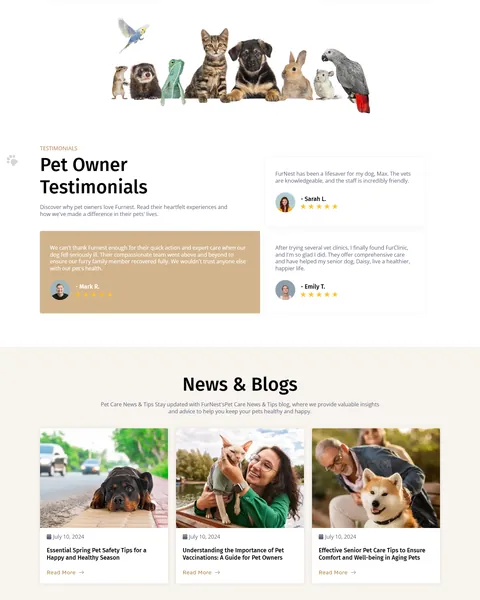
“Pet Owner Testimonials” sits under a playful lineup of a bird, cats, dogs and a rabbit. Three reviews with star ratings tell how the clinic helped real pets, with one featured on a caramel card.
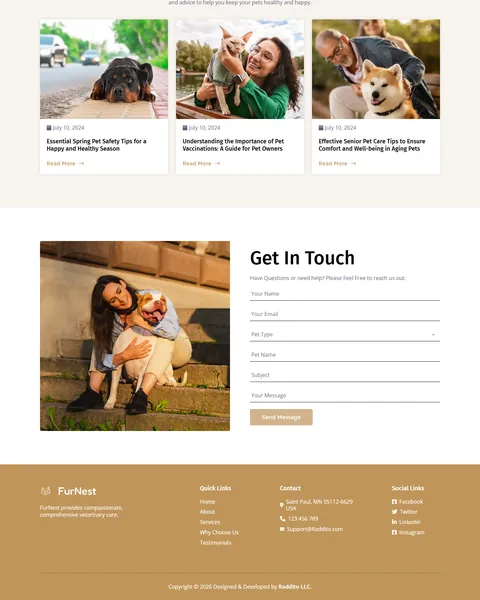
“News & Blogs” shows three dated articles on spring safety, vaccinations and senior care. “Get In Touch” pairs a photo of a woman with her dog with a form for name, email, pet type, pet name, subject and message.
Research-Driven Design for Pet Care Practices
We looked at how pet owners pick a vet online. They want a clinic that feels warm and caring, offers the service their pet needs and is easy to book. Reviews from other owners carry a lot of weight. This pet care Bricks Builder landing page is designed to feel friendly and calm while making booking and contact quick for worried owners.
Warm caramel and soft tan. Warm caramel, #BF955A, fills buttons, the featured review and the footer. Soft tan, #D2B48C, and pale caramel backgrounds feel like a cozy pet bed. Golden yellow, #FEC224, colors the star ratings.
Fira Sans and Readex Pro. Fira Sans headlines are clear and friendly, never cold or clinical. Readex Pro keeps buttons and menus soft and readable.
Pets everywhere. Dogs, cats, rabbits and birds appear in almost every section, so owners of any pet feel welcome. Use photos of your own patients, with their owners’ permission, for a personal touch.
A form that knows the pet. Asking for pet type and name before the visit helps your team prepare and makes owners feel heard.
Light paw-print accents. Small paw icons float in the background of several sections, adding charm without clutter. They give the page a playful feel while the layout stays clean and professional.
Mobile friendly. On phones, the menu opens as a popup, service cards stack and the Book Now and Call Us buttons stay easy to tap. Many owners search for a vet on their phone when a pet gets sick.
What’s Included With the FurNest Bricks Builder Landing Page
- FurNest Bricks templates. The full landing page and a mobile menu popup as JSON files.
- Theme Style file. Global colors, typography and buttons in one JSON file.
- Assets folder. The images and icons the page references.
- READ_ME guide and changelog. Setup steps and the version history, with the latest update on July 29, 2025.
Need help with the template files? Our product support team can help. If you would rather have the whole page built with your own services and branding, see our done-for-you website service.
How to Import the FurNest Pet Care Bricks Builder Landing Page
FurNest only needs Bricks. Follow these steps:
- In Bricks > Settings > General, enable custom breakpoints, SVG uploads and smooth scroll (CSS), then save.
- In the builder’s breakpoint settings, set Tablet Portrait to 1025px and Mobile Landscape to 768px.
- Go to Bricks > Templates and import the FurNest and mobile menu templates.
- Import the Theme Style and set its condition to the entire website or individual pages.
- Link the mobile menu popup to the bar icon and its close icon, then save and refresh.
The video below walks through a full Bricks import. It also shows WooCommerce steps, which you can skip because FurNest does not use WooCommerce.
FurNest vs Other Bricks Options for Pet Care Websites
Comparing ways to build a pet care page in Bricks? Here is how FurNest compares with other popular options online.
| FurNest | Other popular Bricks template libraries online* | |
|---|---|---|
| Complete pet care landing page | Yes, ready to import | No, all three are libraries of sections |
| Six veterinary service cards | Yes | Not mentioned on any of them |
| Contact form with pet type field | Yes | Not as a ready section on any of them |
| Same design also sold for Elementor | Yes | No, not on any of them |
Why pet care practices choose FurNest:
- Made for pet care. Services, visit steps, reviews and a pet form are ready.
- Pure Bricks. No add-ons, so your page stays fast.
- One payment. $8.97 once, with no yearly plan.
*We compared FurNest with two paid Bricks layout libraries and a free community Bricks template library, each listed on its own website. Details come from each product page on October 26, 2026. Prices and features may change.
More Pet Care Templates by Raddito
Prefer Elementor? FurNest is also available as a pet care Elementor landing page with the same look. For other pet businesses, compare these.
FurClinic – veterinary clinic Bricks Builder template kit
Best for vet clinics that also sell pet products online.
14 pages · Bricks with WooCommerce · Live Preview
Pethome – pet grooming Elementor template kit
Best for groomers, pet sitters and boarding businesses.
12 pages · Works with Elementor Free · Live Preview
Veticare – veterinary clinic Elementor landing page
Best for vet clinics and animal hospitals with a vet team.
Single landing page · Needs Elementor Pro · Live Preview
Want more choices? Browse our health and medical website templates or every WordPress Bricks Builder template we sell.
Frequently Asked Questions
Is FurNest a WordPress theme?
No. FurNest is a pet care Bricks Builder landing page, a ready one-page design you import into Bricks. Bricks is the theme, and you need your own Bricks license.
Do I need any plugins besides Bricks?
No. The form, service cards and reviews all use built-in Bricks elements, so there is nothing else to install.
Can owners book appointments online?
Link the Book Now and Appointment buttons to your clinic’s booking system, or use the contact form for visit requests.
Can I change the pet types in the form?
Yes. Edit the Pet Type dropdown in Bricks to list only the animals you treat.
Is it suitable for a grooming salon or pet hotel?
Yes. Rename the services and process steps, and keep the reviews, blog and contact form.
Do the blog cards update automatically?
You can switch them to a Bricks query loop so your latest WordPress posts appear on their own.
Should I replace the sample reviews and articles?
Yes, please. The reviews, blog posts and clinic claims are placeholders, so use only your own real patients and services.