


Travel is a travel booking Bricks Builder landing page for WordPress, made for travel agencies, tour organizers, honeymoon specialists and resort booking services. It is a single scrolling page with a trip search hero, four services, honeymoon and resort sections, tour promotions, trending packages, testimonials and a newsletter.
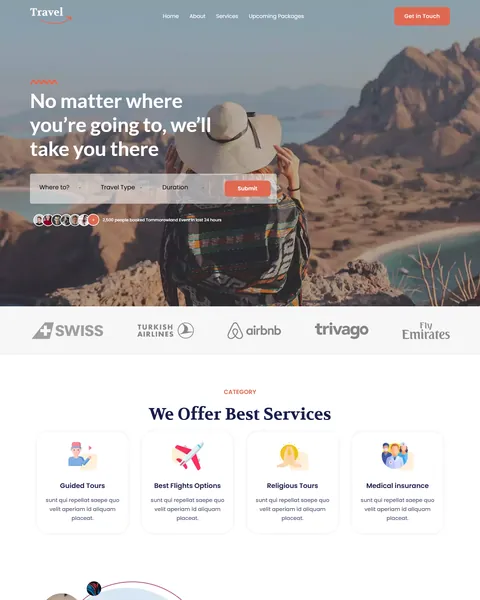
The demo opens with “No matter where you’re going to, we’ll take you there” over a traveler looking across a canyon. A search bar for destination, group size and trip length sits below. Warm coral, deep navy and golden yellow give your agency a sunny, friendly and adventurous look.
Travel’s hero trip search form is built with the free JetFormBuilder plugin, and the zip includes the form ready to import. Bricks itself is a premium theme and is not included.

Quick Template Details
- Template Name: Travel
- Template Type: Single landing page
- Required Theme: Bricks (Premium, not included)
- Plugin Used: JetFormBuilder (Free), for the trip search form
- Landing Page Sections: 10
- Responsive: Desktop, Tablet, Mobile
- Coding Required: No
Who Is This Travel Booking Bricks Builder Landing Page For?
- Travel agencies. Guided tours, flight options, religious tours and travel insurance are ready as services.
- Honeymoon specialists. A romantic tropical destinations section with photos suits couples’ trips.
- Resort booking services. A three-step booking guide explains how to choose, check and book a stay.
- European tour operators. A sightseeing promotion with Paris, Rome and London cards is ready to edit.
- Group tour organizers. Trending tour cards show trip length and how many people are going.
Prefer a design with tour, hotel and flight tabs and a deals section? Our Jetscape tour packages Bricks Builder landing page may suit you better.
See Every Section of the Travel Booking Bricks Builder Landing Page
Click any section below to open it in the live demo.
A Search Hero and Four Core Services
Travelers want to start planning right away. The hero places a search bar over a wide adventure photo, with fields for where to, travel type and duration and a coral Submit button. A small social proof line shows how many people booked recently.
A row of airline and travel brand logos follows, then “We Offer Best Services” with four icon cards: guided tours, best flight options, religious tours and medical insurance. Visitors see at a glance that you handle more than just tickets.
Honeymoon Trips and Easy Resort Booking
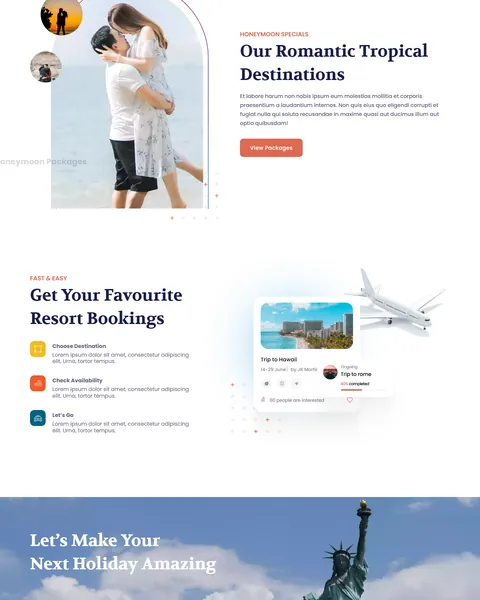
“Our Romantic Tropical Destinations” uses a couple’s photo and a View Packages button to sell honeymoon trips. It is a strong section for a high-value niche many agencies want to grow.
“Get Your Favourite Resort Bookings” explains booking in three steps: choose destination, check availability and let’s go. A floating trip card with a plane graphic shows what a confirmed booking looks like. A wide “Let’s Make Your Next Holiday Amazing” banner with the Statue of Liberty follows.
Europe Tours and Trending Packages
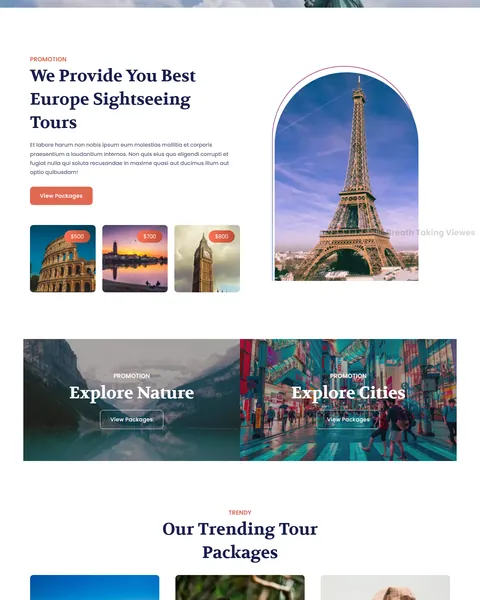
“We Provide You Best Europe Sightseeing Tours” pairs an Eiffel Tower arch with three small city cards showing prices. Two large promotion tiles, Explore Nature and Explore Cities, then invite visitors to browse by trip style.
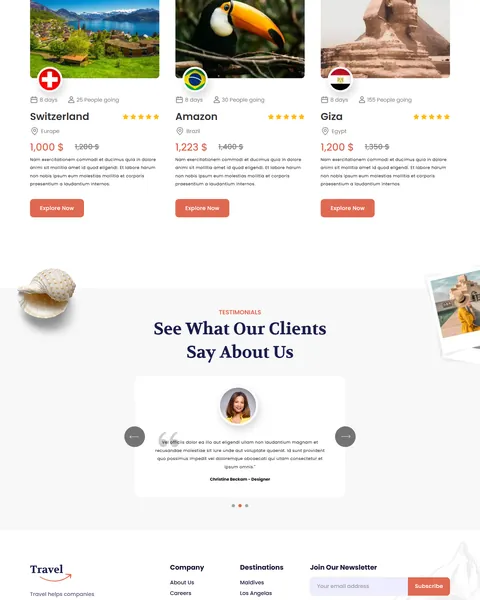
“Our Trending Tour Packages” shows three trips with photos, country flags, star ratings, trip length, group size and old and new prices. Each card has an Explore Now button for the full itinerary.
Testimonials, Newsletter and Footer
“See What Our Clients Say About Us” shows client reviews in a slider with photos and names, framed by playful seashell and photo graphics. Real traveler stories are one of the strongest reasons people book with a small agency.
The footer combines your logo, company links, popular destinations and a newsletter signup for weekly tour updates. It keeps returning visitors connected to your next deals. A short weekly email with one great offer often brings more bookings than a busy page.
Research-Driven Design for Travel Agencies
We looked at how people book trips online. They browse by destination, compare prices and look for proof that the agency is trusted. Inspiring photos and visible discounts often decide where they go. They also want simple steps, because booking a trip can feel complicated. This travel booking Bricks Builder landing page is designed to inspire first, then make searching, comparing and booking feel easy.
Warm coral and deep navy. Warm coral, #DF6951, marks buttons, labels and prices, like a sunset on holiday. Deep navy, #181E4B, keeps headings strong and readable. Golden yellow, #FFBA0A, adds star ratings and sunny accents.
Poppins for clarity. Poppins keeps descriptions, prices and form labels clean and friendly, paired with an elegant serif for the main headlines.
Destination photography. Canyons, beaches, famous landmarks and rainforests make visitors dream about their next trip. Use photos from your own tours where you can.
Prices and social proof. Old and new prices, group sizes and star ratings answer the questions travelers ask before they click. Showing how many people are going also makes a trip feel popular and safe.
Playful details. Floating photos, a paper plane and soft shadows make the page feel light and holiday-like rather than corporate. The mood of a travel site should match the mood of a holiday.
Mobile friendly. On phones, the menu folds into a toggle, cards stack and the search fields stay easy to use. Many travelers plan trips on their phone, often in short breaks during the day, so every section is easy to scan.
What’s Included With the Travel Bricks Builder Landing Page
- Travel Bricks template. The full landing page as one JSON file.
- Theme Style file. Container widths and base typography in one JSON file.
- JetFormBuilder form. The trip search form, ready to import.
- Assets folder. The images and icons the page references.
- READ_ME guide and changelog. Setup steps and the version history.
Need help with the template files? Our product support team can help. If you would rather have the whole page built with your own tours and branding, see our done-for-you website service.
How to Import the Travel Booking Bricks Builder Landing Page
Install JetFormBuilder first. Then follow these steps:
- In Bricks > Settings > General, enable custom breakpoints, SVG uploads and smooth scroll (CSS), then save.
- In the builder’s breakpoint settings, set Tablet Portrait to 1025px and Mobile Landscape to 768px.
- Import the trip search form into JetFormBuilder, then go to Bricks > Templates and import the Travel template file.
- Import the Theme Style and set its condition to the entire website or individual pages.
- Insert the template into a page, then save and refresh.
The video below walks through a full Bricks import. It also shows WooCommerce steps, which you can skip because Travel does not use WooCommerce.
Travel vs Other Bricks Options for Travel Websites
Comparing ways to build a travel agency landing page in Bricks? Here is how Travel compares with other popular options online.
| Travel | Other popular Bricks template libraries online* | |
|---|---|---|
| Complete travel booking landing page | Yes, ready to import | No, all three are libraries of sections |
| Trip search bar in the hero | Yes | Not mentioned on any of them |
| Tour package cards with prices and ratings | Yes | Not as a ready section on any of them |
| Same design also sold for Elementor | Yes | No, not on any of them |
Why travel agencies choose Travel:
- Made for trips. Search, packages, promotions and reviews are ready.
- One free plugin. JetFormBuilder handles the trip search form.
- One payment. $8.97 once, with no yearly plan.
*We compared Travel with two paid Bricks layout libraries and a free community Bricks template library, each listed on its own website. Details come from each product page on October 26, 2026. Prices and features may change.
More Travel Templates by Raddito
Prefer Elementor? Travel is also available as a travel booking Elementor landing page with the same look. For a different travel style, compare these.
Jetscape – tour packages Bricks Builder landing page
Best for agencies selling tours, hotels and flights.
Single landing page · Bricks with JetFormBuilder · Live Preview
Vacaypeak – travel agency Bricks Builder landing page
Best for tour and holiday agencies.
Single landing page · Bricks · Live Preview
Trivana – travel agency Elementor template kit
Best for agencies that want a full multi-page site in Elementor.
12 pages · Works with Elementor Free · Live Preview
Want more choices? Browse our travel and accommodation website templates or every WordPress Bricks Builder template we sell.
Frequently Asked Questions
Is Travel a WordPress theme?
No. Travel is a travel booking Bricks Builder landing page, a ready one-page design you import into Bricks. Bricks is the theme, and you need your own Bricks license.
Do I need any plugins besides Bricks?
Yes, one free plugin. The trip search bar is a JetFormBuilder form, while the review slider and newsletter use built-in Bricks elements.
Does the trip search show real results?
Not by default. Edit the destination options and send the form to your inbox, or link the button to your booking engine.
Can I change the tour packages and prices?
Yes. Edit each package card’s photo, country, rating, group size and prices in Bricks to match your own trips.
Can I remove the religious tours or insurance services?
Yes. Rename or delete any service card in Bricks so the section matches what your agency actually offers.
Does the demo include finished text?
No. Several sections use placeholder text, so write your own service, package and review copy before launch.
Should I replace the demo logos and reviews?
Yes, please. The airline and travel brand logos, reviews and booking numbers are placeholders, so use only your own real partners and customers.