BrevAI is a complete Mobile App, SaaS Product & AI Assistant WordPress Elementor Template Kit created for AI assistant platforms, SaaS startups, mobile app companies, productivity tools, workflow automation software, chatbot applications, digital products, and other technology businesses.
Designed for software companies that need to present AI-powered features, mobile app experiences, workflow automation, productivity tools, integrations, pricing plans, and product benefits clearly, BrevAI combines a modern SaaS-focused visual style with product showcases, feature presentation, industry use cases, testimonials, FAQs, and prominent trial or download calls to action.
This complete multi-page website structure gives AI and SaaS businesses the flexibility to introduce their product, explain features and solutions, display pricing, present customer feedback, publish product-related content, collect enquiries, and guide visitors toward product trials, demos, or app downloads within one consistent design.
Quick Template Details
- Template Name: BrevAI
- Template Type: Full Website Template Kit
- Platform: WordPress
- Page Builder: Elementor Free
- Required Theme: Hello Elementor
- Elementor Pro Required: No
- Premium Plugins Required: No
- Website Page Templates: 10
- Form Support: MetForm
- Responsive Layouts: Desktop, Tablet and Mobile
- Coding Required: No for standard content and design changes
- File Type: ZIP Template Kit
- Access Method: Instant Digital Download
Explore more WordPress Elementor templates created for SaaS products, technology companies, startups, and modern digital businesses.
Who Is BrevAI Designed For?
BrevAI is designed for software and technology businesses that need a professional website for presenting digital products, explaining AI-powered features, showcasing app experiences, displaying pricing, demonstrating use cases, and encouraging trials, downloads, demos, or enquiries.
- AI Assistant Platforms
- SaaS Startups
- Mobile App Companies
- AI Productivity Tools
- Workflow Automation Software
- Chatbot Applications
- Team Collaboration Platforms
- Business Automation Products
- Productivity Software Companies
- Digital Product Startups
- AI Software Businesses
- Technology Startups
Homepage Sections
- Header and Navigation
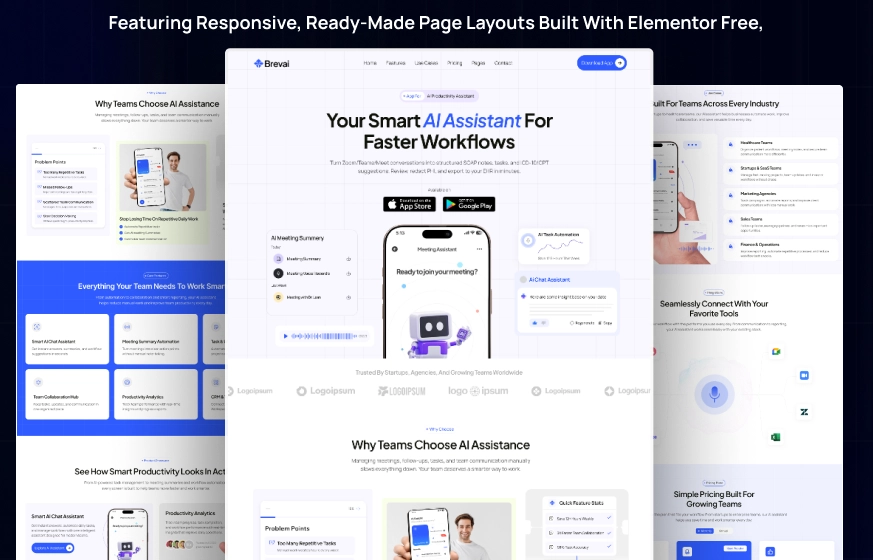
- AI Assistant Hero with Mobile App Mockups, Download Badges and Primary Calls to Action
- Partner and Brand Logo Section
- AI Productivity Challenges and Feature Overview
- Core AI-Powered Features Grid
- Mobile App and Productivity Product Showcase
- Simple Three-Step Product Setup Process
- AI Use Cases Across Multiple Industries
- Software and Productivity Tool Integrations
- SaaS Pricing Plans
- Customer Testimonials
- Frequently Asked Product Questions
- Mobile App Download Call-to-Action
- Newsletter and Footer Area
Dedicated Features & Solutions Pages for Your SaaS Product
BrevAI includes dedicated Features and Solutions page layouts, giving software companies additional space to explain what their product offers and how it can support different users, teams, or business workflows.
These layouts can be customized with your own AI capabilities, productivity features, automation tools, product screenshots, use cases, integrations, workflow examples, and other accurate information about your software or mobile application.
Showcase Mobile App Screens & AI Product Experiences
The BrevAI design uses mobile device mockups and product-focused visual areas to help SaaS and app businesses present the interface and experience of their digital product. The homepage includes layouts for showcasing AI chat experiences, meeting or workflow features, productivity analytics, automation tools, and mobile app screens.
You can replace the demonstration visuals with genuine screenshots from your own application so potential users can see how the product looks and understand its key capabilities before starting a trial, requesting a demo, or downloading the app.
Research-Driven Design for AI, SaaS & Mobile App Products
BrevAI was designed with careful attention to the information hierarchy commonly needed by modern software products. The layout places strong emphasis on product benefits, AI features, workflow improvements, app screenshots, use cases, integrations, pricing, customer feedback, and clear product actions.
The visual direction combines clean white and very light lavender backgrounds with vivid royal-blue and blue-gradient sections, dark typography, soft pastel accent areas, rounded cards, modern iconography, and prominent mobile device mockups. Generous spacing and structured product blocks create a polished SaaS presentation while keeping features, pricing, integrations, and calls to action easy to scan.
Free Template Installation Included
Free installation is included with your BrevAI template purchase. If you prefer not to handle the initial setup yourself, the Raddito team can install the template kit on your WordPress website and prepare the supplied BrevAI demo structure for customization.
- Free template installation
- Initial demo structure setup
- Save time on the template import process
- Start customizing from the supplied BrevAI design
The free installation service covers the template setup. Custom SaaS development, mobile app development, user authentication, subscriptions, payment processing, API integrations, application dashboards, or other product functionality outside the supplied template kit requires separate configuration or development if needed.
Easy to Customize with Elementor
BrevAI can be customized through Elementor to match the branding, product features, app visuals, pricing, use cases, and content of your own SaaS or technology business.
You can update:
- Product Name and Logo
- Brand Colors
- Typography
- Hero Content
- Mobile App Screenshots
- AI Features and Product Benefits
- Solutions and Use Cases
- Workflow and Setup Steps
- Integration Information
- App Store and Download Links
- Pricing Plans
- Customer Testimonials
- FAQ Content
- Contact Information
- Blog Content
- Calls to Action
- Footer Content
How to Import & Set Up the Template Kit
Watch the step-by-step tutorial below to learn how to import the Elementor full website template kit, install the required plugins, create the website pages, and prepare the demo structure for customization.
Blog & SaaS Product Content
BrevAI includes dedicated Blog and Blog Single layouts, giving technology businesses a place to publish product updates, AI productivity tips, workflow automation guidance, SaaS resources, integration information, industry insights, and other useful content related to their product.
Product Support
Need help with the template files, installation, required plugins, or another template-related issue? Visit the Raddito Support page for assistance.
Need a Complete SaaS or AI Product Website Built for You?
If you want a complete AI assistant, SaaS, mobile app, productivity software, or digital product website customized with your own branding, features, app screenshots, integrations, pricing, testimonials, and product content, explore the Raddito Done For You website service.
Explore More Elementor Templates
Browse more WordPress Elementor templates or explore the complete Raddito template collection.
Frequently Asked Questions
Is BrevAI a WordPress theme?
No. BrevAI is a WordPress Elementor Template Kit containing pre-designed pages and layouts for building a professional mobile app, SaaS product, AI assistant, or technology website.
What types of software businesses can use BrevAI?
BrevAI can be customized for AI assistant platforms, SaaS startups, mobile app companies, productivity tools, workflow automation software, chatbot applications, digital products, and other technology businesses.
Does BrevAI include dedicated Features and Solutions pages?
Yes. BrevAI includes dedicated Features and Solutions layouts that can be customized with your own product capabilities, use cases, screenshots, workflow information, and other software content.
Can I showcase my own mobile app screenshots?
Yes. The supplied design includes multiple product and mobile device presentation areas that can be replaced with genuine screenshots from your own application.
Can I display SaaS pricing plans?
Yes. BrevAI includes a dedicated Pricing page, and the homepage also contains pricing plan layouts that can be customized with accurate plans, prices, features, and calls to action from your own product.
Does the template itself include AI or SaaS functionality?
No. BrevAI provides the WordPress Elementor website layouts and presentation design. Your actual AI assistant, SaaS application, mobile app, user accounts, subscriptions, APIs, or other software functionality must be provided or integrated separately.
Is free template installation included?
Yes. Free template installation is included with the purchase, allowing the Raddito team to set up the supplied BrevAI template structure on your WordPress website.