


Hyperestate is a free realtor HTML template built with Tailwind CSS and Vite. It suits real estate agents, brokerages, property developers and rental agencies that want a sleek listings site without WordPress. It is a single scrolling page with 9 sections, from a search hero and featured homes to a client quote, blog posts and an email sign-up.
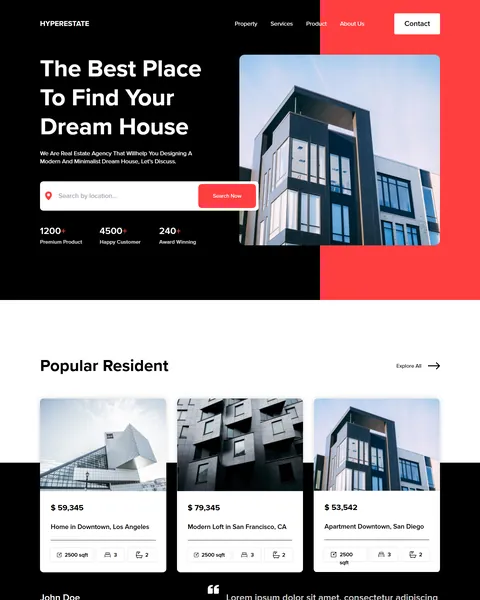
The live demo opens with “The Best Place To Find Your Dream House” in bold white type on black. A tall photo of a modern glass building sits on a red panel beside it. A location search bar and three stat counters sit under the headline. Black, white and a bold red give your agency a sharp, modern and upmarket look.
Hyperestate is plain HTML with Tailwind CSS, so there is no theme or plugin to install. Edit index.html, run the Vite build and upload the files.

Quick Template Details
- Template Name: Hyperestate
- Template Type: Single landing page
- Built With: HTML, Tailwind CSS 3 and Vite 5
- Extra Libraries: Lenis and AOS from public CDNs
- Landing Page Sections: 9
- WordPress Required: No
- Price: Free
- Responsive: Desktop, Tablet, Mobile
Who Is This Realtor HTML Template For?
- Real estate agents. A search bar, featured homes and a personal quote help buyers get to know you.
- Brokerages. Stats for listings, customers and awards show the size of your business.
- Property developers. Large building photos and listing cards suit new apartments and lofts.
- Rental agencies. Property cards with size, bedrooms and bathrooms work for rentals too.
- Developers building property sites. A light Tailwind project with only two extra scripts is quick to customize.
Prefer to run your property site on WordPress? The same Hyperestate design is sold as a realtor Elementor landing page.
See Every Section of the Hyperestate Realtor HTML Template
Click any section below to open it in the live demo.
A Search Hero and Featured Homes
Home buyers start with a search. Hyperestate puts a location search field and a red Search Now button right under the headline, with counters for premium listings, happy customers and awards. The menu links to property, services, product and about pages, with a white Contact button.
“Popular Resident” then shows three property cards with an Explore All link. Each card has a photo, a price, an address and small boxes for floor area, bedrooms and bathrooms. The cards sit half on white and half on black, which gives the section depth.
A Client Quote, Partner Logos and Your Values
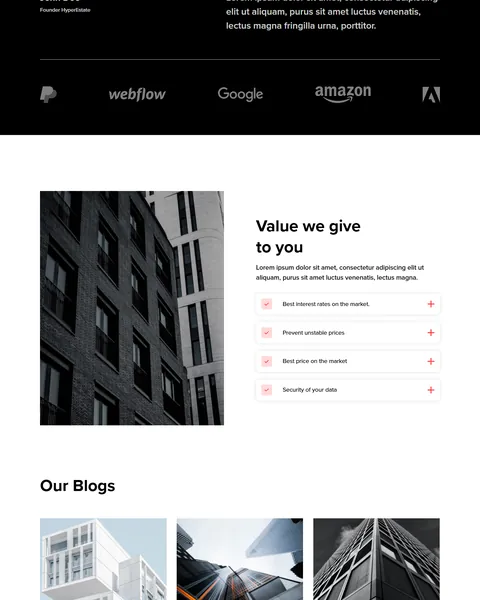
Below the listings, a large quote with the founder’s name adds a personal voice to the agency. A row of grey partner logos follows on the black band.
“Value we give to you” sits beside a tall black and white building photo, with four benefit rows: best interest rates, stable prices, best price on the market and data security. Each row has a red check icon and a plus button.
Blog Posts, Sign Up and Footer
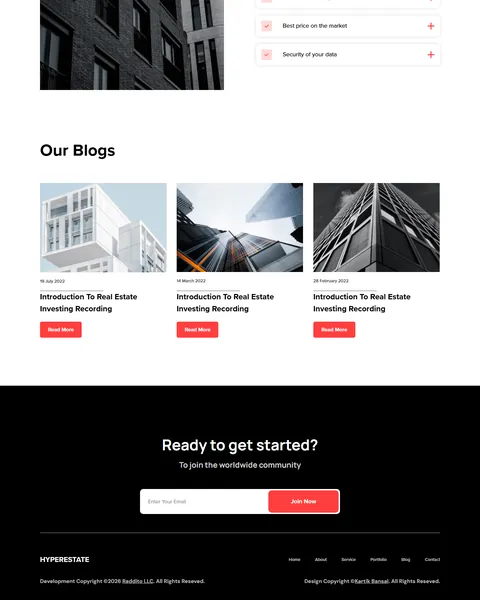
“Our Blogs” shows three article cards with a photo, a date, a title and a red Read More button. Regular market articles help your site rank in search and show buyers you know the area.
A black band asks “Ready to get started?” with an email field and a red Join Now button. The footer repeats the logo, page links and a copyright line.
Research-Driven Design for Real Estate Agents
We looked at how people search for a home or an agent online. They want to search by location, see photos and prices quickly, check the size and number of rooms, and then decide whether the agent seems trustworthy. Buying a home is a large decision, so clear facts and a personal touch both matter. This realtor HTML template is designed to put search first, show listings in a clean format and build trust with stats, a quote and helpful articles.
Black, white and red. The Tailwind config sets a bold red, #FF3F3F, as the primary color, with a darker red, #CC2C2C, for hover states. Black and white keep the focus on property photos, while red guides the eye to search and action buttons.
Proxima Nova, DM Sans and Manrope. Headlines and body text use clean geometric sans-serif fonts that feel modern and easy to read on listing cards.
Search first. The search bar is the first thing visitors can use, because most buyers arrive with a location in mind.
Key facts on every card. Price, address, size, bedrooms and bathrooms are the details buyers compare first, so each card shows them without a click.
Content that builds trust. A founder quote and a blog section show there are real people behind the listings, which matters when the purchase is this large.
Mobile friendly. The hero, search field and property cards stack on phones, where many people browse homes during spare moments, often several times before they call an agent.
What’s Included With the Hyperestate HTML Template
- index.html. The full landing page, written with Tailwind utility classes.
- Tailwind and Vite config. tailwind.config.js with the Hyperestate colors and fonts, plus package.json with the build scripts.
- main.js and style.css. Smooth scrolling, scroll animations, the footer year and custom styles.
- Assets and fonts folders. Building photos, icons, logos and a font stylesheet.
- README. Setup, development and build steps.
Need help with the files? Our product support team can help. If you would rather have the site built for you with your own listings and copy, see our done-for-you website service.
How to Set Up the Hyperestate Realtor HTML Template
Install Node.js on your computer, then:
- Unzip Hyperestate and open its folder in a terminal.
- Run npm install to download Tailwind CSS and Vite.
- Run npm run dev to preview the site locally while you edit.
- Replace the listings, prices, stats, quote, articles and photos in index.html and the assets folder.
- Run npm run build, then upload the dist folder to your host.
Hyperestate vs Other Tailwind Options for Real Estate Websites
Comparing ways to build a realtor page with Tailwind CSS? Here is how Hyperestate compares with other popular options online.
| Hyperestate | Other popular Tailwind CSS libraries online* | |
|---|---|---|
| Complete real estate landing page | Yes, ready to use | No, none of the three offers one |
| Property cards with price, size and rooms | Yes | Not as a ready section on any of them |
| Plain HTML project with a Vite build setup | Yes | No, they offer copy-paste blocks or React templates |
| Same design also sold for Elementor | Yes | No, not on any of them |
Why agents choose Hyperestate:
- Made for property. Search, listings, values, blog and sign-up are ready.
- No WordPress needed. A fast static site with nothing to update.
- Free download. No license fee and no yearly plan.
*We compared Hyperestate with two paid Tailwind CSS libraries, Tailwind Plus and Flowbite Pro, and the free HyperUI collection, using each product’s own website. Details were checked on November 1, 2026. Prices and features may change.
More Real Estate and Service Templates by Raddito
For related businesses, compare these HTML templates. Each one is a free Tailwind CSS landing page with a live demo.
ShiftXpress – house moving HTML template
Best for removal companies and movers.
Single landing page · Free · Tailwind CSS · Live Preview
Artisian – home decor HTML template
Best for interior studios and home decor shops.
Single landing page · Free · Tailwind CSS · Live Preview
Vacaypeak – travel agency HTML template
Best for tour operators and holiday planners.
Single landing page · Free · Tailwind CSS · Live Preview
Want more choices? Browse our real estate and construction website templates or every HTML website template we offer.
Frequently Asked Questions
Do I need WordPress for Hyperestate?
No. Hyperestate is a static realtor HTML template, so it runs on any web host without WordPress, plugins or a database.
Is Hyperestate free?
Yes. It is a free download that you can use for your own agency or a client project.
Does the property search work?
No. The search bar is a design element. Link it to your listings tool, an IDX search page or a contact form.
Can I add more property cards?
Yes. Copy a card in index.html and change the photo, price, address, size, bedrooms and bathrooms.
Do the plus buttons in the values section open?
Not yet. They are icons only, so add a small script if you want each row to expand with more detail.
Will the Proxima Nova font keep working?
It loads from an Adobe Fonts web project that is not yours. Replace it with your own Adobe Fonts project or a free Google font, such as DM Sans or Manrope, before launch.
Should I replace the sample text and logos?
Yes, please. Most paragraphs are placeholder text, the three blog posts share one title, and the partner logos are real third-party brands, so use your own listings, articles and partners.