Podexa is a complete Podcast WordPress Elementor Template Kit created for podcasters, podcast networks, influencers, interview shows, content creators, YouTubers, audio creators, video creators, digital media brands, storytellers, and creator-led communities that need a dedicated website for episodes, hosts, guests, and audience-focused content.
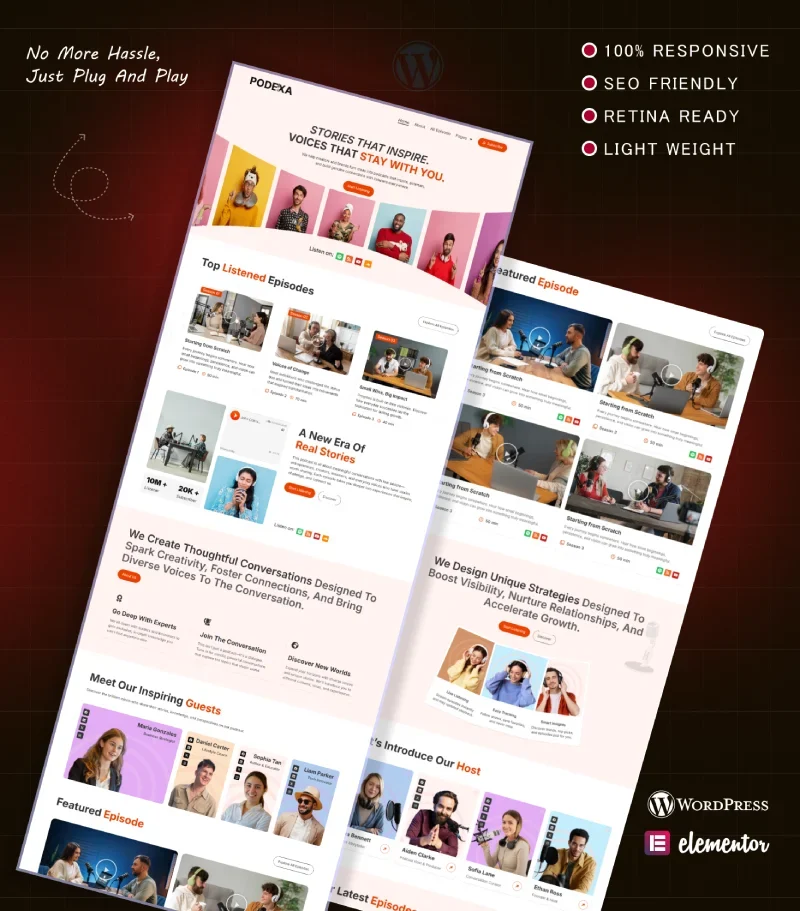
Designed for creators that need to present podcast episodes, featured conversations, hosts, guests, listening platforms, audience feedback, creator stories, and media content clearly, Podexa combines a vibrant editorial design with structured episode presentation, profile layouts, audience-focused sections, social links, blog content, and strong listening calls to action.
This complete multi-page website structure gives podcast and creator brands the flexibility to introduce their show, organize episodes, provide individual episode details, present hosts and guests, publish articles, share listener experiences, collect enquiries, and direct audiences toward their preferred listening platforms within one consistent design.
Quick Template Details
- Template Name: Podexa
- Template Type: Full Website Template Kit
- Platform: WordPress
- Page Builder: Elementor Pro
- Required Theme: Hello Elementor
- Elementor Pro Required: Yes
- Premium Plugins Required: Yes – Elementor Pro
- Website Page Templates: 12
- Form Support: Elementor Pro
- Additional Required Plugins: ElementsKit Lite and Marquee Addons for Elementor
- Responsive Layouts: Desktop, Tablet and Mobile
- Coding Required: No for standard content and design changes
- File Type: ZIP Template Kit
- Access Method: Instant Digital Download
Explore more WordPress Elementor templates created for creators, media brands, professional services, and modern content-focused websites.
Who Is Podexa Designed For?
Podexa is designed for creators and media brands that need a professional website for organizing episodes, introducing hosts and guests, presenting individual conversations, sharing audience feedback, publishing articles, and directing visitors toward podcast and media platforms.
- Podcasters
- Podcast Networks
- Interview Shows
- Influencers
- Content Creators
- YouTubers
- Audio Creators
- Video Creators
- Digital Media Brands
- Creator-Led Communities
Homepage Sections
- Header, Navigation and Subscribe Call-to-Action
- Podcast Hero with Listening Platform Links
- Top Listened Episodes
- Podcast Introduction – A New Era of Real Stories
- Conversation Benefits – Experts, Community and Diverse Voices
- Podcast Host Profiles
- Featured Episodes
- Listener Experience Feature Cards
- Guest Profiles
- Latest Episodes
- Listener Testimonials
- Newsletter, Listening Platforms, Contact Information and Footer
Showcase Podcast Episodes & Conversations
Podexa includes dedicated Episodes and Episode Details layouts, giving podcast creators a structured way to organize their content and provide more information about individual conversations.
The supplied design supports episode information such as titles, season numbers, episode numbers, duration, descriptions, featured imagery, and links to listening or media platforms. You can replace the demonstration content with your own podcast episodes, interview topics, guests, series, seasons, descriptions, artwork, and accurate publication information.
Organize Episodes Across Different Seasons
The dedicated episode archive demonstrates how podcast content can be grouped into different seasons and themes, helping audiences explore a larger content library without placing every episode on the homepage.
You can customize the season names, episode numbering, descriptions, topics, durations, featured content, and archive structure according to the way your own podcast or creator series is organized.
Introduce Your Podcast Hosts
Podexa includes dedicated Hosts and Host Details layouts for presenting the people behind the show. The homepage also includes a prominent host section with profile photography, names, roles, and social links.
You can customize these layouts with your own host photographs, biographies, roles, professional background, social profiles, areas of expertise, creator information, and other accurate details about the people leading your podcast or media brand.
Feature Podcast Guests & Contributors
Podexa includes dedicated Guests and Guest Details layouts, allowing interview-based podcasts and creator brands to give individual contributors more visibility.
You can present guest photographs, names, professional roles, biographies, social profiles, areas of expertise, episode appearances, and other accurate information about the people featured in your content.
Connect Audiences with Listening Platforms
The supplied Podexa design includes prominent links for platforms such as Spotify, RSS, YouTube, and SoundCloud, helping visitors move from your website to the channels where your content is available.
You can replace the demonstration links with your own podcast feeds, YouTube channel, audio platforms, social profiles, newsletter, or other destinations relevant to your creator brand. The template provides the presentation and linking structure; podcast hosting, audio distribution, video hosting, analytics, subscriptions, or platform-specific functionality must be configured separately where required.
Highlight Featured & Latest Episodes
The homepage uses separate Top Listened Episodes, Featured Episode, and Our Latest Episodes sections to surface important content at different stages of the visitor journey.
You can use these areas to promote popular interviews, recent releases, special episodes, seasonal highlights, creator collaborations, or other content you want to make easier for visitors to discover.
Build Trust with Listener Feedback
Podexa includes a substantial homepage listener-feedback section for presenting genuine audience, guest, or client experiences.
You can replace the demonstration feedback with authentic comments about episode quality, host experience, storytelling, production, guest interviews, community engagement, or other aspects of your podcast. Use only feedback and identifying information you have permission to publish.
Research-Driven Design for Podcasts & Creator Brands
Podexa was designed with careful attention to the visual and content needs of podcasts, interview shows, influencers, and creator-led media brands. The layout places strong emphasis on episode discovery, human stories, host visibility, guest personalities, audience connection, listening options, creator identity, and clear media actions.
The visual direction combines soft blush-pink and clean white backgrounds with stronger coral, orange, navy, lavender, and pastel accent blocks. Bold modern typography, colorful creator photography, structured episode cards, profile grids, social icons, media-style thumbnails, and spacious editorial layouts create an energetic but organized presentation.
The varied portrait backgrounds and episode imagery help individual hosts, guests, and conversations remain visually distinct while keeping the overall brand consistent across a content-heavy website.
Free Template Installation Included
Free installation is included with your Podexa template purchase. If you prefer not to handle the initial setup yourself, the Raddito team can install the template kit on your WordPress website and prepare the supplied Podexa demo structure for customization.
- Free template installation
- Initial demo structure setup
- Save time on the template import process
- Start customizing from the supplied Podexa design
The free installation service covers the template setup. Custom episode entry, podcast hosting, RSS configuration, audio or video migration, media distribution, analytics platforms, paid subscriptions, membership systems, email automation, or other functionality outside the supplied template kit requires separate configuration if needed.
Easy to Customize with Elementor
Podexa can be customized through Elementor Pro to match the branding, episodes, hosts, guests, media channels, and content of your own podcast or creator brand.
You can update:
- Podcast or Brand Name and Logo
- Brand Colors and Typography
- Hero Content and Calls to Action
- Podcast Platform Links
- Episode Titles and Descriptions
- Season and Episode Information
- Episode Artwork and Photography
- Host Profiles
- Guest Profiles
- Featured Episodes
- Latest Episodes
- Listener Testimonials
- Contact Information
- Blog Content
- Newsletter Content
- Social Links
- Footer Content
How to Import & Set Up the Template Kit
Watch the step-by-step video below to learn how to import and set up this Elementor full website template kit in WordPress.
Blog & Creator Content
Podexa includes dedicated Blog and Blog Single layouts, giving creators a place to publish episode highlights, guest stories, behind-the-scenes content, creator insights, podcast updates, interviews, media commentary, production experiences, and other articles relevant to their audience.
Product Support
Need help with the template files, installation, required plugins, or another template-related issue? Visit the Raddito Support page for assistance.
Need a Complete Podcast Website Built for You?
If you want a complete podcast, influencer, interview show, creator, audio, video, or digital media website customized with your own branding, episodes, hosts, guests, imagery, platform links, listener feedback, and creator information, explore the Raddito Done For You website service.
Explore More Elementor Templates
Browse more WordPress Elementor templates or explore the complete Raddito template collection.
Frequently Asked Questions
Is Podexa a WordPress theme?
No. Podexa is a WordPress Elementor Pro Template Kit containing pre-designed pages and layouts for building a podcast, influencer, creator, audio, video, or digital media website.
Does Podexa require Elementor Pro?
Yes. Elementor Pro is included in the required plugin list and is required for the complete Podexa template setup.
Can I organize podcast episodes and individual episode pages?
Yes. Podexa includes dedicated Episodes and Episode Details layouts that can be customized with your own episode titles, descriptions, season information, durations, artwork, media links, and other accurate episode content.
Can I create profiles for hosts and guests?
Yes. Podexa includes dedicated Hosts, Host Details, Guests, and Guest Details layouts for presenting the people involved in your podcast or creator content.
Can I link to Spotify, YouTube and other podcast platforms?
Yes. The supplied design includes areas for linking visitors to external listening and media platforms. You can replace the demonstration links with the platforms and channels used by your own podcast.
Can I publish podcast and creator articles?
Yes. Podexa includes dedicated Blog and Blog Single layouts for publishing episode updates, guest stories, creator insights, interviews, behind-the-scenes content, and other articles.
Is free template installation included?
Yes. Free template installation is included with the purchase, allowing the Raddito team to set up the supplied Podexa template structure on your WordPress website.