


EverBright is a dental clinic Elementor landing page for WordPress, designed for dental clinics, family dentists, orthodontists and cosmetic dentistry practices. It is a single scrolling page with 9 sections, including a hero appointment form, four dental services, a dental team, patient feedback and FAQs.
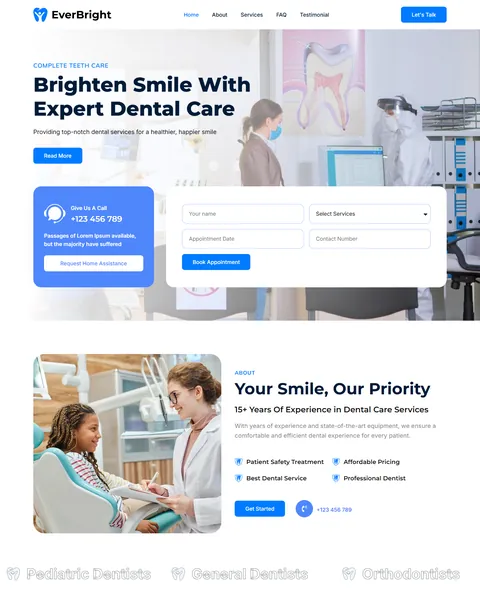
The demo opens with the headline “Brighten Smile With Expert Dental Care” over a bright, modern clinic photo. Right below, a call card and an appointment form let patients book without scrolling. Vivid blue, deep navy and clean white give your practice a fresh, clinical and trustworthy look.
EverBright is built with Elementor. EverBright needs Elementor Pro, and we don’t provide paid plugins, so please have your Pro license ready before we begin. Our team installs the page for you at no cost.
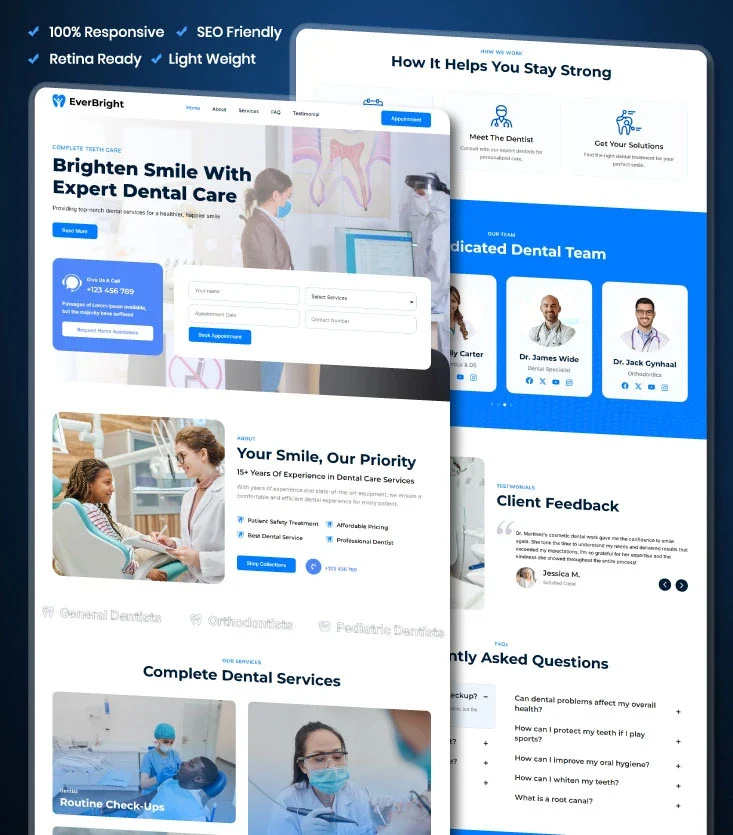
Quick Template Details
- Template Name: EverBright
- Template Type: Single landing page, 9 sections
- Required Theme: Hello Elementor (Free)
- Elementor Pro Required: Yes
- Premium Plugins Required: Yes, Elementor Pro
- Forms: Elementor Pro Forms
- Responsive: Desktop, Tablet, Mobile
- Coding Required: No
Who Is This Dental Clinic Landing Page For?
- Dental clinics. Check-ups, implants, braces and cosmetic work cover a full clinic menu.
- Family dentists. A pediatric option in the booking form and a friendly tone suit care for all ages.
- Orthodontists. A braces and orthodontics service and team role fit specialist practices.
- Cosmetic dentistry practices. Smile-focused messaging and a cosmetic service card speak to aesthetic patients.
- Practices running local ads. A booking form in the hero turns ad clicks into appointments fast.
Need a full multi-page website for a dental clinic instead? Our Dentria dental clinic Elementor template kit is a better fit.
See Every Section of the EverBright Dental Clinic Landing Page
Click any section below to open it in the live demo.
An Appointment Form Right in the Hero
Most people looking for a dentist want to book quickly. EverBright places a booking form directly under the headline, with fields for name, service, appointment date and contact number. The service menu already lists routine check-ups, implants, braces, cosmetic, restorative and pediatric dentistry.
Beside the form, a blue call card shows your phone number with a second button for patients who prefer to talk. Putting both options above the fold means anxious or busy patients can act the moment they arrive.
About, Four Services and a Simple Process
A “Your Smile, Our Priority” section highlights years of experience beside a photo of a dentist with a young patient. Four checkmarks cover patient safety, quality service, affordable pricing and professional dentists, followed by a Get Started button and your phone number.
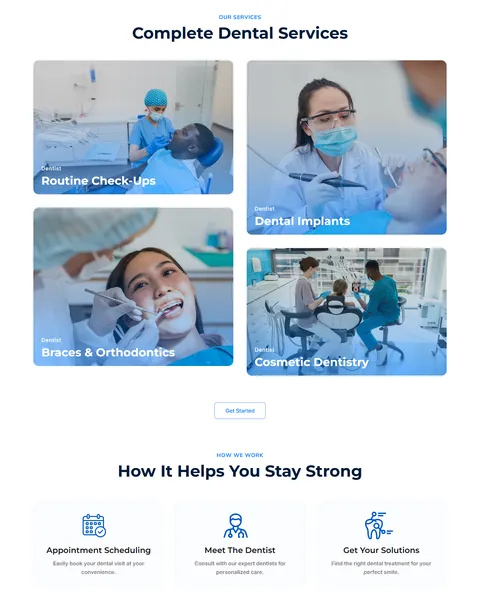
A “Complete Dental Services” section shows four large photo cards for routine check-ups, braces and orthodontics, dental implants and cosmetic dentistry. A “How It Helps You Stay Strong” section then explains three steps: schedule an appointment, meet the dentist and get your solution.
Your Dental Team and Patient Feedback
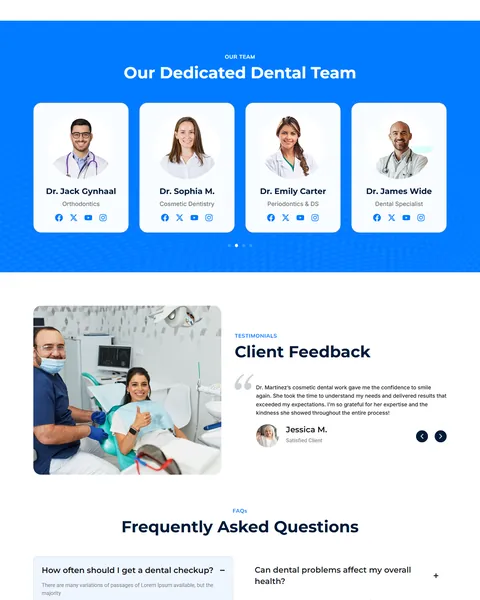
An “Our Dedicated Dental Team” section sits on a bright blue band, with a carousel of dentist portraits, roles such as orthodontics and cosmetic dentistry, and social links. Showing friendly faces helps nervous patients feel more relaxed before their visit.
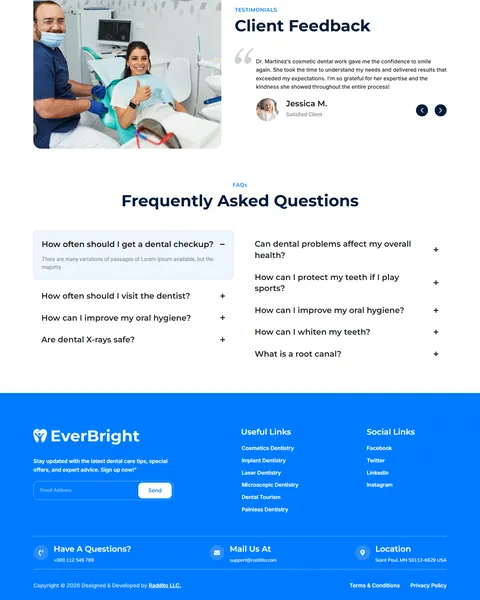
A “Client Feedback” section pairs a photo of a smiling patient in the chair with a review slider and arrow controls. Reviews about confidence and a gentle experience speak directly to what dental patients care about most.
FAQs and a Blue Footer
A “Frequently Asked Questions” section uses a two-column accordion with nine common questions about check-up frequency, oral hygiene, X-ray safety, sports protection, whitening and root canals. Answering these upfront builds trust and saves your front desk time.
A bright blue footer adds a newsletter signup, service and social links, and three contact cards for questions, email and location. Patients can reach you however they prefer.
Research-Driven Design for Dental Clinics
We looked at how patients choose a dentist online. Many feel some anxiety about dental visits, so they look for a clean, modern clinic, friendly dentists, clear services, good reviews and an easy way to book. Speed matters too, since many search when they have pain or a specific need. This dental clinic Elementor landing page is designed to feel bright and reassuring while making booking the first thing visitors see.
Vivid blue and navy. Bright blue feels clean, fresh and trustworthy, a natural fit for dental care, and it marks buttons, the call card, the team band and the footer. Deep navy headings add authority, and white space keeps the page light.
Montserrat and Mulish. Bold Montserrat headlines feel modern and confident, and Mulish body text stays friendly and easy to read on cards and FAQs.
Bright clinic photography. Photos show modern equipment, gentle dentists and smiling patients of all ages, which helps calm first-visit nerves. Replace them with photos of your own team and treatment rooms so patients know exactly where they are going.
Booking above the fold. The hero form and call card let patients book within seconds of arriving, which matters most when someone is in pain.
Helpful answers. A long FAQ shows expertise and reduces repeated phone questions. Have your dentists review every answer before you publish, so the advice stays accurate.
Mobile friendly. On phones, the menu folds into a toggle, headlines scale down and the booking form stacks neatly for easy thumb typing.
Free Installation for This Dental Clinic Elementor Landing Page
We install EverBright on your WordPress site free of charge, set up exactly like the demo, once your Pro license is ready. No other paid plugin is needed.
The demo photos come from Envato and are not included. Adding your own services, dentists and reviews, or connecting a practice management or online booking system, is not part of the free installation. If you want the full site built for you, see our done-for-you website service.
How to Install the EverBright Dental Clinic Landing Page
Prefer to set it up yourself? This video shows each step of the import.
EverBright vs Other Dental Elementor Templates
Comparing dental templates? Here is how EverBright compares with other popular dental clinic templates online.
| EverBright | Other popular dental templates online* | |
|---|---|---|
| Cost to get started | $9.90 one-time | $24 to $29 one-time |
| Free installation | Yes, included | No, not listed on any of them |
| One focused page for local ads | Yes | No, all three are multi-page kits |
| Appointment form right in the hero | Yes | Not described on any of them |
Why dental clinics choose EverBright:
- Built for bookings. A hero form, services and FAQs are ready on one page.
- Bright and reassuring. A clean blue design calms nervous patients.
- Lower price, free setup. $9.90 once, installed for you.
*We compared EverBright with three popular dental Elementor templates that appear in Google results, sold on ThemeForest. Details come from each product page on October 26, 2026. Prices and features may change.
More Dental Templates by Raddito
EverBright is our dental clinic Elementor landing page. If you need a full dental website, compare these.
Dentria – dental clinic Elementor template kit
Best for dental clinics that need a full website.
13 pages · Works with Elementor Free · Live Preview
Dentivo – dentist Elementor template kit
Best for dentists and family practices.
13 pages · Works with Elementor Free · Live Preview
Medvil – dental practice Elementor template kit
Best for modern dental practices.
13 pages · Needs Elementor Pro · Live Preview
Want more choices? Browse our health and medical website templates or every WordPress Elementor template we sell.
Frequently Asked Questions
Is EverBright a WordPress theme?
No. EverBright is a dental clinic Elementor landing page, a ready one-page design you import into Elementor. It runs on the free Hello Elementor theme.
Does EverBright need a Pro license?
Yes. The appointment form, newsletter, header, footer and carousels use Elementor Pro widgets. You need your own license before we install the page.
Where do appointment requests go?
The hero form sends each request to your email, including the service, date and phone number the patient chose.
Can I add more services?
Yes. Add service cards in Elementor and update the form’s service menu to match, such as whitening or emergency care.
Can I show treatment prices?
Yes. Add a pricing section with Elementor to show check-up fees, cleaning packages or payment plans.
Should I replace the demo text and reviews?
Yes, please. Some demo FAQ answers use placeholder text, and the reviews and team are samples, so add your own content.
Is the installation really free?
Yes. We install EverBright exactly like the demo at no cost once your Pro license is ready. Adding your own content is up to you, or our Done For You team can build the full site.